
BurrowTime for Omarchy
An Omarchy bar widget for BurrowTime. It keeps the compact Watson widget design, adds a live count when multiple timers are running, and opens a keyboard-accessible panel where every active timer can be stopped individually.
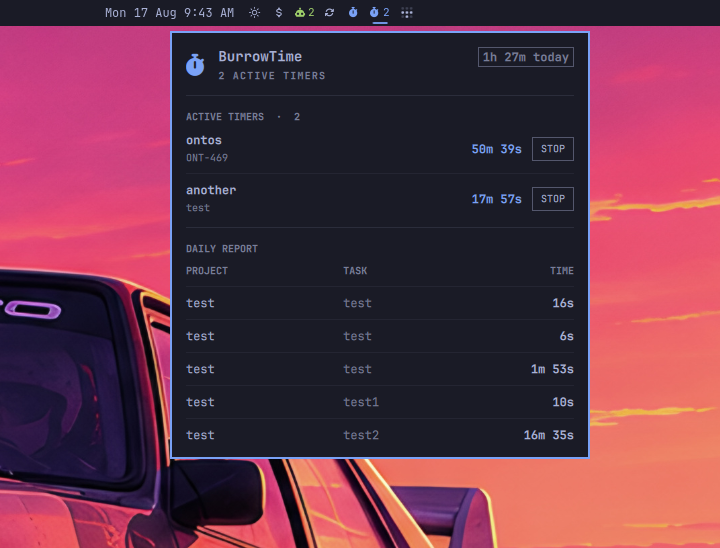
Features
- Shows an active stopwatch in the bar and a count when two or more timers run.
- Lists every active project, its tags, and its live elapsed time.
- Stops exactly the selected timer with
burrowtime stop --timer <id>. - Displays completed sessions and total tracked time for the current day.
- Counts overlapping concurrent timers independently, matching BurrowTime reports.
- Polls local files and commands only; it makes no network requests.
Requirements
- Omarchy with the Quattro shell plugin system
- BurrowTime 0.1.0 or newer
burrowtimeavailable onPATHjq- GNU coreutils
- An Omarchy-compatible Nerd Font for the stopwatch icon
Install BurrowTime by following its installation instructions, then confirm the executable is visible:
command -v burrowtime
When building BurrowTime with Go, place the resulting executable in ~/.local/bin. Omarchy includes that directory on the shell process PATH; Go- or version-manager-specific binary directories may not be visible to the bar.
Install
Review the source before installing. Omarchy plugins run as unsandboxed code inside the long-running shell process.
omarchy plugin add https://github.com/fabean/omarchy-burrowtime.git --enable
The widget uses the right bar section by default. If it was installed without --enable, enable it later:
omarchy plugin enable io.github.fabean.burrowtime --section right
Use
- Left-click the widget to open or close the panel.
- Middle- or right-click the widget to refresh immediately.
- Press
Ror Enter in the panel to refresh, and Escape to close. - Press STOP beside a timer to stop only that timer.
The bar displays only the stopwatch for one active timer and adds the number for multiple timers. A bar click never stops a timer; stopping always requires the explicit panel button.
Data and commands
The bundled burrowtime-status helper reads BurrowTime's compatible state file and its additive active_timers file. It runs burrowtime log --day --json --no-pager for completed daily sessions. The only mutating command is the targeted stop invoked from a timer row.
The helper follows BURROWTIME_DIR, then XDG_CONFIG_HOME, then ~/.config/burrowtime. Set BURROWTIME_BIN to an executable path if burrowtime is not available on the shell process PATH.
Security and permissions
Like all Omarchy shell plugins, this widget runs unsandboxed with the current user's permissions. It requires no elevated privileges, starts no service, does not modify shell configuration, and makes no network requests. It reads BurrowTime's local state, runs the read-only daily log command, and runs a targeted burrowtime stop --timer <id> only after the user presses that timer's STOP button.
Update
omarchy plugin update io.github.fabean.burrowtime
Remove
omarchy plugin remove io.github.fabean.burrowtime
Removal deletes only the plugin checkout and its bar entry. It does not remove BurrowTime or any tracking data.
Develop
./tests/status_test.sh
shellcheck burrowtime-status tests/status_test.sh
omarchy plugin validate .
qmllint -I "$OMARCHY_PATH/shell" BarWidget.qml Panel.qml
For local use, link this checkout into the user plugin directory, rescan plugins, and enable it:
ln -s "$PWD" ~/.config/omarchy/plugins/io.github.fabean.burrowtime
omarchy-shell shell rescanPlugins
omarchy plugin enable io.github.fabean.burrowtime --section right
Plugin files hot-reload after installation.