
OmaSeafile
Seafile in the Omarchy bar — without depending on the desktop client.
Install
omarchy plugin add https://github.com/FelipeMayerDev/omaseafile.git --enable
The only requirement is the seaf-daemon binary. If it is not on the machine,
the panel offers a button that installs it (yay -S --needed seafile on Arch,
which ships the daemon and seaf-cli, no GUI).
Remove
omarchy plugin remove io.github.felipemayerdev.omaseafile
That takes the widget out of the bar and deletes the plugin folder. It leaves your Seafile data alone, on purpose — removing the plugin is not a reason to drop synced files or stop the daemon. To clean up the rest yourself:
rm -rf ~/.config/omarchy/omaseafile   # the API token this plugin stored
seaf-cli stop                          # if you also want the daemon down
Your synced libraries in ~/Seafile and the Seafile packages are untouched.
The desktop client is optional
OmaSeafile talks straight to seaf-daemon's RPC socket
(~/Seafile/.seafile-data/seafile.sock), the same one seaf-cli uses. So it
never needs the Seafile applet running — or even installed:
- starts and stops
seaf-daemonfrom the switch in the panel, and brings it up automatically at login; - signs into the server and keeps its own API token;
- adds and removes libraries on its own.
If you already use the desktop client, the account configured there is picked up automatically and nothing changes.
What it shows
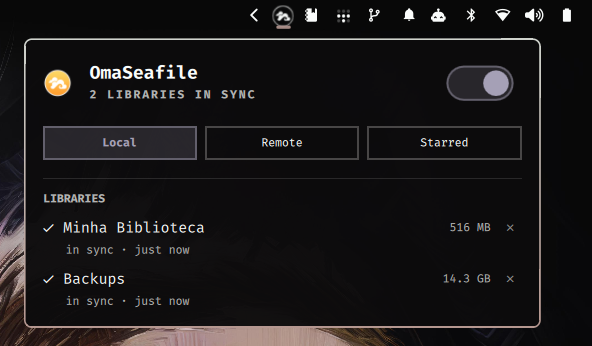
Local — synced libraries with live state (in sync, uploading, downloading,
indexing, paused, error), transfer rate, size on disk, downloads in progress
with a percentage, folders inside ~/Seafile that no library syncs, and
per-file errors.
Remote — libraries that exist on the server but do not sync here, with size and date. The button syncs one right away.
Starred — items starred on the server. If the library is already synced the click opens the local file, otherwise it opens in the browser.
Notifications when a library starts uploading or downloading, when a download finishes, and when something fails. A red dot on the bar icon marks errors; the icon pulses during a transfer.
Controls
- Switch at the top of the panel: start/stop
seaf-daemon. - on a local library: stop syncing it (two taps; the files stay on disk).
- Click a row: open the folder/file, or the library on the server.
- Middle click on the bar icon: refresh now.
Sign in
Server, email and password in the panel. The password is only exchanged for an
API token (/api2/auth-token/) and then discarded; the token lives in
~/.config/omarchy/omaseafile/account.json with mode 0600.
Encrypted libraries still need the desktop client, for the library password.
Icon
seafile.png is the colored logo, used in the panel. seafile-mono.png is the
monochrome mask, tinted at runtime with the theme color through MultiEffect —
the same treatment Omarchy's Tray gives symbolic icons. In the bar the icon
follows the theme; in the panel it stays colored.
Settings
interval (local poll, default 10s), remoteInterval (server calls, only
while the panel is open), autostart (bring the daemon up automatically) and
notifyTransfers.
CLI
bin/seafile-status works on its own in a terminal and only needs python3:
seafile-status                 # local state as json
seafile-status --sizes         # plus size on disk
seafile-status --remote        # account, server libraries, starred items
seafile-status --daemon-start | --daemon-stop
seafile-status --login         # {"server","user","password","otp"} on stdin
seafile-status --logout
seafile-status --sync <id> | --desync <id>
seafile-status --install-cmd   # command that installs seaf-daemon
seafile-status --selftest
License
MIT.