
Curtain
Notices when you start sharing your screen. Takes your notifications off it, hands them back when the capture ends, keeps the screen awake, and wears a badge you cannot miss until it does.
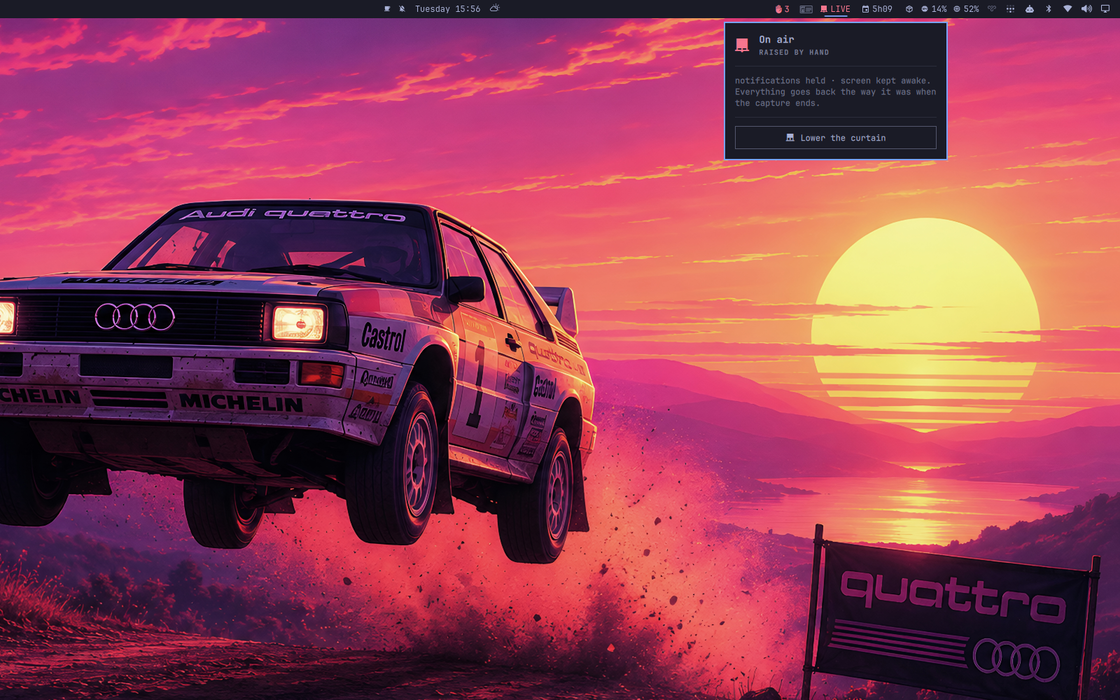
Raised. It names what is being shared and what it is holding back.
Then it puts everything back exactly as it was.
The problem it solves
Everyone has leaked a notification in a call. The fix is always the same and always manual: turn on Do Not Disturb before you share, remember to turn it off after. Nobody remembers either half.
Hyprland already announces every capture as it starts and stops. Curtain listens.
Install
omarchy plugin add https://github.com/fernandomenolli/omarchy-curtain.git --enable
Needs Omarchy 4 and Hyprland 0.56+. No other dependency.
Remove
omarchy plugin remove io.github.fernandomenolli.curtain
It writes nothing outside $XDG_RUNTIME_DIR, which the system clears at
logout.
What happens when you share

The bar while a capture is running, with the curtain drawn shut in red.
| Notifications | off the screen while you share, back on it when you stop |
| The screen | kept awake, so it never locks mid-demo |
| The bar | the curtain draws shut and brightens, naming what is being shared and how many notifications it is holding |
When the capture ends, each of those is restored to what it was before. A machine already in Do Not Disturb before the call stays that way after it.
Where your notifications go
Do Not Disturb in Omarchy does not hold anything back. A notification that arrives while it is on is dropped: no popup, no history entry, gone. That is the right behaviour for a screen share, and it is what Curtain uses, because anything that renders and is then dismissed can still be caught by a frame of the recording.
It does mean the safe half and the honest half are not the same thing, so Curtain does the other half itself. While the curtain is up it listens to the bus that carries notifications, which still carries every one of them whatever the shell decides to do about it, and when the capture ends it hands them back.
Two do not come back, because they were on your screen at the time: Omarchy
lets omarchy-action and a critical notify-send through Do Not Disturb.
Past twenty, the rest are counted rather than shown.
What comes back is the application, the title and the text. The original icon and any buttons it carried are not part of it.
If your machine was already in Do Not Disturb before the capture started, it stays that way afterwards and nothing is handed back — putting notifications on a screen whose owner asked for quiet is not a favour.
Screenshots are ignored. A screenshot is a capture too, and Hyprland
announces grim exactly like it announces a call. Nothing arms until a
capture has lasted longer than the grace period.
By hand
The icon sits in the bar whether or not anything is being shared. It was hidden at first, on the grounds that Omarchy already has both switches in its own menu, Notifications and Stay Awake — but a plugin with nothing in the bar is one you cannot open, cannot configure, and cannot tell is installed. Turn Keep the icon in the bar off once it has earned your trust.
What Omarchy does not have is anything that notices a capture starting, or remembers to undo itself when it ends. That is the whole of this.
Right click the icon to draw the curtain by hand, for a colleague at your desk or a screen on a train, or bind it:
-- ~/.config/hypr/bindings/curtain.lua
o.bind("SUPER + SHIFT + P", "Curtain",
  "omarchy-shell io.github.fernandomenolli.curtain raise")
If the shell restarts while the curtain is up, it adopts the raise rather than forgetting it. A silenced machine with nothing on screen explaining why is the one outcome worth engineering against.
Settings
Open the panel and they are switches. Tapping one takes effect straight away
and is remembered in ~/.local/state/omarchy/plugins/io.github.fernandomenolli.curtain/preferences.json.
Omarchy has no settings screen, and the shell hands a plugin a copy of its
settings precisely so that changing them in place cannot leak back to disk. So
the panel keeps its own file rather than writing yours. If you would rather set
them in ~/.config/omarchy/shell.json, a key on this widget's entry still
works and is what the switches start from:
{
  "id": "io.github.fernandomenolli.curtain",
  "showWhenIdle": false
}
Delete the preferences file and the panel goes back to whatever shell.json says.
| Setting | Default | What it does |
|---|---|---|
| Hold notifications while sharing | on | |
| Keep the screen awake while sharing | on | |
| Hand back what arrived while the curtain was up | on | without it they are dropped, which is what Do Not Disturb does on its own |
| Ignore captures shorter than | 1500 ms | what keeps a screenshot from arming it |
| Keep the icon in the bar | on | turn it off to get the bar space back |
| Log every capture Hyprland announces | off | for working out why it did or did not arm |
What it costs
Measured on the machine this was built on, an AMD box with 24 cores running
Omarchy 4.0.0.alpha and Hyprland 0.56.2. The method is to read utime + stime
from /proc/<pid>/stat for the omarchy-shell process, with the plugin
enabled and then disabled, and take the difference. You can repeat it in four
lines of shell.
| Shell alone | With this plugin | |
|---|---|---|
| Idle, 30 seconds | 10 ms of CPU | 10 ms, no timer, nothing runs |
| 300 focus switches | 840 ms | 890 ms |
| Memory | ~500 MB | no measurable change |
The shell's own cost dominates everything here. 2.8 ms of that per focus switch is Omarchy itself: the bar redrawing, the active-window widget, the workspace indicators. All five of these plugins together add 0.17 ms on top.
It does not get heavier as it runs. It listens for capture events and does nothing else. There is no state that accumulates.
Tests
node tests/run.js
They cover model/: parsing Hyprland's capture events, including titles with
commas in them, and counting overlapping captures so the curtain only falls
when the last one ends.
Licence
MIT.