
Daybook
Where your day actually went, by subject rather than by application, written from the window titles you were already looking at.
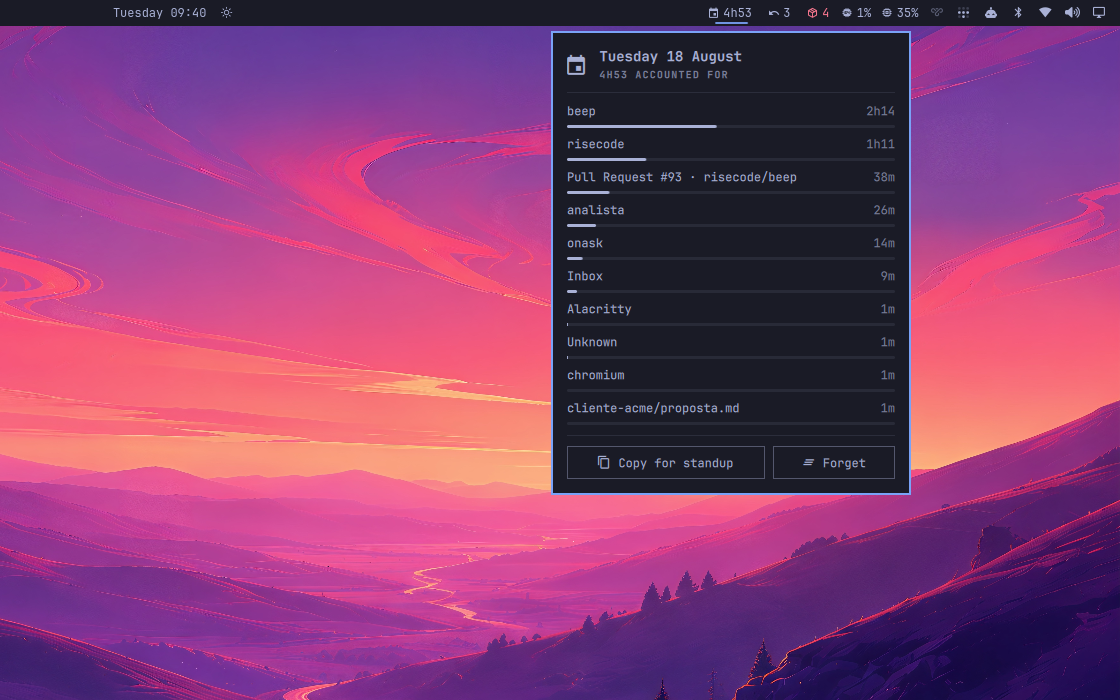
The day by subject, longest first, one click from the clipboard.
Why every other tracker is useless to us
They measure applications. For anyone who works in a desktop, that reads:
Alacritty   6h12
Chromium    3h48
Which is not an answer to any question anyone has ever asked. The subject lives in the title: the terminal names its directory, the editor names the file, the browser names the page. Daybook groups by that:
Tuesday 18 August
- beep (2h14)
- risecode (1h11)
- Pull Request #93 · risecode/beep (38m)
- analista (26m)
That is a standup, a timesheet line or an invoice, one click from the bar.
Install
omarchy plugin add https://github.com/fernandomenolli/omarchy-daybook.git --enable
Needs Omarchy 4, Hyprland 0.56+, and wl-clipboard for the copy action.
Remove
omarchy plugin remove io.github.fernandomenolli.daybook
rm -rf ~/.local/state/omarchy/plugins/io.github.fernandomenolli.daybook
Everything stays here
The record never leaves the machine. There is no account, no sync, no
network call of any kind. It is one plain JSON file per day under
~/.local/state/, which you can read, edit or delete with anything.
Private browsing is excluded out of the box, by a pattern you control. A window whose title matches it is not recorded, and the clock on whatever you were doing before stops the moment it takes focus.
Forget empties today with one click. A log of every window title is the most sensitive thing on a machine, and getting rid of it should not require finding a file.
When the title says nothing
A terminal running a TUI writes whatever that program decided to put there.
Claude Code, for instance, sets the title to the task it is working on, and
two windows in two different projects then look identical: Alacritty and
Alacritty.
When nothing in the title carries a subject, Daybook asks the window where it
is working instead, the same way Omarchy's own omarchy-cmd-terminal-cwd
does: it finds the shell running inside and reads its directory. The last part
of that path is the project, and that is what gets filed.
The answer arrives a few milliseconds after the entry was opened, so the entry is renamed rather than duplicated. Only entries opened since the question was asked are touched, because a terminal that moved between projects earlier was filed correctly at the time.
The answer is cached for a minute per window, so this costs one short-lived process per window per minute at the very most, and usually far less.
How it decides you are away
Every event on the desktop is evidence someone is there: a window opening, a title changing, focus moving. A silence longer than the cutoff is the only honest evidence of absence, and it seals the entry where it stopped. Lunch does not become two hours of work on whatever was left on screen.
There is no polling and no timer driving this: the events were already arriving.
Using it

Today's total, in the bar.
| Action | What happens |
|---|---|
| Left click | today, ranked, with a bar per subject |
| Right click | copy the summary |
| Enter, with the panel open | copy the summary |
omarchy-shell io.github.fernandomenolli.daybook summary   # prints it
omarchy-shell io.github.fernandomenolli.daybook copy      # to the clipboard
omarchy-shell io.github.fernandomenolli.daybook forget    # empties today
Settings
| Setting | Default | What it does |
|---|---|---|
| Count you as away after | 15 min | of complete desktop silence |
| Lines in the copied summary | 6 | |
| Leave out anything under | 2 min | keeps glances out of the record |
| Never record titles matching | Incognito|InPrivate|Private Browsing|Anônima |
a regular expression |
| Show today's total in the bar | on |
What it costs
Measured on the machine this was built on, an AMD box with 24 cores running
Omarchy 4.0.0.alpha and Hyprland 0.56.2. The method is to read utime + stime
from /proc/<pid>/stat for the omarchy-shell process, with the plugin
enabled and then disabled, and take the difference. You can repeat it in four
lines of shell.
| Shell alone | With this plugin | |
|---|---|---|
| Idle, 30 seconds | 10 ms of CPU | 10 ms, the 30-second tick does not register |
| 300 focus switches | 840 ms | 880 ms, or 0.13 ms per switch |
| Memory | ~500 MB | no measurable change |
The shell's own cost dominates everything here. 2.8 ms of that per focus switch is Omarchy itself: the bar redrawing, the active-window widget, the workspace indicators. All five of these plugins together add 0.17 ms on top.
It does not get heavier as it runs. Verified rather than assumed: a day holding 600 entries costs the same per focus switch as an empty one (2966 µs against 2933 µs, the same number twice, within measurement noise).
That was not free. The first version added the whole day up on every focus change, with the panel closed and nobody looking at the result: 1.3 ms per switch at breakfast and 13.2 ms by late afternoon. Finding that is why these numbers are here at all.
Tests
node tests/run.js
They cover model/: how a title becomes a subject, and the arithmetic of a
day, which is switching, returning and being away.
Licence
MIT.