
Encore
Reopen the window you just closed by mistake, in the directory it was in and on the workspace it was on.
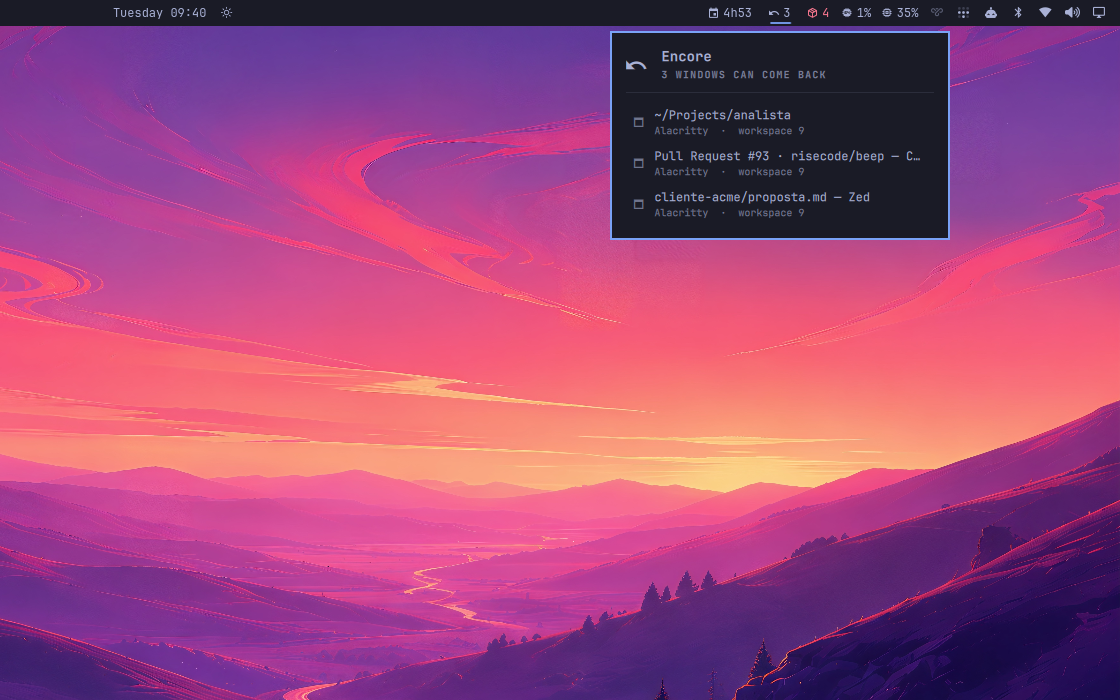
Three windows that can come back, each with the workspace it was on.
Every browser has had Ctrl+Shift+T for fifteen years. No desktop has it.
How it can work at all
A closed window leaves nothing behind: the process is gone, and with it the
command that started it. So Encore reads the recipe while the window is
still open. It reads /proc/<pid>/cmdline and /proc/<pid>/cwd once, when
the window appears, and keeps them against the day you close the wrong one.
Install
omarchy plugin add https://github.com/fernandomenolli/omarchy-encore.git --enable
Needs Omarchy 4 and Hyprland 0.56+.
Remove
omarchy plugin remove io.github.fernandomenolli.encore
It writes nothing outside its own directory.
Using it

The count of what can be brought back.
| Action | What happens |
|---|---|
| Right click the icon | bring back the last window you closed |
| Left click | the list of everything that can come back |
| Click a row | bring that one back |
| Enter, with the list open | bring back the most recent |
Put it on a key, which is where this belongs:
-- ~/.config/hypr/bindings/encore.lua
o.bind("SUPER + SHIFT + T", "Reopen closed window",
  "omarchy-shell io.github.fernandomenolli.encore reopen")
What it cannot do
A window is restarted, not restored. The application opens again with the command it had; it does not come back with your unsaved work, your scroll position, or the tabs you had. For a terminal you get the terminal, not the session that was running in it.
Only windows you actually used. A window that never held focus is not remembered, and neither is a window with no class. The browser's "is sharing your screen" indicator takes focus and has no class, and it is not something anyone wants back. A window that cannot be identified cannot be brought back as itself, which is the only thing this promises. Sharing a screen in a browser puts an indicator on screen and takes it away again; neither moment is one you would want undone, and you never looked at it. Focus is what separates a window you were using from one that merely happened.
Only windows that were open while Encore was running. It reads the recipe for everything already open when it loads, so a shell restart does not lose what is on screen. But a window closed before Encore ever saw it is gone.
The directory is the process's own. An app launched from a menu has your home directory, whatever the window was showing. A command launched from a terminal keeps the directory it ran in.
Settings
| Setting | Default | What it does |
|---|---|---|
| Windows to remember | 8 | the oldest fall off the end |
| Keep the icon with nothing to bring back | off | otherwise it only appears when it can help |
What it costs
Measured on the machine this was built on, an AMD box with 24 cores running
Omarchy 4.0.0.alpha and Hyprland 0.56.2. The method is to read utime + stime
from /proc/<pid>/stat for the omarchy-shell process, with the plugin
enabled and then disabled, and take the difference. You can repeat it in four
lines of shell.
| Shell alone | With this plugin | |
|---|---|---|
| Idle, 30 seconds | 10 ms of CPU | 10 ms, no timer, nothing runs |
| 300 focus switches | 840 ms | 870 ms |
| Memory | ~500 MB | no measurable change |
The shell's own cost dominates everything here. 2.8 ms of that per focus switch is Omarchy itself: the bar redrawing, the active-window widget, the workspace indicators. All five of these plugins together add 0.17 ms on top.
It does not get heavier as it runs. Opening a window costs 8 ms, once, to read how it was started from /proc. That is the only work this plugin ever does, and it is bounded by how many windows you open, not by how long the session has run. The list of closed windows is capped, so it cannot grow.
Tests
node tests/run.js
They cover model/: parsing Hyprland's window events, including titles with
commas, and the stack that decides what comes back first.
Licence
MIT.