
Sill
A shelf on the bar. Drag a file onto it from anywhere, walk away to another workspace, and copy it out where it belongs.
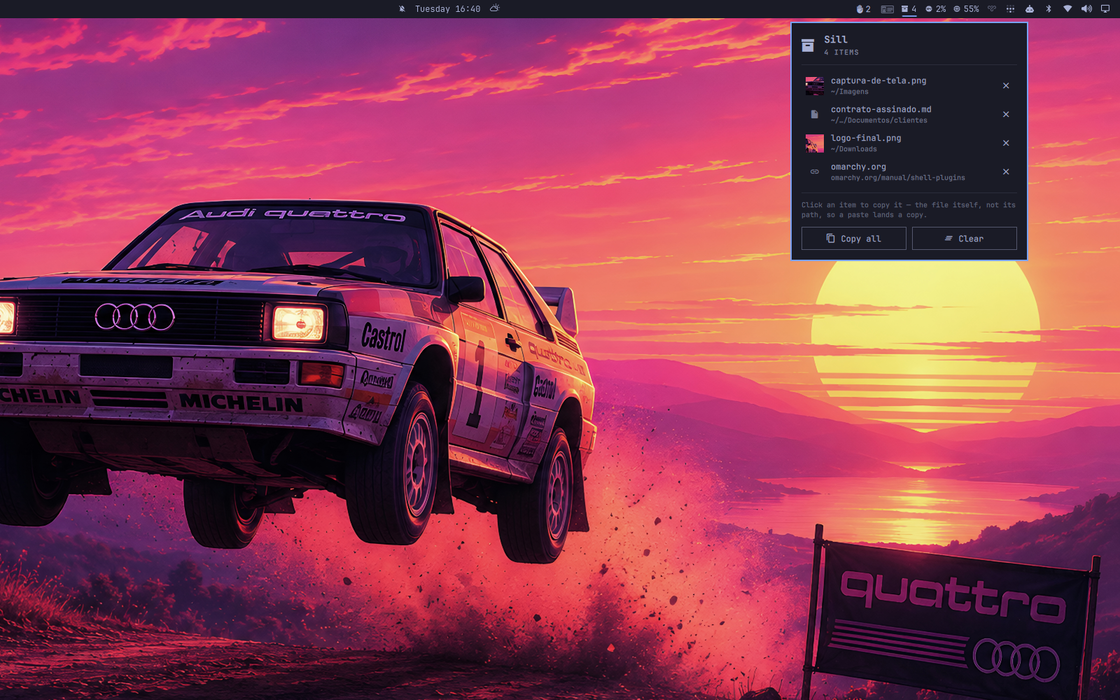
Four things set down: two files, a link, and a line of text.
The bar is the one surface a drag can always reach: it is on top of every window, on every workspace. That is the whole idea.
The problem it solves
Dragging a file from a folder on workspace 2 into a chat on workspace 5 is not hard on Hyprland. It is impossible. You cannot switch workspaces with a file held in your hand. So you copy it to a temporary folder, or you tile both windows side by side and drag across the seam.
Sill gives you somewhere to put things down.
Install
omarchy plugin add https://github.com/fernandomenolli/omarchy-sill.git --enable
Needs wl-clipboard (wl-copy), which Omarchy already installs.
Remove
omarchy plugin remove io.github.fernandomenolli.sill
rm -rf ~/.local/state/omarchy/plugins/io.github.fernandomenolli.sill
Using it

The shelf in the bar, holding four.
The icon is an outline while the shelf is empty and fills in when it is holding something, with the count beside it. No colour changes: nothing on a shelf is urgent, and red in this bar means something is the matter.
| Action | What happens |
|---|---|
| Drag a file onto the bar icon | it lands on the shelf; the panel opens so the whole panel becomes a target |
| Left click the icon | open the shelf |
| Right click the icon | copy every file on the shelf at once |
| Click a row | copy that one thing |
| Enter, with the shelf open | copy everything |
| × on a row | take it off the shelf |
Copying a file copies the file, not its path. It goes onto the clipboard
as x-special/gnome-copied-files, so Ctrl+V in a file manager, a file
dialog or a chat lands the file itself. Gathering five files from three
folders and pasting them in one go is the thing dragging could never do.
Links and lines of text can be dropped too, and they copy as text.
What it does not do
Nothing is moved or duplicated on disk. The shelf holds references: a path, a URL, a line of text. Clearing it never deletes anything.
A file you delete elsewhere says so. The shelf checks each path when you open it, and one that is no longer there goes grey and reads no longer there instead of its folder. Clicking it tells you rather than putting nothing on the clipboard, and Copy all leaves it out. Finding this out at the moment you paste, and getting silence, is the worst place to find it out.
You cannot drag back out. The reason is worth stating precisely, because it is not the one you would guess. Wayland is fine with it: a plain layer-shell surface can start a drag that a file manager accepts, verified against the protocol trace.
What blocks it is the bar. Dragging a widget along the bar is how you reorder it, so the bar owns the pointer across its whole strip and a press inside a widget never reaches the widget. A drag cannot leave an open panel either: the panel keeps a full-screen surface above everything to catch the click that dismisses it, so a drag leaving the card lands on that instead of on the window underneath.
So the way out is copying, which for the thing this is actually for beats dragging anyway. Five files gathered from three folders is not a gesture dragging can make.
Settings
Open the panel and they are switches. Tapping one takes effect straight away
and is remembered in ~/.local/state/omarchy/plugins/io.github.fernandomenolli.sill/preferences.json.
Omarchy has no settings screen, and the shell hands a plugin a copy of its
settings precisely so that changing them in place cannot leak back to disk. So
the panel keeps its own file rather than writing yours. If you would rather set
them in ~/.config/omarchy/shell.json, a key on this widget's entry still
works and is what the switches start from:
{
  "id": "io.github.fernandomenolli.sill",
  "showWhenIdle": false
}
Delete the preferences file and the panel goes back to whatever shell.json says.
| Setting | Default | What it does |
|---|---|---|
| Open the shelf when a drag reaches the bar | on | gives you the whole panel to drop into |
| Empty the shelf after copying everything | off | for people who treat it as a one-way conveyor |
| Set a screenshot down as soon as it is taken | off | see below |
| Maximum items | 25 | the oldest fall off the end |
The clipboard
An image is the one thing you cannot drag onto the shelf. Dragging one out of a web page hands over a link to it rather than the picture, and holding a link is not holding the image.
Copying it hands over the picture, so Put the clipboard on the shelf is the way in. An image is written to a file and held as one, because the point of keeping it is to paste it somewhere as a file. A file copied in a file manager comes in as that file. Anything else comes in as its text.
Worth a key, since the whole point is not having to go anywhere:
-- ~/.config/hypr/bindings/sill.lua
o.bind("SUPER + SHIFT + V", "Stash the clipboard",
  "omarchy-shell io.github.fernandomenolli.sill stash")
Nothing leaves the machine to make this work, and nothing is downloaded: what is written to disk is what was already on your clipboard.
Screenshots
Turn on Set a screenshot down as soon as it is taken and every screenshot lands on the shelf as a file, next to whatever else is there.
A screenshot already goes to the clipboard, so one of them needs no help. The case this serves is three of them for the same message: the clipboard holds one thing, so by the time you take the third the first two are only files in a folder, and gathering them again is the errand this exists to remove.
It costs nothing while nothing is happening. Hyprland announces a screenshot as a screen capture, the same way it announces a call, and a capture that starts and stops again immediately is somebody pressing the screenshot key. Nothing watches a directory and no process is left running.
It is off by default, and deliberately so: everything else here arrives because you put it there, and that promise is worth more than the convenience. This is the one exception.
What it costs
Measured on the machine this was built on, an AMD box with 24 cores running
Omarchy 4.0.0.alpha and Hyprland 0.56.2. The method is to read utime + stime
from /proc/<pid>/stat for the omarchy-shell process, with the plugin
enabled and then disabled, and take the difference. You can repeat it in four
lines of shell.
| Shell alone | With this plugin | |
|---|---|---|
| Idle, 30 seconds | 10 ms of CPU | 10 ms, no timer, nothing runs |
| 300 focus switches | 840 ms | 870 ms |
| Memory | ~500 MB | no measurable change |
The shell's own cost dominates everything here. 2.8 ms of that per focus switch is Omarchy itself: the bar redrawing, the active-window widget, the workspace indicators. All five of these plugins together add 0.17 ms on top.
It does not get heavier as it runs. Nothing runs unless you drop something on it or click a row. A shelf holding twenty-five items costs exactly what an empty one costs, because nothing walks the list until you open the panel.
Tests
node tests/run.js
No dependencies, no framework. They cover model/: parsing a drop into
items, deduplicating, and the labels each kind of item gets.
Licence
MIT.