
Choosium
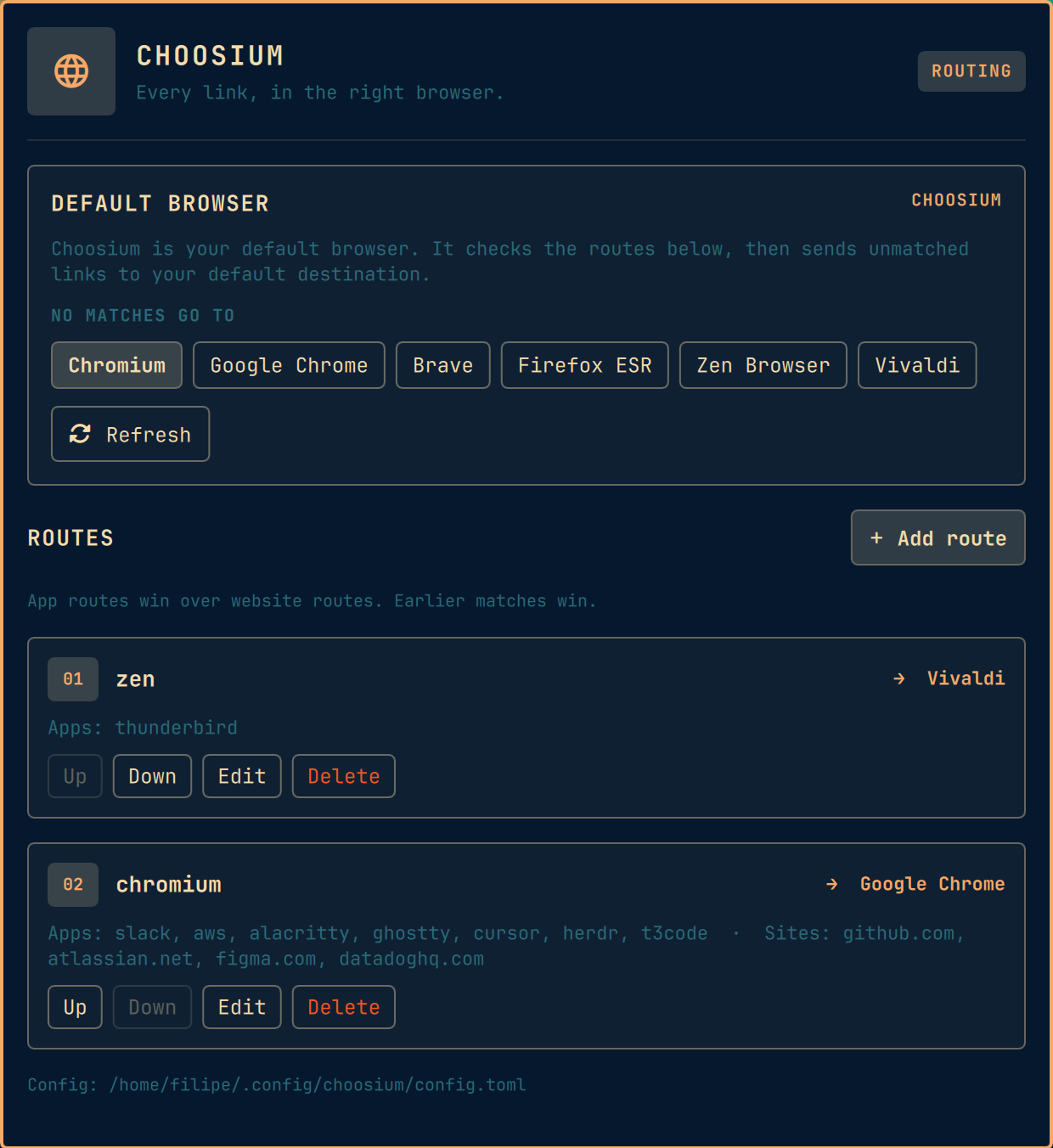
Choosium is a native Omarchy browser router. It sends links to different browsers based on the app that opened them or the website being opened, while keeping the complete configuration in an editable TOML file.
It is the Omarchy successor to Hyprchoosy. Existing Hyprchoosy rules are loaded automatically and can be migrated without re-entering them.
Features
- Native, theme-aware Omarchy configuration panel.
- Installed-browser discovery from XDG desktop entries.
- One-click setup as your default browser.
- A separate default destination for links that match no route.
- Ordered app and website routes, with app matches taking priority.
- An add workflow that lists current windows from
hyprctl -j clients. - Search, multi-select, and refresh for open Hyprland app classes.
- Direct TOML editing with stale-write protection in the UI.
- No build step, daemon, network access, or non-standard Python dependency.
Requirements
- Omarchy 4.0 or newer.
- Python 3.11 or newer.
gtk-launch,xdg-settings,xdg-mime, andhyprctl.
These commands are part of a standard Omarchy installation. Choosium does not install or remove system packages.
Install
Omarchy plugins run unsandboxed in the long-lived shell process. Review the source before enabling it.
omarchy plugin add https://github.com/filipechagas/omarchy-choosium.git --enable
Choosium appears in the right side of the bar. Its plugin ID is
io.github.filipechagas.choosium.
Setup
- Open Choosium from the bar.
- Choose the browser that should receive links when no route matches.
- Select Set Choosium as your Default browser.
- Select Add route to configure app or website routing.
Choosium now appears as your default browser. Links that do not match a route open in the browser selected under No matches go to.
Add Routes
The route editor opens with a searchable Source apps picker. Every time the
picker opens or its refresh button is pressed, Choosium reads the current
hyprctl -j clients response. The focused app is shown first, followed by the
other open app classes, window titles, workspaces, and window counts.
You can also type an app class manually for an app that is not open. Website
entries accept a domain or full URL; Choosium stores only the normalized domain.
For example, https://docs.example.com/path becomes docs.example.com.
Matching is deterministic:
- App routes are checked in the displayed order.
- Website routes are checked in the displayed order.
- The configured default destination is used.
App matching is case-insensitive and keeps Hyprchoosy's partial-match behavior. A website route matches the exact domain and its subdomains.
Configuration
Choosium stores its configuration at
${XDG_CONFIG_HOME:-$HOME/.config}/choosium/config.toml with mode 0600.
version = 1

[default]
browser = "chromium.desktop"

[[rules]]
name = "Work chat"
browser = "google-chrome.desktop"
clients = ["slack", "teams"]
url = []

[[rules]]
name = "Development"
browser = "firefox.desktop"
clients = ["ghostty"]
url = ["github.com", "localhost"]
Browser values written by the UI are XDG desktop IDs. A hand-edited config may also use an executable command, including command-line arguments. Choosium launches argument arrays directly and never evaluates them through a shell. Command arguments are preserved exactly.
Use CHOOSIUM_CONFIG=/path/to/config.toml to override the config path for a
specific invocation.
Hyprchoosy Migration
If the Choosium config does not exist, the plugin reads
${XDG_CONFIG_HOME:-$HOME/.config}/hyprchoosy/config.toml. The panel marks this
as an imported config. The first save, or selecting Set Choosium as your
Default browser, writes the equivalent ordered configuration to Choosium's
own path. The old file is left untouched. Inert triggerless rules and duplicate
triggers are retained for compatibility; routing remains deterministic because
earlier matches win.
The old HYPRCHOOSY_CONFIG environment override is also honored as a migration
source.
Runtime Design
The panel and background service are QML. A standard-library Python helper owns config parsing, validation, browser discovery, XDG integration, and routing. The generated desktop entry invokes that helper directly, so link routing does not depend on the Omarchy shell panel being open.
Choosium makes no network requests and has no telemetry. It reads local desktop
entries, its TOML config, /proc as a fallback for source-app detection, and
Hyprland state through hyprctl. See
docs/architecture.md for the module boundaries.
Disable And Remove
Before removing Choosium while it is your default browser, set another browser as the default from that browser or your desktop settings.
omarchy plugin remove io.github.filipechagas.choosium
Removal leaves the config and generated desktop entry in place. To delete them:
rm -f "${XDG_DATA_HOME:-$HOME/.local/share}/applications/io.github.filipechagas.choosium.desktop"
rm -rf "${XDG_CONFIG_HOME:-$HOME/.config}/choosium"
update-desktop-database "${XDG_DATA_HOME:-$HOME/.local/share}/applications"
Development
omarchy plugin validate .
python3 -W error -m unittest discover -s tests -p 'test_*.py' -v
node --test tests/test_model.js
/usr/lib/qt6/bin/qmllint \
  -i /usr/share/omarchy/shell/Commons/qmldir \
  -i /usr/share/omarchy/shell/Ui/qmldir \
  BarWidget.qml Panel.qml Service.qml
The standalone QML linter reports known warnings for properties injected by the Omarchy host and for nested singleton properties. Syntax and type errors still produce a nonzero exit.
Manual acceptance cases are in docs/manual-test.md.
License
Copyright (c) 2026 Filipe Chagas. Licensed under the MIT License.