
OmaHome — Home Assistant for Omarchy
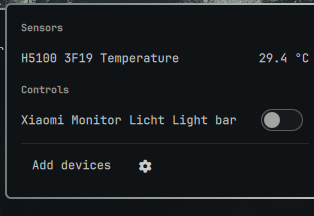
Read sensors and control lights, switches, and fans on your Home Assistant server from the Omarchy bar.
Install
omarchy plugin add https://github.com/FishMacc/omahome.git --enable
Connect to your Home Assistant
- In Home Assistant, create a token: click your profile (bottom left) → Security → Long-lived access tokens → Create token, and copy it.
- Click the house icon in the Omarchy bar.
- Enter the address of your server — the same URL you use to open the
Home Assistant web interface, for example
http://homeassistant.local:8123orhttp://192.168.1.10:8123— and paste the token. - Click Connect, then pick the devices and sensors you want to see.
Plain HTTP on your local network is fine: requests go only to the address you enter, nowhere else.
Usage
- Click the house icon to open the panel; Escape closes it.
- Toggles switch devices on and off. Dimmable lights get a brightness slider (drag, or scroll over it).
- Add devices reopens the picker. The gear button returns to the connection setup, where Disconnect deletes the stored token and the server address — your device selection is kept for the next connect.
- A device you deleted in Home Assistant stays listed with a Remove button so you can drop it.
Remove
omarchy plugin remove io.github.fishmacc.omahome
This does not delete your stored token. Remove it separately:
rm -r ~/.config/omarchy/homeassistant
What it does with your data
- Requests go only to the Home Assistant address you configure. Nothing is sent anywhere else.
- Your token is stored in
~/.config/omarchy/homeassistant/auth.header, mode600, in a mode-700directory. - The token is never written to
shell.jsonand never appears on a command line, so it cannot be read out of the process list. - The only external program the plugin uses to talk to Home Assistant is
curl. Writing and managing the credential file locally (never over the network) uses a handful of standard POSIX utilities:sh,mkdir,chmod,cat,stat,mv,rm.
Supported entities
light (on/off and brightness), switch, fan, input_boolean, sensor, binary_sensor.
Requirements
Omarchy 4 or newer, with omarchy-shell.