
Shortcut Sheet for Omarchy
Shortcut Sheet is a context-aware keyboard shortcut overlay for Omarchy Quattro. Tap <kbd>Super</kbd> once to show the keyboard shortcuts available in the current app or web page, alongside window, launcher, and system shortcuts.
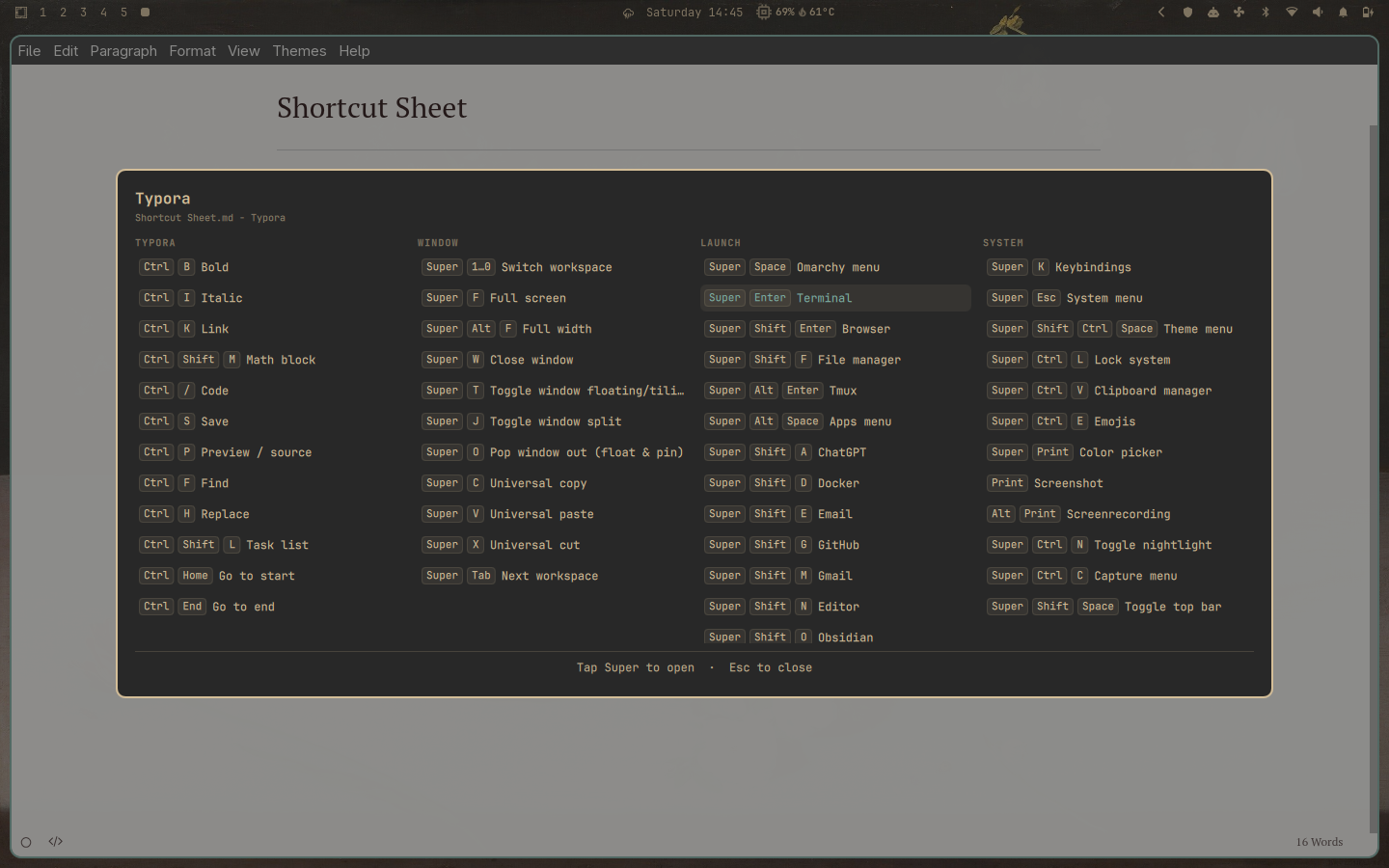
The sheet refreshes and scans every live Hyprland binding each time it opens, so
desktop rows stay complete and aligned with your configuration. It also includes
curated shortcuts for terminals, browsers,
Files, Typora, VS Code-compatible editors, Gmail, GitHub, YouTube, X, ChatGPT,
Grok, Neovim, lazygit, QQ, and the Omarchy Agent. When Claude Code is the
foreground terminal program, the collector also reads that user's installed
Claude version and ~/.claude/keybindings.json.
Features
- Context-aware application and web-page shortcuts
- Complete live scan of every Hyprland shortcut, including custom and media keys
- Type-to-filter navigation
- Keyboard and mouse selection
- Foreground Claude Code detection with local keybinding overrides and unbinds
- Independent vertical group scrolling and horizontal category scrolling
- Persistent visibility controls for desktop shortcut groups
- A persistent three- or four-column layout, with three columns by default
- Stable centered panel dimensions while filtering
- Theme-aware Omarchy UI
- No network access, background daemon, or elevated privileges
Requirements
- Omarchy 4 (Quattro)
- Hyprland and Python 3, both included with Omarchy
There are no additional packages to install.
Install
Install and enable the plugin from its public repository:
omarchy plugin add https://github.com/fze-fze/omarchy-shortcut-sheet.git --enable
Then add the following explicit bindings to ~/.config/hypr/bindings.lua:
hl.unbind("SUPER + Super_L")
hl.unbind("SUPER + Super_R")
o.bind("SUPER + Super_L", "Shortcut sheet", "omarchy-shell -q shell summon io.github.fze-fze.shortcut-sheet", { release = true })
o.bind("SUPER + Super_R", "Shortcut sheet", "omarchy-shell -q shell summon io.github.fze-fze.shortcut-sheet", { release = true })
Hyprland reloads the bindings automatically. Tap either <kbd>Super</kbd> key to open the sheet. Press <kbd>Esc</kbd> or click the dimmed background to close it.
Super + K remains Omarchy's full searchable keybinding list.
Use
- Type to filter the visible shortcuts.
- Use <kbd>Left</kbd> and <kbd>Right</kbd> to switch categories.
- Use <kbd>Up</kbd> and <kbd>Down</kbd> to move within the current category.
- Press <kbd>Enter</kbd> or click a row to run it.
- Use the gear button to show or hide Window, Launch, System, Workspace, Hardware, and Other groups. Current app and page shortcuts always remain visible. The same menu switches between three and four columns. In this menu, use <kbd>Up</kbd>/<kbd>Down</kbd> to choose a setting, <kbd>Left</kbd>/<kbd>Right</kbd> to preview its value, and <kbd>Enter</kbd> to save that value. On a group switch, <kbd>Enter</kbd> by itself toggles the current state.
- Press <kbd>Esc</kbd> once to clear a filter, then again to close the sheet.
Update
omarchy plugin update io.github.fze-fze.shortcut-sheet
Remove
First remove the four Shortcut Sheet lines from
~/.config/hypr/bindings.lua, then remove the plugin:
omarchy plugin remove io.github.fze-fze.shortcut-sheet
The plugin stores hidden-group preferences inline in Omarchy's existing
shell.json plugin entry. It does not create services or separate state files.
How it works
The overlay reads the focused window from hyprctl activewindow -j and parses
Omarchy's generated keybinding records. When you choose a runnable row, it asks
Hyprland to dispatch that shortcut after the overlay releases keyboard focus.
Terminal application detection is deliberately conservative. It walks only the
focused terminal's bounded /proc child tree when the sheet opens. For Claude
Code, it reads version metadata from the local install path or package file and
reads a bounded keybindings JSON file. A built-in Claude map is used only for an
explicitly verified client version, then the user's overrides and null
unbinds are applied. Unknown versions show only bindings explicitly present in
the user's file; the plugin does not guess maps for other detected TUI programs.
Nothing runs in the background and no personal shortcut file is bundled in the
plugin.
Plugins run unsandboxed inside omarchy-shell. Review the source before
installing any third-party plugin.
Development
omarchy plugin validate .
node --test tests/model.test.mjs
python3 -m unittest tests/test_collect.py
python3 -m py_compile collect
bash -n run