
Omarchy IRC
Join #omachee on Libera.Chat from a native, Omarchy-themed bar panel. Omarchy
IRC uses a bundled, standard-library-only Python helper and does not embed a web
page or browser UI.
Preview
Native Chat
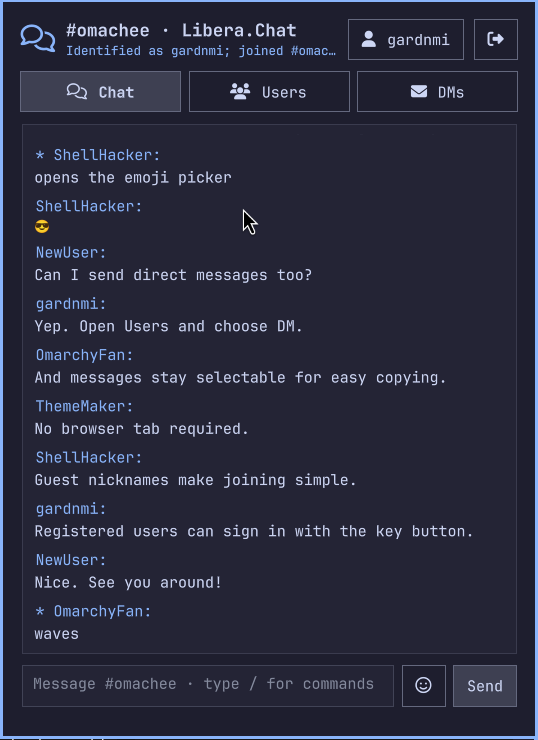
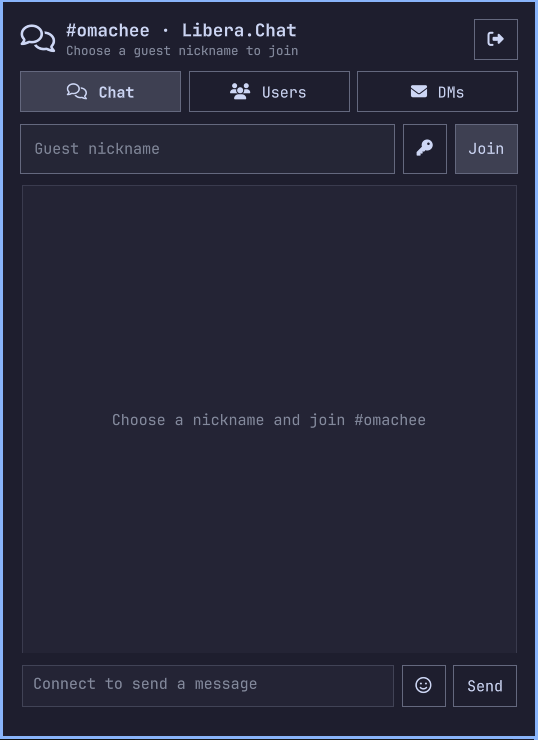
Simple Guest Login
Features
- Native bar icon, connection indicator, and unread count
- Native QML timeline and bounded multiline message composer
- Separate Chat, Users, and DMs tabs
- Searchable, virtualized user roster with bounded visible results
- Mouse-selectable message text with standard
Ctrl+Ccopying - Clickable sender names with contextual DM and mute actions
- Searchable slash-command suggestions with keyboard and mouse selection
- Unicode emoji display and native Omarchy emoji-picker input
- Channel member selector populated from IRC
NAMESreplies - Direct-message conversations with individual channel members
- Session-only mute and unmute controls for incoming user messages
- Guest nicknames and optional session-only NickServ login with SASL PLAIN
- Verified TLS connection to
irc.libera.chat:6697 - Automatic PING/PONG and bounded exponential reconnect backoff
- Session-only messages that disappear when Omarchy shell restarts
- Plain-text rendering for messages and notices
- Outgoing IRC line-limit checks and one-message-per-second throttling
- Compact join, part, quit, nickname, and connection notices
- Server-authorized operator controls with confirmed kick and ban actions
/meactions rendered as plain text; other CTCP commands ignored
Requirements
- Omarchy with the Quattro shell plugin system
- Python 3 available on
PATH - Network access to
irc.libera.chaton TCP port6697
Install
Review the source before installing. Omarchy plugins run as unsandboxed code inside the long-running shell process, and this plugin starts its bundled Python helper on first panel open.
omarchy plugin add https://github.com/gardnmi/omarchy-irc.git --enable
If needed, enable it later:
omarchy plugin enable io.github.gardnmi.omarchy-irc --section right
Open the chat icon, choose a guest nickname, and select Join. The default
form does not ask new users about IRC accounts. Experienced users can select the
key icon beside Join to reveal a masked password field and identify with a
registered Libera.Chat account such as gardnmi; selecting it again returns to
the simple guest flow. Keep Remember selected to save a successful login in
the desktop system keyring and reconnect automatically after shell restarts or
plugin rescans. The unlocked-key button in the header forgets the saved login
without disconnecting the current session. Chat is the
fixed #omachee channel with no channel dropdown. Users contains a searchable
virtualized roster with DM and mute actions. It keeps all known nicknames as
lightweight strings but renders at most 250 matching rows at once, so channels
with thousands of users remain responsive. DMs contains private
conversations and uses a selector for the available private conversations.
The login form is shown only until the channel is joined. Afterward,
the active nickname appears as a clickable header control; select it to reveal a
compact Apply/Cancel nickname editor. /nick newname remains available from the
composer.
After an authenticated account joins, the helper automatically asks ChanServ for
temporary operator status. ChanServ grants it only when that account has channel
access. While the server reports @ for the current nickname, the Users tab
displays Kick and Ban + kick actions. Both require confirmation; ban first
checks WHOIS and uses a NickServ account mask when available, otherwise it falls
back to a nickname mask. The helper independently checks the live @ state and
does not expose arbitrary IRC mode commands.
Enter sends from the composer. Shift+Enter or Ctrl+Enter inserts a newline.
Because IRC framing cannot contain CR/LF, the plugin encodes composer breaks as
Unicode LINE SEPARATOR characters so they remain one IRC message and render on
separate lines in compatible clients. Change updates the nickname. The
compact leave icon in the header parts the channel and closes the connection.
Drag across any message body to select plain text, then press Ctrl+C to copy
the selection. Click another user's nickname in the timeline to reveal DM
and Mute/Unmute actions directly beneath that message. Clicking the name
again dismisses the actions.
The composer supports these local slash commands without forwarding arbitrary raw IRC commands:
| Command | Action |
|---|---|
/me action |
Send an IRC action to the active channel or DM |
/action action |
Alias for /me |
/dice [sides] |
Roll a die, defaulting to six sides, and send the result as an action |
/msg nick message |
Open a DM and optionally send a message |
/query nick |
Open a DM without sending |
/nick nick |
Change the current nickname |
/mute nick |
Suppress subsequent incoming messages from a nickname |
/unmute nick |
Remove a session mute |
/clear |
Clear the active conversation from shell memory |
/part or /quit |
Leave #omachee and disconnect |
/join #omachee |
Report the fixed channel's current join state |
/help |
Show the supported command list |
Start a message with // to send a literal leading slash.
Typing / opens the supported-command list. Continue typing to filter it, use
Up/Down to move, and press Enter or Tab to insert the selected command. Commands
can also be selected with the mouse; Escape dismisses the list.
Choose the smiley icon beside the composer to open Omarchy's searchable emoji overlay.
Selecting an emoji inserts it into the focused composer without sending it;
continue typing or press Enter to send. The standard SUPER+CTRL+E Omarchy
shortcut opens the same picker. Received Unicode emoji use the system emoji font
fallback, normally Noto Color Emoji on Omarchy.
Kiwi IRC's optional emoticon renderer sends ASCII tokens over IRC and replaces
them with emoji only inside Kiwi. For compatibility, the panel applies the same
display-only conversion to common whitespace-delimited tokens, including
8) to 😎, :) to 🙂, and <3 to ❤. The raw IRC text remains unchanged
in the session timeline and is never rewritten before protocol handling.
URLs remain plain text in the initial release. The panel does not automatically open, fetch, preview, or execute links or message content.
Connection And Privacy
The bundled irc_helper.py connects directly to the fixed host
irc.libera.chat:6697 with Python's default verified TLS trust store. It sends
the selected nickname, a generic IRC user description, channel messages, and
protocol traffic required to join and remain connected to #omachee.
The helper starts only after the panel is opened for the first time. It remains connected while Omarchy shell runs, including while the panel is closed. QML and the helper communicate through newline-delimited JSON on local process pipes. If Omarchy reloads the plugin during a plugin rescan, the panel explicitly stops its helper so an invisible IRC connection cannot outlive the UI. DMs, presence notices, roster data, the muted-user set, and connection state remain only in memory and are discarded by a shell restart or rescan. A remembered login starts a new authenticated connection when the replacement panel is next opened. Muting is a local presentation action: Libera still delivers the traffic, but the panel does not retain, display, or persist subsequent messages from that nickname.
The session keeps at most 100 distinct DM conversation targets so unsolicited messages from rotating nicknames cannot grow the dropdown without bound.
The timeline retains the newest 500 total channel messages, DM messages, and
connection/user notices by default. The optional maxTimelineEntries plugin
setting changes this session-memory cap, with a minimum of 100 entries. The cap
is global across all conversations rather than 500 entries per DM. Separately,
the helper persists only the newest 100 displayed messages and actions from the
public #omachee channel. It excludes DMs, notices, presence events, roster data,
and muted traffic.
Public history is stored as versioned JSON at
$XDG_STATE_HOME/omarchy-irc/history.json, or
~/.local/state/omarchy-irc/history.json when XDG_STATE_HOME is unset. The
helper uses a private directory, mode 0600 for the file, and atomic replacement
so an interrupted write cannot leave a partial history. /clear while viewing
Chat deletes both the visible and persisted channel history. Removing the
plugin does not automatically remove this XDG state file; use /clear first or
delete that path manually if desired.
NickServ passwords are accepted only through the masked login field, sent to the
helper over its local stdin pipe, and used for SASL PLAIN inside the verified TLS
connection. When Remember is selected, the helper saves the account and
password only after SASL succeeds. It invokes secret-tool directly, supplies
the secret through stdin rather than process arguments, and stores it in the
desktop Secret Service under this plugin's ID, where the keyring protects it at
rest. The account and password are never written to plugin files or returned to
QML during automatic login. If the keyring is unavailable, login continues for
the current session and the panel reports that it could not save the credential.
The helper keeps a process-memory copy only while needed for reconnects and
clears it when leaving or when authentication fails. A keyring copy remains
until the unlocked-key Forget saved login action is selected. Authentication
must succeed before the helper joins #omachee; it never silently falls back to
a guest after an authentication failure. If another IRC client already holds
the requested registered nickname, account login stops with instructions to
disconnect that client instead of joining under a suffix. When no password is
supplied, registered nickname notices still trigger a random guest suffix.
There are no analytics, telemetry, public logs, bots, bridges, embedded browsers, or LLM processing. Libera.Chat and other channel participants receive normal IRC traffic; consult Libera.Chat's policies before use.
Protocol Boundary
Commands sent to the helper include:
{"command":"connect","nickname":"gardnmi","account":"gardnmi","password":"<masked>","remember":true}
{"command":"send","target":"#omachee","text":"Hello from Omarchy"}
{"command":"send","target":"someone","text":"Hello privately"}
Events returned to QML include:
{"event":"message","nick":"someone","target":"#omachee","text":"Welcome!"}
{"event":"message","nick":"someone","target":"someone","text":"Private hello"}
{"event":"names","channel":"#omachee","users":["someone","another-user"]}
{"event":"connected","channel":"#omachee","network":"Libera.Chat"}
{"event":"error","message":"Nickname already in use"}
The helper handles SASL PLAIN capability negotiation and the IRC messages needed
for JOIN, channel and direct PRIVMSG, NOTICE, NICK, PART, QUIT,
PING, NAMES, channel names, and connection numerics. Direct-message targets
must pass the same nickname validation as the local guest nickname. Malformed
IPC and IRC lines are rejected or ignored without evaluating their contents.
Update And Remove
omarchy plugin update io.github.gardnmi.omarchy-irc
omarchy plugin remove io.github.gardnmi.omarchy-irc
Removing the plugin stops its helper when Omarchy reloads the plugin. No history or credentials remain to remove.
Development
mise run test
mise run validate
mise run restart
omarchy-shell io.github.gardnmi.omarchy-irc open
The tests exercise IRC parsing, malformed input, Unicode, line limits, JSON IPC, nickname collisions, SASL negotiation, operator authorization, account-aware bans, emoji Unicode, member-list parsing, and direct-message routing without connecting to Libera.Chat. A release smoke test should use disposable nicknames to verify connect, join, channel and direct sends, mute/unmute, part, reconnect, unread state, shell restart, responsive layout, and plugin removal.