
Proxmox Plugin for Omarchy
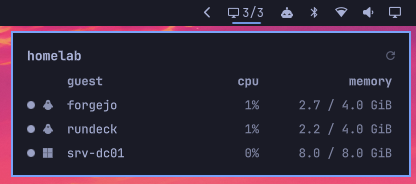
A bar widget for Omarchy Quattro showing Proxmox VE guest status, CPU and memory usage at a glance.
The bar shows running / total. Click it for a panel listing every guest with its live metrics.
The widget turns to the bar's alert colour when the API is unreachable, or when a guest you explicitly watch is not running.
Requirements
curlandjqon the machine running Omarchy- A Proxmox VE API token with the read-only
PVEAuditorrole
Setup
1. Create a read-only API token
On your Proxmox node:
pveum user add omarchy@pve --comment "Omarchy bar widget (read-only)"
pveum user token add omarchy@pve bar --privsep 1
pveum acl modify / --users  'omarchy@pve'     --roles PVEAuditor
pveum acl modify / --tokens 'omarchy@pve!bar' --roles PVEAuditor
The token secret is displayed once, at creation. Copy it now.
Both ACL lines are required. With privilege separation enabled the token's effective permissions are the intersection of the user's and the token's, so granting the role to only one of them yields no access at all — and /cluster/resources returns an empty list rather than a 403.
2. Store the credentials outside shell.json
install -d -m 700 ~/.config/omarchy/proxmox
cat > ~/.config/omarchy/proxmox/credentials <<'EOF'
PVE_TOKEN_ID='omarchy@pve!bar'
PVE_TOKEN_SECRET='<the secret from step 1>'
EOF
chmod 600 ~/.config/omarchy/proxmox/credentials
Single quotes matter: the token id contains !, which bash would otherwise treat as history expansion.
Never put the token in shell.json. That file is plugin configuration, not a secret store, and it is the kind of file people keep in their dotfiles repo.
The widget only ever learns the path to the credentials file.
3. Trust the cluster CA
Proxmox generates its own PKI at install time. Copy the cluster CA to the system trust store so TLS verification succeeds without special-casing:
# Print it on the node, paste it locally
cat /etc/pve/pve-root-ca.pem

sudo cp pve-root-ca.pem /etc/ca-certificates/trust-source/anchors/pve.crt
sudo trust extract-compat
Verify — a 401 means the TLS handshake succeeded and only authentication is missing, which is what you want at this point:
curl -s -o /dev/null -w '%{http_code}\n' https://your-node.example.com:8006/api2/json/version
The endpoint host must match the certificate's CN or a SAN entry. Check what the node presents with:
openssl s_client -connect <node>:8006 </dev/null 2>/dev/null \
  | openssl x509 -noout -subject -ext subjectAltName
If you prefer not to touch the system trust store, point the caBundle setting at a local copy of the CA instead.
Install
omarchy plugin add https://github.com/g-desoutter/omarchy-plugin-proxmox.git --enable
Settings
Settings are inline on the widget's entry in ~/.config/omarchy/shell.json:
{
  "id": "io.github.gdesoutter.proxmox",
  "endpoint": "https://your-node.example.com:8006",
  "label": "homelab",
  "watchedGuests": [500]
}
| Key | Default | Description |
|---|---|---|
endpoint |
https://proxmox.example.com:8006 |
PVE API base URL. Must match the certificate CN or a SAN. |
credentialsFile |
~/.config/omarchy/proxmox/credentials |
Absolute path to the credentials file. |
caBundle |
(system trust store) | Absolute path to a CA bundle, if you did not install the CA system-wide. |
interval |
15 |
Refresh interval in seconds. Values below 10 gain nothing — see below. |
label |
(the endpoint) | Name shown in the panel header. |
watchedGuests |
[] |
VMIDs whose shutdown is abnormal. Empty means never alert on a stopped guest. |
allowMultiple is enabled, so you can add one widget per cluster.
On watchedGuests
A stopped guest is not inherently a problem — lab VMs and templates are meant to be off. The widget cannot know your intent, so you declare it: list only the VMIDs whose absence is genuinely abnormal. Everything else is ignored, and the widget stays quiet.
Notes
Refresh interval. pvestatd refreshes /cluster/resources roughly every 10 seconds, so polling faster than that re-reads the same sample. The widget floors the interval at 10s for this reason. Guest status changes, unlike metrics, are immediate — stopping a VM is reflected on the next poll, or instantly via the panel's refresh button.
Memory figures. mem is memory as seen by the hypervisor, not pressure inside the guest. A Linux guest filling its page cache, or a Windows guest caching aggressively, will read high without being short of RAM. Don't size guests from this number; check Available Memory inside the guest instead.
CPU figures. cpu is already normalised across all vCPUs assigned to the guest, so 100% means the guest is saturating its allocation — not one core.
Guest OS icons. The OS type comes from each VM's ostype config field, which is declarative rather than detected — a guest created with the wrong value shows the wrong icon.
It is cached for 24 hours under $XDG_CACHE_HOME/omarchy-proxmox, so the extra request happens once per guest per day.Containers always show the container icon.
Privileges
The plugin issues a single read-only GET /api2/json/cluster/resources?type=vm through curl. It never writes to the cluster, never runs an install hook, never asks for sudo, and never disables TLS verification. The poller is a
plain shell script in bin/ — read it before enabling the plugin.
Like every Omarchy plugin, this runs unsandboxed inside the long-lived shell process, with your user's permissions.
Remove
omarchy plugin remove io.github.gdesoutter.proxmox
License
MIT — see LICENSE.