
OmaFonts
Browse Omarchy fonts in a live preview grid, apply one with Activate, and install .ttf / .otf / .zip fonts into ~/.local/share/fonts from the panel.
Version: 0.4.1
Screenshot
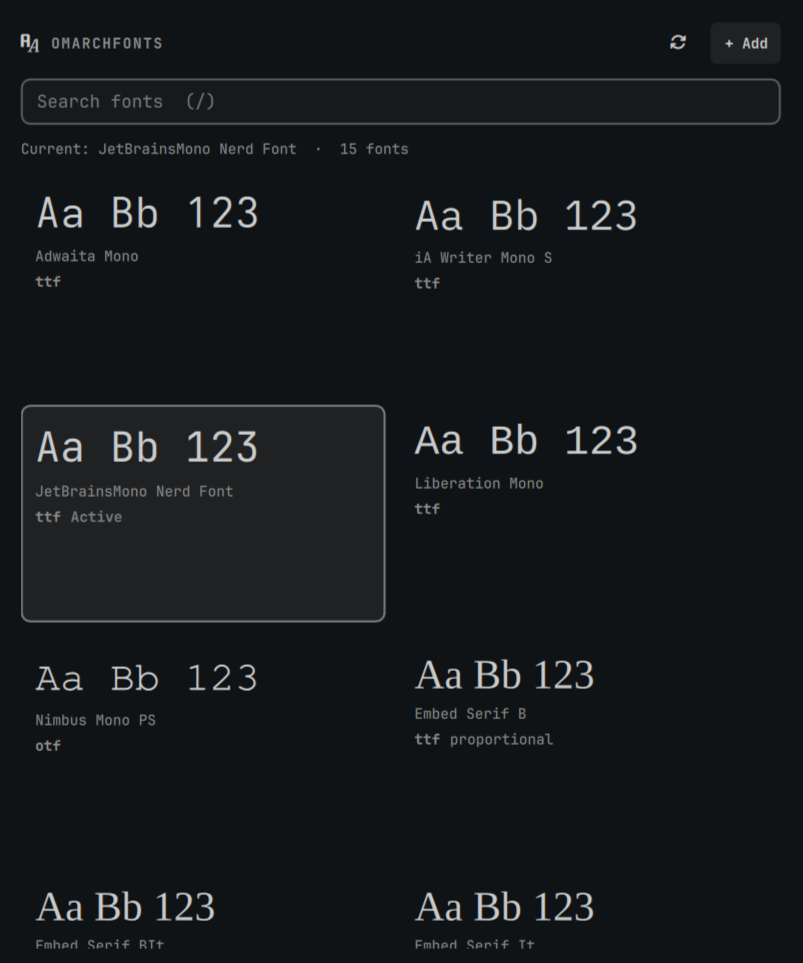
What it does
- Grid preview — monospace fonts from
omarchy font list, plus user-installed faces from~/.local/share/fonts - Activate on hover — small Activate button (bottom-right); Enter also applies the selection
- Delete user fonts — Delete button (bottom-left) on user-installed cards, with confirm; Delete key also works
- Format labels — shows
ttf/otf/ etc. on each card - Add fonts — Zenity file picker copies into
~/.local/share/fonts, refreshesfc-cache, notifies, optionally auto-applies the first monospace family - Search — filter by family name (
/focuses the search field)
Install
omarchy plugin add https://github.com/giodc/OmaFonts.git --enable
Dependencies
These are expected on a normal Omarchy install:
| Dependency | Used for |
|---|---|
Omarchy (omarchy font list / current / set) |
Listing and applying the system monospace font |
fontconfig (fc-list, fc-query, fc-cache) |
Discovering families/formats and refreshing the cache |
zenity |
File picker when adding fonts from the panel |
unzip |
Extracting .zip font archives on install |
Install (local / development)
mkdir -p ~/.config/omarchy/plugins
ln -sfn "$(pwd)" ~/.config/omarchy/plugins/io.github.giodc.omafonts
omarchy plugin enable io.github.giodc.omafonts
omarchy-shell shell rescanPlugins
How fonts work on Omarchy
| Step | Command / path |
|---|---|
| List monospace fonts | omarchy font list |
| Show active font | omarchy font current |
| Apply | omarchy font set "Family Name" |
| User-installed files | ~/.local/share/fonts + fc-cache -f |
Settings
| Key | Default | Meaning |
|---|---|---|
previewText |
Aa Bb 123 |
Sample string on each card |
autoApplyOnInstall |
true |
After install, set the first monospace family automatically |
Remove
omarchy plugin remove io.github.giodc.omafonts