
OmarchWeb
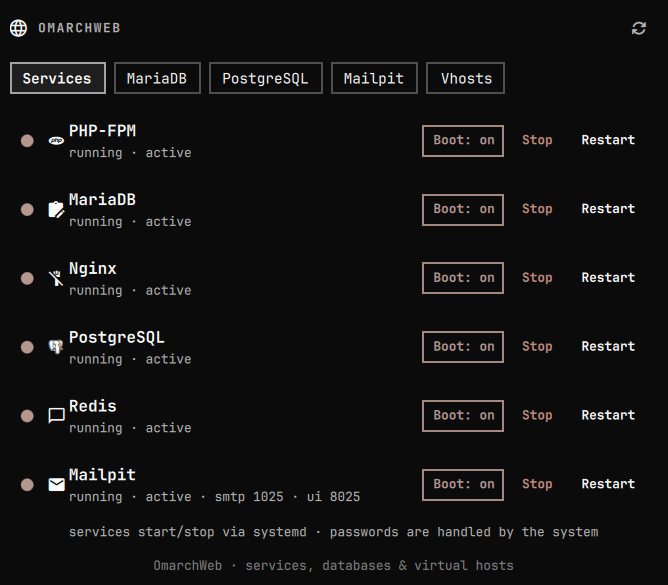
A native Omarchy Quattro bar plugin for local web development: start/stop services, manage MariaDB and PostgreSQL databases and users, and add Nginx virtual hosts (PHP, Laravel, WordPress).
Install
omarchy plugin add https://github.com/giodc/omarchweb.git --enable
Or from a local clone under ~/.config/omarchy/plugins/io.github.giodc.omarchweb/:
omarchy plugin enable io.github.giodc.omarchweb right
Saved edits hot-reload. If a change does not apply:
omarchy-shell shell rescanPlugins
Usage
Click the globe on the bar to open the panel. Escape closes it.
- Services — install, start, stop, restart, or uninstall PHP-FPM, MariaDB,
Nginx, PostgreSQL, Redis, and Mailpit. Privileged actions use the desktop
polkit agent (
pkexec). - MariaDB / PostgreSQL — tabs appear when that server is installed. Create and delete databases and password users for apps (e.g. WordPress).
- Vhosts — add PHP, Laravel, or WordPress sites. WordPress downloads pinned release 7.1 (SHA-256 verified) into the site folder. Each row has icons to open the site in a browser, the project folder, or a terminal in that folder.
Default panel tab is Services. The bar widget defaults to the right
section (defaultSection).
Tune sites
After installing or updating OmarchWeb (or if PHP/WordPress permissions look wrong), run Tune sites once from the Vhosts tab. That may ask for your password. It:
- Installs/refreshes your per-user PHP-FPM pool so PHP runs as your user
- Rewires managed vhosts to that pool socket
- Reclaims leftover
http-owned files under WordPress docroots - Repairs nginx layout / path issues and reloads (or starts) nginx
From a terminal you can do the same with:
~/.config/omarchy/plugins/io.github.giodc.omarchweb/scripts/vhost.sh tune
Tune is idempotent — safe to run anytime after a plugin update.
Laravel sites
OmarchWeb does not scaffold Laravel for you. Adding a Laravel vhost creates
an empty project folder and an nginx vhost pointed at public/.
- In the panel, add a vhost with type laravel (name e.g.
blog). - Open the project folder or terminal from the vhost row (or:
cd ~/Web/blog). - Scaffold into that empty folder yourself:
cd ~/Web/blog

# Blank Laravel app (no starter kit)
composer create-project laravel/laravel .

# Or an official starter kit (pick one)
composer create-project laravel/react-starter-kit .
# composer create-project laravel/vue-starter-kit .
# composer create-project laravel/livewire-starter-kit .
# composer create-project laravel/svelte-starter-kit .
After a starter kit (or any app with a frontend build):
npm install && npm run build
Or from the parent directory with the Laravel installer (recreates the empty
folder; add --react, --vue, --livewire, or --svelte for a kit):
cd ~/Web
laravel new blog --force
# laravel new blog --force --react
Do not use laravel new . inside the project folder. Current Laravel
Installer versions always report “Application already exists” for ., even
when the directory is empty — they compare the string . to getcwd(),
which never matches, and --force is disallowed with ..
- When
public/exists, open the site (panel browser icon, orweb open).
Requirements: Composer (and optionally the Laravel installer / Node for kits). Full OmarchWeb setup installs Composer and the installer.
Until you scaffold, the URL may 404 — that is expected.
CLI (web / omarchweb)
After full setup (or Install CLI on the Services tab), wrappers are
installed to ~/.local/bin. Ensure that directory is on your PATH, then:
cd ~/Web/myapp
omarchweb open            # open this site's URL in the browser
web open                  # same

omarchweb url             # print URL only
omarchweb open wordpress  # open a named vhost from anywhere
omarchweb list            # list managed vhosts
omarchweb install-cli     # reinstall/refresh ~/.local/bin wrappers
open / url resolve the current directory to a managed vhost (for Laravel,
either the project root or public/).
Manual install if needed:
~/.config/omarchy/plugins/io.github.giodc.omarchweb/scripts/cli.sh install-cli
Configure
omarchy bar move io.github.giodc.omarchweb --section right
omarchy bar set io.github.giodc.omarchweb refreshSeconds 30
omarchy bar set io.github.giodc.omarchweb webRoot ~/Web
omarchy bar set io.github.giodc.omarchweb nginxPort 80
| Key | Type | Default | Meaning |
|---|---|---|---|
refreshSeconds |
integer | 30 | How often to re-check service/db state while the panel is open |
webRoot |
path | ~/Web |
Base folder for new vhosts/projects |
nginxPort |
integer | 80 | Listen port for generated virtual hosts |
Privileges
The first privileged action installs a reviewed snapshot of scripts/root.sh
to /usr/local/libexec/omarchweb/root.sh (root-owned, mode 0555). After that,
systemd control, package install/remove, nginx config, /etc/hosts, Mailpit
install, and database grants run that snapshot via passwordless sudo when
available, otherwise pkexec. The plugin checkout is never executed as root.
If you update the plugin, the next privileged action reinstalls the helper when the digest no longer matches.
Every helper operation is narrowly defined: package, service, and PHP
extension names come from fixed allow-lists, systemctl takes exactly one
allow-listed unit, database grants pass only a validated role name (the SQL is
built inside the snapshot), a vhost document root must live under the calling
user's home, and nginx-tune derives that home from the authenticated caller
rather than an argument. There is no generic "run this as root" path.
Tests
bash test/security.sh
These checks encode the marketplace privilege and supply-chain review (root-owned helper, pinned artifacts, no generic root primitives). Run them before resubmitting.
Backends
Scripts in scripts/ (not invoked as a second Quickshell process):
services.sh— systemd status/start/stop/restartdb.sh— MariaDB and PostgreSQL databases and app usersvhost.sh— Nginx virtual hosts (pinned WordPress release)cli.sh— user CLI (omarchweb/web: open/url/list)setup.sh— install/uninstall stack packages (Mailpit from a pinned GitHub release)root.sh— allow-listed privileged helper (installed as a root-owned snapshot)pins.sh— reviewed versions and artifact digests
Environment overrides: OMARCHWEB_SERVICES, OMARCHWEB_DB_BIN,
OMARCHWEB_PG_BIN, OMARCHWEB_WEB_ROOT, OMARCHWEB_NGINX_DIR,
OMARCHWEB_PORT, OMARCHWEB_FPM_SOCK.
IPC
omarchy-shell ipc call io.github.giodc.omarchweb toggle
omarchy-shell shell summon io.github.giodc.omarchweb '{}'
omarchy-shell shell hide io.github.giodc.omarchweb
Remove
omarchy plugin remove io.github.giodc.omarchweb
Removing the plugin does not uninstall web services, virtual hosts, or the
root-owned helper at /usr/local/libexec/omarchweb/root.sh. To drop the
helper after removing the plugin:
sudo rm -f /usr/local/libexec/omarchweb/root.sh
sudo rmdir /usr/local/libexec/omarchweb 2>/dev/null || true
License
MIT — see LICENSE.