
NordVPN — Omarchy bar widget
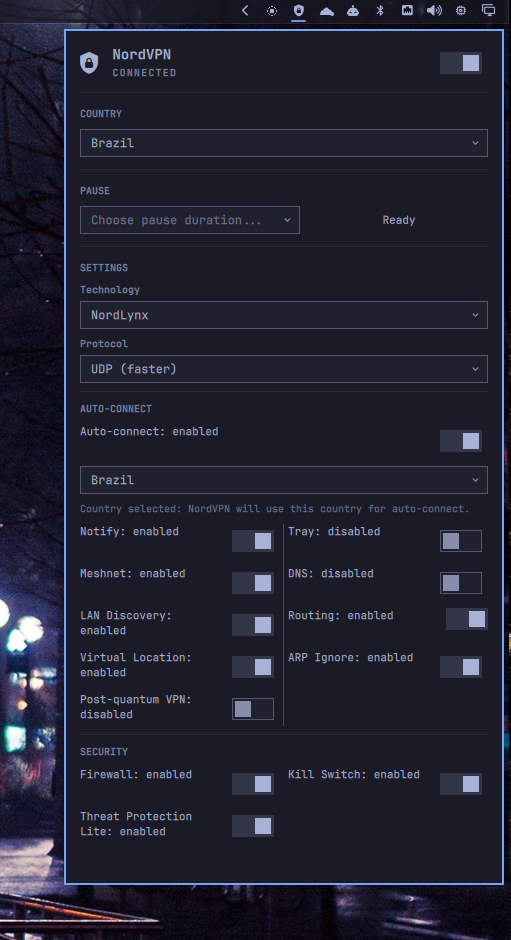
A widget for Omarchy that controls the official NordVPN Linux client from the top bar, with quick connect, disconnect, and a searchable country selector.
Requirements
-
Omarchy with the Quickshell-based plugin system.
-
The official NordVPN Linux client installed, with
nordvpnavailable onPATH. -
The client authenticated and its daemon running. Test it with:
nordvpn status
The plugin uses the official NordVPN CLI commands status, settings,
countries, connect, disconnect, pause, and supported set options. It
does not access NordVPN credentials or modify NordVPN configuration files
directly. Actions are passed as argument arrays to Quickshell processes; user
input is not interpolated into a shell command.
Installation
omarchy plugin add https://github.com/guiestrela/omarchy-norvpn-plugin.git --enable
Enable or disable
Enable the plugin in the right bar section:
omarchy plugin enable io.github.guiestrela.nordvpn right
Disable it without removing the installed files:
omarchy plugin disable io.github.guiestrela.nordvpn
Usage
- Left-click: open or close the popup.
- Right-click: refresh the connection status.
- Middle-click: connect or disconnect.
- In the popup, the switch performs a quick connect or disconnect.
- The country selector searches countries and runs
nordvpn connect <country>. - The Protocol selector switches between UDP and TCP through
nordvpn set protocol. - Auto-connect can target a specific country by choosing it in the country list
shown below Auto-connect, or by setting
autoConnectCountryto its two-letter NordVPN country code (for example,brorfr). When the field is empty, NordVPN chooses the fastest available server. The plugin saves the selected country in the widget configuration and applies it asnordvpn set autoconnect on <country_code>when Auto-connect is enabled. - The Pause selector pauses the VPN immediately when you choose 5m, 15m, 30m, 1h, or 24h using
nordvpn pause. A countdown is shown beside the selector, which then returns to its placeholder.
The icon is bright when connected, dimmed when disconnected, and shown in the alert color when the NordVPN daemon is unavailable.
Settings
The popup reads nordvpn settings and presents supported options in a
two-column layout. The following settings can be changed through the official
nordvpn set command:
- Technology
- Firewall
- Kill Switch
- Auto-connect
- Threat Protection Lite
- Notify and Tray
- Meshnet and DNS
- LAN Discovery
- Routing
- Virtual Location
- ARP Ignore
- Post-quantum VPN
The Security section groups Firewall, Kill Switch, and Threat Protection Lite for quick review and changes. Enable Kill Switch and Firewall when you need traffic protection during connection drops; availability depends on the installed NordVPN client version.
refreshIntervalSec(2–60, default 5): connection status refresh interval.autoConnectCountry(default empty): optional two-letter country code used by Auto-connect, such asbrorfr.
Theme and fonts
The widget does not ship its own colors or font files. It follows the active
Omarchy bar theme (foreground, urgent, and theme spacing) and uses the bar
font, including Nerd Font icons. Change these globally with omarchy theme set <name> and omarchy font set <name>; the widget updates with the shell.
Uninstall
To remove the plugin completely, run:
omarchy plugin remove io.github.guiestrela.nordvpn --yes
This disables the plugin and removes its installed files.
License
MIT — see LICENSE.