
Omarchy Google Calendar Clock Refresh
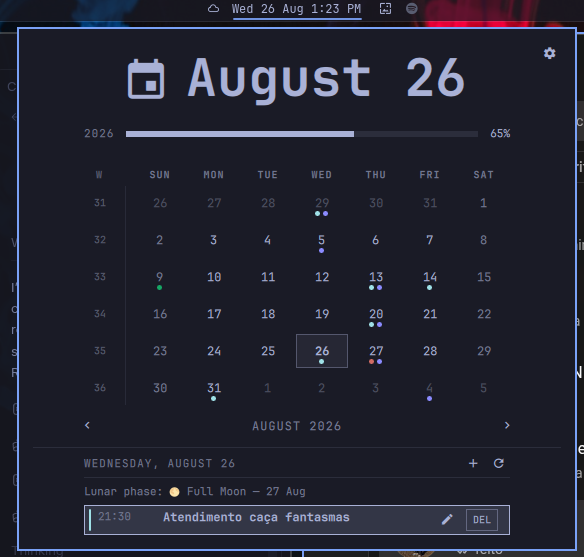
This community-maintained fork is based on the original Omarchy Google Calendar and Clock project. It adds bidirectional Google Calendar sync, event editing, lunar phases, and interface refinements while preserving a local-first data model.
Repository: guiestrela/omarchy-google-calendar-clock-refresh
Note: the repository is named
omarchy-google-calendar-clock-refresh, while the Omarchy plugin ID isio.github.guiestrela.omarchy-google-calendar-clock. The local plugin path below uses the plugin ID, as defined inmanifest.json.
An Omarchy bar clock with a local-first calendar. It reads standard .ics
files through Caldir, supports local event
creation and editing, and can pull from or push to Google Calendar on demand.
Calendar data and OAuth credentials stay in Caldir's local directories. The plugin stores only an owner-readable derived event cache and includes no telemetry.
Requirements
- Omarchy with the Quattro plugin API
- An x86-64 or ARM64 Linux system
- Bash, Python 3,
curl,jq, GNUcoreutils, andtar(included with a standard Omarchy installation) - A Google account for optional Google Calendar sync
The plugin downloads its own patched Caldir runtime; no Rust toolchain or separate Caldir installation is required.
Security, theme, fonts, and technology
- Security: all downloaded runtime archives are restricted to HTTPS/TLS 1.2+, checked against a committed SHA-256 digest, verified for an exact file inventory, and installed with owner-only temporary files. OAuth credentials, tokens, and the derived cache remain readable only by the current user; no elevated permissions or telemetry are used.
- Theme: the panel uses Omarchy
ColorandStyletokens. Calendar colors can follow Google Calendar or the active Omarchy theme; synthetic lunar events also follow the selected theme instead of using a fixed color. - Fonts: bar and panel text inherit the active Omarchy font (
bar.fontFamilywithStyle.font.familyas fallback), while sizes use the shared Omarchy typography scale for consistent rendering. - Technology: Qt 6/QML and Quickshell power the UI; Bash and Python
provide the local bridge; Caldir handles ICS, recurrence, time zones, and
Google synchronization;
jq,curl, and GitHub Actions support the validated runtime and release pipeline.
Each release includes one committed SHA-256 digest per architecture. Setup verifies the downloaded archive against the digest in the installed plugin checkout before extracting or executing it. The pinned Caldir source commit, patch, and reproducible release workflow are kept in this repository.
Data access and permissions
- The plugin runs entirely as the current user and requests no elevated permissions.
- Setup writes the downloaded Caldir runtime under
~/.local/share/io.github.guiestrela.omarchy-google-calendar-clock/. - Calendar data and Google OAuth credentials are managed under Caldir's XDG data and configuration directories.
- The derived event cache is written to
~/.local/state/omarchy/calendar-cache.jsonwith owner-only permissions. - Direct OAuth talks to Google only. Hosted OAuth additionally sends OAuth
tokens through
caldir.org, as explained before that mode is selected. - Setup changes the Omarchy bar only after the user explicitly runs it: it disables the built-in clock, enables this widget, and makes it the center anchor. The uninstaller restores the built-in clock and preserves unrelated bar changes.
Install and set up
Add and enable the plugin with Omarchy:
omarchy plugin add https://github.com/guiestrela/omarchy-google-calendar-clock-refresh --enable
If an older installation is still present, remove it first with
omarchy plugin remove omarchy-google-calendar-clock --yes, then run the
installation command above. The renamed plugin uses the ID
io.github.guiestrela.omarchy-google-calendar-clock.
It initially behaves as a plain clock. Click it to open the calendar, then select Direct setup or Hosted setup. The selected flow opens in a terminal and guides you through the remaining steps.
You can run the same setup from a terminal:
~/.config/omarchy/plugins/io.github.guiestrela.omarchy-google-calendar-clock/setup          # Direct
~/.config/omarchy/plugins/io.github.guiestrela.omarchy-google-calendar-clock/setup --hosted # Hosted
After setup verifies the release, Google connection, and first calendar pull, it disables the built-in clock, enables this widget, and anchors it at the exact center of the top bar.
Choose an OAuth mode
Direct (default, recommended). You create a Desktop OAuth client in your own Google Cloud project. Authentication and token refreshes go directly between your machine and Google.
Hosted. Caldir.org provides the OAuth relay, so no Google Cloud project is needed. The trade-off is that sign-in and future token refreshes depend on caldir.org, and OAuth tokens pass through its servers.
The setup flow explains the same choice before it proceeds. An existing OAuth session is reused; it is not recreated on every setup run.
Switch modes later
~/.config/omarchy/plugins/io.github.guiestrela.omarchy-google-calendar-clock/scripts/calendar-auth-mode switch hosted
~/.config/omarchy/plugins/io.github.guiestrela.omarchy-google-calendar-clock/scripts/calendar-auth-mode switch direct
Switching signs out the current session and starts the chosen sign-in flow. Your direct OAuth client ID and secret are kept when switching modes. Check the current mode with:
~/.config/omarchy/plugins/io.github.guiestrela.omarchy-google-calendar-clock/scripts/calendar-auth-mode status --json
You can see the chosen mode and switch from the settings panel too.
Use
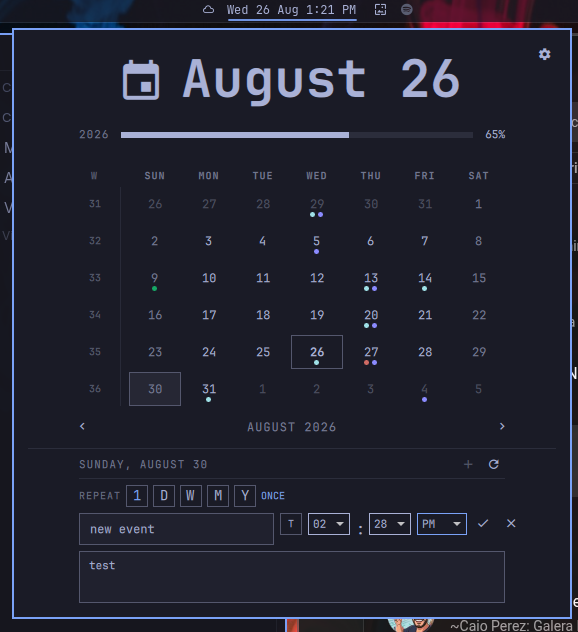
Click the clock to open the calendar. The toolbar lets you:
- create an event (
+); - synchronize with Google (
); - pull from Google (
↓); - push local changes to Google (
↑); - delete editable events with the
DELbutton.
New events are uploaded to Google automatically after they are saved locally. Pull and push results remain visible for three seconds before the panel closes.
Lunar phases are added to the agenda as read-only events. When a day already contains birthdays or manually-created events, the next lunar phase is shown in the same event area as well.
The settings button can switch OAuth mode, choose Google or theme calendar colors, and open the interactive full-uninstall flow.
The plugin reads its local cache immediately, refreshes in the background at
shell startup, and pulls every 30 minutes. The cache is stored at
~/.local/state/omarchy/calendar-cache.json with owner-only permissions.
Personal modifications
- moved the popup to match Omarchy's native top-bar calendar behavior;
- added a sync icon and made the status action perform a Google pull;
- added three-second sync feedback followed by automatic panel closing;
- made event creation upload to Google automatically;
- added one-click deletion for editable events;
- added approximate new moon, first quarter, full moon, and last quarter events to the agenda;
- kept lunar events read-only and preserved read-only Google calendars;
- expanded
~/caldircorrectly so existing local Caldir calendars are found; - improved hosted OAuth and local-installation error handling;
- added safer release-manifest, URL, and uninstall-path checks.
Update
omarchy plugin update io.github.guiestrela.omarchy-google-calendar-clock
~/.config/omarchy/plugins/io.github.guiestrela.omarchy-google-calendar-clock/setup
Setup safely replaces the plugin runtime and reuses a valid existing OAuth session.
Remove
Prefer the plugin’s uninstaller to Omarchy’s Plugins menu removal tool:
~/.config/omarchy/plugins/io.github.guiestrela.omarchy-google-calendar-clock/uninstall
It removes the plugin, its downloaded Caldir runtime, and its event cache. It
then restores the built-in omarchy.clock as the fixed center anchor of the
bar.
The uninstaller separately asks whether to delete Google OAuth credentials and
local Caldir calendar data. Keeping them allows a later reinstall to reuse
your calendar state. Pass --yes only after reviewing the script: it accepts
all removal prompts.
Using the removal hook in the Omarchy menu removes the plugin directory, but leaves the data mentioned above and does not restore the built-in clock.