
mclovin — an Omarchy shell plugin
Choose which browser opens every link.
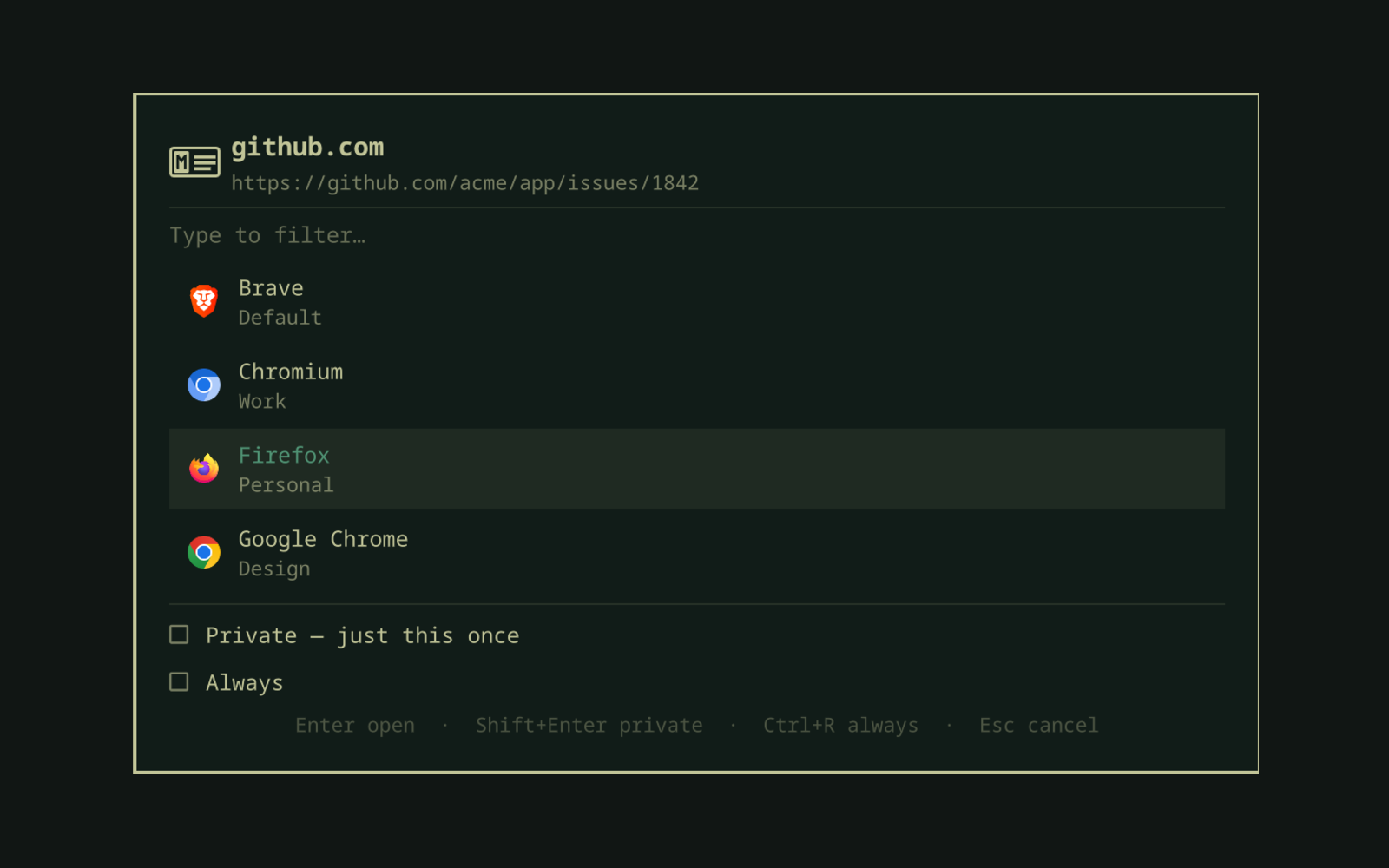
Click a link and mclovin puts a picker in the middle of the screen listing the browsers you have installed — one row per profile, so "Chromium · Work" and "Chromium · Personal" are separate choices. Pick one and the link opens there. Tick always use this browser and the choice becomes a rule, so the next link to that host skips the picker.
Rules are written in a form, not a config file: say whether a link starts with, contains, or is on something, choose a browser and profile, and watch the preview tell you what it would catch before you save it. When two rules could take the same link the narrower one wins, so there is no ordering to maintain.
<p align="center"> <img src="preview-picker-rule.png" width="82%" alt="The same picker with Always ticked, showing the term field and the Site, Path and Contains shapes"> </p> <p align="center"> <img src="preview-form.png" width="82%" alt="The rule form, with matcher, destination, and a live preview"> </p>Everything runs inside omarchy-shell as QML. There is no daemon, no compiled
binary, and no dependency on the mclovin CLI
that shares the name — though it can import that CLI's rules if you have them.
Requirements
- Omarchy Quattro (the Quickshell-based shell —
omarchy plugin listshould work) - Nothing else
Install
omarchy plugin add https://github.com/guilhermeyo/omarchy-mclovin.git --enable
That puts the bar widget on the right side of the bar. Click it, then click
Make mclovin the default to register mclovin as the system handler for
http and https.
Until you do that, the bar icon stays in the theme's urgent colour — links are still opening, just not through mclovin.
Using it
The picker. Any link that does not match a rule opens the picker.
It lists one row per browser profile, not per browser: three Chromium profiles are three rows, and a browser with no profiles is a single row. Picking "Chromium" when three profiles exist would just reopen whichever was last used, which is not a choice.
 Brave            Default
 Chromium         Work
 Firefox          Personal
 Google Chrome    Design
| Key | Does |
|---|---|
| type | filter across browser name, profile name, and desktop id |
↑ ↓ Tab |
move |
Enter |
open the link in the highlighted browser and profile |
Shift+Enter |
open it in a private window, just this once |
Ctrl+P |
tick the private box without opening yet |
Ctrl+R |
toggle "always use <browser · profile> for <host>" |
Esc |
clear the filter, then cancel |
Typing des finds the Google Chrome profile named "Design". Cancelling
drops the link — nothing opens.
Turning a link into a rule, without leaving the picker. Under the list sit two boxes, and the second one is a whole rule on one line:
☐  Private — just this once
☐  Always
Tick it and the line grows into the rule it will write:
☐  Private — just this once
☑  Always  Brave · Default · site  [ github.com ]   Site   Path   Contains
                                                    ‾‾‾‾
Until then none of that exists — no field, no shapes, no summary. Private and Always are the two actions here; everything else is a detail of one of them and only appears when it has something to say. The card shrinks to match, so the unticked state is two checkboxes rather than two checkboxes and a hole.
The three shapes are not buttons either: caption-sized, all the width of the longest label, no box and no fill, with a hairline under the active one.
The link you clicked was https://github.com/acme/app/issues/1842, but the rule
is never the URL you happened to open. It is the term in the field, matched the
way the chip says:
| Chip | Fills the field with | Matches |
|---|---|---|
| Site | github.com — the host, no www. |
that site |
| Path | https://github.com/acme/app — origin plus the first couple of path segments, stopping at anything that looks like an id |
that project |
| Contains | the host, for you to trim down to github |
anywhere in the link |
The field is editable, so "everything GitHub goes to Brave" is one click and one
tick. The row reads as the rule that will exist, private included: tick both
boxes and it says Always Brave · Default · private · site.
No regex here — that lives in the form, which the picker deliberately does not open. A picker is for choosing quickly.
Profiles come from the browser itself: Chromium-family from Local State,
Firefox from Profile Groups/*.sqlite (Firefox 143+) and profiles.ini before
that. The SQLite read shells out to sqlite3; without it installed you lose the
Firefox profile rows and nothing else.
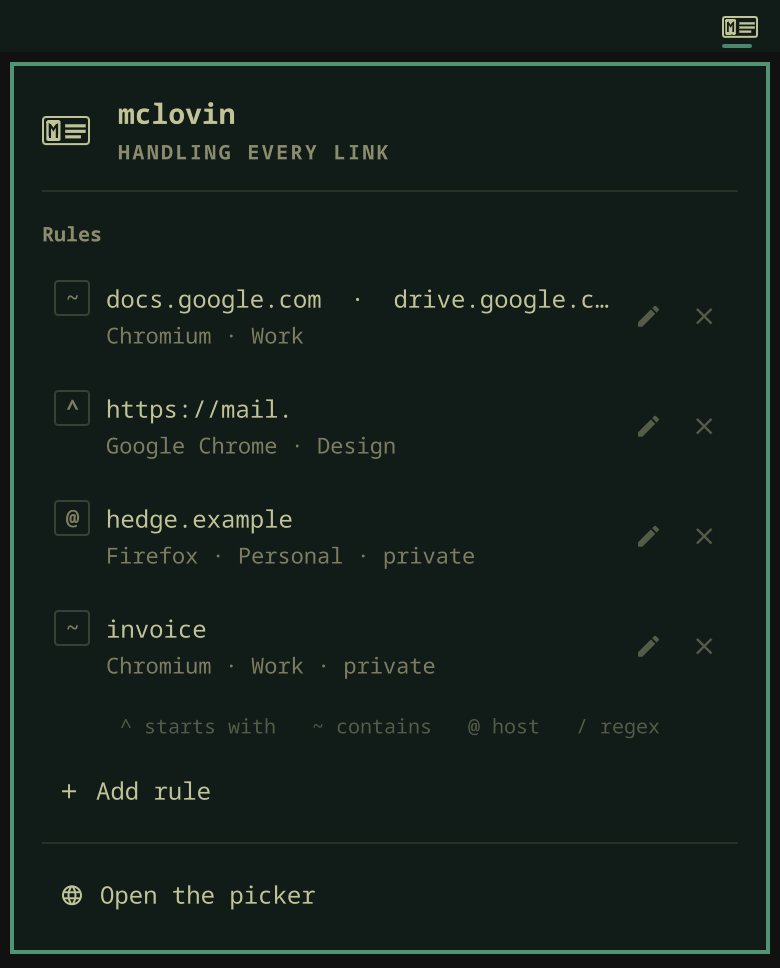
Rules. Ticking the remember box in the picker writes a rule for that host. Everything else happens in the rule form, which is the bar widget's drop-down → Add rule, or the pencil on any rule in the list — the row itself opens it too. The × next to it asks first, naming the rule in the question.
Private windows
Two separate things, deliberately not the same control.
Just this link. Shift+Enter in the picker, or the Private — just this
once box above the remember line. Both reset every time the picker opens, so a
private link cannot leave the toggle armed for the next one.
Always, for this site. A rule can be private: Open in a private window in
the rule form. Every link it catches opens incognito, in that browser and
profile. The rule list marks it — Firefox · Personal · private on the second
line — so it is visible without opening anything.
Tick both in the picker and the remember line says so out loud —
Always Firefox · Personal · private · site — so nothing becomes a private rule
by accident.
The flags are each browser's own, read off the [Desktop Action new-private-window] group in its installed desktop entry rather than guessed:
| Browser | Flag |
|---|---|
| Chromium, Chrome, Brave, Edge, Vivaldi | --incognito |
| Firefox and friends | --private-window |
Profile and private compose. On Firefox both are visible at once — a window launched into a profile privately titles itself "… — Personal — Mozilla Firefox Private Browsing", which is how this was verified. Chromium's incognito is per-profile by design, but its windows expose no state to read back, so that family rests on the vendor's own flag rather than on a measurement.
A browser with no private flag is not offered one: the toggle greys out and says
so instead of opening an ordinary window and calling it private. Command rules
have no private option either — a command line already states how it wants to
launch, and appending --incognito to an arbitrary one would be a guess.
The rule form
Three questions, in order, with the answer to the third visible while you answer the first two.
When a link… picks how the rule matches:
| Catches | Good for | |
|---|---|---|
| Starts with | the link begins with this | one section of a site — github.com/acme/ |
| Contains | the text appears anywhere | a word — invoice |
| Host is | the link is on exactly this site, www or not | example.com |
| Regex | a case-insensitive pattern | the rest |
Regex lives behind the advanced link in the corner, so it is one click away rather than in the way. A rule opened for editing that already uses one expands it for you.
+ Add another gives the rule a second term, a third, and so on. Any one of
them matching is enough, so example.com and example.org live in one rule instead of
two.
Open it in… is a browser — picked from the same browser·profile list the
picker shows, never a field you have to guess the spelling of — a web app, a
command with {url} in it, or a native app.
Start from… is a preset library above the form. Custom rule keeps the
ordinary editor defaults; Zoom meeting → its native app fills the editable
form with a narrow rule for numbered Zoom meeting links. New presets are
data-driven entries in Router.js, so the library can grow without adding
one-off controls to the form.
A native app hands the link to the desktop application that owns the site it
is on, by rewriting it into that application's own URI — an ordinary
https://…zoom.us/j/… becomes zoommtg://… before a browser opens.
The rewriting is a table, and it has to be. Nothing derives
zoommtg://zoom.us/join?action=join&confno=1842 from zoom.us/j/1842 except
knowing Zoom, any more than it derives spotify:track:X from
open.spotify.com/track/X: each is its own vendor's convention. So Router.js
holds the sites and the schemes they claim, mclovin-open holds the conversions
under the same ids, and adding a site is one entry in each. The form says which
it would use for the link in hand, or says plainly that it knows none for links
like that.
Only Zoom is in the table today, because a conversion nobody has watched open a real application is a guess. If the protocol cannot launch, mclovin sends the original HTTPS link to the configured fallback browser instead.
Links clicked inside a browser normally never reach the system HTTP handler — the
browser owns that navigation, and no XDG handler is ever asked. The optional
Chromium companion under browser-companion/ closes that gap.
It catches links clicked on any HTTP or HTTPS site and hands them to mclovin, which routes them through the same rules it applies to every other link. It asks for access to all sites because the source could be any calendar, chat, email or document, but its content script reads nothing until a trusted click lands on a link, and then reads only that link's destination. It does not request history, cookies, storage, or network access.
It does not watch every rule. Only the ones whose destination leaves the browser — a web app, a built-in action, a command — because a link already headed for the browser you are reading in should navigate the tab rather than open a second one, and only the browser can do that. The native host serves those matchers and nothing else: where a link ends up is decided on this side and never travels into the browser.
To send a link the automatic path leaves alone, right-click it and choose Open link with mclovin. That gesture is explicit, so it routes whatever was clicked — a link no rule claims reaches the picker.
Once a rule with such a destination exists, the bar panel offers Set up browser companion. The equivalent terminal command is:
./browser-companion/native/manage install
It installs the extension the same way Omarchy installs its own — copy-url,
yt-dlp and whatsapp-slim all arrive by being named on the browser's
--load-extension line in ~/.config/<browser>-flags.conf, and mclovin's is
appended to that same list. An extension named on the command line installs as
COMMAND_LINE rather than unpacked, so this needs no Chrome Web Store listing
and no Developer mode, and Chromium does not prompt about it on every start.
The list is appended to, never rewritten, and uninstall removes only mclovin's
own path — Omarchy's extensions are on that line too. Flags are read once at
startup, so the browser has to be closed and opened again.
Loading browser-companion/extension/ by hand from chrome://extensions with
Developer mode on works exactly the same, for a browser with no flags file or for
anyone who would rather not have their browser's command line edited.
The manager detects Chromium-family profiles already present under ~/.config.
It also has uninstall, status, and open commands; a browser name such as
chromium, chrome, brave, vivaldi, or edge can be supplied when needed.
The extension reports a local id/version/timestamp handshake so the panel can
show Ready. If the bridge cannot be reached, the browser navigation is
restored instead of the click being dropped. Architecture, lifecycle, and release
details live in browser-companion/README.md.
Preview is the part that makes the rest trustworthy:
- "A link like https://github.com/acme/… would open in Chromium · Work." Rewritten on every keystroke.
- A Try a link… box that says
matchesorno matchagainst what you type. For regex rules this replaces the example, since there is no honest way to invent a URL from a pattern. - A warning when another rule is narrower and takes the link, naming it and where it goes: "“Contains github.com/acme” is narrower and takes this link — it opens in Chromium · Work."
Ctrl+Enter saves, Esc cancels. You never see the config file.
When two rules catch the same link
The narrower one wins. There is no order to manage.
"Narrower" is measured as how much of the link a rule pins down — essentially the length of the text it constrains, with a point of credit for being anchored:
| Matcher | Counts as |
|---|---|
Host is |
length of the host, +1 for being exact rather than a substring |
Starts with |
length of the prefix, +1 for being anchored |
Contains |
length of the text |
Regex |
its literal characters only — metacharacters describe what a pattern accepts, not what it pins down |
So Contains github.com/acme (15) beats Contains github.com (10)
without anyone dragging anything, which is the case that actually comes up.
Ranking by matcher kind instead would get that backwards: Host is github.com
constrains ten characters, while a Contains rule naming an organisation inside
that host constrains twenty-four and is plainly the more specific rule.
A rule with several terms is only as narrow as its widest one, since any of them can match. Exact ties keep the order the rules were written in.
The list is shown and stored narrowest-first, which is the order they are tried, so the panel and the file always read the same way.
Opening a browser with no link. Right-click the bar icon, or use the drop-down's Open the picker. Same window, no URL, picks just launch the browser.
Configuration
Rules live in ~/.config/omarchy-mclovin/config.json. The plugin watches the
file, so an edit takes effect without a restart. The rule form writes it for
you; it is documented because the file is yours and editing it by hand still
works.
Every read goes through normalizeConfig in Router.js, which rebuilds the
config from the keys below rather than patching what it found. A key that is
not listed here is not an error and is not a warning — it is simply not read,
and it disappears from the file the next time anything saves.
Top-level keys
| Key | What it does |
|---|---|
version |
Rewritten to 1 on every save. Whatever is in the file is ignored. |
fallback |
Desktop entry id of the browser that takes links no rule matches, instead of the picker. Empty means always ask. A link asked for privately never falls back — that one always reaches the picker. |
fallbackProfile |
Profile name used with fallback. Read only when fallback is set. |
webapp |
Desktop entry id of the browser that gets --app= windows from omarchy-launch-webapp and from webapp rules. Empty falls back to fallback, then to the first installed browser. It has to be a Chromium-family browser: --app= is a Chromium flag, and Gecko handed one opens nothing at all. |
handlers |
Scheme → absolute path of a desktop entry, for a scheme more than one application claims. Keys are lowercased; an entry whose key is not a bare scheme name, or whose value is not an absolute path, is dropped. |
rules |
The list. Stored narrowest-first — see Which rule wins. |
A rule
Two halves, both required. A rule with no terms, or with no destination, is dropped on load rather than kept as a rule that can never fire.
terms is a list, and a bare string is accepted and wrapped in one. Entries are
trimmed, and empty ones are removed. Terms are OR'd: any one of them matching is
enough, so example.com and example.org live in one rule.
when — the four matchers
All four are case-insensitive.
when |
Matches when | Compared against |
|---|---|---|
host |
the link's host is exactly the term, www. stripped from both sides |
the host only |
startsWith |
the link begins with the term, or the link with its scheme:// removed begins with the term |
the whole link |
contains |
the term appears anywhere in the link | the whole link, scheme and query included |
regex |
the JavaScript regular expression matches anywhere in the link | the whole link |
Three consequences that catch people:
hostis the host, not the site.github.comdoes not catchgist.github.com. Usecontains github.comfor that.startsWithdoes not stripwww., thoughhostdoes. A term ofyoutube.com/watchmisseshttps://www.youtube.com/watch. Add thewww.spelling as a second term, or usecontains.containssees the query string.contains github.comalso catcheshttps://elsewhere.example/?redirect=https://github.com/acmeandhttps://github.com.phish.example/.hostis the matcher that cannot be fooled that way.
A regex that does not compile matches nothing; it does not throw and does not
stop the rules after it.
A missing or unrecognised when is migrated rather than rejected: matchRegex
becomes a regex rule, match becomes contains terms, and anything else
becomes contains. Configs written before the rule form existed keep working
and are rewritten into the shape above on the next save.
The destination — exactly one
A rule may carry only one. When it carries several, the first row of this table wins and the rest are dropped without complaint.
| Key | Value | Modifiers it accepts |
|---|---|---|
action |
"native" — hand the link to the desktop application that owns the site |
none |
command |
a command line with {url} where the link goes |
none |
webapp |
desktop entry id of an Omarchy web app | none |
browser |
desktop entry id | profile, private |
browsertakes the id with or without the.desktopsuffix (brave-browserandbrave-browser.desktopboth resolve).profileis the name the browser's own profile switcher shows —"Work"rather than the on-disk"Profile 3", though the directory name resolves too. mclovin resolves that to--profile-directoryfor the Chromium family and--profile/-Pfor Firefox.privateistrue(the string"true"is also accepted). Every link the rule catches opens in a private window.action: "native"rewrites the link into the URI its application claims — today only numberedzoom.usmeeting links, which becomezoommtg://. A link the table does not know makes the rule fail and the picker open saying so."zoom"is what this action was called when Zoom was the only entry; it is read and rewritten to"native".commandis split like a desktopExec=line, so quotes group.{url}is replaced everywhere it appears. If the binary is not installed the link goes tofallbackinstead of vanishing.webappis the desktop entry id of an Omarchy web app (WhatsApp), with or without.desktop— not the window title.
profile and private next to webapp, command or action are dropped. A
--app= window has one site and one session, so there is no profile to pin and
no incognito to ask for; and appending --incognito to somebody's own command
line would be a guess about what that command line means.
Which rule wins
The list is sorted narrowest-first on every load and every save, and the first match in that order is the one that fires. There is no order to maintain — write the rules in any order and the plugin rewrites the file in the order it uses.
"Narrowest" is how much of the link a rule pins down:
when |
Scores |
|---|---|
host |
length of the host with www. stripped, +1 for being exact rather than a substring |
startsWith |
length of the term, +1 for being anchored |
contains |
length of the term |
regex |
its literal characters only — a metacharacter scores zero, and so does the character after a backslash |
So contains github.com/acme (15) beats host github.com (11), which is the
case that actually comes up: ranking by matcher kind instead would send every
github.com/acme link to the rule about the whole of GitHub.
A rule scores as its loosest term, because any one term matching is enough:
contains ["whatsapp.com", "wa.me"] scores 5, not 12. Exact ties keep the order
the rules were written in.
Worked examples
One site, one browser and profile.
{
  "fallback": "firefox.desktop",
  "fallbackProfile": "Personal",
  "rules": [
    { "when": "host", "terms": ["github.com"], "browser": "brave-browser", "profile": "44" }
  ]
}
https://github.com/acme/app/issues/1842 and https://www.github.com/ both
land in Brave's "44" profile. https://gist.github.com/acme does not — it is a
different host — and goes to Firefox · Personal along with everything else.
A narrower rule inside a wider one, and a rule that is always private.
{
  "rules": [
    { "when": "host", "terms": ["github.com"], "browser": "brave-browser", "profile": "44" },
    { "when": "contains", "terms": ["github.com/acme"], "browser": "chromium", "profile": "Work" },
    { "when": "host", "terms": ["hedge.example"], "browser": "firefox", "profile": "Personal", "private": true }
  ]
}
Written in that order, stored in the order 15, 14, 11 — the contains rule
first. https://github.com/acme/app opens in Chromium · Work,
https://github.com/other/app in Brave · 44, and https://hedge.example/x in a
private Firefox · Personal window.
A web app, and a command.
{
  "rules": [
    { "when": "contains", "terms": ["whatsapp.com", "wa.me"], "webapp": "WhatsApp" },
    { "when": "startsWith", "terms": ["youtube.com/watch", "www.youtube.com/watch"], "command": "mpv {url}" }
  ]
}
https://api.whatsapp.com/send?phone=1 and https://wa.me/1 go to the WhatsApp
web app window — the share link and the app sit on different hosts, which is why
this is contains rather than host. The second rule needs both spellings: with
only youtube.com/watch, http://youtube.com/watch?v=abc matches and
https://www.youtube.com/watch?v=abc does not.
Adding "profile" or "private" to either of these rules writes a key that is
read once and dropped.
Its native app, and the shapes the loader rewrites.
{
  "handlers": { "zoommtg": "/usr/share/applications/Zoom.desktop" },
  "rules": [
    { "when": "regex", "terms": ["^https://([a-z0-9-]+\\.)*zoom\\.us/(j|w|wc/join)/[0-9-]+(?:[/?#]|$)"], "action": "zoom", "browser": "firefox" },
    { "match": "figma.com", "browser": "chromium" },
    { "matchRegex": "^https?://(\\w+)\\.internal\\.", "browser": "chromium" },
    { "when": "host", "terms": ["nowhere.example"] }
  ]
}
Loads as three rules. The Zoom one keeps action, rewritten to "native", and
loses the browser it also carried; https://us02web.zoom.us/j/123456789?pwd=example
becomes a zoommtg:// URI while https://zoom.us/myroom stays an ordinary page
and reaches the picker. match becomes contains figma.com and matchRegex
becomes a regex rule, both still routing to Chromium. The fourth rule names no
destination and is dropped.
Everything on a site, subdomains included.
{
  "fallback": "firefox.desktop",
  "rules": [
    { "when": "contains", "terms": ["github.com"], "browser": "brave-browser", "profile": "44" },
    { "when": "host", "terms": ["example.com", "example.org"], "browser": "chromium" }
  ]
}
Now https://gist.github.com/acme and https://www.github.com/acme both reach
Brave · 44. https://raw.githubusercontent.com/x does not, because the string
github.com is not in githubusercontent.com. The second rule catches
https://example.org/a and https://www.example.com/a but not
https://docs.example.com/a. It scores 12 — both its terms are eleven
characters, plus one for being an exact host match — against 10 for
contains github.com, so the plugin stores it first even though it is written
second.
Importing from the mclovin CLI
If you have the mclovin CLI with rules
in ~/.config/mclovin/rules.toml, the drop-down offers Import N rules from
the mclovin CLI. It reads the TOML and resolves browser names to desktop entry
ids. Profiles and command = rules come across intact.
The CLI is first-match-wins and this plugin is narrowest-wins, so the imported rules get re-ranked rather than keeping their file positions. For the ordering people actually write — the specific rule above the general one — that lands on the same answer. A pair where the wider rule was deliberately first is the exception, and the form's preview will show it opening somewhere new.
It is a one-shot copy, not a live binding. After importing, this plugin owns its config and the CLI can go away.
Two things do not come across:
rewriterules are skipped. This plugin dispatches URLs, it does not transform them, and importing the match without the rewrite would send the right link to the right browser with the wrong address.fallback_browseris not imported. In the CLI it is an emergency backstop used only when the picker cannot open; here the same word means "route there instead of asking". Copying it would silently switch the picker off.
The offer disappears once there is nothing left to take.
Today's counters live in ~/.cache/omarchy-mclovin/stats.json and reset at
midnight.
The bar widget has one setting, showCount, which puts today's link count next
to the icon. Set it in ~/.config/omarchy/shell.json on the widget's entry.
IPC
One target, named after the plugin id.
ID=io.github.guilhermeyo.mclovin

omarchy-shell $ID open https://example.com   # route a URL
omarchy-shell $ID status                     # JSON: handler, browsers, profiles, rules
omarchy-shell $ID refresh                    # re-read browsers and the default handler
omarchy-shell $ID importRules                # import from the CLI's rules.toml
omarchy-shell $ID becomeDefault              # register as the http/https handler
omarchy-shell $ID restoreDefault firefox     # hand the handler back to a real browser
omarchy-shell $ID setupBrowserCompanion      # register/open the optional Chromium companion
omarchy-shell $ID refreshBrowserCompanion    # refresh companion status in the panel
omarchy-shell $ID togglePanel                # open the bar drop-down (bind a key to this)
The handler lives on the service rather than on the panel, which is where every
other plugin puts it, because it has to answer whether or not the bar widget is
on the bar. For the same reason the panel calls are togglePanel / showPanel
/ hidePanel rather than the usual toggle / show / hide: open on this
plugin means "open this link" and takes a URL, and that is the one call the
desktop entry depends on.
open answers routed when a rule took it, asked when the picker went up,
and failed when neither worked.
How it hooks into the system
XDG requires an executable on disk to be the registered handler for
x-scheme-handler/http, and omarchy-shell is a process that is already
running — it cannot be the Exec= target. So Make mclovin the default writes
one desktop entry:
~/.local/share/applications/io.github.guilhermeyo.mclovin.desktop
pointing at mclovin-open, a shell shim in this repo whose main job is to hand
the URL to the shell over IPC. It also owns fallback launching and built-in
targets that must observe whether an external protocol handler succeeds. The
plugin then runs xdg-mime default for both schemes.
If the shell is not running when a link is clicked, the script falls back to
launching your configured fallback browser directly, and failing that, the
first installed browser it finds. A link is never silently swallowed.
Webapps
omarchy-launch-webapp calls the default browser as <browser> --app=URL, but
only for browsers on a hard-coded whitelist — anything else it silently replaces
with chromium.desktop. mclovin's id is not on that list.
So installing mclovin and making it the default moves your webapps to Chromium, even though nothing about your webapps changed. That is worth knowing before you switch: it is the one thing this plugin quietly takes away.
mclovin-webapp-fix gives them back, by adding *mclovin* to that whitelist:
~/.config/omarchy/plugins/io.github.guilhermeyo.mclovin/mclovin-webapp-fix
Webapps then go through mclovin, which sends them to the webapp browser from
your config without ever showing the picker. It is idempotent, keeps a
.before-mclovin.bak next to the script it edits, and --revert undoes it.
The pattern is a glob rather than the plugin's id because a pattern pinned to
one id dies silently the day the id changes — which is exactly what happened to
the mclovin CLI's version of this patch, and why --check exists.
Run --check when webapps still land in the wrong browser. It deliberately does
not ask whether the patch is present; it runs your real default handler id
against the real pattern, resolves the handler binary, and confirms the webapp
browser is installed and understands --app=:
$ mclovin-webapp-fix --check
✔ Whitelist: omarchy-launch-webapp accepts mclovin
✔ Default handler: io.github.guilhermeyo.mclovin.desktop matches the whitelist
✔ Handler binary: …/io.github.guilhermeyo.mclovin/mclovin-open
✔ Web app browser: brave-browser (brave)
Two caveats, both unavoidable, both stated because this edits a file the plugin does not own.
Whether you can write it depends on how Omarchy was installed: a checkout under
$HOME is yours, a packaged one under /usr belongs to the package manager.
The script refuses with an explanation instead of a bare permission error.
And omarchy update runs git pull --ff-only, which restores the original
line. Install the hook to re-apply after every update:
install -Dm755 \
  ~/.config/omarchy/plugins/io.github.guilhermeyo.mclovin/hooks/mclovin-webapp-fix.hook \
  ~/.config/omarchy/hooks/post-update.d/mclovin-webapp-fix.hook
That same pull --ff-only is the price of a modified tracked file: when
upstream edits omarchy-launch-webapp itself, the pull aborts and the update
stops there. Nothing is lost and nothing is silent — run mclovin-webapp-fix --revert, update, and the hook re-applies. There is no pre-update hook that
would avoid it.
Uninstall
./browser-companion/native/manage uninstall
omarchy plugin remove io.github.guilhermeyo.mclovin
Remove the Chromium extension from chrome://extensions as well if the
companion was installed. The manager command removes only mclovin's native-host
manifests and local connection status; it does not modify unrelated browser
configuration.
Point the system at a real browser again first, otherwise links have no handler:
omarchy-shell io.github.guilhermeyo.mclovin restoreDefault firefox
# or, once it is gone:
xdg-mime default firefox.desktop x-scheme-handler/http x-scheme-handler/https
rm ~/.local/share/applications/io.github.guilhermeyo.mclovin.desktop
Your rules in ~/.config/omarchy-mclovin/ are left alone.
Going to a browser that is already open
Picking a browser with no link in hand means "take me there". If that browser and profile already has an ordinary window, mclovin raises it instead of stacking a second one on top. Picking privately always opens: a fresh private window is the point of asking.
Windows come from the Wayland foreign-toplevel protocol rather than from a
compositor query, so recognising them needs no hyprctl. A --app= window
reports an id like brave-web.whatsapp.com__-Default, and that doubled
underscore is what keeps a web app from ever counting as the browser being open.
Raising one does take hyprctl. The protocol's own activate() lands while
the picker is up, because the shell holds the keyboard at that moment, and does
nothing when a rule fires with no overlay on screen. So both are sent: the
protocol first, then mclovin-raise, which tries the dispatcher in the two
dialects a Lua config and a classic config speak and runs the browser itself
right after, so the focus is always ahead of the launch.
Two limits worth stating plainly, because both fail towards opening a window rather than towards the wrong one:
- Chromium-family windows do not say which profile they show. With one profile every ordinary window is that profile and raising it is safe. With several there is nothing to match on, so mclovin launches instead of guessing — and a link pinned to one of those profiles can still open a new window when the last window of that profile was a web app. An incognito window is likewise indistinguishable from an ordinary one, so on a single-profile browser it can be the window that gets raised.
- Firefox does say, in its title, so its profiles are told apart — and a private window is skipped, in any language, by requiring the brand segment to be exactly "Mozilla Firefox" rather than matching English wording.
A link joins the window you were using
Chromium 146 changed which window a link handed to a running browser goes to.
It used to be the profile's last used ordinary window, always. It is now the
profile's most recently activated window of any kind, and when that is a web
app's --app= window, a popup, or undocked DevTools, the browser opens a
brand-new window rather than a tab. On X11 a workspace check still steers it
back to an ordinary window; under Wayland that check answers nothing, so on
Hyprland the outcome depends only on which of the browser's windows you touched
last. Focus WhatsApp, click a link bound for Brave · 44, get a second Brave
window; focus Brave first, get a tab. Same command line both times.
mclovin routes around it. When a link is bound for a Chromium-family browser
with one profile and its ordinary window is not the active one, that window is
raised first and the browser is told the URL immediately after, by the same
process, so the order is guaranteed and the link is launched whatever the raise
did. Which ordinary window is the one the browser would have chosen is the
compositor's activation history, which the protocol does not keep, so the
service records it as windows are activated. status shows the record under
recentWindows and the decision under lastLaunch.reuse.
What it cannot do, and says so in lastLaunch.reuse:
- Several profiles. Chromium windows do not say which profile they show, so with more than one profile no window is raised, pinned or not. The link is launched as before and lands wherever the browser puts it.
- Popups and the like. A
window.openpopup, undocked DevTools, or a second Brave instance under XWayland reports the same class as an ordinary window. If one of those was the last window used, the browser still opens a new one. - Firefox is untouched. It has no
--app=windows and a link joins its window on its own.
Sending a link to a web app
A rule can name an Omarchy web app instead of a browser — the third choice under Open it in… in the rule form. Links it catches land in the window that app already has open, and open one when it has none.
This exists for WhatsApp, and for anything else that allows one session at a time. WhatsApp Web logs the open window out the moment a second one claims the session, so a share link that opened a second window did not merely duplicate the app, it broke the app that was already there.
{ "when": "contains", "terms": ["whatsapp.com", "wa.me"], "webapp": "WhatsApp" }
The web app is matched by site, not by exact URL: the app sits on
web.whatsapp.com/ and the share link that wants it is on
api.whatsapp.com/send. A --app= window cannot be navigated from outside, so
the choice is that window or another one, and the open one wins.
Nothing routes to a web app on its own. Without a rule the picker behaves exactly as before — web apps are never offered as rows.
Notes
- The picker lists every installed application that declares the
WebBrowserdesktop category. If you also have the mclovin CLI installed, it declares that category too and will appear in the list — routing to it hands the link to a second router rather than to a browser. - Browsers are read from the shell's desktop entry index, so one installed mid-session shows up without a restart.
When two applications claim the same thing
An Omarchy with the Zoom web app installed has two files named Zoom.desktop —
Omarchy's handler in ~/.local/share/applications and the native client's in
/usr/share/applications — and both claim zoommtg://. XDG resolves the user
directory first, so every meeting link took a round trip back to a browser while
the native client sat there, and xdg-mime query default answered
Zoom.desktop for either, which is not an answer.
mclovin asks instead. The first time a rule hands a link to a scheme more than
one application claims, the picker opens listing them — by directory, because
the directory is the only thing that tells two entries with one name and one id
apart. Tick Always and the choice is written to handlers in
config.json:
"handlers": { "zoommtg": "/usr/share/applications/Zoom.desktop" }
By absolute path, for that same reason. A stored choice whose file has gone is treated as no choice, and the question is asked again rather than sent to something that is not there.
omarchy-shell io.github.guilhermeyo.mclovin status | jq .nativeApps
is where to look when a link lands somewhere unexpected. For each site with a native application it reports the scheme, how many things claim it, and which one was chosen:
{ "zoom": { "scheme": "zoommtg", "claimedBy": 2, "chosen": "" } }
claimedBy: 2 with chosen: "" is the state that opens the picker.
Credits
The browser companion is @jondkinney's idea, and his first working version of it landed in #3, along with the data-driven preset library the rule form uses.
That first one caught Zoom meeting links. It is worth saying what it actually was: mclovin is an XDG handler, so it gets every link the system is asked to open and nothing else, and a link clicked inside a browser had been written off here as permanently out of reach. That was true — the browser owns that navigation, and no handler is ever consulted. Catching the click in the page is the one place the decision still exists. Zoom was the first passenger; every rule rides it now.
Licence
MIT. See LICENSE.