
TryStation
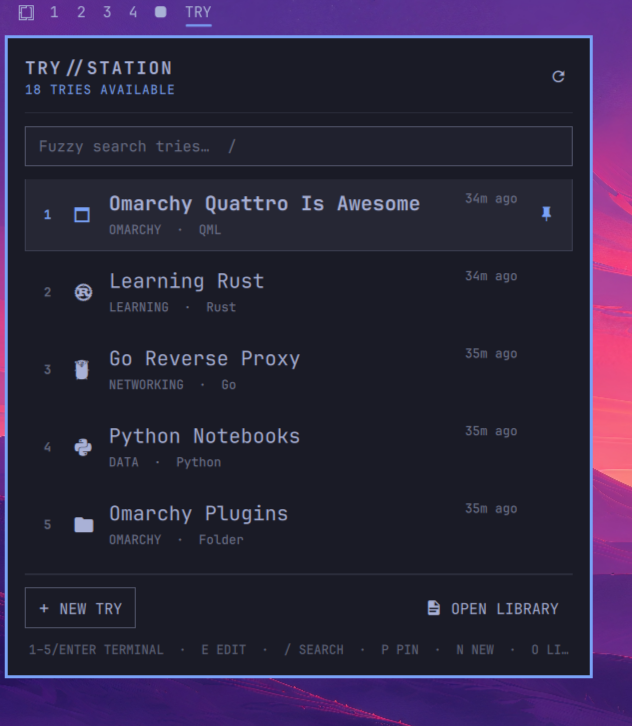
A theme-aware, retro-inspired visual workbench for Tobi Lütke's
try, turning ephemeral coding experiments into searchable, inspectable tries.
TryStation is an Omarchy Quattro plugin for the experiment directories already managed by try. It adds a themed desktop window and optional bar widget without replacing the CLI or introducing a second project format.
Features
- Compact Omarchy-style summary popout for recent and pinned tries
- Fuzzy search across names, groups, notes, languages, and Git branches
- Numbered
1–5shortcuts that open visible results in a terminal - Full theme-aware library window with retro-inspired workstation styling
TRYbar widget with left-click, right-click, and middle-click actions- Browse and search every try by name, group, language, Git branch, or note
- Inspect Git status, worktree state, stack, README summary, and activity time
- Create date-prefixed tries compatible with the CLI and open them immediately in the default editor
- Reuse existing groups through autocomplete or type a new group to create it
- Event-based autosave for groups and notes, plus instant pin/unpin from the library or summary
- Open a try in the Omarchy editor, terminal, or file manager
- Copy its path or safely move it to the desktop trash
- Follow graduated symlinks created by
try - Refresh on open, after TryStation changes, or explicitly through the refresh action
How it works
The configured try directory remains the source of truth. TryStation scans only its immediate, non-hidden directories and does not maintain a separate project index. Git and project information is gathered through local, read-only inspection.
TryStation delegates supported workflows to the surrounding Omarchy tools, but try currently has no documented, non-interactive command for creating a plain try. Quick Create therefore uses a small filesystem adapter that:
- Normalizes the entered name.
- Adds the same
YYYY-MM-DD-prefix recognized bytry. - Adds a numeric suffix if that path already exists.
- Creates a normal directory and opens it in the default Omarchy editor.
It does not modify the try executable, shell function, configuration, or files inside existing tries. Directories created by TryStation remain ordinary tries that can be opened, renamed, graduated, or deleted through the native CLI.
Groups, notes, and pins are intentionally external to project directories. They are stored in ${XDG_STATE_HOME:-$HOME/.local/state}/trystation/metadata.json and keyed by filesystem identity, allowing metadata to follow a try renamed by the CLI. Metadata writes occur only after editing events or explicit pin actions.
There is no daemon, recurring scan, network access, or second Quickshell process. The summary and library refresh when opened, after relevant TryStation actions, or when explicitly requested.
Requirements
TryStation targets Omarchy 4 / Quattro and uses tools included by Omarchy:
try- Python 3
- Git
gioxdg-terminal-execomarchy-launch-editor- Nautilus and
wl-copy
It does not request elevated privileges, install hooks, background services, network access, or a second Quickshell process.
Install
omarchy plugin add https://github.com/guillechuma/trystation.git --enable
The plugin is added to the left section of the bar:
- Left-click opens the compact recent-tries summary.
- Right-click opens the full TryStation library.
- Middle-click opens the quick-create form.
From the summary, select a try to open it in a terminal, press E for the editor, or choose Open Library for the full interface.
You can also summon it directly:
omarchy-shell shell summon io.github.guillechuma.trystation '{}'
Configure
Omarchy configures try at ~/Work/tries by default. Change the path through the bar settings UI or directly in the widget's shell.json entry:
{
  "id": "io.github.guillechuma.trystation",
  "triesPath": "~/Work/tries"
}
When summoned without the bar widget, TryStation defaults to ~/Work/tries. A caller may provide another path:
omarchy-shell shell summon io.github.guillechuma.trystation '{"path":"~/src/tries"}'
Keyboard
Summary popout
| Key | Action |
|---|---|
1–5 |
Open the corresponding visible try in a terminal |
/ |
Focus fuzzy search |
↑ / ↓, j / k |
Select a recent or matching try |
Enter |
Open the selected try in a terminal |
T |
Open the selected try in a terminal |
E |
Open the selected try in the default editor |
P |
Pin or unpin the selected try |
N |
Create a try |
O |
Open the full library |
R |
Refresh |
Esc |
Close |
Full library
| Key | Action |
|---|---|
↑ / ↓, j / k |
Select a try |
Enter |
Open the selected try in the default editor |
/ |
Focus search |
Ctrl+N |
Create a try |
Ctrl+R |
Refresh |
Esc |
Clear/leave the active input, then close |
Safety and privacy
- All inspection is local.
- Git commands are read-only and have a two-second timeout.
- Delete uses the desktop trash, not
rm -rf. - TryStation only trashes an immediate child of the configured try directory.
- Graduated symlinks are unlinked; their destination project is never deleted.
- Notes and groups remain local and are never written into repositories.
Current limitations
- Only immediate directories under the configured try path are listed; nested project collections are not scanned.
- Quick Create follows
try's directory convention but does not invoke the interactive CLI becausetrydoes not expose a documentedcreatesubcommand. - Native
try clone, worktree, rename, and graduation workflows are not reproduced in TryStation; use the CLI for those operations. - External filesystem or Git changes made while the library is open appear after reopening it or using Refresh/
Ctrl+R. - TryStation is an unsandboxed Omarchy shell plugin and runs with the permissions of the current user, like other shell plugins.
Development
omarchy plugin validate .
qmllint -I "$OMARCHY_PATH/shell" BarWidget.qml SummaryPanel.qml TryStation.qml
python3 -m unittest discover -s tests -v
For live development, install the repository as a local path or copy it under ~/.config/omarchy/plugins/io.github.guillechuma.trystation/, enable it, and run:
omarchy-shell shell rescanPlugins
omarchy-shell shell summon io.github.guillechuma.trystation '{}'
Files under the user plugin directory hot-reload on save.
Remove
omarchy plugin remove io.github.guillechuma.trystation
Removing the plugin does not remove tries or local labels. To remove labels as well:
rm -rf "${XDG_STATE_HOME:-$HOME/.local/state}/trystation"
Credits
TryStation is built around Tobi Lütke's try, the ephemeral workspace manager that defines the try workflow and directory convention.
License
MIT