
Omamusic
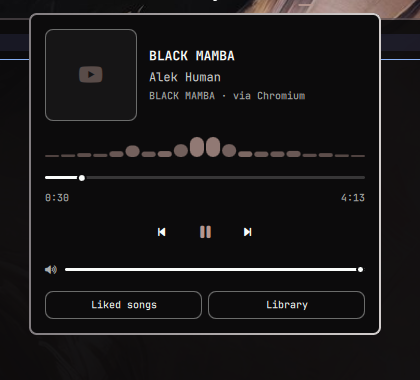
Bar widget + popup panel for YouTube Music via MPRIS
(Quickshell.Services.Mpris), for the Omarchy bar.
No background service, no API keys, no persisted state — everything is read live from the player's D-Bus interface. Click the icon in the bar to open a popup with album art, track info, a seekable progress bar, shuffle/repeat, playback controls, volume and a live spectrum histogram.
The plugin is source-independent: it never launches or requires any particular app. Whatever is playing YouTube Music — a native client or a browser tab — is what it controls.
Inspired by omaspotify, rewritten for YouTube Music.
Requirements
- Omarchy (Quickshell-based desktop)
- A Nerd Font v3 (the icons use the Material Design range)
- A YouTube Music source that speaks MPRIS — either a native client or a browser tab, see below
- Optional:
cavafor the spectrum histogram. Without it the visualizer simply does not appear.
Which players work
Native clients are matched by MPRIS identity / desktop entry and always win over browsers:
- pear-desktop — formerly
th-ch/youtube-music; both the old and new identities are matched - YTMDesktop
Any other client can be added through the extraPlayerNames setting.
Browser playback on music.youtube.com (a normal tab or an installed PWA)
works through the browser's own MPRIS session, whichever browser you use:
Firefox, Chromium, Chrome, Brave, Vivaldi, Edge, Opera, Zen, LibreWolf,
Floorp, Waterfox, qutebrowser, Falkon, Epiphany and so on.
Forks are covered without needing to be listed by name: besides the identity,
the D-Bus name is checked, and browsers derive it from their engine
(org.mpris.MediaPlayer2.firefox.* for the Firefox family,
.chromium / .chrome / .brave for the Chromium family). The Play button
is browser-agnostic too — it opens the URL with xdg-open, so your default
browser is used, whatever it is.
There is a catch worth knowing. A browser publishes one MPRIS session for
whatever media is currently active, and Chromium's metadata is limited to
title, artist, album, artwork and length — there is no URL. Measured against a
live session, YouTube Music leaves album empty, exactly like a plain
YouTube video does, so the metadata cannot tell the two apart. The widget
therefore adopts any browser media session that reports an artist, and names
the source (via Chromium) so you always know what you are driving.
If that is too loose, turn on Strict browser match: it additionally
requires a window titled YouTube Music to be open, which the tab title does
expose. The trade-off is real — a browser window reports its active tab, so
switching that window to another tab while music plays in the background makes
the widget go idle. It is off by default for that reason, and it needs
Hyprland since it reads hyprctl.
If you only ever use a native client, set Player source to Native app
and the guessing stops entirely. Setting it to Browser does the opposite:
browser sessions only, and the play button always opens music.youtube.com
rather than launching an app.
When a browser session is being controlled, the panel appends via <browser>
under the track so it is never ambiguous which session you are driving.
Install
omarchy plugin add https://github.com/haripako/omamusic.git
The plugin is disabled by default so you can read the code first:
omarchy plugin enable io.github.haripako.omamusic
Then add it to the bar — you'll be asked where to place it:
omarchy bar plugin add io.github.haripako.omamusic
You can drag-and-drop it to reposition later, or edit
~/.config/omarchy/shell.json by hand.
Usage
- Left click — open/close the popup
- Middle click — play/pause without opening the popup, or start YouTube Music when nothing is playing
- Nothing playing — the popup offers a Play on YouTube Music button that
launches the native client if it is installed, and otherwise opens
music.youtube.comin your default browser. Override it with thelaunchCommandsetting. - Scroll over the icon — volume (when the player supports it)
- In the popup — shuffle, previous, play/pause, next, repeat; drag the progress bar to seek, drag the volume slider to set volume
- Music videos — when the artwork is 16:9 rather than square, the cover is drawn as a video thumbnail with a small camera badge
- Spectrum histogram — animates while playing, hidden when paused
Keyboard shortcuts
Inside the popup:
| Key | Action |
|---|---|
Space / Enter |
Play / Pause |
n / Right |
Next track |
p / Left |
Previous track |
Up / Down |
Volume up / down |
s |
Toggle shuffle |
r |
Cycle repeat (off → playlist → track) |
1–9 |
Open the matching quick link |
Escape |
Close popup |
Tab |
Switch to adjacent panel |
Suggested global keybinding (~/.config/hypr/bindings.lua):
o.bind("SUPER + M", "Toggle Omamusic", "omarchy-shell io.github.haripako.omamusic toggle")
Choosing a source
Both routes speak MPRIS — a browser publishes a session exactly like a native client does. What differs is how much of the interface each one implements:
| Native app | Browser | |
|---|---|---|
| Play/pause, next, previous | yes | yes |
| Track, artist, album, artwork | yes | yes |
| Seeking | yes | usually |
| Volume | yes (MPRIS) | yes, via its PipeWire stream |
| Shuffle / repeat | yes | no — the browser does not expose them |
| Needs an install | yes | no |
Browsers leave volume out of their MPRIS session, so the volume slider drives the player's PipeWire playback stream instead — the same knob a mixer moves. That stream only exists while audio is flowing, so the slider appears with playback rather than being permanently visible.
Settings
Configurable from the widget's settings in Omarchy, or directly in the
widget's entry in ~/.config/omarchy/shell.json:
| Setting | Default | What it does |
|---|---|---|
playerSource |
Auto |
Auto, Native app or Browser — where playback is controlled |
strictBrowserMatch |
false |
Also require an open window titled YouTube Music (Hyprland only) |
extraPlayerNames |
"" |
Comma-separated MPRIS identities/desktop entries to also treat as YouTube Music |
showVolume |
true |
Show the volume slider when supported |
scrollVolume |
true |
Scroll over the bar icon to change volume |
showVisualizer |
true |
Draw the live spectrum histogram while playing |
launchCommand |
"" |
Command for the play button when idle; empty auto-detects |
quickLinks |
Liked songs, Library | Playlist shortcuts, as `Name |
quickLinkBehavior |
Focus if open |
Raise an existing YouTube Music window instead of opening a tab |
Playlists and Liked songs
MPRIS defines Playlists and TrackList interfaces for exactly this, and
browsers implement neither — verified by calling both against a live Chromium
session, where each one fails. "Liked" is not in the MPRIS spec at any level.
So the widget cannot read your library or toggle a thumbs-up.
What it can do is open one, because a YouTube Music playlist is just a URL.
The popup shows a row of quick links — Liked songs and Library out of the
box — which open in your default browser and start playing. They are shown
while idle too, which is when starting a playlist is most useful, and the
first nine are bound to keys 1–9.
Add your own by editing quickLinks, using Name|URL entries separated by
commas. Copy the URL straight from the address bar:
Liked songs|https://music.youtube.com/playlist?list=LM, Chill|https://music.youtube.com/playlist?list=PLxxxxxxxx
Entries without a valid http(s) URL are ignored rather than rendered as
buttons that do nothing.
Focus instead of stacking tabs. A browser tab cannot be reused from
outside, so opening a link repeatedly would pile up duplicates. With
quickLinkBehavior left at Focus if open, the widget first tries to raise
an existing YouTube Music window and only opens the URL when there is none.
The window is matched on titles ending in "YouTube Music", so a page merely
mentioning the words is not focused by mistake. Since a browser window reports
its active tab, a YouTube Music tab sitting in the background of another
window cannot be found — the link then opens as before. Set Always open to
skip the focus attempt and navigate every time.
This navigates the tab rather than queueing in place. True in-app playlist and like control would need a native client that exposes its own HTTP API (pear-desktop, YTMDesktop) — possible to add later, but it would reintroduce the app dependency this plugin deliberately avoids.
Notes and limitations
- Seeking requires the player to support it. Native clients do; browsers usually report position but not always seek — the progress bar dims when seeking is unavailable.
- Volume uses MPRIS when the player implements it and the player's PipeWire stream otherwise. The stream route moves the whole application's output, so with a browser it also affects other tabs making sound.
- Shuffle / repeat buttons only appear when the player advertises support, so browser sessions typically show neither.
- Likes / thumbs up are not exposed over MPRIS and are therefore not available here.
- The visualizer shows system audio, not the player.
cavareads the default sink monitor, and Linux gives no per-application spectrum without capturing that stream directly. If something else is making noise, you will see it. cava only runs while the popup is open and playback is active. - Video detection is inferred from the artwork ratio (16:9 vs square), not from a metadata flag — MPRIS has none. It is right for the usual cases and can be fooled by unusual artwork.
Update
omarchy plugin update io.github.haripako.omamusic
Uninstall
omarchy plugin disable io.github.haripako.omamusic
omarchy plugin remove io.github.haripako.omamusic
Then remove the entry from ~/.config/omarchy/shell.json.
Author
Haripako — @haripako
License
MIT — see LICENSE.