
Self Control for Omarchy
Block distracting sites for a fixed stretch. Arming is one click. Ending it early is deliberately not.
A Linux port of SelfControl,
the macOS app by Charlie Stigler and Steve Lambert, rebuilt as an Omarchy
plugin plus the root daemon a plugin is not allowed to be. None of its code is
reused: macOS enforces with a launchd daemon and pf, this enforces with a
systemd service, nftables and /etc/hosts. What is carried over is the idea
and the discipline, including the part everyone asks about, which is that there
is no way to end a block early.
This project is not affiliated with or endorsed by the SelfControl authors.
What it looks like
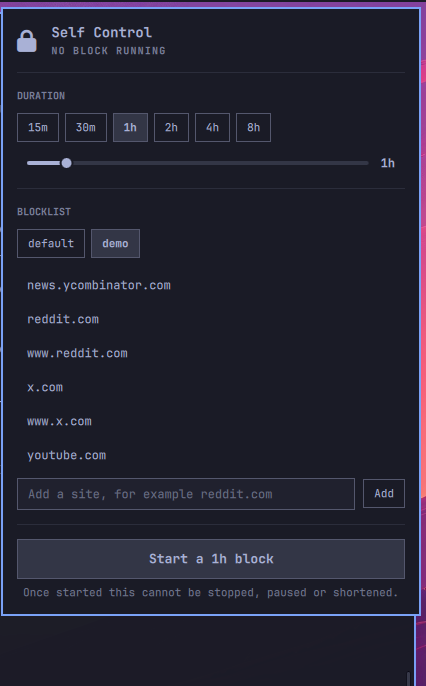
| Idle | Running |
|---|---|
 |
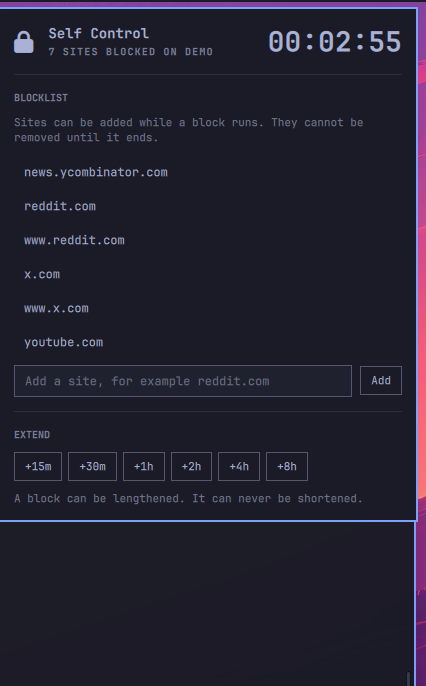 |
Pick a duration, edit the blocklist, press start. While a block runs there is a countdown, sites can still be added, and there is no control anywhere that ends it early.

What this actually promises
Friction, not a boundary. You are in wheel, so sudo systemctl stop and
sudo nft flush ruleset both end a block, and no arrangement of systemd and
nftables changes that. SelfControl is the same on macOS, where an admin can
sudo pfctl -d, and it works anyway because the product is cost rather than
enforcement.
So the design target is seconds of deliberate sabotage:
- no stop path in the widget, and none in the CLI's happy path
RefuseManualStop=yes, so the reflexivesystemctl stopbounces- polkit actions for
armandlist-setonly, and none at all fordisarm
See knowledge/this-is-friction-not-a-boundary.md for the full threat model, including the one variant that is a real boundary.
Shape
Two halves, and the split is forced rather than chosen. omarchy plugin add
clones files and never runs sudo, and plugins run unsandboxed inside the shared
omarchy-shell Quickshell process with your permissions. Anything privileged
has to live outside that process and arrive through a separate setup step.
BarWidget.qml     display only: reads a status file, shells out to arm
Model.js          pure JS, no QML imports, so a plain JS harness can test it
daemon/daemon     the privileged half: arm, enforce, status, disarm
daemon/lib/       deadline math and ruleset generation, both pure and tested
daemon/units/     the systemd service
daemon/polkit/    one action per privileged verb, and no action for disarm
lists/            blocklists, one domain per line
knowledge/        measured platform facts, one per file
tests/            everything checkable without arming a real block
The widget never touches nftables and holds no privilege. The daemon publishes
one line of JSON to /run/omarchy-selfcontrol/status.json on every state
change, and the widget reads that and nothing else.
How a block holds
Two layers, because either alone is defeated. /etc/hosts entries between
markers handle the system resolver. An nftables table handles the addresses
directly, and rejects DoT on 853 plus 443 to known DoH resolvers, because
Chromium's secure-DNS auto-upgrade otherwise makes the hosts entry invisible
mid-session. See knowledge/hosts-alone-loses-to-doh.md.
Two clocks, because either alone is cheatable. A block stores a
CLOCK_REALTIME deadline and a CLOCK_BOOTTIME deadline. Remaining time is
the maximum of the two, so winding the clock in either direction cannot end a
block. The one hole it does not close is documented and pinned by a test:
knowledge/reboot-with-a-wound-clock-ends-a-block.md.
Reassertion. The daemon reapplies the ruleset every 5 seconds, so a manual
nft flush buys 5 seconds. Blocked domains are re-resolved every 15 minutes.
The IP layer is blunt, and that is inherent. Resolving reddit.com yields
Fastly anycast addresses, x.com yields Cloudflare ones, and those ranges are
shared with an enormous number of unrelated sites. Blocking them can take other
sites hosted on the same edge with them. This is why DNS is the primary layer
and addresses are only the backstop, and it is not a bug that can be fixed
without a proxy that reads SNI. SelfControl has the same limitation.
Install
omarchy plugin add https://github.com/harisb2012/omarchy-selfcontrol.git --enable
Then open the widget. The daemon is not there yet, so the panel says so and
offers an Install button, which runs setup through polkit and waits for the
service to publish its first status. That is the whole install. It asks for
your password, and it asks on purpose, because it is putting a root service and
a polkit policy on the machine.
If you would rather read that script before running it, the panel also prints
the path to setup with a Copy button beside it. Running it yourself in a
terminal does the same work.
Updating runs omarchy plugin add again, which refreshes the plugin half only,
so the daemon stays on the old code until setup runs again. The panel notices
when the two halves report different versions and offers the same button under
the label Install the update. It offers it only while idle, and refuses to
pretend it can fix the skew during a block: setup will not replace a daemon
that is enforcing one. See
knowledge/plugin-updates-without-the-daemon.md.
Starting a block does not prompt for a password; changing a blocklist does, through Omarchy's own polkit dialog.
Uninstall
Removal has no button, and it is two steps in this order, because the daemon outlives the plugin directory that carries the script which removes it.
~/.config/omarchy/plugins/io.github.harisb2012.selfcontrol/uninstall
omarchy plugin remove io.github.harisb2012.selfcontrol
uninstall takes down the service, the polkit actions and the nftables table,
and puts /etc/hosts back. It refuses while a block is armed, since an
uninstall mid-block would be the cheapest bypass in the tool. Your blocklists
survive in /var/lib/omarchy-selfcontrol/lists; add --purge to remove those
too.
Running omarchy plugin remove on its own deletes the plugin files and leaves
the root service running with no UI left to reach it, so run uninstall first.
Tests
tests/run
Nothing in there needs root and nothing touches the host firewall.
| Step | What it covers |
|---|---|
omarchy plugin validate . |
the manifest checks the shell itself enforces |
qmllint -I $OMARCHY_PATH/shell |
QML static analysis against the real shell modules |
systemd-analyze verify |
unit keys, including which section they belong in |
deno run tests/model.test.js |
display logic, evaluated out of Model.js |
tests/deadline.test.sh |
clock tampering, and the list name that reaches root |
tests/ruleset.test.sh |
the generated ruleset, applied for real in a private netns |
The last one is the important one. unshare --user --map-root-user --net gives
an unprivileged process real nftables in a throwaway namespace, so the ruleset
is applied and queried with nft get element rather than checked with grep. It
caught a syntax error on the empty-blocklist path within minutes of existing.
See knowledge/netns-gives-unprivileged-nftables.md.
Not built yet
- Wildcard subdomains, which
/etc/hostscannot express and dnsmasq can. - An allowlist mode, which is the only shape that survives a VPN.
- The opt-in hard mode that drops the user from
wheelfor the duration.