
omarchy-media-pip
Streamlines your media streaming setup on Omarchy with one-click Omarchy web apps for Plex, YouTube, Netflix, and the rest of your streaming services — then lets you float any of them into a corner as picture-in-picture whenever you want them out of the way.
The setup half is what makes the rest painless: set up all your streaming
web apps from one place, then every source you've added is available as
PiP with a click. Right-click the bar icon any time for the same checklist
across every configured source. The PiP half does what it says: float,
pin, and corner-snap any configured source's window to a few fixed sizes,
with a real Quickshell bar icon and hotkeys (see sources.json for the
ten sources it ships with).
Screenshots
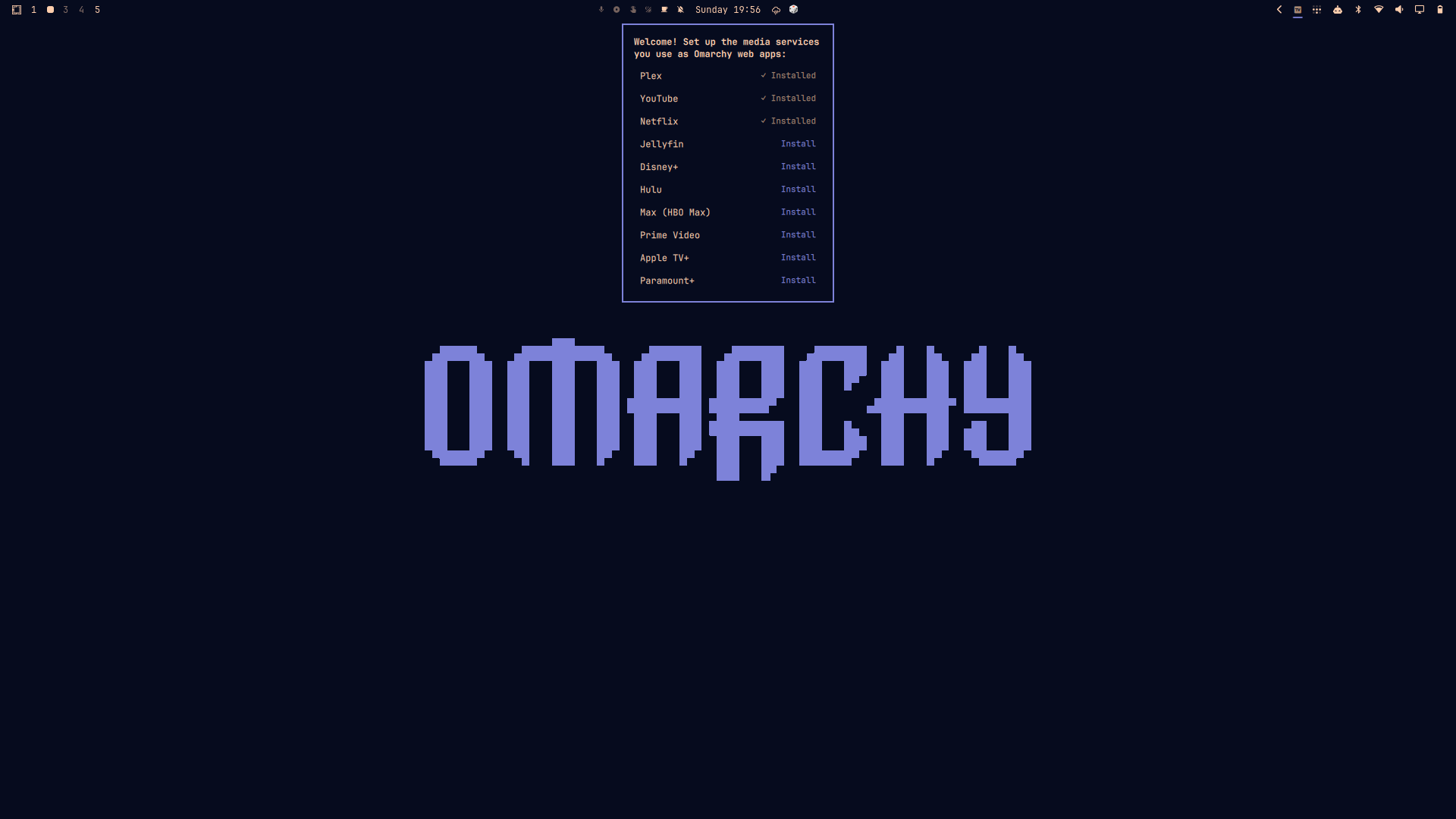
First run. A one-time welcome popup offers to set up the media services you use as proper Omarchy web apps — never shown again once dismissed.
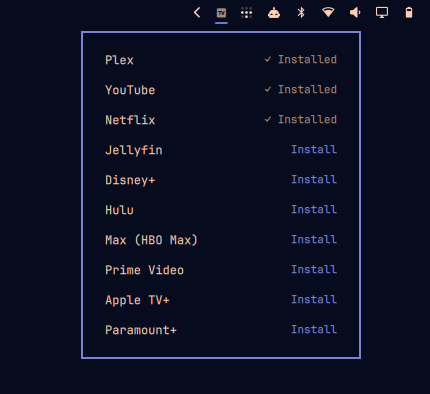
Manage sources, any time. Right-click the bar icon for the same checklist — installed services show a checkmark, everything else is a one-click install.
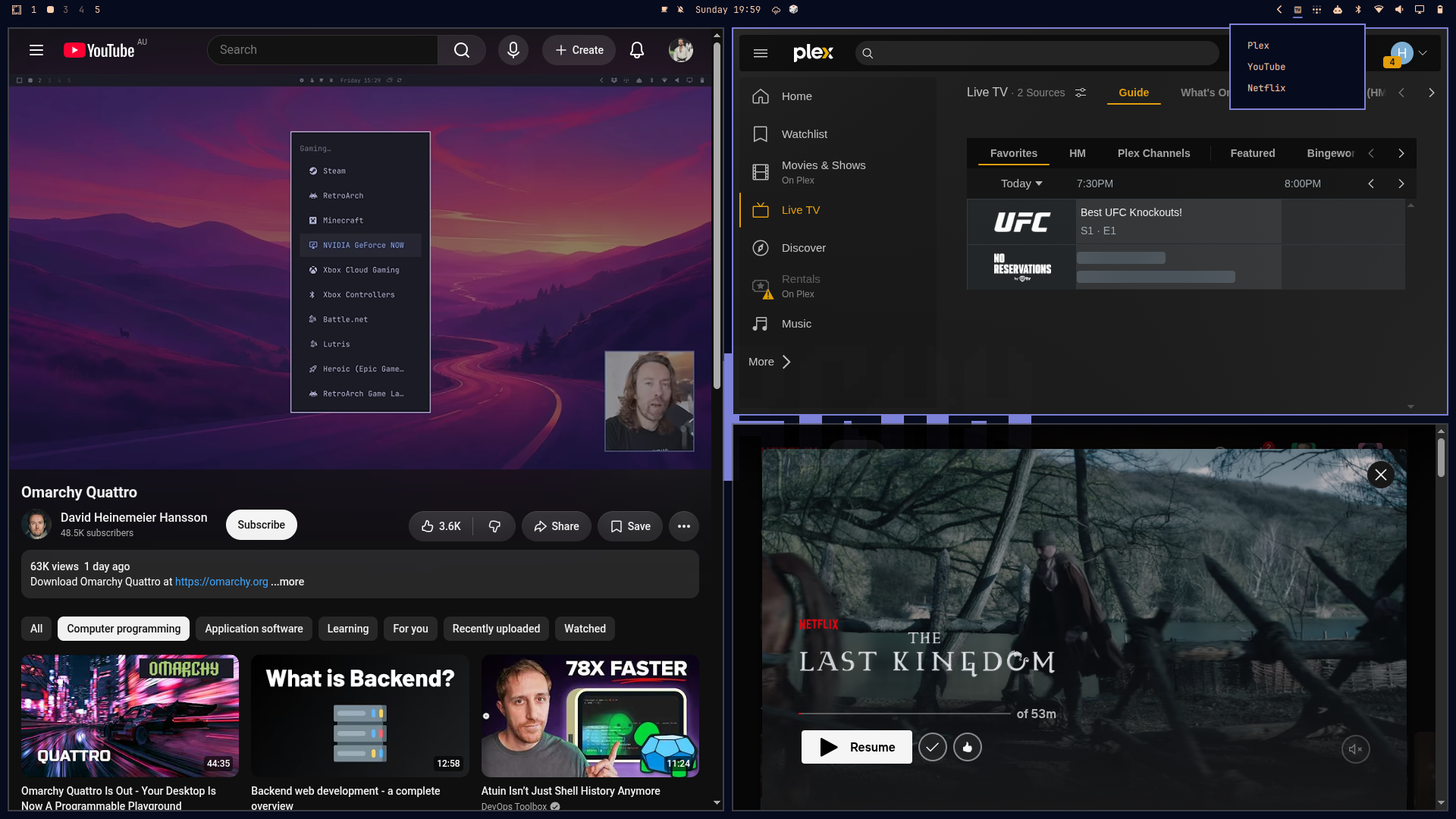
Multiple sources at once. With more than one source's window open, clicking the bar icon asks which to PiP instead of guessing — shown here with YouTube tiled, the Plex/YouTube/Netflix picker open top-right, and Netflix already floating as PiP bottom-right.
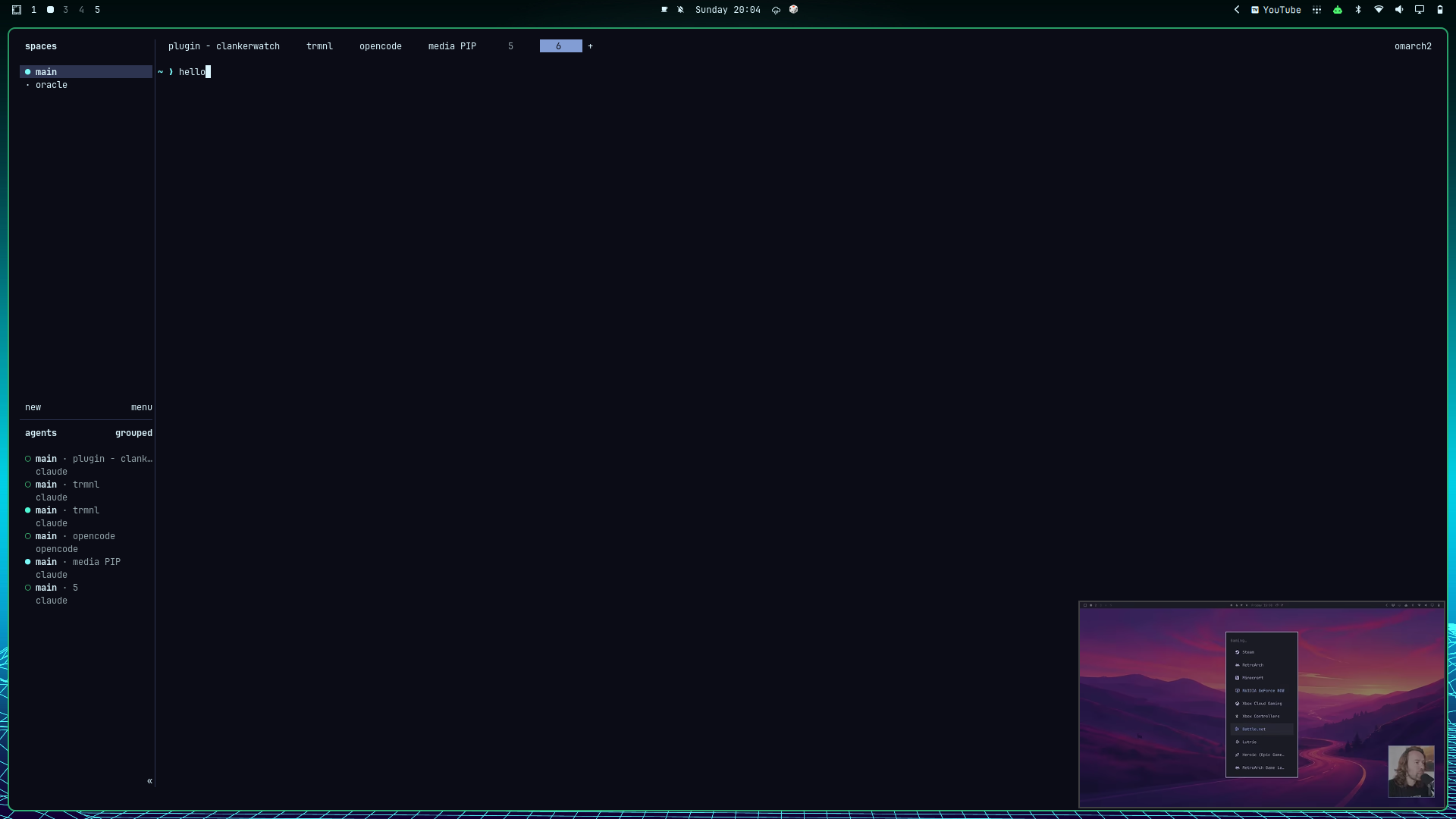
Out of your way. PiP sits in the corner while you work — here running alongside a terminal session, well clear of anything else on screen.
Install
omarchy plugin add https://github.com/haydenmckay/omarchy-media-pip.git --enable
(For local development against a checkout of this repo instead: ./install.sh,
then omarchy plugin enable io.github.haydenmckay.media-pip --section right
if it doesn't enable itself.)
Uninstall
omarchy plugin remove io.github.haydenmckay.media-pip
This deletes the plugin directory; nothing else on your system depends on
it. It leaves behind ~/.local/state/media-pip/ (PiP state, and the
self-staged copy of the CLI the plugin runs from — see Service.qml's
cliPath comment) and any Omarchy web apps you installed through the
"Manage sources" popup, since those are your data, not the plugin's —
remove ~/.local/state/media-pip/ yourself if you want a completely clean
slate, and omarchy webapp remove <name> for any web app you no longer
want.
Keybindings
Add these to ~/.config/hypr/bindings.lua. Two things these can't inherit
from a plain hotkey press, so both are spelled out explicitly:
- The CLI's full self-staged path, not a bare
media-pip— it isn't on$PATH(seecliPathinService.qml). MEDIA_PIP_SOURCES_DIR, pointing at the plugin's real install directory — the staged copy can't findsources.jsonrelative to its own location (that's the whole reason it's staged elsewhere), andService.qmlnormally supplies this env var for its own calls, which a bare hotkey exec doesn't get for free.
o.bind("SUPER + ALT + P", "Toggle picture-in-picture", "MEDIA_PIP_SOURCES_DIR=~/.config/omarchy/plugins/io.github.haydenmckay.media-pip ~/.local/state/media-pip/media-pip toggle")
o.bind("SUPER + ALT + SHIFT + P", "Cycle PiP size", "MEDIA_PIP_SOURCES_DIR=~/.config/omarchy/plugins/io.github.haydenmckay.media-pip ~/.local/state/media-pip/media-pip size")
o.bind("SUPER + CTRL + ALT + P", "Cycle PiP corner", "MEDIA_PIP_SOURCES_DIR=~/.config/omarchy/plugins/io.github.haydenmckay.media-pip ~/.local/state/media-pip/media-pip corner")
o.bind("SUPER + ALT + O", "Cycle PiP source", "MEDIA_PIP_SOURCES_DIR=~/.config/omarchy/plugins/io.github.haydenmckay.media-pip ~/.local/state/media-pip/media-pip source")
This is the whole list — deliberately short, because the bar icon covers the rest and Omarchy's own window hotkeys apply to the PiP window for free (see below).
| Keys | Action |
|---|---|
SUPER ALT + P |
Toggle PiP — turning it off un-floats and un-pins the window, sending it straight back into your tiling layout |
SUPER ALT SHIFT + P |
Cycle size (small → medium → large) |
SUPER CTRL ALT + P |
Cycle corner (bottom-right → bottom-left → top-left → top-right) |
SUPER ALT + O |
Cycle source, installed services only (falls back to every configured source if none are installed yet) |
Mouse:
Left-click the TV icon in the bar while a streaming service is open to start PiP for it. If more than one is open, you'll get a dropdown to pick which one instead of guessing — that's the picker in the "Multiple sources at once" screenshot above.
| Action | Result |
|---|---|
SUPER + left-drag on the PiP window |
Move it freely |
SUPER + right-drag on the PiP window |
Resize it freely |
| Left-click bar icon | Toggle PiP for the active source, or open the picker described above |
| Right-click bar icon | Open "Manage sources…" |
| Scroll bar icon up/down | Cycle size |
The drag rows above are Omarchy defaults, not plugin-specific — the PiP
window is a normal floated+pinned Hyprland window underneath, so dragging
it around already just works, same as SUPER + Backspace for toggling its
transparency. A manual move/resize just repositions the window; it doesn't
update the stored corner/size preset, so the next size/corner cycle
snaps back to whatever the preset says.
Picking a source when more than one is open
Toggling PiP on doesn't always need SUPER ALT + O first. media-pip
checks which configured sources' windows are actually open
(open_source_ids / auto_detect_source_id in bin/media-pip):
- Exactly one open → that one, automatically, even if a different source was last active.
- None open → falls back to the last-active (or default) source, and launches it.
- More than one open at once → ambiguous. The hotkey path falls back the
same as "none open," but the bar icon instead shows a small picker on
click, listing whichever of the open ones apply — see
openSourcesinService.qmland thePopupCardinBarWidget.qml.
Architecture
Hybrid. Real video content stays in an actual Brave app-mode window — DRM, auth, each source's own player all just work for free. A Quickshell plugin supplies everything else: a bar icon and OSD feedback.
bin/media-pip— CLI that does the actual work: launches/finds the source's browser window and drives it withhyprctl dispatch "hl.dsp.window.*"calls (float, pin, resize, move). Writes all state to~/.local/state/media-pip/state.json. A new browser window is launched viasystemd-run --user --scope— this just detaches the browser process from the CLI's own short-lived process tree so it keeps running after the CLI invocation exits; it's the standard systemd-session equivalent of double-forking, not privilege escalation — every command runs as your own user, no unit files are written, and nothing reaches outside the current user session.Service.qml— headless Quickshell service. Mirrors that state file live viaFileView.SpacerWindow.qml— an invisiblePanelWindowanchored to a single edge with anexclusiveZone, so Hyprland's tiling layout reserves real space for it, active whenever reservation is turned on (`SUPER ALT- R
if bound, ormedia-pip reservation on`) — off by default, and with no bar-icon path to it, since day to day nobody actually needed tiled windows kept clear of the PiP corner.
- R
BarWidget.qml— the bar icon (a television glyph), the source-picker popup shown when more than one source is open at once, and the "Manage sources" popup (right-click).sources.json— the source list (Plex, YouTube, Netflix, and a handful of other streaming services out of the box — edit this to add more, e.g. a self-hosted Jellyfin). A source can setonEnableKeyto havemedia-piptype that key into its window every time PiP turns on for it — YouTube uses"f"to drop into its own in-page fullscreen player, which fits a small PiP box far better than the normal header/sidebar/comments layout (verified empirically to stay contained inside the small window rather than hijacking the whole monitor — see "Known limitations"). Not yet verified for the other bundled sources. Sent viaydotool(ships with Omarchy for voxtype/dictation;media-pipstarts itsydotool.serviceon demand since it isn't kept running by default).
Self-hosted sources: personal overrides
Plex and Jellyfin ship with a placeholder/localhost URL, since there's no public address to point at for a self-hosted server. Right-click the bar icon → "Manage sources…" — Plex and Jellyfin each show a small settings cog (self-hosted sources only; there's nothing to point elsewhere for a fixed public service like Netflix). Click it, type the real address, hit Enter.
That writes to ~/.local/state/media-pip/sources.local.json, outside the
plugin's own files, so it survives updates. You can also edit that file
directly if you'd rather:
[
  { "id": "plex", "name": "Plex", "url": "http://192.168.1.50:32400/web/index.html" }
]
Entries match by id and merge field-by-field with the shipped entry —
overriding just the URL doesn't lose that source's other fields (e.g.
selfHosted itself, which is what makes the cog show up in the first
place) — or add an entirely new source if the id doesn't exist upstream.
It's also .gitignored as a backstop, in case it's ever created inside a
checkout by mistake.
Known limitations
- Space reservation (
media-pip reservation on) has no bar-icon path and no default keybind — nobody was actually using it day to day, so it's parked rather than surfaced. The command still works; bind it yourself (e.g.SUPER ALT + R, using the same full-path pattern as the keybinds above) if you want it. - Two
toggle/size/cornercalls for a source with no window open yet, issued within about a second of each other, can each fail to see the other's in-flight launch and open a duplicate window (aflockguard narrows but doesn't fully close this — seeensure_windowinbin/media-pip). Not an issue once a source's window already exists; only the very first cold-open per source per session is slow enough to matter. onEnableKey(YouTube'sf) sends a real keypress, which toggles in-page fullscreen rather than forcing it on. It fires every time PiP turns on, which is right in the common case (you were already on a video in a normal tab, then toggled PiP on), but re-toggling PiP on and off again without navigating away in between can flip it back to YouTube's normal chrome instead of re-entering fullscreen — there's no reliable way to read the page's actual fullscreen state from outside it. Pressfmanually if that happens.plex'surlinsources.jsondefaults tohttp://localhost:32400/web/index.html, andjellyfin's tohttp://jellyfin.local:8096/— both self-hosted, so there's no fixed public address to ship. Use a personal override (below) rather than editingsources.jsondirectly if your server's elsewhere, so the fix doesn't need repeating on every plugin update.