
LocalSend panel for Omarchy
Send files, folders, or the clipboard to nearby devices from the Omarchy bar — and see what arrived.
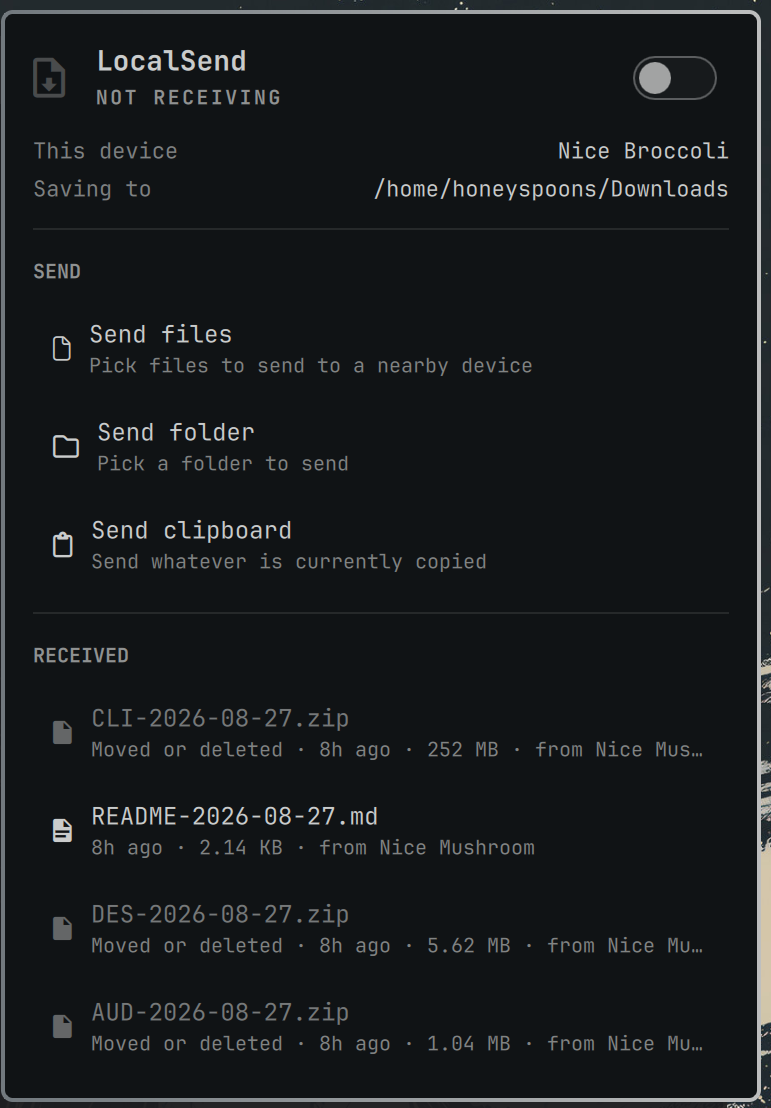
Built on Omarchy's own panel components, so it inherits your theme and behaves like the first-party panels: same popup styling, same keyboard navigation, same open/close lifecycle.
Install
omarchy plugin add https://github.com/HoneySpoons/omarchy-localsend.git --enable
Pick a bar section when prompted (right is the default and what this was
designed for). --enable places it for you; to put it somewhere specific:
omarchy bar move io.github.honeyspoons.localsend --after omarchy.agents
(Use move, not put — put is a no-op once the widget is already on the bar.)
Requirements
- Omarchy 4.0+ — uses the shell plugin system and the
qs.Uipanel components. localsend—omarchy pkg add localsend(it ships in Omarchy's base package set, so you probably already have it).omarchy-menu-share,python3, andnautilus— all already present on a stock Omarchy install.
Port 53317 is already open on a stock Omarchy install (install/config/firewall.sh opens it for LocalSend).
What it does
| Receive switch | Toggles LocalSend on and off. LocalSend has no daemon mode — the app is the receiver — so this launches and stops the app. |
| This device | Your LocalSend alias, so you know what name to look for on the sending device. |
| Saving to | Where received files land. |
| Send files / folder / clipboard | Hands off to Omarchy's own omarchy-menu-share, which opens the file chooser and sends headlessly. |
| Received | Recent transfers, newest first. Click one to reveal it in the file manager. Files you've since moved or deleted are shown greyed and labelled, rather than silently opening onto nothing. |
Mouse and keyboard
| input | action |
|---|---|
| left-click the bar icon | open / close the panel |
| right-click the bar icon | send the clipboard immediately, without opening the panel |
| middle-click the bar icon | refresh status |
f / d / c |
send files / folder / clipboard |
o |
open the LocalSend app |
r |
refresh |
arrows + Enter |
move and activate; Esc closes; Tab switches panels |
Configuration
Set per-widget options in ~/.config/omarchy/shell.json, or with omarchy bar set:
omarchy bar set io.github.honeyspoons.localsend historyLimit 8
| key | default | meaning |
|---|---|---|
refreshIntervalSec |
15 |
how often status is polled (5–3600) |
historyLimit |
5 |
how many recent transfers to show (0–12) |
A note on the bar-panel keybindings
SUPER + CTRL + <n> is positional, not per-app: it runs
togglePanelAt right <n>, which counts panel-bearing widgets in the bar's right
section (the tray has no panel of its own and is skipped). So adding this plugin
renumbers the panels after it automatically — no keybinding edits, no
hl.unbind, and nothing in bindings.lua to re-maintain after an update.
What this code actually does
Omarchy warns — correctly — that plugins run as unsandboxed code inside your
long-lived omarchy-shell process. So, plainly, this one:
- Reads
~/.local/share/org.localsend.localsend_app/shared_preferences.jsonfor your alias and transfer history, and/proc/net/tcp{,6}to see whether the LocalSend port is listening.status.pyis ~120 lines of stdlib Python, no network calls, no dependencies. - Runs
pgrep -x localsend,pkill -x localsend,omarchy-menu-share,uwsm-app -- localsend, andnautilus— nothing else, and nothing privileged. - Sends nothing anywhere. All transfer is LocalSend's own, over your LAN.
It's a short read. Please do read it before enabling.
Uninstall
omarchy plugin disable io.github.honeyspoons.localsend
omarchy plugin remove io.github.honeyspoons.localsend
Credits
Modeled closely on Omarchy's first-party dropbox panel, which is the reference
for "external app + status + recent files" in this system. Thanks to the Omarchy
team for building a plugin system where a third party can make something that
looks native.
License
MIT — see LICENSE.