
Omasticky
Markdown sticky notes pinned to the Omarchy desktop.
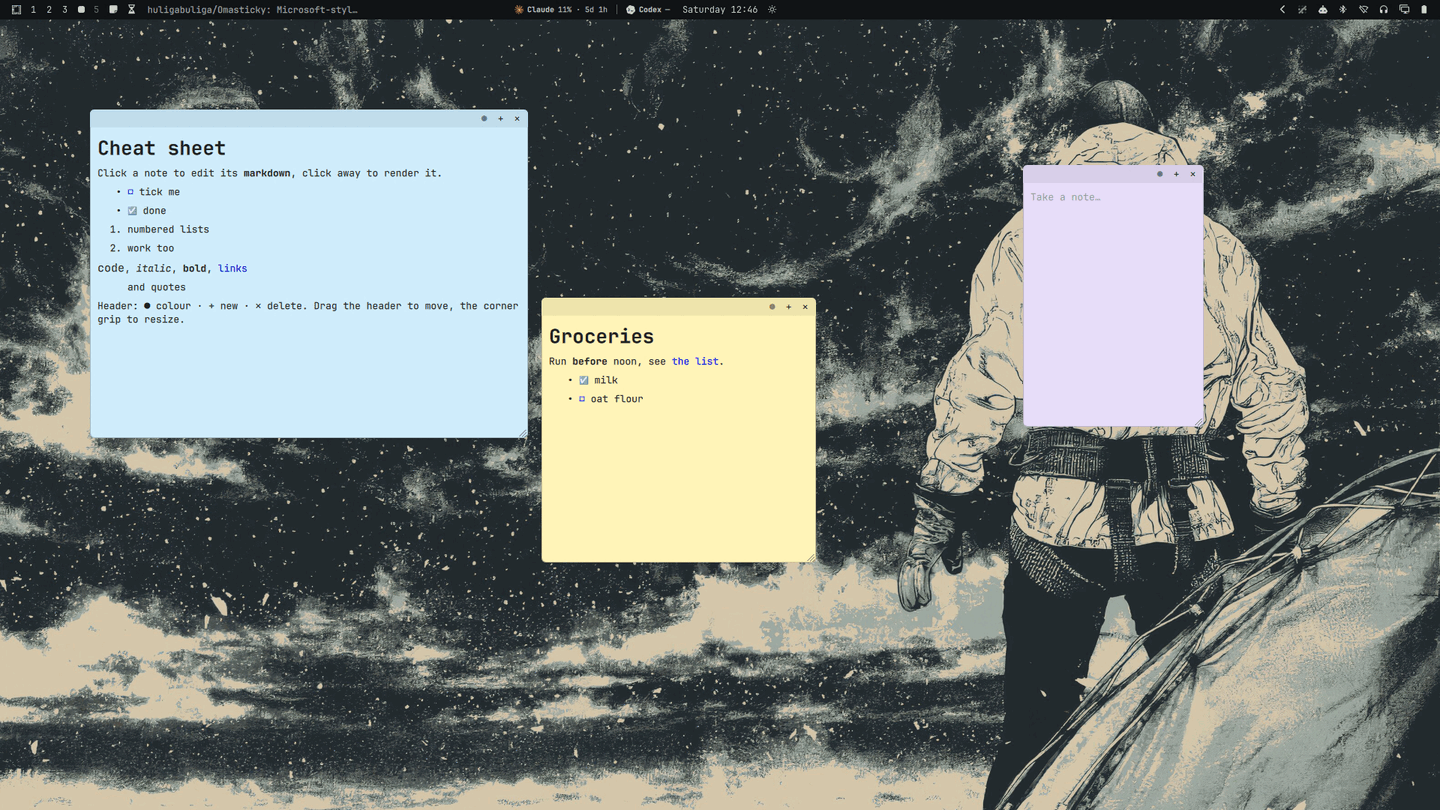
Each note is its own layer-shell window sitting under your normal windows — on the desktop, not in an app you have to launch.
Install
omarchy plugin add https://github.com/huligabuliga/Omasticky.git --enable
omarchy-restart-shell
That registers the service (the notes). For the bar icon, add the widget from
the bar customization UI, or put { "id": "io.github.huligabuliga.omasticky" }
in a bar.layout section of ~/.config/omarchy/shell.json.
Remove
omarchy plugin remove io.github.huligabuliga.omasticky
omarchy-restart-shell
Notes live in ~/.local/state/omarchy/omasticky.json; delete that file too if
you don't want them back.
No external dependencies beyond Omarchy's shell (Quickshell/Qt).
Use
| Board menu | Click the bar icon |
| New note | New, or + in a note header |
| Hide / show all | Hide, or right click the bar icon |
| Cheat sheet | Help — drops a note listing the syntax |
| Edit | Click the note body |
| Render | Click away, or Esc |
| Tick a box | Click ☐ / ☑ |
| Move | Drag the header — across monitors too |
| Move to another monitor | ◀ / ▶ — previous / next screen, left to right; hidden at the ends |
| Resize | Drag the corner grip |
| Colour | ● cycles yellow → green → pink → purple → blue → gray → charcoal |
| Delete | ✕ — twice within 3s if the note has text |
Markdown
Bodies are CommonMark, rendered by Qt: headings, bold, italic, code,
quotes, tables, lists, links.
Checklists are - [ ] / - [x], and ticking a box in the rendered view
rewrites the markdown underneath.
# Groceries

Run **before** noon, see [the list](https://example.com).

- [x] milk
- [ ] oat flour
Only http, https, mailto and file links open.
Storage
~/.local/state/omarchy/omasticky.json, written 400ms after the last edit.
Edit it with the shell stopped — the plugin owns the file while running.
Notes stay put across restarts. One whose monitor is gone falls back to the first.
Hyprland
Surfaces use the namespace omasticky-note:
layerrule = ignorezero, omasticky-note
layerrule = blur, omasticky-note
Known limits
- Notes assume the bar reserves the same strip on every monitor, which is what Omarchy does. A per-monitor bar would put a note off by the difference when it crosses.
- Where two notes overlap, the newer one takes the click.
- Notes keep compositor keyboard focus after
Escuntil you click elsewhere.
Development
node test.mjs                              # markdown transform round-trip
omarchy plugin validate .
omarchy-shell shell rescanPlugins          # reload without restarting
License
MIT