
Shokz
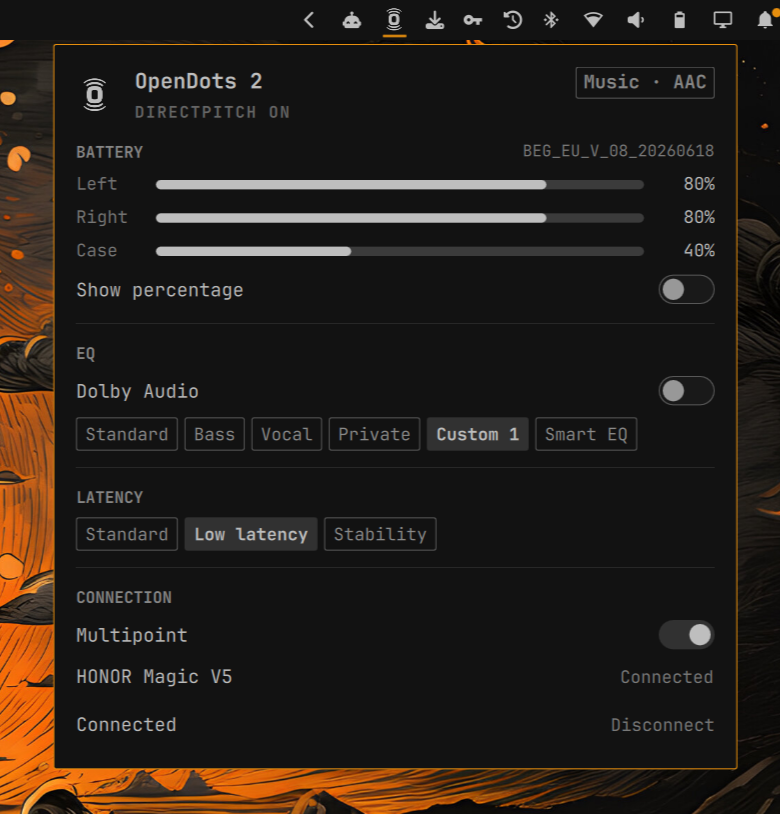
Shokz and OpenDots in the Omarchy bar: per-bud battery, EQ, Dolby, latency, multipoint, and codec.
The panel follows the same Omarchy idiom as omarchy-pods, the AirPods plugin. It does not speak Apple's AACP. Control is BlueZ + PipeWire plus the Shokz RFCOMM protocol used by Gadgetbridge on OpenSwim Pro, with OpenDots 2 commands reverse-engineered on a live pair.
Requirements
- Omarchy with the Quickshell-based shell
- Python 3 (standard library only)
- BlueZ (
bluetoothctl, RFCOMM) - Optional:
libbluetoothto buildbin/sdp-rfcommfor a faster SDP lookup. Without it, the helper still finds the control channel by probing known RFCOMM ports.
Install
omarchy plugin add https://github.com/Hutsoncap/omarchy-shokz.git --enable
Then place it on the bar if it is not already there:
omarchy bar move io.github.hutsoncap.shokz --section right
Usage
Left click opens the panel. Right click, or Show percentage in the battery section, toggles the bar percent — same slot size as the laptop battery widget.
| Key | Action |
|---|---|
j / k, ↓ / ↑ |
move between rows |
enter / space |
activate the highlighted row |
s b v p |
Standard, Bass, Vocal, Private |
u q |
Custom 1, Smart EQ |
1 2 3 |
Standard, Low latency, Stability |
% |
toggle bar battery percentage |
o |
toggle Dolby Audio |
m |
toggle multipoint |
c |
connect |
d |
disconnect |
r |
refresh |
tab |
move to the next panel |
esc |
close |
Volume and the output device stay in the stock Audio panel.
What it matches
Any paired BlueZ device whose name contains Shokz, AfterShokz, OpenDots,
OpenRun, OpenFit, OpenSwim, OpenComm, OpenMove, OpenMeet, or Aeropex, or
whose vendor id is 02B0. A renamed pair still matches by vendor; extra
name fragments can be added in the widget settings.
OpenDots 2 is the model this was built and tested against (split L/R/case battery, Dolby, latency modes, the OpenDots EQ names). Other Shokz should appear, connect, and show codec; EQ / Dolby / latency / per-bud battery depend on that model speaking the same control channel.
Data
The helper caches the last known control-channel state at:
~/.cache/omarchy-shokz/classic.json
~/.cache/omarchy-shokz/rfcomm-channel
It does not write Omarchy user configuration except the widget's own
showPercentage setting when you toggle it.
Update
omarchy plugin update io.github.hutsoncap.shokz
Remove
omarchy plugin remove io.github.hutsoncap.shokz --yes
Development
omarchy plugin validate .
/usr/lib/qt6/bin/qmllint -I "$OMARCHY_PATH/shell" Panel.qml Service.qml ShokzIcon.qml
python3 -m unittest discover -s tests -v
make
make builds the optional SDP helper (bin/sdp-rfcomm) when BlueZ
development headers are installed.
Attribution
The panel layout and Omarchy bar-widget idiom follow omarchy-pods by GM (MIT). This plugin is not a fork of that codebase; AirPods AACP is unused.
RFCOMM framing and several command IDs follow Gadgetbridge's Shokz /
OpenSwim Pro support. OpenDots 2-specific commands (split battery, Dolby,
latency, extra EQ names) were reverse-engineered against firmware
BEG_EU_V_08_20260618.
Shokz is a trademark of Shokz Holding Limited. This plugin is not affiliated with or endorsed by Shokz.