
Unraid
An Omarchy Quickshell plugin that monitors and manages an Unraid server from the bar, over the native Unraid GraphQL API (Unraid 7.2+). Optional: launch container WebUIs and open VM consoles (VNC/SPICE) directly in app windows.
Video
https://github.com/user-attachments/assets/944ab549-4224-49f4-8716-c34aeb8b98aa
Install
From the plugin repository:
omarchy plugin add https://github.com/tuthan/omarchy-unraid.git --enable
For local development:
plugin_dir="$HOME/.config/omarchy/plugins/io.github.hvo.omarchy-unraid"
mkdir -p "$(dirname "$plugin_dir")"
if [ -L "$plugin_dir" ]; then unlink "$plugin_dir"; fi
mkdir -p "$plugin_dir"
rsync -a --delete --exclude='.git/' "$PWD"/ "$plugin_dir"/
omarchy-shell shell rescanPlugins
omarchy plugin enable io.github.hvo.omarchy-unraid --section right
Omarchy expects a real plugin directory, so this setup copies the repository
into the plugin directory instead of symlinking it. The .git directory is
excluded because it is not needed by the runtime and may be protected by
Omarchy. After making source changes, rerun the rsync command and
omarchy-shell shell rescanPlugins, then omarchy restart shell if the bar
widget does not pick up the change.
The plugin requires curl for API calls.
Update
For a plugin installed from GitHub, update it with:
omarchy plugin update io.github.hvo.omarchy-unraid --yes
omarchy restart shell
For local development, recopy the repository into the real plugin directory and rescan it:
rsync -a --delete --exclude='.git/' "$PWD"/ "$HOME/.config/omarchy/plugins/io.github.hvo.omarchy-unraid"/
omarchy-shell shell rescanPlugins
Setup
Open the panel and switch to the Setup tab:
- Server URL — host or base URL of the Unraid server, for example
tower.localor192.168.1.10. The plugin appends/graphqlwhen needed. - Transport — HTTPS is selected by default and verifies the server certificate. HTTP is available as an explicit opt-in for Unraid setups that do not accept API keys on their HTTPS listener; HTTP sends the API key in cleartext and should only be used on a trusted network.
- Self-signed HTTPS certificate — off by default. Enable this only when the HTTPS endpoint uses a certificate you trust; it disables certificate verification for the API requests.
- API key — create one under Unraid web UI → Settings → Management Access. The key needs read access; management actions additionally need write roles for Docker, VMs, array, and parity check.
- Poll interval — seconds between bar refreshes (default 30).
- Management — off by default. When enabled, start/stop actions become
available for containers, VMs, the array, and parity checks. Destructive
actions confirm inline: the button turns into
CONFIRM?for four seconds; click again to fire. - VM console (SSH) — off by default. When enabled, running VMs get an
Open Consolebutton. The plugin runs a read-onlyvirsh dumpxmlover SSH to find the VM's VNC/SPICE ports and opens the server's own console page in an app window. Setup: install~/.ssh/id_ed25519_unraid.pubas an authorized key for the SSH user (rootby default) on the Unraid server. The API never starts or stops a VM for this; ports are fetched per click and never stored. - Theme — Unraid brand colors (orange accent) by default, or follow the Omarchy palette.
Settings are stored in ~/.config/omarchy/shell.json under the widget's bar
entry and survive restarts.
Panel tabs
- Array — per-disk usage bars, temperature, and status for data disks, cache pools, and parity; array start/stop and parity check start/pause/resume/cancel when management is enabled.
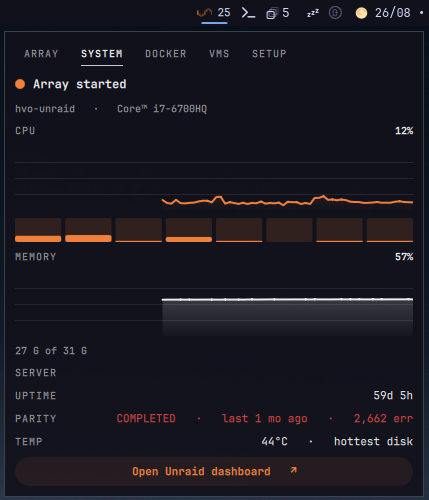
- System — CPU and memory usage history graphs with a per-core breakdown, uptime, parity check status (last run, duration, errors), hottest disk temperature, and a link to open the Unraid web dashboard.
- Docker — container list with state, autostart, and (for running
containers with a valid WebUI URL from the container template) an
Open WebUIaction with the resolved LAN destination; start/stop/restart per container when management is enabled. - VMs — virtual machine list with state; start/stop per VM when management is enabled.
- Setup — configuration as described above.
Launching WebUIs
Running containers can be opened directly in an app window when the Unraid API reports a WebUI URL for the container template. Behavior and limits:
- Optional API fields. On the first poll of each connection the widget
probes the API for the optional
webUiUrlfield. Server builds or API key roles that do not expose it keep monitoring but show no per-container WebUI buttons; the tab-level Open Unraid Docker link remains available. - Destination fidelity. The container's own URL — scheme, host, port, path, query string, and fragment — is preserved exactly. Template destinations may point at a LAN host that is unreachable from the current network; the plugin shows the destination but never rewrites it. Published ports are informational and never used to construct launch URLs.
- Browser authentication and TLS are separate. Launching the app does not prove the page connected or authenticated: browser login, certificate warnings, and target reachability are handled by the browser. The API key and the self-signed-certificate setting apply to API calls only; the plugin never adds API headers or keys to a launched destination.
- Launch handling. Each launch runs the
omarchy-launch-webapphelper with the validated URL as a single argument (no shell). If the launch cannot be confirmed, the panel offers an Open in browser fallback for the same destination. Closing the panel does not terminate a launched app. - Unraid page links.
Open Unraid DockerandOpen Unraid VMsopen the server's Docker and VM pages; they work with management disabled. - VM console (VNC/SPICE), optional. The Unraid GraphQL API does not
expose VM graphics data at any build, so the plugin discovers console
ports read-only over SSH (
virsh dumpxml) when the feature is enabled in Setup. The console itself opens the server'svnc.html/spice.htmlpage through its websocket proxy (/wsproxy/<port>/), exactly like the Unraid web UI does — your normal Unraid browser login applies, and SPICE VMs use the same flow. VMs without a VNC/SPICE graphics device, or stopped VMs, show no console button. Console discovery never boots a VM and never usesdomain-start-console. Without the SSH key there is no direct console link — the console port is only readable by the webgui session itself; use theOpen Unraid VMspage and its per-VM console menu instead. - No focus reuse. Every click launches its destination in a fresh app window; reusing an existing window is intentionally not implemented (app-class identity across ports is unreliable).
Keyboard
1–5switch tabs←/→cycle tabs↓/↑orj/kscroll the panel one list row at a timeRrefreshEscclose
Behavior
- The bar pill shows the Unraid mark with the number of running containers; an orange/red dot appears next to it when the array is degraded, containers are dead, or the API is unreachable. Hovering shows a one-line summary.
- History graphs accumulate one point per poll (up to 90 points) and survive panel open/close.
- Parity history and uptime are fetched on demand when the System or Array tab opens, not on every poll.
RESTARTon a container is emulated as a chained stop followed by start, because the restart mutation is not available on current Unraid API builds.- Container and VM lists render through recycling
ListViews. Mouse-wheel speed follows Qt's flick-deceleration constant; this session tunes it viaQT_QUICK_FLICKABLE_WHEEL_DECELERATION(see~/.config/uwsm/env.d/), and↓/↑orj/kscroll one row per press regardless. - Helper checks for the launch helpers live in
tests/remote-console-access.test.cjs(node --test tests/remote-console-access.test.cjs); they validate URL parsing, query composition, and response mapping without contacting a server. - Reboot/shutdown are not implemented: the Unraid GraphQL API does not expose them yet.
- With multiple monitors, each bar widget targets its own server connection and the panel opens anchored to the clicked widget.
Remove
omarchy plugin remove io.github.hvo.omarchy-unraid
License
MIT