
Prayer Times
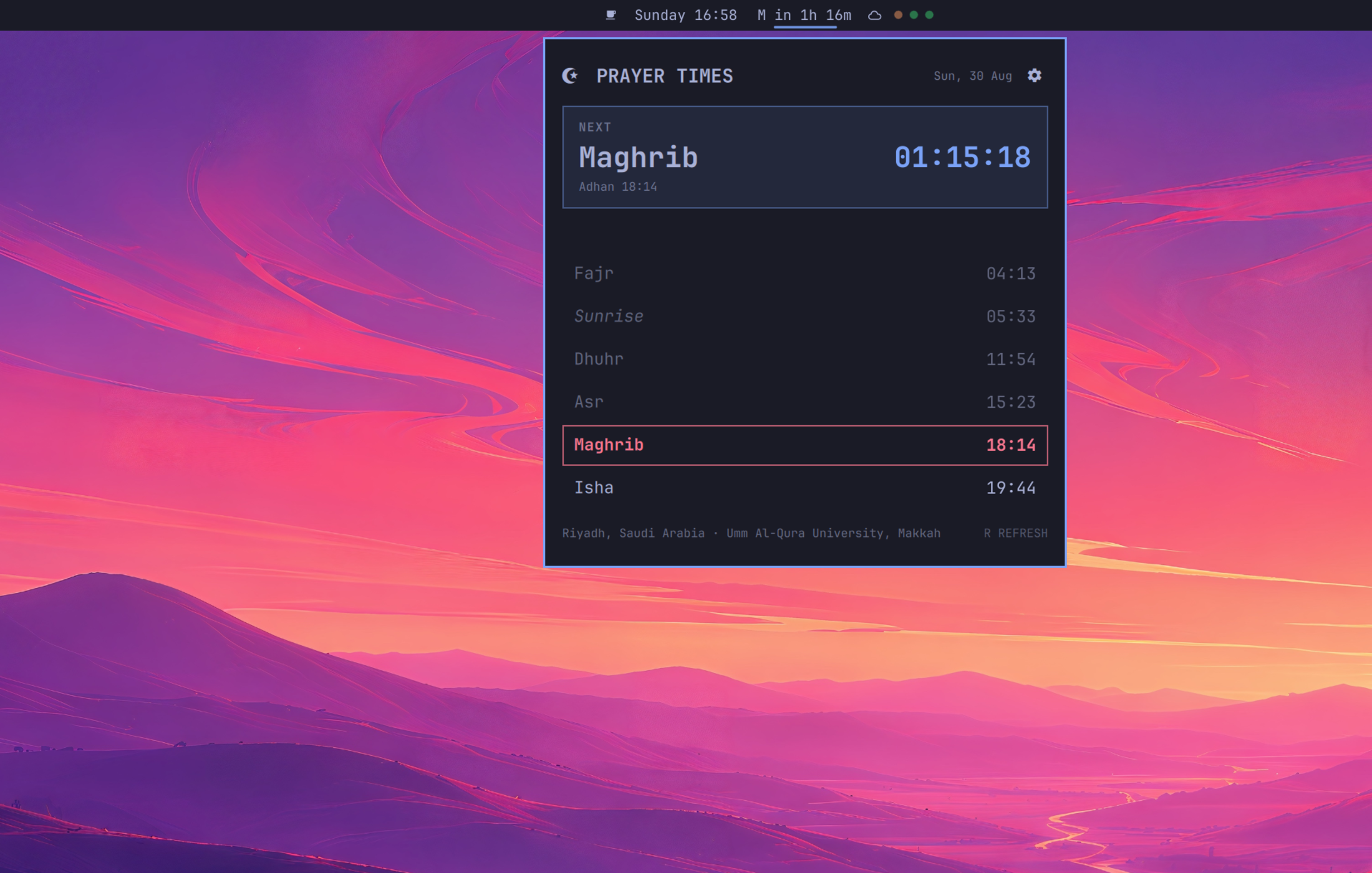
A configurable prayer-time bar widget and daily schedule for Omarchy Quattro. It detects your location automatically by default, caches prayer data for offline use, and follows the widget when you place it on the left, center, or right side of the bar.
Features
- Automatic location detection, with searchable manual city selection
- Prayer times from the AlAdhan API with an offline cache
- Calculation method, madhab, high-latitude rule, Ramadan Isha adjustment, Hijri date adjustment, and per-prayer minute offsets
- Four bar formats:
Asr 15:24,Asr in 3m,A 15:24, andA in 3m - Optional crescent icon in the bar
- Live next-prayer countdown and complete daily schedule
nowat adhan time andNm agofor the first 20 minutes afterward in the two relative display modes- Theme-native settings and panel UI
Requirements
- A current Omarchy Quattro installation
- Python 3 and
curl, both included by Omarchy - Internet access for the first location and prayer-time lookup
Install
omarchy plugin add https://github.com/idr4n/omarchy-prayer-times.git --enable
The installer prompts you to place the widget on the left, center, or right side of the bar. The attached panel opens below the selected position. You can move it later without reinstalling:
omarchy bar move io.github.idr4n.prayer-times --section left
omarchy bar move io.github.idr4n.prayer-times --section center
omarchy bar move io.github.idr4n.prayer-times --section right
Controls
| Input | Action |
|---|---|
| Left click | Open or close the daily prayer panel |
| Right click | Cycle through the four bar text formats and save the choice |
| Middle click | Refresh prayer data |
Settings button or S |
Open or close settings |
R |
Refresh prayer data while the panel is open |
Escape |
Return from settings, then close the panel |
Settings
Location detection is automatic by default. The settings panel can switch to a searchable manual city and configure:
- calculation method;
- madhab (
StandardorHanafi); - high-latitude adjustment;
- Umm al-Qura Ramadan Isha adjustment;
- Hijri date adjustment from -2 to +2 days;
- minute offsets from -15 to +15 for Fajr, Sunrise, Dhuhr, Asr, Maghrib, and Isha;
- bar text format; and
- crescent icon visibility.
Absolute formats always show clock time. Relative formats count down to the
next prayer, show now at adhan, and show elapsed minutes for 20 minutes after
adhan before advancing to the next prayer.
Network access and stored data
Omarchy plugins run unsandboxed inside the existing shell. Prayer Times makes HTTPS requests to:
ipwho.isover IPv4 for automatic city, coordinates, and timezone detection;api.aladhan.comfor prayer times; andgeocoding-api.open-meteo.comonly when you search for a manual city.
Automatic location data is cached for 30 days. Prayer responses are cached for
offline use. Settings are written atomically with mode 0600 and are never
sent anywhere except as calculation parameters to AlAdhan.
IP geolocation is approximate. Use manual city search when an ISP or VPN endpoint is mapped somewhere else.
Stored files:
${XDG_CACHE_HOME:-$HOME/.cache}/omarchy/prayer-times/${XDG_STATE_HOME:-$HOME/.local/state}/omarchy/settings/prayer-times.json
The plugin requests no elevated privileges, installs no service, and starts no separate long-running process.
Remove
omarchy plugin remove io.github.idr4n.prayer-times
Removal intentionally leaves settings and cached responses in place. Delete them only if you also want to reset all saved choices and offline data:
rm -rf "${XDG_CACHE_HOME:-$HOME/.cache}/omarchy/prayer-times"
rm -f "${XDG_STATE_HOME:-$HOME/.local/state}/omarchy/settings/prayer-times.json"
Development
Run the contract tests, QML linter, and manifest validator from the repository root:
node tests/prayer-logic.js
python3 tests/test_prayer_times_plugin.py
qmllint -I "${OMARCHY_PATH:-/usr/share/omarchy}/shell" \
  BarWidget.qml Panel.qml PrayerService.qml PrayerSettings.qml
omarchy plugin validate .
Panel hover suppression must use bar.setCenterHoverRevealSuppressed(...);
the current Omarchy plugin bar API exposes the corresponding state as read-only.
After shell updates, verify shortcut opening, repeated toggling, Escape,
outside-click dismissal, and closing from settings against the live shell.
Before release, also exercise automatic and manual locations, every bar text format, settings persistence, offline cache fallback, shell restart, and all three bar placements against a current Omarchy Quattro installation.
Data sources
Prayer calculations are provided by AlAdhan, automatic location by IPWHOIS.io, and manual city search by Open-Meteo Geocoding.