
Omahub
← All plugins
I

CLIamp quake

by ilyaZar

Quake-style CLIamp: a TUI in a hyprland window drop-down, that's it. Under 1,000 lines of core code, with measured idle plugin overhead below 4 MiB, excluding CLIamp and its terminal. CLIamp runs in a dropdown instead of floating/tiled windows with configurable top-edge geometry (width/height and placement), otherwise very compact bar controls.

Security review

Review recommended · 1 finding

Deterministic scan — not a security guarantee

Low
Risk level
Low
Analyzed commit
8c96aa5
Scanned
3 weeks ago

Automated analysis only — not a security guarantee.

AI advisory review

No obvious issues detected

Language-model assessment · ~deepseek/deepseek-v4-flash-latest — advisory only

Low
AI risk level
Low
Recommendation
install
Model
~deepseek/deepseek-v4-flash-latest
Analyzed commit
8c96aa5
Reviewed
3 weeks ago

The plugin is a legitimate Quake-style dropdown for CLIamp, managing a Hyprland window and rebinding existing CLIamp shortcuts. The deterministic scan's obfuscation finding is a false positive: it flags a unit test that verifies Lua string quoting, not executable plugin code. No malicious behavior, hidden persistence, or destructive operations were found.

How this check works

This review combines the deterministic scan (the rule-based results above) with an independent look at the plugin's code by a language model. The model reads a trimmed sample of the repository's files, the manifest, and the README, then gives a plain-language risk level and a recommendation: install (no notable danger), review (look closer first), or avoid (clearly dangerous).

It runs on the same analyzed commit as the deterministic scan and is strictly advisory — it is not a security guarantee and never blocks a plugin by itself. A human moderator still reviews plugins before they are listed.

AI advisory only — automated analysis, not a security guarantee.

Install
$ omarchy plugin add https://github.com/omarchy-QOL/omarchy-cliamp-control --enable
Widgets #Hyprland #bar #media

CLIamp quake

A Quake-style drop-down for CLIamp. Open it from the bar or your music shortcut, then choose its size and horizontal position. Under 1,000 lines of core code, with measured idle plugin overhead below 4 MiB, excluding CLIamp and its terminal.
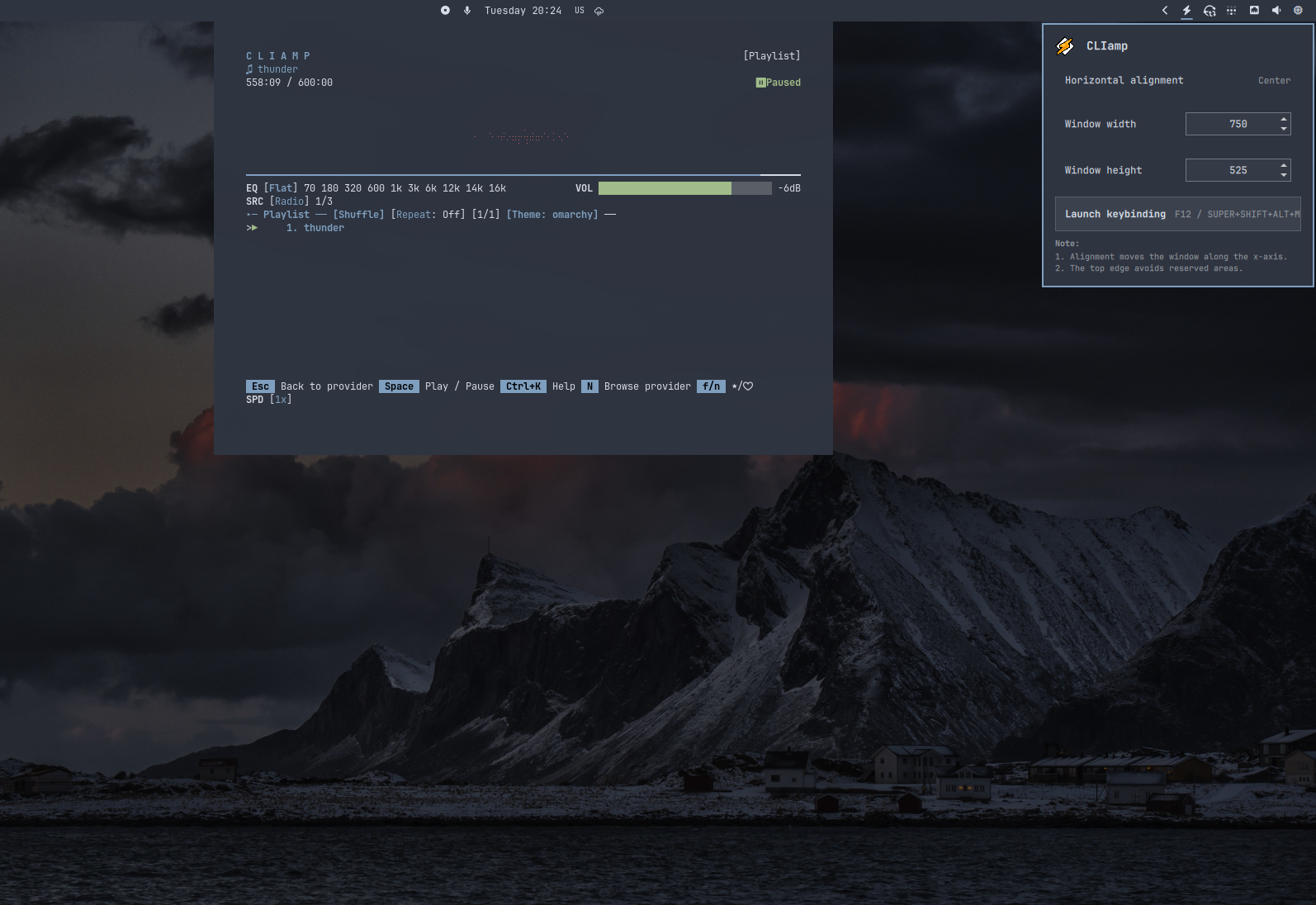
CLIamp drop-down and window controls

Watch the demo — changing alignment, resizing, and showing or hiding the player. The key and mouse overlay in the video is a separate tool.

Use

  • Left-click the lightning bolt to show or hide CLIamp.
  • Right-click to set Left, Center, or Right alignment and adjust its size.
  • Size arrows resize immediately in 50 px steps. Typed values apply on Enter or when you click elsewhere in the panel.
  • Select Launch keybinding to edit your shortcut in Omarchy's editor.

The default size is 1200 x 600, centered below the bar. Larger sizes fit within the available screen space. Regular CLIamp windows are unaffected.

Your existing CLIamp music shortcut works with the drop-down. Omarchy's default is Super+Shift+Alt+M; the demo uses a custom F12 binding.

Install

Requires Omarchy Quattro, Hyprland 0.56.2 or newer, and CLIamp. The helpers use Bash, jq, Lua, and hyprctl, available in a standard Omarchy installation.

omarchy plugin add \
  https://github.com/omarchy-QOL/omarchy-cliamp-control.git --enable

No extra setup is needed. If you have a ~/.local/share/cliamp/thunder.webm file, it plays automatically when CLIamp opens. Otherwise, CLIamp starts normally.

Update or remove

omarchy plugin update io.github.ilyazar.cliamp
omarchy plugin remove io.github.ilyazar.cliamp

Removal closes the plugin's drop-down and restores your original music shortcuts. Your CLIamp configuration stays unchanged.

License

MIT.

Development and checks.