
Keyboard Layout Pulse
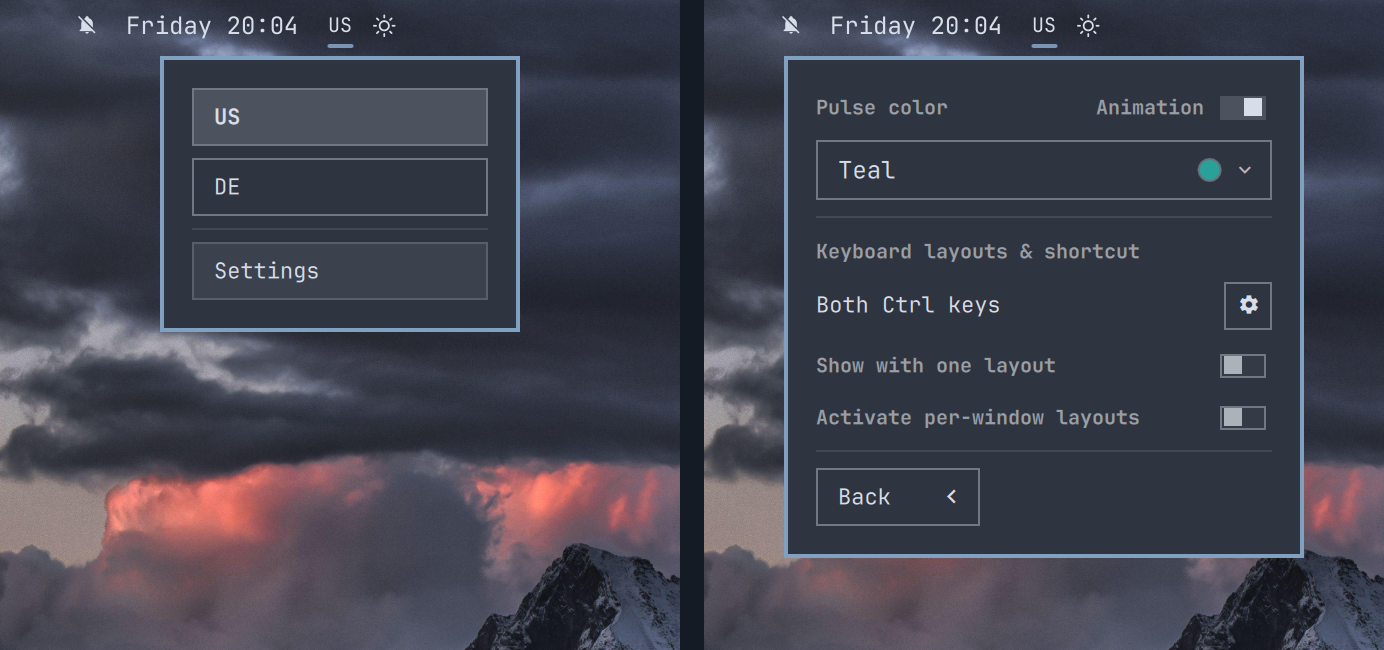
A compact keyboard-layout picker for the Omarchy Quattro bar. It shows the active XKB layout, opens a native layout menu, and optionally pulses after a layout change to improve visual confirmation of the layout change.
What's new in 0.2.3
- Tell layouts apart with labels like
USandUS(intl). - See a pulse when switching between them, including on another keyboard.
Requirements
- Omarchy Quattro: >= 4.0.0
- x86-64 for optional per-window layouts:
C-compiled binary is shipped json-cfor optional per-window layout (included in default Omarchy installs)- one or more keyboard layouts configured in
~/.config/hypr/input.lua
The optional per-window mode runs a bundled helper through one shell service only while it is enabled. It does not install a system service. On other architectures its toggle stays disabled; layout selection still works.
Install
omarchy plugin add https://github.com/omarchy-QOL/omarchy-keyboard-layout.git --enable
The plugin replaces Omarchy's built-in omarchy.keyboard-layout bar widget.
Removing or disabling the plugin restores the built-in widget in the same
position.
Use
- Click the layout label to choose a configured language.
- Scroll over the label to move to the next or previous language.
- Open Settings from the language menu to customize the widget.
- Enable Show with one layout to keep the widget visible with one layout.
- Under settings, toggle on/off:
- animation (pulsing + colored indicator)
- show icon even for one layout enabled (never hide top level language icon)
- per-window layout tracing; each hyprland window keeps track of layout
Demo
See layouts change using the bar and keyboard shortcuts, choose a pulse color,
add languages, and change the switching shortcut from double Ctrl to double
Alt.
https://github.com/user-attachments/assets/9e631b8e-f155-45d1-9731-567414712d6a
Animation and color
Animation is enabled by default. After a layout change, the label pulses using the selected color.
Turn Animation off for an immediate, plain layout change with no pulse, scale effect, or accent color. The color controls become shaded and inactive; the selected color remains saved for the next time Animation is enabled.
The color dropdown puts Custom first, followed by fixed presets:
- Teal:
#2aa198 - Purple:
#a77bd8 - Blue:
#3b82f6 - Nord yellow:
#ebcb8b
Custom accepts exactly six-digit hex colors such as #2aa191. Apply saves
the color and closes the menu.
Layouts and keybindings
The plugin reads the effective layouts and grp:* switching option directly
from Hyprland. It translates XKB descriptions into friendly names such as Both
Alt keys and Super + Space.
The bar and picker show variants, such as US(intl), and plain US otherwise.
Layout switches pulse even when their labels match.
Use the gear beside the displayed shortcut to open its owning line in
~/.config/hypr/input.lua with nvim.
The plugin never rewrites the Hyprland input file. Layout and keybinding changes remain owned by Omarchy and Hyprland.
Enable Activate per-window layouts to remember the active layout separately for each open window. Disabling it stops the bundled helper and returns to one layout shared across windows. Automatic restores do not trigger the pulse, so the animation continues to identify manual layout changes.
Remove
omarchy plugin remove io.github.ilyazar.keyboard-layout --yes
Preferences are stored on the widget's entry in Omarchy's shell.json.
Preferences from the legacy .settings.json file are imported automatically;
newer inline values take precedence on later starts. Removing the replacement
restores the built-in keyboard widget and retains those fields, so reinstalling
Keyboard Layout Pulse restores its preferences.
License
MIT