
Plugin Control
Plugin Control gives Omarchy Quattro a command palette to find plugins and choose what to do: add, remove, enable, disable, or update them.
Install
omarchy plugin add https://github.com/omarchy-QOL/plugin-control.git --enable
Click the bar icon to open Plugin Control. Plugin manifests cannot add global
shortcuts. For a keyboard shortcut, add this binding to your repo-managed or
user-owned bindings.lua:
o.bind(
  "CTRL + P",
  "Plugin Control",
  "omarchy-shell shell toggle io.github.ilyazar.plugin-control '{}'"
)
This uses plain Ctrl+p, so it replaces the usual application shortcut while
the binding is active. Change "CTRL + P" if that gets in your way.
Use
Search and actions
Plugin Control opens from a local cache, with no network or Git work. Press
Ctrl+r for fresh catalog and marketplace data.
Search by plugin name, ID, description, author, or tag. Press Enter to see
that plugin's available actions. Search and direct commands use the same menu:
- built-in plugins show Enable or Disable when Omarchy allows that action
- added user plugins show Update, Enable, Disable, or Remove when available
- available user plugins show Add
- inactive full bars show Enable; active full bars are left alone
Marketplace-listed plugins keep the marketplace name, description, GitHub
link, and manifest version even after they are added. Added plugins also show
their local manifest version as a green (installed X) label. Local-only
plugins show that installed label without inventing a marketplace version.
An unverified marketplace version is yellow and carries a warning icon. Hover over the icon or version for the exact verification-coverage explanation. GitHub releases and version-like tags may differ from the manifest and do not replace the marketplace version.
Plugin Control runs every change through native omarchy plugin commands.
To narrow the list by action, use:
plug-add:shows plugins available throughomarchy plugin addplug-remove:shows removable local pluginsplug-enable:shows disabled switchable pluginsplug-disable:shows enabled switchable pluginsplug-update:checks first, then shows safely updateable plugins
Type add, remove, enable, disable, or update to find the matching
command. Press Tab or Enter to complete it. Text after the colon filters the
plugins. Completing plug-update: starts a read-only update check.
Updates
Ctrl+u opens plug-update: and checks each added Git plugin against upstream
HEAD. It shows only safe fast-forward updates and changes nothing. Choosing
Update runs:
omarchy plugin update <plugin-id> --yes && omarchy restart shell
After Add, or an Update that changed a plugin, Plugin Control restarts Omarchy
Shell once. If that fails, the plugin change stays and Plugin Control tells you
to run omarchy restart shell.
Update is dimmed when Plugin Control cannot prove it is safe. This includes
copied plugins, development symlinks, dirty checkouts, unsupported Git layouts,
and ahead or diverged histories. Leave it selected for one second, or press
Enter, to see why. If one check fails, the other results still appear with a
yellow warning. A failed scan is red.
Useful keys
| Keys | Action |
|---|---|
Ctrl+p or Escape |
Close from the plugin list |
Up, Down, Page Up, Page Down |
Move the selection |
Home or End |
Jump to the first or last result |
Enter |
Complete or confirm |
Tab |
Complete the selected command |
Ctrl+Backspace |
Remove the previous word |
Ctrl+u |
Check for updateable plugins |
Ctrl+r |
Refresh catalog and metrics |
Ctrl+i |
Show read-only plugin details |
Ctrl+w |
Open the marketplace page |
Ctrl+g |
Open the source repository |
Ctrl+s |
Open settings; Escape returns |
Escape or q in any submenu |
Return directly to the plugin list |
The six footer cells run these same shortcuts when clicked. Dialog actions use their visible button bounds; surrounding space is inert.
The status row shows actions on the left and the catalog on the right. Yellow means work or a warning, green means recent success, and red means a failed action or no usable data. Hover over a warning to see the failed source and fallback.
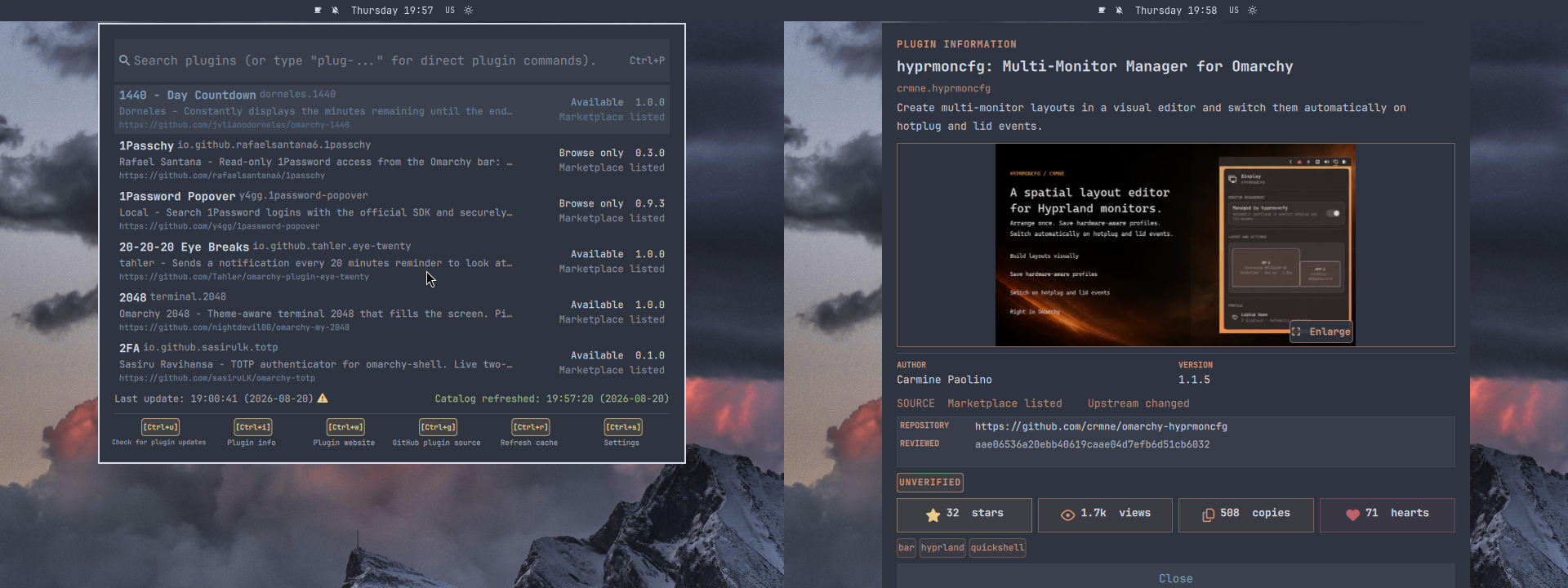
Plugin information
Rest on a plugin for one second to open a small preview to the right of the
picker. Keyboard selection and mouse hover use the same delay. The card shows
the marketplace image, description, tags, metrics, and verification status.
It hides while using dialogs or settings, and on screens without enough room.
Missing images or metrics do not prevent the text preview from appearing.
Click anywhere on the card, including its image, for the same details as
Ctrl+i.
Ctrl+i opens read-only details: the full description, source, repository,
tags, marketplace activity, and verification state. Verification reflects the
marketplace checks for the listed commit; it is not a security audit.
Marketplace previews download on demand and are cached as PNGs for the shell.
Click the card for the full preview. Press Enter or Space for the details,
or Escape or q for the plugin list. Ctrl+r refreshes marketplace totals;
failed requests keep the last valid values, and missing values are not shown as
zero.
Demo
Click either preview to play the video.
<table> <tr> <td width="50%" valign="top"> <a href="https://ilyazar.github.io/plugin-control/demo/video_plugin_control_add_remove_enable_disable.mp4" > <img src="demo/video_plugin_control_add_remove_enable_disable.png" alt="Add, remove, enable, and disable plugins" > </a> <p><strong>Add, remove, enable, and disable</strong></p> <p> Manage the <a href="https://github.com/omarchy-QOL/omarchy-btop-activity">btop plugin</a> from one action menu. </p> </td> <td width="50%" valign="top"> <a href="https://ilyazar.github.io/plugin-control/demo/video_plugin_control_settings.mp4" > <img src="demo/video_plugin_control_settings.png" alt="Refresh the catalog and configure Plugin Control" > </a> <p><strong>Refresh and settings</strong></p> <p> Refresh the catalog, change tray settings, and cleanly reinstall Plugin Control. </p> </td> </tr> </table>Start and stop
These commands turn Plugin Control itself on or off. Tray options only control whether its bar icon is visible:
~/.config/omarchy/plugins/io.github.ilyazar.plugin-control/bin/plugin-control start
~/.config/omarchy/plugins/io.github.ilyazar.plugin-control/bin/plugin-control start --tray-hidden
~/.config/omarchy/plugins/io.github.ilyazar.plugin-control/bin/plugin-control stop
The helper is not on PATH. Run it by full path, or run bin/plugin-control
from the checkout. start uses the tray setting from your configuration. A tray
flag overrides that setting. stop turns off the whole plugin.
Settings
Press Ctrl+s for plugin settings, keybindings, clean removal, and Cancel /
Back. Move with j/k, the arrow keys, or the mouse. Press Enter to choose,
or Escape or q to return to the plugin list.
~/.config/omarchy/ilyazar.plugin-control/channels.yaml
~/.config/hypr/bindings.lua
settings:
  tray-icon-hidden: false
  background_dim: false
Plugin Control never rewrites your Ctrl+p binding. Saving valid YAML updates
the tray and background settings at once. Set background_dim to true to dim
the workspace behind the palette.
Only schema 2 is accepted. Invalid YAML stays untouched. Plugin Control reports the rejected value and uses the last valid configuration, or the shipped defaults for a recoverable first-run error.
Dependencies
- Omarchy Quattro and its shell
- Bash, curl, Git, and jq
- Ruby with Psych
- util-linux (
flockandsetsid) - GNU coreutils (
timeout) omarchy-launch-terminalfor terminal adds
Plugin Control installs no packages and requests no elevated privileges.
Remove
Use plug-remove: for native removal. To remove the saved data as well, choose
Cleanly remove Plugin Control and user data from Settings. Then pick one:
- Yes (preserve user data) uses native removal
- Yes (delete user data) removes namespaced state and the recognized Plugin Control keybinding before native removal
- No / abort makes no changes
The native command is:
omarchy plugin remove io.github.ilyazar.plugin-control
Native removal preserves:
- settings:
~/.config/omarchy/ilyazar.plugin-control/ - cache:
~/.cache/omarchy/ilyazar.plugin-control/ - state:
~/.local/state/omarchy/ilyazar.plugin-control/
Clean removal deletes these paths and the recognized Plugin Control binding.
Development
For plugin development, keep the source outside
~/.config/omarchy/plugins/<plugin-id> and symlink it into that path. Plugin
Control does not manage the source behind the symlink. Update leaves the
checkout alone, and Remove deletes only the symlink.
tests/all.sh
shellcheck bin/plugin-control scripts/*.sh tests/*.sh
omarchy plugin validate .
Official Marketplace design
Kudos where Kudos is due: the detail view follows the icon language, activity rules, and semantic colors of @HANCORE-linux's MIT-licensed Omarchy Plugin Marketplace. It uses Omarchy's installed Nerd Font rather than bundling the website font.
License
MIT. See LICENSE.