
Divinum Officium for Omarchy
An unofficial Divinum Officium client for traditional Catholic prayer in the Omarchy bar. It keeps the traditional Roman canonical hours close at hand while leaving the liturgical texts to the open-source Divinum Officium project.
Features
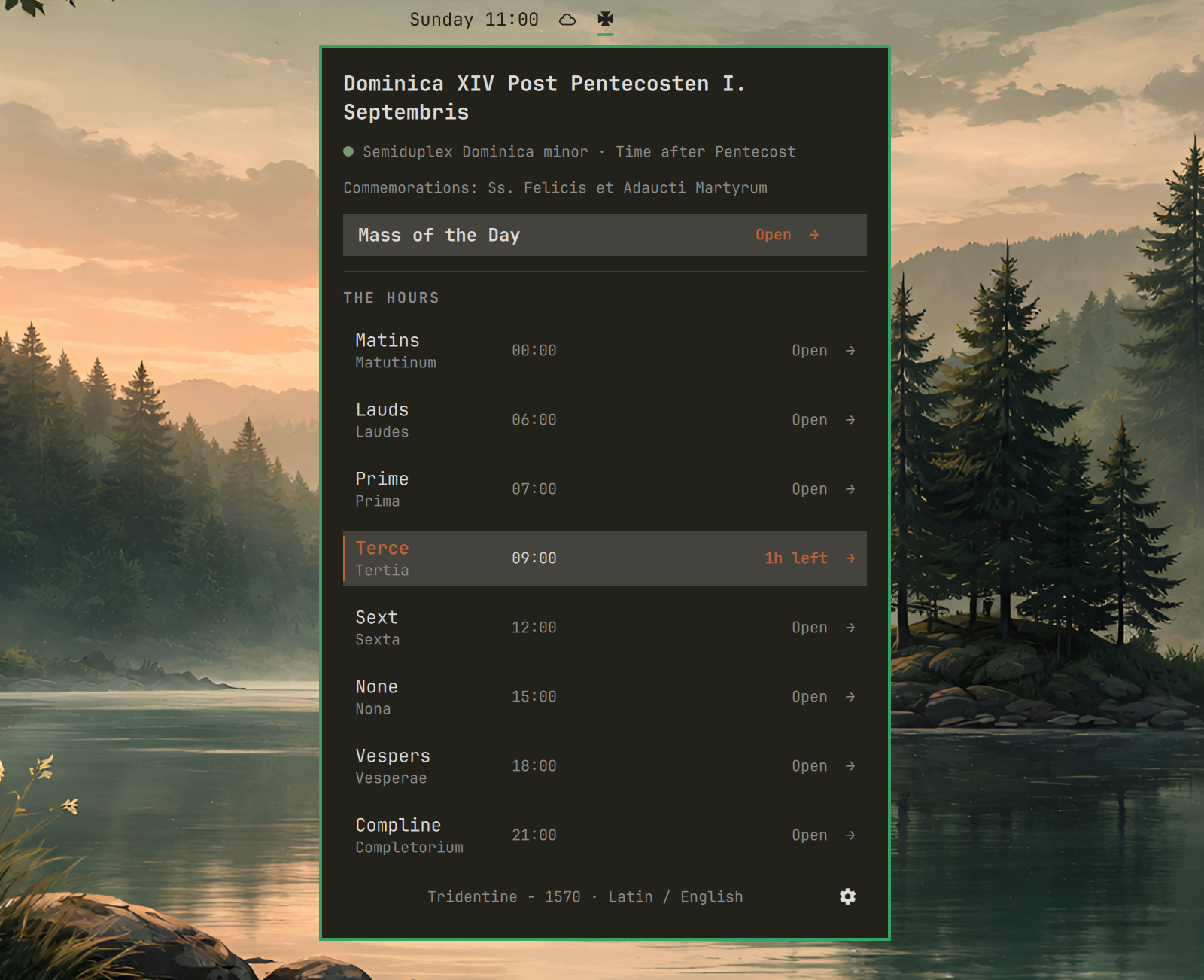
- A theme-colored Tatzenkreuz in the bar, with an optional current-hour label.
- All eight canonical hours in one panel, with the current hour highlighted and a countdown to the next.
- Direct links to the correct Office and Mass using the selected rubrics and languages.
- The day's feast or Sunday, rank, liturgical season and color, and commemorations.
- A feast-title link to the corresponding date in CatholicSaints.Info's public 1914 Roman Martyrology.
- Fixed custom hour boundaries or a sunrise-and-sunset schedule based on the location configured in Omarchy Weather.
- One bounded metadata request when the panel first opens each day, with a three-day cache, stale-data fallback, persistent request cooldowns, and total helper deadlines.
Settings
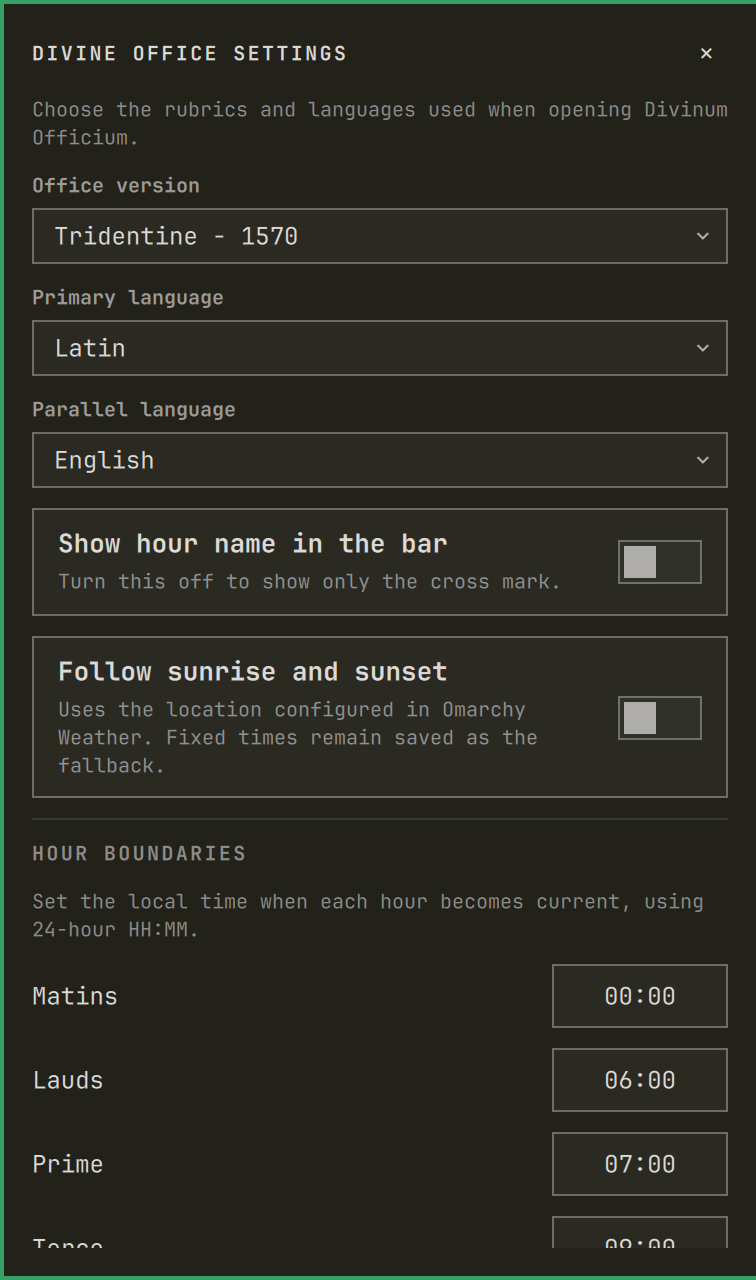
Click the gear in the panel's lower-right corner to choose the rubrics, primary and parallel languages, bar label, and hour schedule.
Install
omarchy plugin add https://github.com/imr-git/omarchy-divinum-officium.git --enable
The widget appears in the center section by default, so no placement command is required after installation. To move it to a different section later, use one of:
# Left
omarchy bar move io.github.imr-git.divinum-officium --section left

# Center
omarchy bar move io.github.imr-git.divinum-officium --section center

# Right
omarchy bar move io.github.imr-git.divinum-officium --section right
Add --index 0 to place it first in that section, or use --before <widget-id> / --after <widget-id> for precise ordering. The bar updates immediately.
Update
Git-managed installations can be updated with:
omarchy plugin update io.github.imr-git.divinum-officium
Omarchy shows the incoming diff, fast-forwards the installed checkout, validates the updated manifest, and rescans the shell. If an affected Omarchy release continues showing the previous QML after the update, restart the shell once:
omarchy restart shell
No cache cleanup is required when updating. The plugin starts a new cache schema when necessary and removes expired metadata during its next successful daily refresh.
Usage
- Click the cross to open or close the panel.
- Middle-click the cross, or press
Rwhile the panel is focused, to refresh the liturgical metadata after any active cooldown. - Click an hour or Mass of the Day to open it on Divinum Officium.
- If Cloudflare blocks a direct link, use the panel's homepage fallback and navigate from the site.
- Click the feast title to open that date in the Roman Martyrology.
- Click the gear to edit settings; press
Escapeto close settings or the panel.
Defaults
- Office version:
Tridentine - 1570 - Primary language: Latin
- Parallel language: English
- Hour boundaries: Matins 00:00, Lauds 06:00, Prime 07:00, Terce 09:00, Sext 12:00, None 15:00, Vespers 18:00, Compline 21:00
- Schedule mode: fixed times
The optional solar schedule places Matins at the eighth hour of night, Lauds at civil dawn, Prime at sunrise, Terce/Sext/None at the quarter/middle/three-quarter points of daylight, Vespers at sunset, and Compline one hour later. It is a practical approximation: historical monastic timetables varied with season, latitude, work, meals, and the superior's judgment.
Dependencies and network access
The plugin requires Omarchy's Quickshell bar, Python 3, and GNU timeout from coreutils; it otherwise uses only Python's standard library. The first time the panel is opened each civil day for the selected rubrics and languages, its metadata helper requests the lightweight calendar heading from www.divinumofficium.com. Loading the shell does not make this request. A settings change or explicit manual refresh can request a new heading, but an active request cooldown is always enforced. The plugin does not prefetch complete Office or Mass pages; those are opened only when clicked.
Successful metadata is retained for today and the previous three days. During an outage, the most recent matching result remains visible. Every response is read with a 256 KiB limit, including responses without a trustworthy Content-Length header. Cache files are limited to 64 KiB and held under an owned 0700 directory as owned, single-link 0600 regular files. Reads, locks, pruning, and durable atomic replacements remain bound to that directory descriptor and do not follow links. If the cache or lock fails those checks, the helper fails closed without making a metadata request.
The Weather state used for the optional solar schedule is also opened without following links, required to be an owned single-link regular file, and limited to 16 KiB before UTF-8/JSON decoding. Its coordinates and display name are schema-checked and bounded before reaching QML. Both helpers use bounded stdout/stderr producers and streaming consumers, run under process-group deadlines, and escalate from TERM to KILL so a stalled helper or descendant cannot hold the bar indefinitely.
An HTTP 429 response creates a persistent cooldown using the server's Retry-After value, capped at one day, or one hour when none is provided. An HTTP 403 response creates a six-hour access-denied cooldown. This prevents panel or shell restarts from repeatedly contacting the service. The panel shows when an active pause ends; once it has ended, the message changes to a manual retry prompt. Metadata redirects are accepted only when they remain on the same HTTPS Divinum Officium origin.
Divinum Officium is currently protected by Cloudflare after upstream work to control bot-driven hosting costs. It may deny automated metadata requests—or even browser visits from some networks—with HTTP 403. That decision is made by the upstream site, not by this plugin's daily cache. When it happens, the plugin uses the newest matching cached metadata if one exists and offers a homepage fallback for direct links that Cloudflare blocks.
Solar events are calculated locally from the coordinates already configured in Omarchy Weather. Those coordinates are not sent to Divinum Officium or another service by this plugin.
Results and request-cooldown state are cached under ${XDG_CACHE_HOME:-~/.cache}/omadivoff with private permissions.
Remove
omarchy plugin remove io.github.imr-git.divinum-officium
The metadata cache is intentionally left in ${XDG_CACHE_HOME:-~/.cache}/omadivoff and can be removed separately if desired.
Development
omarchy plugin validate .
/usr/lib/qt6/bin/qmllint -I "$OMARCHY_PATH/shell" BarWidget.qml Panel.qml TatzenkreuzIcon.qml
python3 -m unittest discover -s tests -v
Omarchy plugin folders must not contain symlinks.
Credits and affiliation
The liturgical texts, calendar, and web reader are provided by the MIT-licensed Divinum Officium project. This plugin is unofficial, is not affiliated with Divinum Officium, and does not redistribute its liturgical texts.
Solar events use the NOAA sunrise/sunset equations. The traditional mapping is informed by the Rule of Saint Benedict, especially chapters 8, 16, 41, 42, and 48.
License
MIT