
Dori — use an Android phone as a webcam on Linux
Turn your Android phone into a webcam and a second screen on Linux. The
phone's camera appears as an ordinary /dev/video* device, so Google Meet,
Zoom, Microsoft Teams, Discord, Slack, Jitsi, Firefox, Chrome and OBS Studio
see it as any other USB webcam — no app to install on the phone, no account, no
video going through anyone else's server.
An Android phone is a good camera and a spare screen that you already own. Dori
puts both on the Omarchy bar: one icon, one panel, everything over the USB cable
you charge with. It runs on Wayland and Hyprland, built on adb, scrcpy and
v4l2loopback.
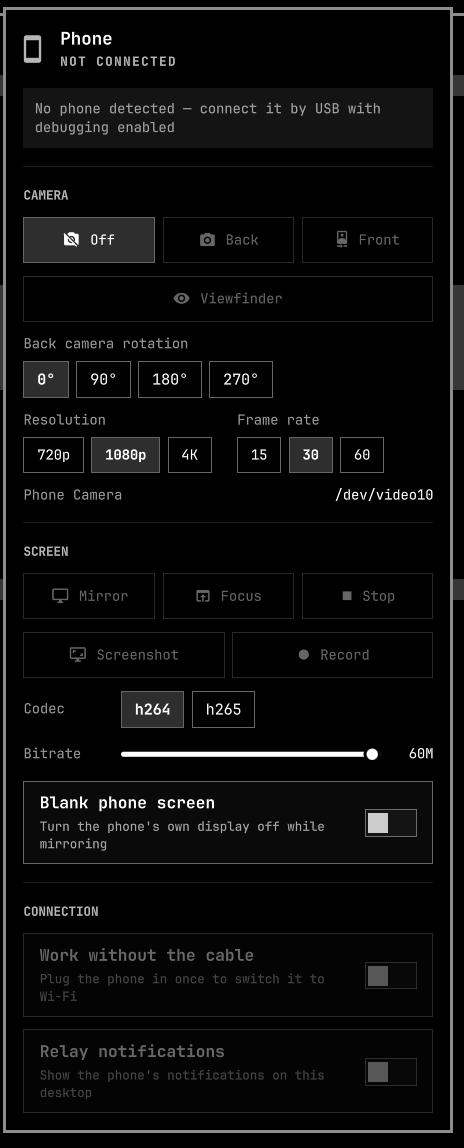
- Live preview — a still of the phone's screen beside the controls, refreshed about every two and a half seconds while the panel is open, and not at all when it is closed or when the full mirror is up.
- Camera — the phone's back or front camera appears as an ordinary webcam at
/dev/video10, so Google Meet, Zoom, Microsoft Teams, Discord, Slack, Jitsi, OBS Studio and anything else that opens a/dev/video*node can use it without knowing where the picture comes from — and a modern phone's rear sensor is a far better camera than the one in a laptop lid. Rotation, resolution and frame rate are on the panel, and a viewfinder button opens the loopback node in a window so you can fix your framing without joining a call to look at yourself. - Screen — the phone's display mirrored in a window, with audio and keyboard, at a bitrate and codec you choose.
- Screenshot — one click puts the phone's screen on your clipboard and in
~/Pictures/dori, because the reason you took it is usually to paste it. - Record — the phone's screen to an mp4 in the background, with no mirror window in the way, while you keep using the phone.
- Notifications — the phone's notifications, on this desktop. No app to install on the phone, no account in the middle: adb can already read them.
- No cable — switch the connection to Wi-Fi and unplug. Everything above keeps working.
- It tells you what is wrong. A phone that is plugged in but not authorised looks exactly like a working one from the bar. Dori says which it is.
Everything the panel does, the scripts in bin/ also do from a
terminal, so a phone that will not cooperate can be debugged without the shell
in the way.
Requirements
| Omarchy | Quattro (the Quickshell bar) |
| Phone | Android 12 or newer for the camera; any adb-capable Android for the mirror |
| Packages | scrcpy, android-tools, v4l-utils, v4l2loopback-dkms, v4l2loopback-utils |
| Optional | mpv or ffmpeg, for the camera viewfinder |
| Optional | wl-clipboard, so a screenshot lands on the clipboard as well as on disk |
| On the phone | USB debugging enabled in Developer options |
bin/dori-setup installs the packages for you on Arch and Omarchy.
Install
omarchy plugin add https://github.com/infiniV/omarchy-dori --enable
Then run the one-time host setup, in a terminal, once per machine:
~/.config/omarchy/plugins/io.github.infiniv.dori/bin/dori-setup
It installs the missing packages, creates Dori's own loopback node with
v4l2loopback-ctl, and installs a small systemd unit that recreates it after
every reboot. It asks for your sudo password when it needs it and never
installs a passwordless sudo rule. The screen mirror works without any of this;
only the webcam needs the module.
It does not write anything to /etc/modprobe.d, so it neither disturbs nor is
disturbed by anything else on the machine using v4l2loopback — OBS, Droidcam,
omarchy-camera-effects. If Dori 1.0.0 left a dori-v4l2loopback.conf behind,
running the setup again removes it.
If /dev/video10 is already taken by another tool, pick a free number and tell
both halves about it:
bin/dori-setup --device-number 11 # then set "Webcam device" to /dev/video11
Finally, enable USB debugging on the phone (Settings › Developer options), plug it in, and accept the prompt it shows. The bar icon lights up when a stream is live.
Use
| Where | Action |
|---|---|
| Left click the icon | open the panel |
| Right click | cycle the camera: off → back → front → off |
| Middle click | start or focus the screen mirror |
| Panel | all of it, plus screenshot, recording, notifications, codec, bitrate, and Wi-Fi |
Notifications. Turn on Relay notifications and what appears on the phone
appears here. Ongoing notifications — music players, downloads, "app is
running" — are skipped, because they re-post forever. Nothing is written down
but a hash of what has already been shown, in $XDG_RUNTIME_DIR; the
notification text itself is never stored.
Working without the cable. Plug the phone in, open the panel, and turn on Work without the cable. Dori switches the phone's adb to Wi-Fi and reconnects over the network; the cable can then come out and the camera, the mirror and everything else keep working. Turning it back off closes the network connection and puts the phone's daemon back on USB, so it is not left listening.
The icon stays on the bar, dimmed, when no phone is attached. Turn on Hide the bar icon when no phone is attached in the plugin's settings if you would rather it disappeared.
Picking the phone in a video call
The phone shows up as Phone Camera, alongside any built-in webcam.
| App | Where |
|---|---|
| Google Meet | Settings › Video › Camera |
| Zoom | Settings › Video › Camera |
| Microsoft Teams | Settings › Devices › Camera |
| Discord | Settings › Voice & Video › Video Device |
| Slack | Settings › Audio & Video › Camera |
| Jitsi, or any site in Firefox or Chrome | the camera picker in the call, or the browser's site permissions |
| OBS Studio | add a Video Capture Device (V4L2) source |
Start the camera from the panel before opening the app — most of them scan for devices once, at startup, and a webcam that appears later will not be in the list until they are restarted. If the picture is upside down or sideways, set that camera's rotation in the panel rather than fighting it in the app.
Settings
Omarchy renders these from the manifest, under the plugin's own settings.
| Setting | Default | What it is for |
|---|---|---|
| Live preview | on | the still of the phone's screen in the panel |
| Webcam device | /dev/video10 |
must match the node dori-setup made; change both together with dori-setup --device-number N |
| Back / front camera id | 0 / 1 |
run scrcpy --list-cameras if the two buttons are swapped |
| Back / front camera rotation | 0 / 0 |
clockwise turn applied to the picture, for a sensor that arrives rotated; set 180 if it is upside down. Also on the panel, under CAMERA, where it follows the camera you have selected |
| Camera resolution | 1080p |
longest edge of the captured picture. 4K mostly heats the phone up for detail the far end scales away again |
| Camera frame rate | 30 |
what video calls use; 60 is for recording something that moves |
| Typing into the mirror | sdk |
uhid acts like a real keyboard: it needs a layout set on the phone first, and on some Samsungs it leaves the phone's own keyboard wedged |
| Mirror codec | h264 |
h265 is smaller at the same quality and needs a phone that encodes it |
| Mirror bitrate | 20 Mbps |
4 is unwatchable, 60 saturates USB 2 |
| Mirror frame rate | 60 |
|
| Blank the phone screen | off | turns the phone's own display off while mirroring |
Dori asks the phone which hardware encoder it has rather than pinning a vendor name, so h265 works on a Samsung, a Pixel, and a OnePlus without being told which is which.
From a terminal
bin/dori-status [--full]        # one JSON blob: device, battery, camera, mirror
bin/dori-camera back|front|off|cycle [--back-rotation 180] [--max-size 1280] [--fps 60]
bin/dori-view   start|stop|toggle    # watch the loopback node in mpv or ffplay
bin/dori-mirror start|toggle|focus|stop|restart [--codec h265] [--bitrate 30M]
bin/dori-shot                   # screenshot to ~/Pictures/dori and the clipboard
bin/dori-frame --slot a         # one low-res frame, for the panel's preview
bin/dori-notify start|stop|toggle|status|once
bin/dori-record start|stop|toggle|status
bin/dori-wireless on|off|status
bin/dori-setup [--uninstall]
Every script takes --help. Logs go to $XDG_RUNTIME_DIR/dori/, never to a
shared /tmp path.
Everything that keeps running — the camera stream, the mirror, a recording, the
notification relay, the viewfinder — is a transient systemd user unit named
dori-camera, dori-mirror, dori-record, dori-notify, or dori-view. So
the usual tools apply:
systemctl --user status 'dori-*'
systemctl --user stop dori-mirror
When it does not work
| What you see | What it means |
|---|---|
| "Accept the USB debugging prompt" | the phone is attached but has not trusted this machine; unlock it and look for the dialog |
| "No webcam device at /dev/video10" | v4l2loopback is not loaded — run bin/dori-setup |
| "v4l2loopback is loaded but nothing created /dev/video10" | something else on the machine owns the module and loaded it without Dori's node. Run bin/dori-setup, which adds one through v4l2loopback-ctl without touching the other tool's |
dori-setup says the device belongs to something else |
it does — run it again with a free number, dori-setup --device-number 11, and set the same one in settings |
| The viewfinder button is greyed out | it reads the webcam stream, so start the back or front camera first |
| "No video player" | install mpv or ffmpeg |
| Back and front buttons are swapped | set the camera ids in settings, from scrcpy --list-cameras |
| The camera picture is upside down or sideways | set that camera's rotation, in the panel under CAMERA or in settings. Back and front are set separately, because phones mount the two differently |
| Camera buttons do nothing on an older phone | camera capture needs Android 12; the mirror still works |
| Mirror opens then dies | see $XDG_RUNTIME_DIR/dori/mirror.log, or systemctl --user status dori-mirror |
| "no systemd user session" | the scripts run their services as user units; from a bare ssh login, start them from the desktop session instead |
| "Work without the cable" is greyed out | it needs the phone on the cable once, to switch it over |
| Wi-Fi connects, then drops later | phones reset adb over TCP on reboot and on some Wi-Fi changes; plug in and switch again |
| Everything is slow over Wi-Fi | the phone's screen is off; wake it. Android throttles the radio while it sleeps |
| The mirror opens but lags over Wi-Fi | it is already on the lighter profile; drop the bitrate further, or plug the cable back in |
| Everything fails with "more than one device" | it should not — every script names one device, preferring the cable. Set DORI_SERIAL if you have two phones and want the other one |
| The phone's own on-screen keyboard stops typing | a uhid session can leave Samsung's keyboard wedged. adb shell am force-stop com.samsung.android.honeyboard, or restart the phone. Staying on sdk avoids it |
| Typing into the mirror does nothing | you are on uhid; either switch the setting back to sdk, or set a layout on the phone under Settings > System > Languages and input > Physical keyboard |
| A recording will not play | it was killed rather than stopped; use the panel or dori-record stop, which lets scrcpy finalise the file |
What it runs on your machine
Dori is a QML panel plus a handful of bash scripts. It starts scrcpy, reads
adb, and that is the whole of it.
bin/dori-setupis the only part that usessudo, only when you run it yourself in a terminal. It installs packages withpacman, writes/etc/systemd/system/dori-v4l2loopback.serviceand the small script it runs at/usr/local/lib/dori/loopback-node, and creates the loopback node. Both files are root-owned: the boot-time unit deliberately does not execute anything out of the plugin folder, which lives in a home directory you can write to.--uninstallremoves exactly those two files and deletes Dori's own node, leaving the module loaded for whatever else is using it.- No sudoers rule, passwordless or otherwise, is ever installed.
- Nothing is downloaded and executed. Nothing is sent anywhere.
dori-wirelessis the only part that puts anything on the network: it is Android's own adb-over-TCP, off by default, switched on by you, and closed again by the same toggle.- Dori only ever stops what it started. Each long-running piece is a systemd
user unit with a fixed name, and stop means
systemctl --user stopon that unit. Dori never finds its processes by name, command line, or pid, so ascrcpyyou started yourself — even one recording, even one writing to the same webcam node — is invisible to it and cannot be signalled by it, and there is no pid to validate and race against. - The preview frames and the notification hashes live in
$XDG_RUNTIME_DIR: your user only, in memory, gone at logout. The notification text itself is handed to the desktop over D-Bus with the content on stdin — never on a command line, where any local user could read it out of /proc while it runs. Screenshots and recordings go where you would expect, under~/Picturesand~/Videos.
Uninstall
~/.config/omarchy/plugins/io.github.infiniv.dori/bin/dori-setup --uninstall
omarchy plugin remove io.github.infiniv.dori
The first line removes the unit, its helper script, and Dori's own loopback
node; the second removes the plugin. The v4l2loopback module is left loaded,
because something else on the machine may be using it, and the packages are
left installed.
Credits
Built on scrcpy by Genymobile, which does all of the hard work, and v4l2loopback.