
Bujo
A bullet journal in the Omarchy bar. Tasks belong to a day, and what you don't finish gets migrated forward — deliberately, by you.
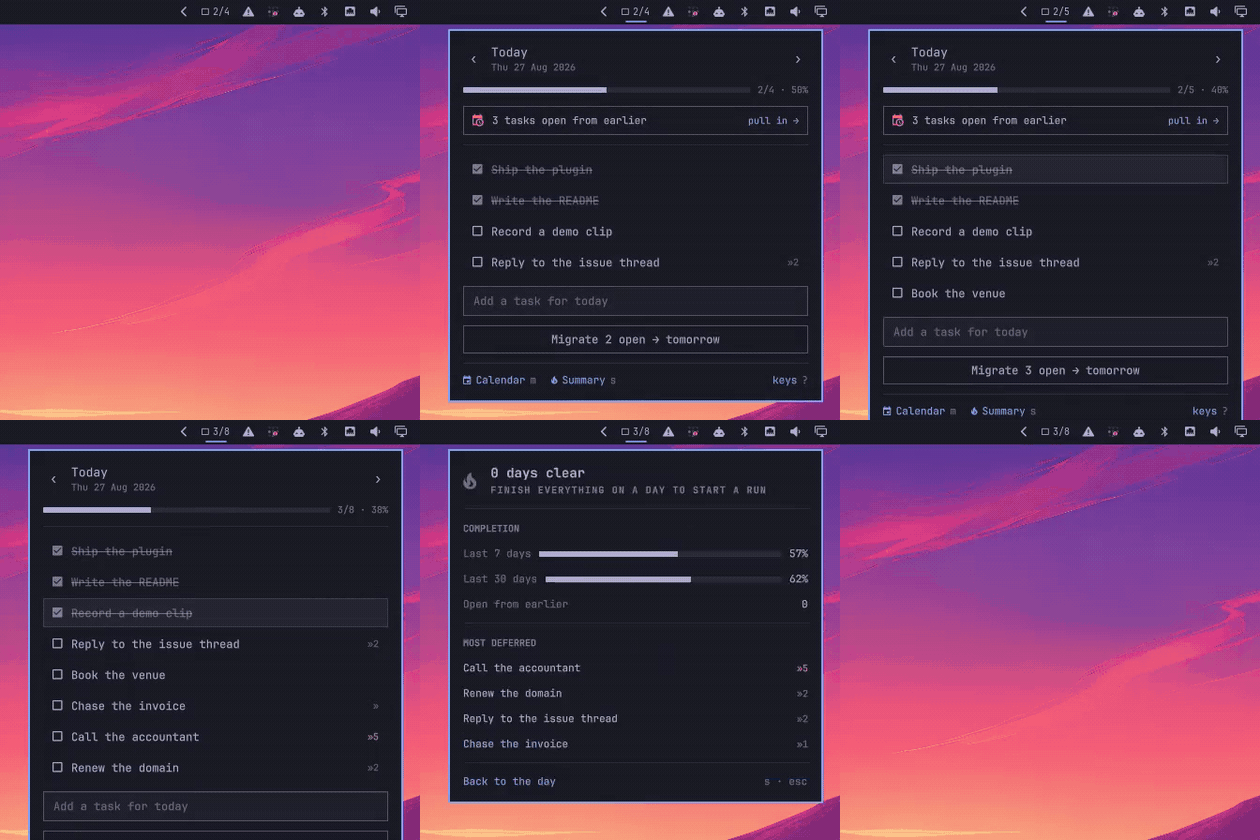
Every other task widget is a flat list or a board: things are either done or they aren't, and nothing records that you have now rewritten call the accountant four days running. A bullet journal is a different instrument. Work belongs to a date. At the end of the day you look at what is left and decide, one item at a time, whether it is worth carrying forward. That decision is the practice — and it is what this puts in the bar.
Plugin id: io.github.ipastorsan.bujo
Install
omarchy plugin add https://github.com/IpastorSan/omarchy-plugin-bujo.git --enable
Move it if you'd rather it sat somewhere else:
omarchy bar move io.github.ipastorsan.bujo --section right
No dependencies beyond Omarchy itself. Nothing leaves your machine.
What you get
The pill shows today at a glance — 2/5 — and goes to a checked box when
the day is clear. It dims on a day you have not written anything on.

The day view is the list: click a box to strike it through, type in the
field to add. ‹ and › walk through dates; the completion rail and 2/5 · 40% say how the day is going.
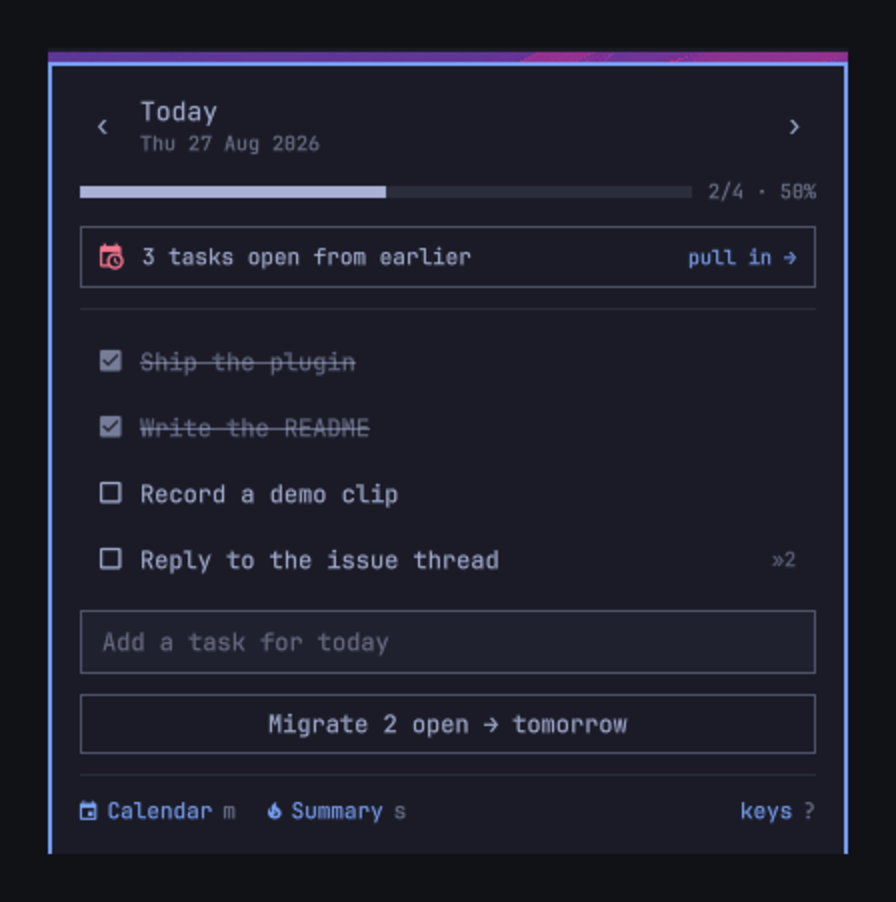
Migration is the point. The button names where things land, always —
Migrate 3 open → tomorrow on today, → today on a day in the past. And when
anything is still open from an earlier day, today's view opens with a banner:
2 tasks open from earlier — pull in →
One click and the whole backlog is on today. That is the daily ritual, and it takes a second.
Migrated tasks keep their history. A task carries the date it was first
written and a count of how many times it has been pushed. Four migrations shows
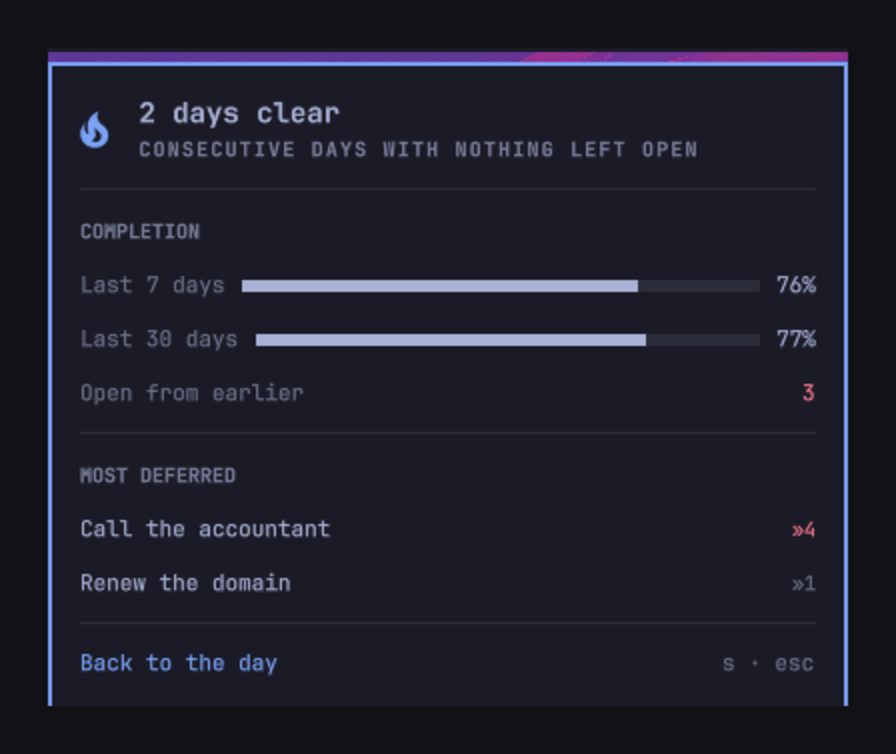
as »4 in red — the journal telling you to either do it or drop it. The
summary view (s) ranks exactly those: your most-deferred work, alongside
7- and 30-day completion and a streak of days you finished clean.
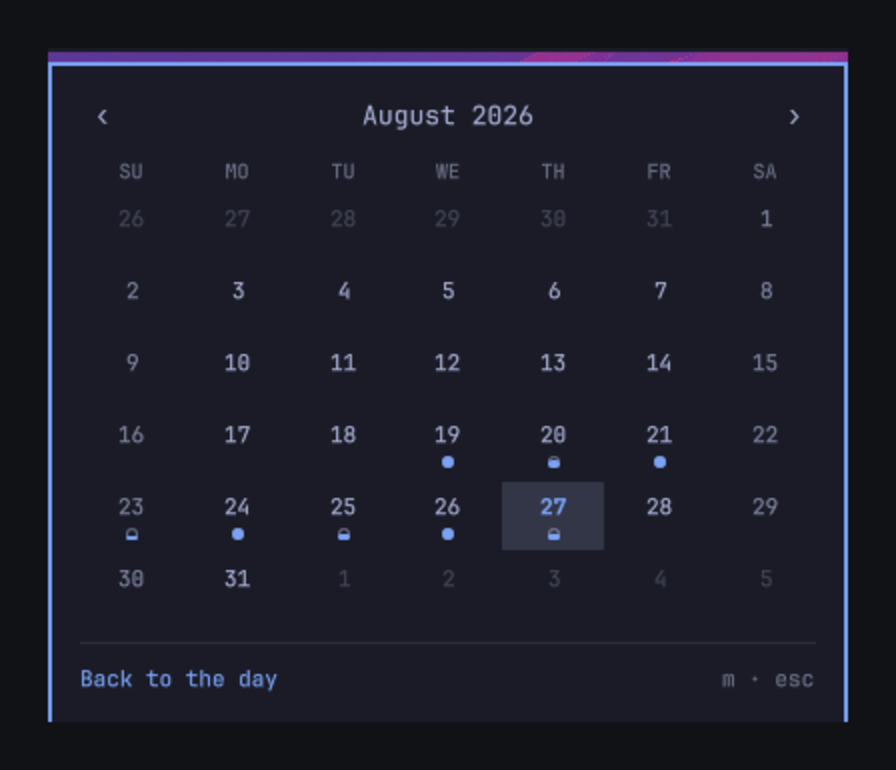
The calendar (m) is a month of dots: hollow for a day you wrote on and
finished nothing, filling as the ratio climbs, solid when you cleared it. Click
any day to open it.
What migrating does not do
It does not erase the entry from the day it was written on. That day keeps the
line, struck through with › and pointing at where the work went:
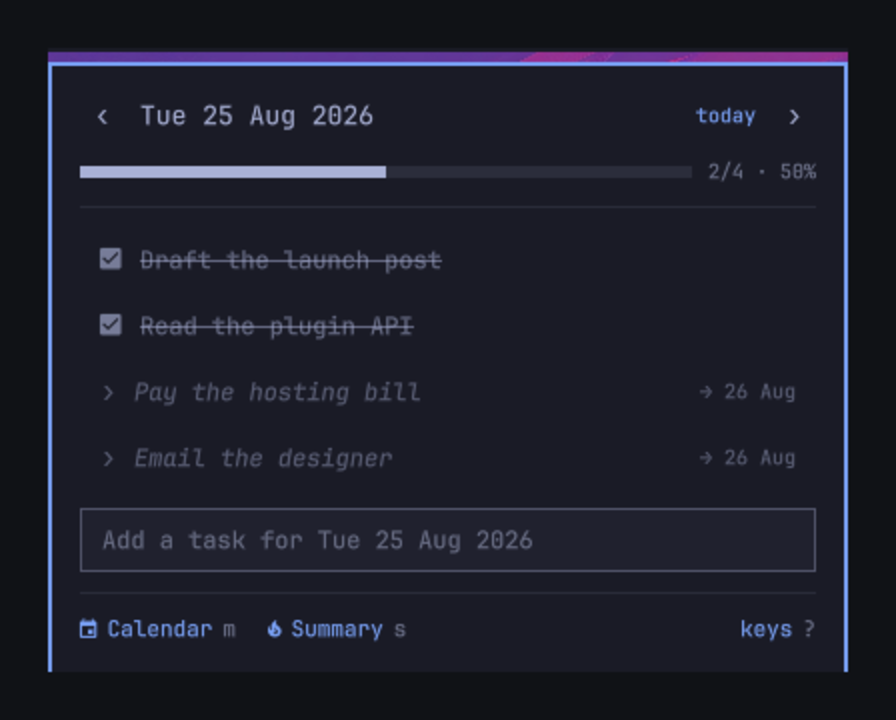
This is deliberate, and it is the reason the percentages mean anything. Delete the open tasks instead and every day you ever migrated from reads 100%, because all that is left on it is the work you finished. The 25th was a half-finished day. It says so, permanently.
Keys
The panel is keyboard-first. Open it and:
j k / ↓ ↑ |
move down and up the list |
space / enter |
tick the task off |
e |
rename it in place |
x |
delete it |
J K |
reorder |
a / i |
jump to the add field |
h l / ← → |
previous and next day |
g |
back to today |
m |
month calendar |
s |
summary |
c |
migrate this day |
? |
show the key list in the panel |
esc |
close |
Right-click the pill to jump to today without opening anything; middle-click to open straight into the add field.
A global shortcut
Optional, and never installed for you:
~/.config/omarchy/plugins/io.github.ipastorsan.bujo/bin/setup-keybind
Binds SUPER + SHIFT + J in ~/.config/hypr/bindings.lua, backing the file up
first and restoring it if Hyprland refuses to reload. --key "SUPER + B" picks
a different one; --remove takes it back out. Running it twice leaves one
binding, not two.
From the command line
The panel registers an IPC target, so it scripts:
omarchy-shell bujo add "call the accountant"   # capture onto today
omarchy-shell bujo migrate                     # pull the backlog onto today
omarchy-shell bujo today                       # open, on today
omarchy-shell bujo day 2026-08-25              # open a specific date
omarchy-shell bujo view month                  # day | month | summary
omarchy-shell bujo toggle
omarchy-shell bujo status                      # JSON: counts, streak, backlog
add always lands on today, whatever the panel happens to be showing.
Settings
Right-click the bar → widget settings, or edit the entry in
~/.config/omarchy/shell.json:
| Setting | Default | |
|---|---|---|
pillMode |
ratio |
ratio (2/5), count (tasks left), percent, or icon |
weekStartDay |
locale |
locale, monday, or sunday |
dimWhenEmpty |
true |
dim the pill on a day with nothing written |
showMigrationMarks |
true |
show the »n deferral count |
statePath |
"" |
where the journal lives |
Your data
One JSON file, keyed by date, written atomically:
~/.local/state/omarchy/bujo/tasks.json
{
  "version": 1,
  "days": {
    "2026-08-27": [
      {
        "id": "mtbaqzdk-7d703430-0",
        "root": "mtbaqzdk-7d703430-0",
        "text": "Ship the plugin",
        "done": false,
        "createdAt": "2026-08-25T09:14:00.000Z",
        "doneAt": null,
        "origin": "2026-08-25",
        "migrations": 2,
        "migratedTo": null,
        "migratedAt": null,
        "updatedAt": "2026-08-27T09:14:00.000Z",
        "deleted": false,
        "deletedAt": null
      }
    ]
  }
}
Keys are sorted and the file is indented, so it diffs cleanly under git. A corrupt or truncated file loads as an empty journal rather than taking the shell down with it.
How the files are opened
Both paths are predictable, and the plugin runs inside the long-lived
omarchy-shell process — so a read that blocks takes the whole shell with it.
Every open is therefore made through a bounded, non-following descriptor:
dd if=<path> iflag=nofollow,nonblock bs=65536 count=<bounded>
nofollow— a symlink fails to open instead of redirecting the readnonblock— a FIFO returns immediately instead of blocking forevercount/bs— the read is bounded regardless of what the file claims to be, with a 4 MiB ceiling on the journal
The -f/-L/size tests before it are a cheap early bail, not the guarantee;
they race by construction. The open flags are the guarantee. Anything that is
not a plain regular file is refused, logged, and leaves the in-memory journal
untouched rather than being guessed at.
Writes hold one descriptor from creation to publication. Creating a
temporary exclusively and then writing to it by name is not enough — the
exclusivity ends with the create, and the name can be replaced with a symlink or
a FIFO before the write reopens it. So the temporary is opened once with
O_CREAT|O_EXCL|O_NOFOLLOW|O_NONBLOCK at mode 600, every byte goes through that
same descriptor, and before publishing, the name is confirmed to still refer to
the file being held. Publication is rename(2), which replaces a symlink at the
destination rather than following it.
The temporary is never unlinked before it is created — clearing the name first
is exactly what makes O_EXCL meaningless. A stale temporary left by a hard
kill is swept after an hour instead.
This part is perl rather than shell because the shell's noclobber only
guards regular files: a FIFO planted at the temporary name opens and blocks the
whole shell. perl is already an Omarchy dependency, so this adds nothing new.
The device id is created the same way and published with a hard link, so it either creates the file or reads what was already there — it never writes through something another process put in the way.
The journal and the device id are both mode 600.
The plugin ships single-device: statePath is empty, the journal lives in
the local state directory, and nothing syncs. To use it on more than one
machine, see below.
Using it on more than one device
The journal is one JSON file, so any file-sync tool moves it. Point statePath
at a synced folder on each machine and they share one journal:
omarchy-shell shell setBarWidget io.github.ipastorsan.bujo \
  statePath '"/home/YOU/Sync/bujo/tasks.json"' '{}'
Use the same path on every machine, pointed at the same synced directory
(Syncthing, Dropbox, a git checkout — anything that reproduces the file). Set it
back to '""' to go local again.
Changing statePath carries your existing journal with you. The panel keeps
what it is holding and merges it into whatever is at the new location, so
switching a machine over to a shared folder brings its history along rather than
stranding it. That is what you want the first time. It also means pointing at a
path expecting a clean slate will not give you one — empty the journal first, or
point somewhere the tasks are welcome.
The two devices merge rather than overwrite. When the file changes underneath it, the panel does not adopt the new contents wholesale — it combines them with what it already has and, if its own side had anything the file did not, writes the result back so the other machine learns about it too. So editing on both machines while both are offline does not cost you a task.
What each field does when the two machines disagree:
| A task only one machine has | kept |
| Finished on either | finished, keeping the earlier completion time |
| Deleted on either | deleted — this outranks finished |
| Edited on both | the later edit wins, by updatedAt |
| Migrated on both, to any days | one task, not two |
migrations count |
the higher one |
| Order within a day | stays local — it is what J/K control |
Two consequences worth knowing:
- Deleting is a soft delete. The entry stays in the file marked
deleteduntil it is 30 days old, then it is pruned. Without the marker a merge cannot tell "new over there" from "deleted over here", and every task you deleted on one machine would be resurrected by the other. Deleted tasks never appear in the list, the counts, or the calendar. - A task keeps its identity across migrations. Every entry carries a
rootalongside itsid: the id names one copy on one day, the root names the work itself and survives every hop. If two machines migrate the same task to different days, the copies have different ids but the same root, so the merge recognises them as one task and folds them together — the copy on the earliest day survives, having first absorbed anything done to its siblings, so a completion or a rename made on the losing copy is not thrown away. The survivor may land on a day already past, in which case it simply shows up in the backlog banner and you pull it forward again.
What it does not do
Order within a day is not merged — it stays local, because that is what J/K
control and a canonical sort would mean one machine silently rearranging the
other's list on every meeting.
Nothing here is a substitute for the sync tool doing its job. If Syncthing hands
you a .sync-conflict-* file, the plugin never sees it; the merge only runs on
the file statePath points at. Delete the conflict copy, or merge it in by
hand.
Device identity
Each machine generates four random hex bytes on first run and stores them at:
~/.local/state/omarchy/bujo/device
Task ids embed it (mtbaqzdk-7d703430-0). This is what stops two machines that
add a task in the same millisecond from minting the same id, which under a merge
would fuse two unrelated tasks into one. The path is fixed and local on
purpose — it must not be inside the synced folder, and statePath does not
move it. If you clone a machine's whole home directory, delete this file on the
clone so it generates its own.
omarchy-shell bujo status reports both the device id and the journal path, and
is the first thing to check if two machines are not converging.
Remove
omarchy plugin remove io.github.ipastorsan.bujo
Your journal is left where it is. To delete it too:
rm -rf ~/.local/state/omarchy/bujo
Development
just            # lint, unit tests, manifest + QML checks
just test       # node --test — the migration and stats logic
just restart    # sync into the live shell, restart it, query the IPC target
Saving a file under ~/.config/omarchy/plugins/ hot-reloads the plugin — the
shell watches the tree with inotifywait -m -r on a 150 ms debounce. just install-dev is usually the whole loop; the bar pill picks up the new code
without a restart.
Three things worth knowing before you debug this:
qmllintonly distinguishes "parses" from "does not", and both it andqmlformathard-fail on any file containing a QuickshellIpcHandler— including Omarchy's own.just restartfollowed byomarchy-shell bujo statusis the check that actually proves the QML loaded.omarchy-shell shell rescanPluginsdoes not evict a component that failed to compile. After a load error, a fixed file keeps reporting the old error until the shell restarts. This is the one case that genuinely needsjust restart.- The IPC target does not survive a hot reload. A bar widget is instantiated
once per monitor, so two
IpcHandlers compete for thebujotarget and one loses with a warning. After a reload the target is stranded on an instance whose surface is gone:omarchy-shell bujo openreports success and shows nothing. Mutating calls likeaddstill work, and clicking the pill still works — only IPC-driven opening is affected. Restart before testing the panel through IPC.
License
MIT. See LICENSE.