
Proton Calendar for Omarchy
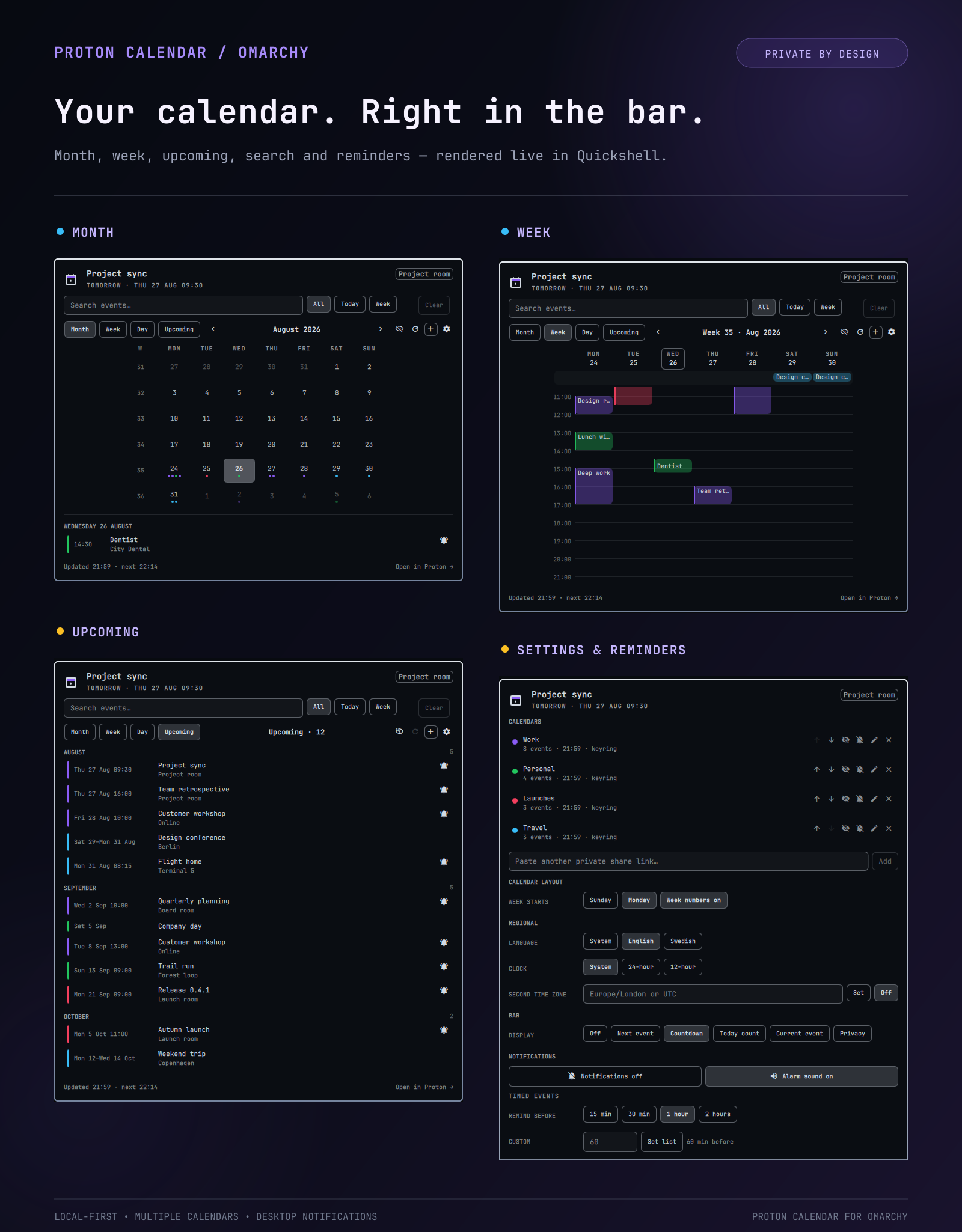
Your Proton Calendar in the Omarchy bar: what's next, a month grid, a week grid, and an upcoming list — with a quick add that hands off to the Proton web app.
What's new in 0.4.3
- The panel notices when the shell is still running a cached older version of it after an update, and offers a one-click shell restart
Updatingsection in the README:omarchy plugin updatealone is not enough
What's new in 0.4.2
- The panel closes again.
close()threw on the bar's read-onlycenterHoverRevealSuppressedproperty and never reachedhide(), which left the panel stuck open and the bar unresponsive (#5, #6) - A reminder is shown once, not once per monitor. Every bar surface runs its own copy of the widget, so a reminder reached the notifier once per screen; the notifier now claims each reminder in a lock-guarded state file (#7, #8)
- The reminder sound follows the same claim, so it is heard once per reminder burst instead of once per screen, and two reminders due in the same sweep no longer play over each other
- Previewing an alarm sound in settings no longer stacks: the most recent click wins (#3)
- Event search matches word by word and ignores spacing, so
my companyfindsmycompanyand the other way round (#3)
What's new in 0.4.1
- Complete Swedish localization across weekdays, months, dates, navigation, reminders, calendar management, status text, and settings controls
- Language-aware date formatting that follows the plugin language instead of the desktop locale
What's new in 0.4.0
- Full event details with descriptions, locations, participants, organizers, recurrence status, source time zones, and one-click meeting links
- A focused day view plus search and
All,Today, andWeekfilters - Multiple reminders, all-day reminders, per-calendar alert defaults, and notification actions for opening, snoozing, and dismissing
- Share links migrate from
feeds.jsoninto Secret Service when available - Per-calendar visibility, order, name, color, sync status, and notification controls
- Six bar modes including countdown, current event, today count, and privacy
- Richer quick add with end time, calendar, location, and private clipboard handoff
- English and Swedish UI, 12/24-hour clocks, secondary time zones, and optional week numbers
What's new in 0.3.0
- Choose Sunday or Monday as the first day of the week from the settings panel
What's new in 0.2.0
- Desktop notifications one hour before timed events by default
- Global reminder presets, custom minutes, and per-event overrides
- Optional alarm sound with four live-preview choices
- One-minute notification test directly from the settings panel
- Official Proton Calendar icon in desktop notifications
- A cleaner, aligned notification settings layout
What it does, and what it can't
Proton Calendar has no CalDAV and no public write API. Reading works well: the plugin fetches your calendar's share link (plain iCalendar over HTTPS), expands recurring events, and caches the result. Writing is a handover — quick add copies the title to your clipboard and opens the Proton web app on the right day, but you finish the event in the browser.
The share link is a secret URL — anyone holding it can read that calendar, and its contents are no longer end-to-end encrypted the way the rest of your Proton data is.
Requirements
sudo pacman -S --needed python-icalendar python-recurring-ical-events wl-clipboard libsecret libnotify
python-icalendar and python-recurring-ical-events are required for the
plugin to work at all — without them it can't parse your calendar feed.
wl-clipboard is needed for the quick-add clipboard handover.
libsecret stores share links in the desktop keyring, while libnotify
provides actionable reminders. If Secret Service is unavailable, the plugin
keeps the link in an owner-only feeds.json without deleting it.
Install
omarchy plugin add https://github.com/itsmoorgrove/omarchy-protoncalendar --enable
Then open the panel and paste your calendar's share link (Proton Calendar → Settings → Calendars → your calendar → Share → Share with anyone).
Updating
omarchy plugin update io.github.itsmoorgrove.protoncalendar
omarchy restart shell
The restart is not optional. Omarchy reloads a plugin's bar widget when the files change, but the panel QML stays in the QML engine's in-memory component cache, so the old code keeps running until the shell is restarted — a fixed panel can still behave like the broken one, and the shell log keeps reporting errors against line numbers from the version you just replaced.
From 0.4.3 the panel notices this itself: it compares the version compiled into
it against manifest.json on disk, and if they disagree it shows a notice with
a restart button. That check can only run once the new code is loaded, so the
update into 0.4.3 still needs the restart above.
Features
- Bar mark — pips for how much is on today, a warning colour when a feed is stale, and the next event's title beside it
- Month — always six rows, ISO week numbers, today outlined, up to four event dots per day
- Week — an hour grid with an all-day band, overlapping events side by side, a line for right now, and a Sunday or Monday week start
- Day — one spacious timeline focused on the selected day
- Upcoming — everything ahead as one dated list, grouped by month
- Event details — description, location, attendees, organizer, recurrence, source and secondary time zones, plus meeting and Proton actions
- Search — text search across event content with today and week scopes
- Quick add — start/end time, all-day, calendar, and location handoff to Proton
- Multiple calendars — reorder, rename, recolor, hide, pause, and configure alerts
- Notifications — multiple lead times, all-day and per-calendar defaults, per-event overrides, sounds, snooze, dismiss, and a built-in test
- Privacy — keyring-backed share links and a bar mode that never exposes titles
The plugin sends standard freedesktop notification actions. Omarchy currently
uses a notification-card click for the default Open in Proton action; snooze
controls are always available from the event detail card even when the active
notification theme does not render secondary action buttons.
Keyboard
| Key | Action |
|---|---|
←/→ or [/] |
Previous / next month or week |
↑/↓ or {/} |
Previous / next year or four weeks |
t / enter |
Back to today |
m / e / u |
Month / week / upcoming |
d |
Day view |
/ |
Focus event search |
b |
Cycle the bar label |
s |
Show/hide calendars |
n / a |
New event |
o |
Open the selected day in Proton |
r |
Refresh |
w |
Toggle week start |
esc |
Close |
Right-click the bar widget to cycle the bar label; middle-click to refresh.
Settings
| Key | Type | Default | Meaning |
|---|---|---|---|
refreshIntervalSec |
integer | 900 | Feed poll interval |
barMode |
enum | Countdown |
Off, Next event, Countdown, Today count, Current event, or Privacy |
defaultView |
enum | Month |
Month, Week, Day, or Upcoming |
weekStartDay |
enum | Sunday |
Sunday or Monday |
language |
enum | System |
System, English, or Swedish |
timeFormat |
enum | System |
System, 24-hour, or 12-hour |
secondaryTimeZone |
timezone | — | Optional IANA zone such as Europe/London or UTC |
showWeekNumbers |
boolean | true |
Show ISO week numbers in month view |
dayStartHour |
integer | 7 | Week view window start |
dayEndHour |
integer | 22 | Week view window end |
quickAddDurationMinutes |
integer | 60 | Default quick-add event duration |
notificationsEnabled |
boolean | true |
Desktop notifications for timed events |
notificationSoundEnabled |
boolean | true |
Alarm sound with event notifications |
notificationSound |
enum | Alarm |
Gentle, Bell, Chime, or Alarm |
reminderMinutes |
integer | 60 | Default notification lead time |
reminderMinutesList |
integer list | [60] |
One or more notification lead times |
allDayNotificationsEnabled |
boolean | false |
Desktop notifications for all-day events |
allDayReminderDays |
integer | 1 | Days before an all-day event |
allDayReminderHour |
integer | 9 | Local hour for all-day notifications |
feedsFile |
path | — | Defaults to ~/.config/omarchy/protoncalendar/feeds.json |
Tests
test/run exercises the backend and Model.js against a synthetic
iCalendar fixture — all-day events, multi-day spans, recurrence, and a
daily rule crossing the autumn DST change.
./test/run
Removal
omarchy plugin remove io.github.itsmoorgrove.protoncalendar
rm -rf ~/.config/omarchy/protoncalendar ~/.cache/omarchy/protoncalendar
License
MIT. See LICENSE.