
Time Capsule
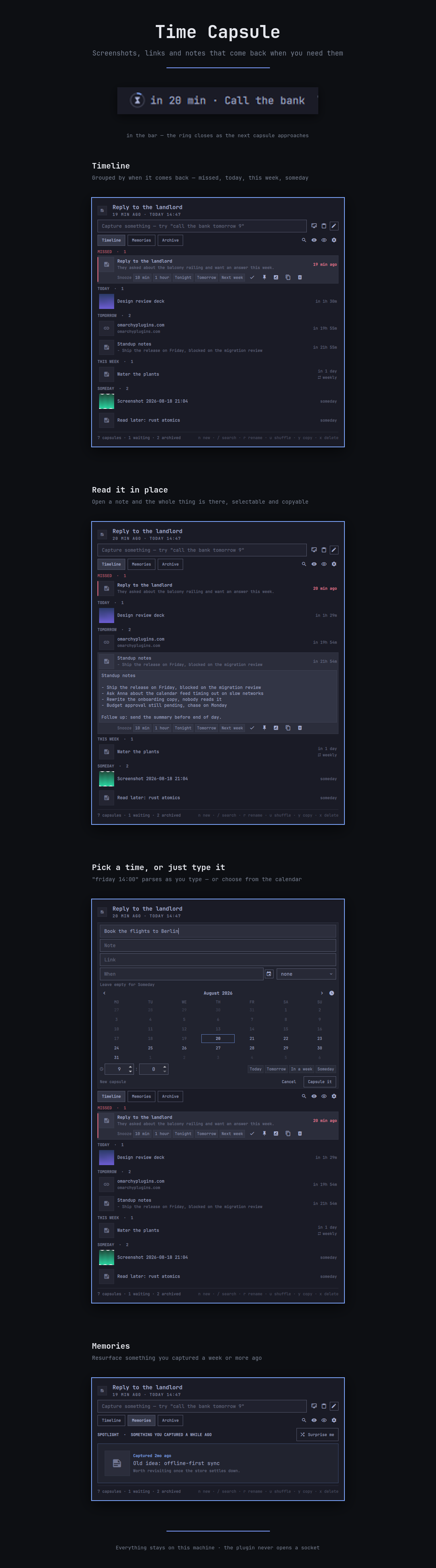
Capture a screenshot, a link or a thought right now, and have it come back to you when it matters. Time Capsule lives in the Omarchy bar, keeps everything on your own machine, and never opens a network socket.
What it does
- One-line capture. Type
call the bank tomorrow 9and the date is parsed out of the sentence as you type.in 45m,friday 14:00,next monday,25/12,2027-01-15 08:30andsomedayall work. Paste a link mid-sentence and it is pulled out into a proper link capsule. - Or pick a date from a calendar. The full composer has a month grid with hour and minute steppers and Today / Tomorrow / In a week / Someday shortcuts, so you never have to guess at wording.
- Capture what you are looking at. Grab a region of the screen, or paste the clipboard — an image becomes an attachment, a link becomes a link capsule, text becomes a note.
- Comes back with its picture. When a capsule falls due it arrives as a desktop notification carrying its own screenshot. Click it to open the link, the image, or the panel.
- Snooze and repeat. One click for 10 minutes, an hour, tonight, tomorrow or next week. Capsules can repeat daily, weekly or monthly.
- Memories. Shuffle resurfaces a random old capsule; On This Day shows what you captured a year ago today.
- Search and archive. Finished capsules are archived rather than destroyed,
and
/searches titles, notes, links and tags. Bulk deletion lives in the settings pane behind a confirmation. - Tuneable. Bar-icon pulse (off, slow, gentle, fast), what the capture button picks (region, smart, window, fullscreen), week start, how many minutes early to notify, and a silent catch-up mode all live in settings.
- Keyboard-first. The panel is fully drivable without the mouse.
Install
omarchy plugin add https://github.com/itsmoorgrove/omarchy-timecapsule.git --enable
Then add Time Capsule to your bar from the Omarchy bar settings.
To install from a local clone instead:
git clone https://github.com/itsmoorgrove/omarchy-timecapsule.git
cd omarchy-timecapsule
rsync -a --delete --exclude .git --exclude test \
  ./ ~/.config/omarchy/plugins/io.github.itsmoorgrove.timecapsule/
omarchy-shell shell rescanPlugins
Using it
Click the bar icon to open the panel. The icon is an hourglass inside a ring: the ring closes as the next capsule approaches, turns red the moment something is due, and carries a dot when capsules are waiting.
| Action | |
|---|---|
| Click the bar icon | Open the panel |
| Middle-click the bar icon | Capture the clipboard |
| Right-click the bar icon | Cycle what the bar label shows |
Inside the panel:
| Key | |
|---|---|
j / k |
Move through capsules |
h / l |
Switch between Timeline, Memories and Archive |
t / m / g |
Jump straight to Timeline, Memories or Archive |
r |
Rename the selected capsule |
y |
Copy its text to the clipboard |
Enter |
Open the selected capsule |
n |
New capsule, full editor |
/ |
Search |
s |
Snooze the selected capsule an hour |
e |
Edit the selected capsule |
p |
Pin |
a |
Mark done |
x |
Delete, with a confirmation |
c |
Capture a region |
v |
Capture the clipboard |
u |
Shuffle a memory |
i |
Toggle private mode |
, |
Settings |
b |
Cycle what the bar label shows |
Esc |
Close |
Dates it understands
tomorrow, tomorrow 9, tomorrow morning, tonight, this evening,
today at 17:00, in 45m, in 2h, in 3d, in 2 weeks, in an hour,
3 days from now, friday, friday 14:00, next monday, next week,
next month, 25/12, 25/12 18:00, 2027-01-15 08:30, 31 dec 20:00,
jan 5 2027, at noon, at midnight, 9pm, 21:45, someday.
Bare numbers are never read as times — Buy 9 eggs stays a title. Numeric dates
are day-first, so 3/4 is the third of April.
Scripting
omarchy-shell -q io.github.itsmoorgrove.timecapsule add "renew the domain in 2 weeks"
omarchy-shell -q io.github.itsmoorgrove.timecapsule due
omarchy-shell -q io.github.itsmoorgrove.timecapsule list
omarchy-shell -q io.github.itsmoorgrove.timecapsule next
omarchy-shell -q io.github.itsmoorgrove.timecapsule count
omarchy-shell -q io.github.itsmoorgrove.timecapsule capture
omarchy-shell -q io.github.itsmoorgrove.timecapsule paste
omarchy-shell -q io.github.itsmoorgrove.timecapsule shuffle
Bind capture to a key in ~/.config/hypr/bindings.lua:
o.bind("SUPER + SHIFT + C", "Capsule a region",
  "omarchy-shell -q io.github.itsmoorgrove.timecapsule capture")

o.bind("SUPER + SHIFT + V", "Capsule the clipboard",
  "omarchy-shell -q io.github.itsmoorgrove.timecapsule paste")
Where your data lives
~/.local/share/omarchy/timecapsule/     mode 0700
├── capsules.json                       mode 0600, written atomically
└── media/<sha256>.png                  mode 0600, content-addressed and deduplicated
$XDG_DATA_HOME is honoured if you set it. Deleting a capsule releases its
screenshots, and Tidy media in the settings removes anything unreferenced.
capsules.json is written atomically, which replaces the file each time, so
the running shell stops noticing outside edits to it. If you restore a backup
or edit the store by hand, restart the shell afterwards:
omarchy restart shell
Privacy and security
Time Capsule holds notes and screenshots, so it is built defensively.
- No network access. The plugin never opens a socket. It does not fetch page titles, favicons, or anything else. Nothing you capture leaves the machine.
- Owner-only storage. The store directory is
0700and every file inside it is0600, created that way rather than fixed up afterwards. - Private mode covers note bodies and thumbnails until you click to reveal them, and re-covers everything when the panel closes. This protects against someone reading your screen over your shoulder. It is not encryption — a process running as you can still read the files.
- Links are checked twice. Only
httpandhttpsare ever opened. Links carrying credentials (https://user@host/) are refused, and international domains are converted to punycode and displayed that way, so a Cyrillicаpple.comshows asxn--pple-43d.cominstead of impersonating Apple. Every link is validated again at the moment you click it, so editing the store by hand cannot smuggle afile://URL past the check. - Images are checked before they are stored. Magic bytes must match a real PNG, JPEG or WebP; symlinks are refused; files over 12 MB or images over 12000px on a side are refused so a decode bomb cannot be handed to the long-lived shell process. Thumbnails decode at a bounded size.
- Nothing is run through a shell. Every external command is executed as an
argument vector; there is no
shell=True, noos.system, nosh -canywhere. The one string the shell later evaluates — the notification's click action — is built only from a path we own and a validated capsule id, both shell-quoted. Text that must reach a helper travels by environment variable or stdin, never as an argument. - Helper binaries are verified before they run.
$OMARCHY_PATHis only honoured when it is an absolute path, and the screenshot tool must be a real regular executable, not a symlink, or the capture is refused. - Nothing the capture writes is trusted. The wrapper hands back a JSON result which is re-validated in full: the media name must match the content-address pattern, the timestamp must be sane and newer than the last one seen, and error text is flattened to a single line before display.
- Text is never rendered as markup. Every label in the plugin is
Text.PlainText, so a note containing HTML is shown, not interpreted. - The clipboard is read only when you ask. There is no watcher and no polling, and clipboard content marked sensitive by a password manager is refused.
- Hostile store contents fail safe. A malformed record is dropped on its own rather than taking the file down with it.
Like every Omarchy plugin, Time Capsule runs unsandboxed inside the shell process with your user's permissions.
External commands used
| Command | Why |
|---|---|
omarchy-capture-screenshot |
Region capture |
omarchy-notification-send |
The reminder notification |
wl-paste |
Reading the clipboard, on request only |
xdg-open |
Opening a validated link or a stored image |
python3 |
The store and open helpers in bin/ |
Development
./test/run
There is also a live keyboard test that drives the real running shell:
./test/live-keys
It types with wtype, so keys land in whatever window has focus. Leave the
panel focused and do not touch the keyboard while it runs. It is deliberately
not part of test/run, which must stay runnable without a desktop.
Runs 340 checks: the logic suite (Sanitize, DateParse, CapsuleModel), an
adversarial suite that fuzzes hostile links, media names, capsule ids, notify
arguments and malformed store records, the security suite against the real
bin/ helpers, a manifest check, and source rules that fail the build if a
Text ever loses Text.PlainText or if the screenshot tool is handed a pipe.
omarchy plugin validate .
/usr/lib/qt6/bin/qmllint -I "$OMARCHY_PATH/shell" *.qml components/*.qml
To pick up local changes:
rsync -a --delete --exclude .git --exclude test \
  ./ ~/.config/omarchy/plugins/io.github.itsmoorgrove.timecapsule/
omarchy-shell shell rescanPlugins
rescanPlugins reloads the bar widget and the panel, but an already-mounted
service keeps running its old code. After changing Service.qml, cycle the
plugin instead:
omarchy plugin disable io.github.itsmoorgrove.timecapsule
omarchy plugin enable io.github.itsmoorgrove.timecapsule
Removing it
omarchy plugin remove io.github.itsmoorgrove.timecapsule
rm -rf ~/.local/share/omarchy/timecapsule
The second line deletes your capsules and screenshots.
License
MIT