
OmaValet

Park apps in the Omarchy workspaces where they belong.
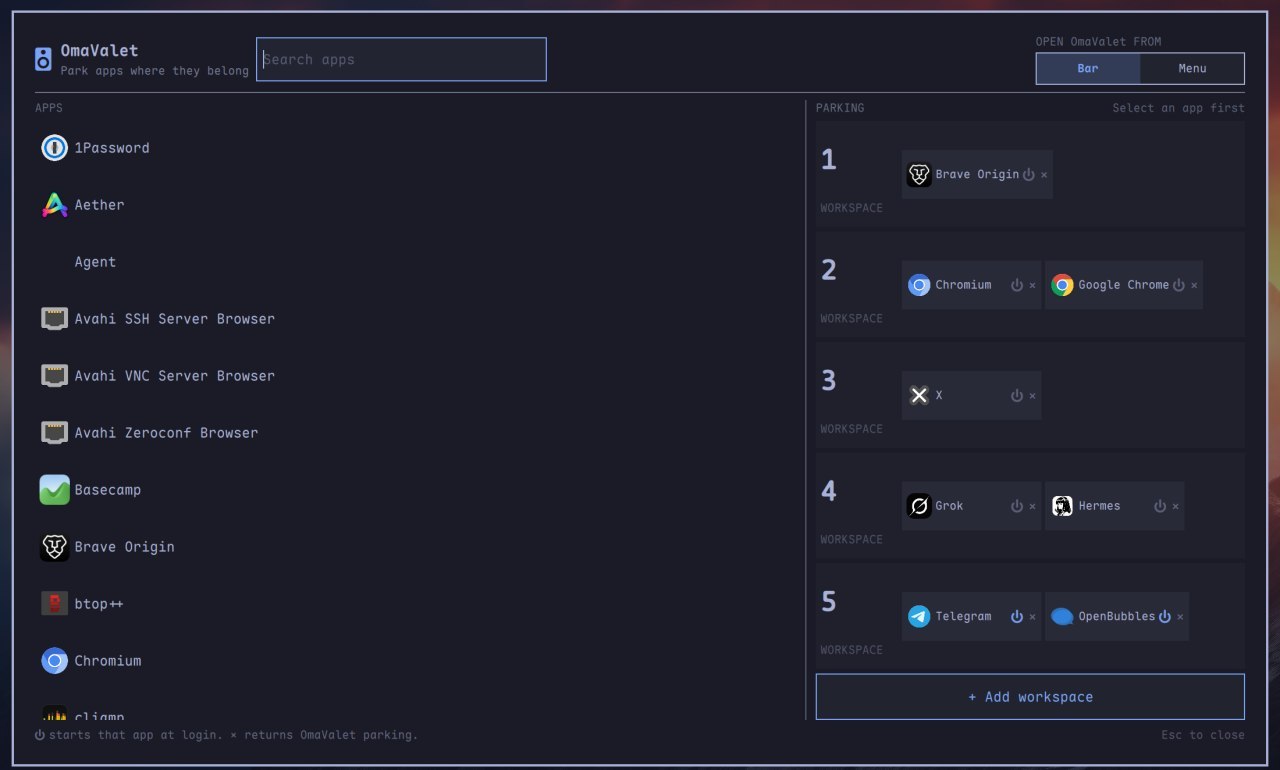
OmaValet is a minimal, theme-aware workspace valet for Omarchy Quattro. It starts in the bar for quick access while you set up parking, then lets you switch between the bar and the root Omarchy command menu from inside OmaValet. It shows applications by their desktop name and icon, displays existing Hyprland workspace assignments, and lets you assign apps to workspaces without hand-editing Lua. Placement is the default. Launch-at-login is optional and off by default.
Features
- Search installed desktop applications by name, including Omarchy Agent (
Super+Ctrl+Shift+A). - Start with quick bar access, then switch between Bar and Menu with the Open OmaValet from toggle in OmaValet's header.
- See five workspace parking lanes at a glance, matching Omarchy's default.
- Park more than one app in the same workspace.
- Add extra workspaces with + Add workspace (up to 10), and remove empty extras with − Remove workspace down to five.
- Click an app, then click a workspace (or + Park) to park it there.
- Opening a parked app switches to its workspace. ⏻ login start is optional, off by default, and silent so it does not steal the current workspace.
- See existing Hyprland assignments as locked, read-only entries.
- Remove OmaValet-owned assignments with ×.
- Press Esc to close (first press clears search if it has text).
- Match real window classes from StartupWMClass, desktop id, and Flatpak
--command=so apps land on the right workspace. - Follow the active Omarchy theme through its native
Color,Style, andBordertokens. - Generate deterministic Hyprland Lua without rewriting
autostart.lua. - Back up
hyprland.luabefore adding the reversible loader block. Writes are atomic and do not follow planted symlinks; reset never restores a stale backup over later edits.
Requirements
- Omarchy Quattro (Omarchy 4)
- Python 3 (standard library only)
No extra packages and no second Quickshell process. No sudo or pkexec is required. Installing the plugin does not write Hyprland config; parking an app does, and only after you click.
Install
omarchy plugin add https://github.com/jcarcinogen/OmaValet.git --enable
OmaValet appears on the right side of the Omarchy bar by default. Click its icon to open the parking board. When setup is finished, choose Menu under Open OmaValet from to remove the bar icon and add OmaValet to the root command menu at Super+Space → OmaValet.
Switching to menu access installs this action:
omarchy-shell shell toggle io.github.jcarcinogen.omavalet
Use
- Open OmaValet from its bar icon. If you previously chose menu access, press Super+Space and choose OmaValet instead.
- Use Open OmaValet from → Bar / Menu in the header whenever you want quick access or a less cluttered bar.
- Search for and select an application.
- Click the workspace where the valet should park it, or + Park on a lane that already has apps.
- Use + Add workspace under the lanes if you need a workspace past the five Omarchy shows by default. Use − Remove workspace to drop an empty extra lane. Five lanes always remain.
- Remove an OmaValet assignment by clicking its ×.
- Click ⏻ on a parked app if you also want it to start at login. Login start stays on that workspace without switching away from wherever you are.
- Press Esc to close.
Locked entries come from existing user-authored Hyprland rules. OmaValet shows them for context but does not overwrite or remove them.
What OmaValet writes
OmaValet does not edit ~/.config/hypr/autostart.lua. Placement is the default; login launch is opt-in:
~/.config/omarchy/omavalet.json— OmaValet-owned assignments- a marked
OmaValetentry in~/.config/omarchy/extensions/omarchy-menu.jsonc, with a first-writeomarchy-menu.jsonc.omavalet.bak, while Menu access is selected - either a right-side bar entry or a top-level overlay entry in
~/.config/omarchy/shell.json, with a first-writeshell.json.omavalet.bak; the toggle moves the same entry instead of creating duplicates ~/.config/hypr/omavalet.lua— generatedo.window(...)rules (follow the workspace on a normal launch). When ⏻ is on, alsoo.exec_on_start("[workspace N silent] uwsm-app -- …")~/.config/hypr/hyprland.lua.omavalet.bak— first-write backup- a marked
require("hypr.omavalet")block in~/.config/hypr/hyprland.lua
Parked apps go to their workspace when you open them. They start at login only if you turn ⏻ on, and that start is silent.
Remove
Reset OmaValet first so its generated state and marked loader are removed safely:
PLUGIN_DIR="$HOME/.config/omarchy/plugins/io.github.jcarcinogen.omavalet"
python3 "$PLUGIN_DIR/scripts/omavalet.py" reset
omarchy plugin remove io.github.jcarcinogen.omavalet
If reset reports "backupPreserved": true, OmaValet detected that the current Hyprland configuration no longer matches its original backup. The backup is deliberately left at:
~/.config/hypr/hyprland.lua.omavalet.bak
Review it before deleting it. Reset never replaces later user changes with the backup.
Development
Run the Python tests:
python3 -m unittest discover -s tests -v
Validate the plugin on Omarchy:
omarchy plugin validate .
The plugin id is io.github.jcarcinogen.omavalet.
Current scope
- Workspaces 1–5 are shown by default, matching Omarchy. Extra lanes appear if you already park there, or when you click + Add workspace (up to 10). Empty extras can be removed down to five.
- Existing assignments found in
hyprland.luaandwindows.luaare read-only. - Application identity comes from freedesktop desktop files plus live class aliases (StartupWMClass, desktop stem, Flatpak
--command=). Omarchy Agent is included even without a.desktoplauncher.
License
MIT