
Omarchy Vibez
Apple Music from vibez, seamlessly integrated into the Omarchy status bar.
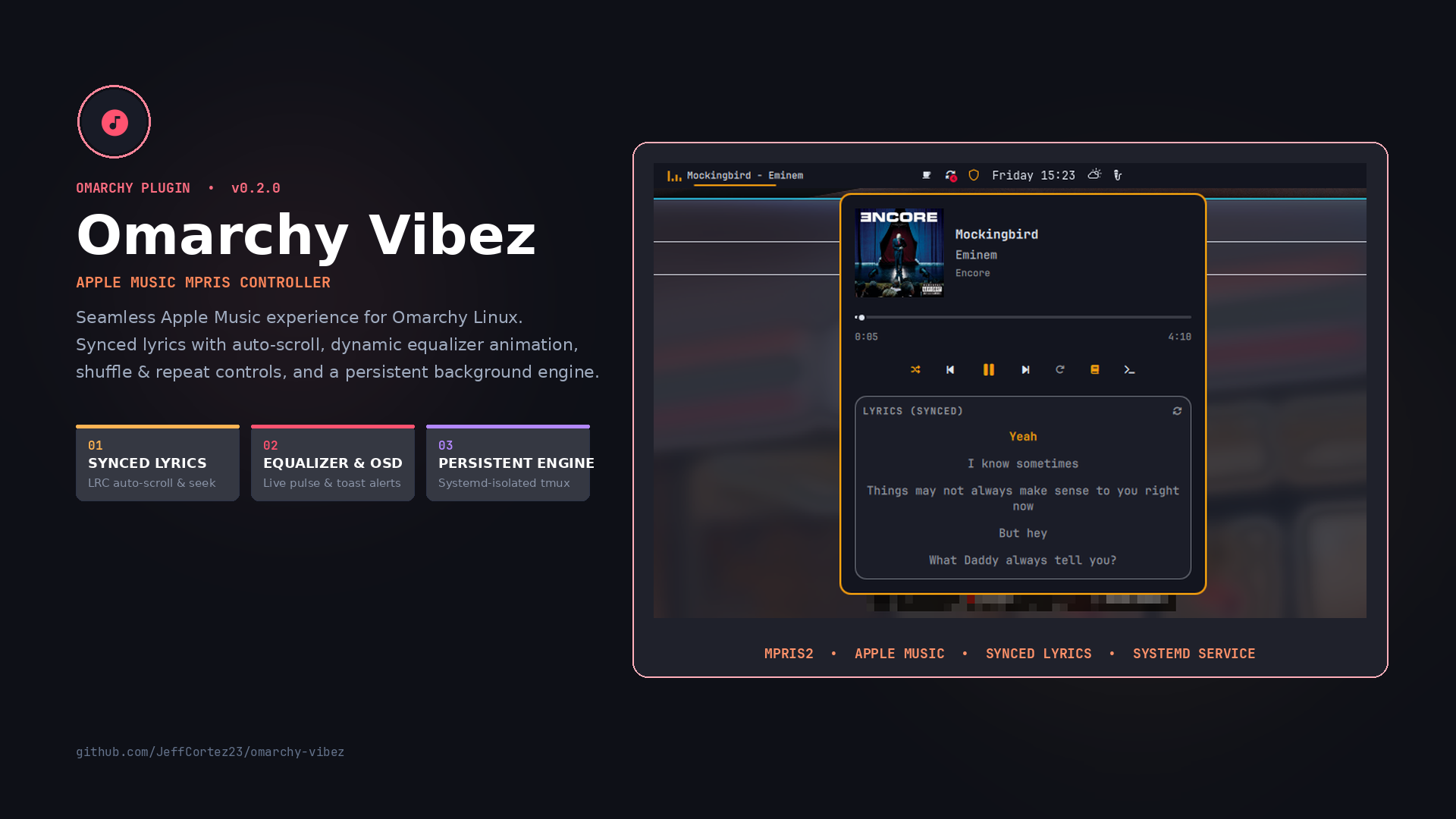
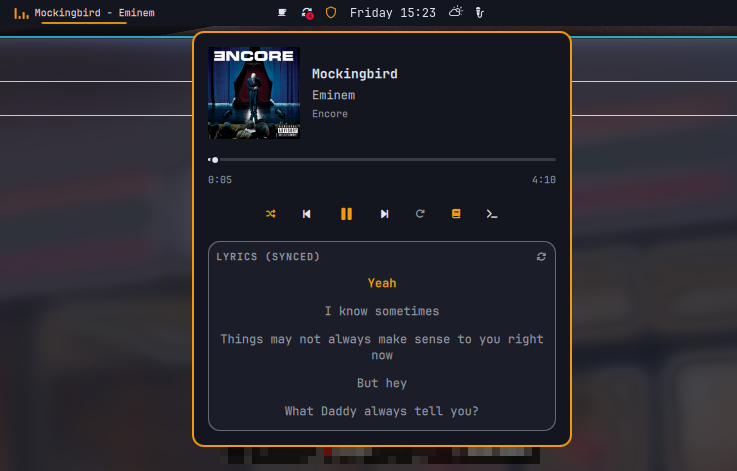
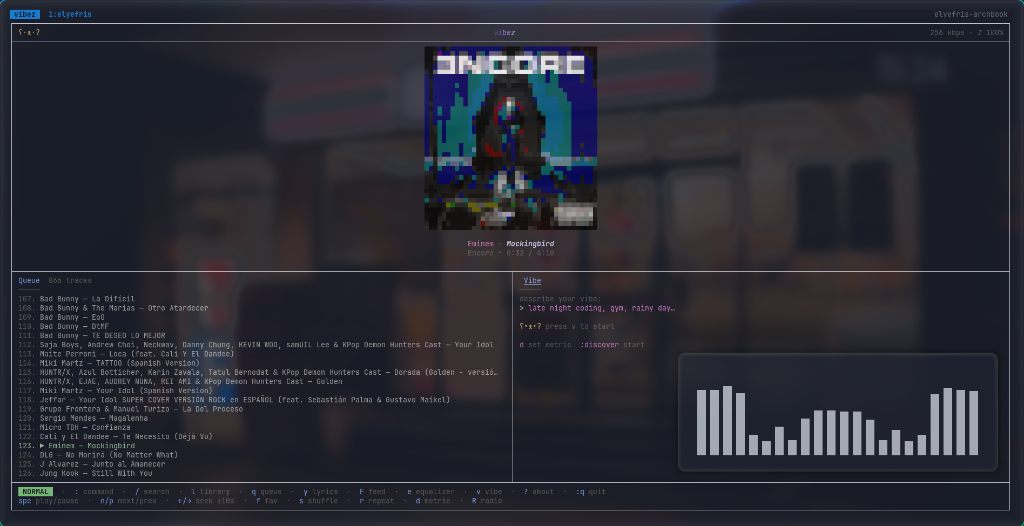
Omarchy Vibez is a native Omarchy shell plugin that reads the MPRIS player exported by vibez. It provides a theme-aware bar widget with now-playing metadata, album art, interactive seekable progress bar, and media transport controls, while keeping the full vibez TUI accessible in a persistent terminal session.



✨ Features
- 🎵 Now-Playing Status: Displays track title, artist, album, and live playback status in the Omarchy bar.
- 📊 Animated Equalizer Icon: Dynamic pulsing equalizer bars in the status bar while playing.
- 🔀 Shuffle & Repeat Modes: One-click toggles for Shuffle (
On/Off) and Repeat (None/Playlist/Track). - 📜 Synced Lyrics Viewer: Expandable lyrics view powered by LRCLIB with real-time autoscrolling and click-to-seek.
- 🔔 Track Change Notifications: Native Omarchy OSD toast notifications whenever songs change.
- 🖼️ Album Art & Metadata: Clean popup with album cover preview, title, artist, and album name.
- ⏱️ Seekable Progress Bar: Interactive time slider with elapsed and total duration timestamps (
mm:ss). - ⏯️ Transport Controls: Previous, Play/Pause, Next, Shuffle, Repeat, Lyrics, and Open TUI buttons.
- 🔄 Mouse Wheel Track Switching: Scroll on the bar icon to skip forward or backward between tracks.
- ⚡ IPC Support: Full CLI and keybind control via
omarchy ipc io.github.jeffcortez23.omarchy-vibez <action>. - 🪟 Persistent Supervisor: Runs
vibezin a managedtmuxsession with persistent logs (~/.local/state/vibez/vibez.log) and auto-recovery. - 🎨 Adaptive Omarchy Theming: Automatically matches your active Omarchy theme colors and typography.
- ⚙️ Configurable: In-bar label, animated icon toggle, toast toggle, click actions, scroll actions, and idle hiding.
📋 Requirements
- Omarchy Linux (v4+) with the Quickshell-based shell.
vibezinstalled and authenticated on your system.tmux(recommended for persistent background playback).- Any supported terminal emulator:
ghostty,alacritty,kitty,foot, orxdg-terminal-exec. - Nerd Font support on your system.
Quick Setup
Check your system prerequisites:
./scripts/check-prereqs.sh
Install tmux and your preferred terminal (ghostty, alacritty, kitty, or foot) using your package manager.
Install vibez following the official vibez installation instructions.
Note: Launch vibez in your terminal once and complete the initial Apple Music login before using the bar controls.
🚀 Installation
From GitHub
# Add the plugin and enable it
omarchy plugin add https://github.com/JeffCortez23/omarchy-vibez.git --enable

# Place it on the center section of your bar (or left / right)
omarchy bar move io.github.jeffcortez23.omarchy-vibez --section center
From Local Checkout
omarchy plugin add /path/to/omarchy-vibez --enable
omarchy bar move io.github.jeffcortez23.omarchy-vibez --section center
If the plugin is already installed but you want to place or re-enable it:
omarchy plugin enable io.github.jeffcortez23.omarchy-vibez --section center
omarchy bar put io.github.jeffcortez23.omarchy-vibez --section center
🎮 Usage & Controls
Mouse Controls
- Left click: Opens the popup panel (or toggles play/pause if configured).
- Middle / Right click: Toggles play/pause.
- Mouse scroll (wheel up/down): Skips to Next / Previous track.
Keyboard Controls (Inside Popup Panel)
Space: Toggle play/pause.n: Next track.p: Previous track.s: Toggle Shuffle mode (On/Off).r: Cycle Repeat mode (None->Playlist->Track).yorl: Toggle Lyrics viewer.o: OpenvibezTUI in terminal.Left/Rightarrow: Seek backward / forward.Esc: Close the popup panel.
IPC & Keybindings
You can trigger plugin actions from custom scripts, shortcuts, or your window manager:
| Command | Action |
|---|---|
quickshell -p /usr/share/omarchy/shell ipc call io.github.jeffcortez23.omarchy-vibez toggle |
Open / close the popup panel |
quickshell -p /usr/share/omarchy/shell ipc call io.github.jeffcortez23.omarchy-vibez playpause |
Toggle play / pause |
quickshell -p /usr/share/omarchy/shell ipc call io.github.jeffcortez23.omarchy-vibez next |
Next track |
quickshell -p /usr/share/omarchy/shell ipc call io.github.jeffcortez23.omarchy-vibez previous |
Previous track |
quickshell -p /usr/share/omarchy/shell ipc call io.github.jeffcortez23.omarchy-vibez shuffle |
Toggle shuffle mode |
quickshell -p /usr/share/omarchy/shell ipc call io.github.jeffcortez23.omarchy-vibez repeat |
Cycle repeat mode |
quickshell -p /usr/share/omarchy/shell ipc call io.github.jeffcortez23.omarchy-vibez lyrics |
Toggle lyrics view |
quickshell -p /usr/share/omarchy/shell ipc call io.github.jeffcortez23.omarchy-vibez launch |
Open / attach to vibez TUI |
quickshell -p /usr/share/omarchy/shell ipc call io.github.jeffcortez23.omarchy-vibez status |
Output playback state (playing, paused, stopped) |
quickshell -p /usr/share/omarchy/shell ipc call io.github.jeffcortez23.omarchy-vibez track |
Output current track title and artist |
⚙️ Configuration
You can customize the widget behavior in ~/.config/omarchy/shell.json or via omarchy bar set:
| Option | Type | Default | Description |
|---|---|---|---|
showTitle |
boolean |
true |
Show track title in tooltip and panel |
showArtist |
boolean |
true |
Show artist in tooltip and panel |
showLabelOnBar |
boolean |
false |
Display track title & artist directly on the status bar |
maxLabelWidth |
number |
180 |
Maximum pixel width for in-bar text label |
animatedIcon |
boolean |
true |
Show animated equalizer bars when playing |
notifyOnTrackChange |
boolean |
true |
Show toast notification when track changes |
hideWhenClosed |
boolean |
false |
Hide widget when vibez is not running |
leftClick |
string |
"Open panel" |
Left click action ("Open panel" or "Play/pause") |
scrollAction |
string |
"Previous/next track" |
Scroll action ("Previous/next track" or "Disabled") |
Configuration Examples
# Show track label directly on the status bar:
omarchy bar set io.github.jeffcortez23.omarchy-vibez showLabelOnBar true --json

# Set left-click to immediately toggle play/pause:
omarchy bar set io.github.jeffcortez23.omarchy-vibez leftClick '"Play/pause"' --json

# Hide the widget when vibez is not playing:
omarchy bar set io.github.jeffcortez23.omarchy-vibez hideWhenClosed true --json
🔁 Persistent Playback & Architecture
vibez runs audio playback and its MPRIS D-Bus service inside its terminal process. To guarantee playback never terminates when closing your terminal emulator window, this plugin runs vibez inside an isolated user systemd session managing a persistent tmux session:
# Attach to the running session from any terminal:
tmux attach-session -t vibez

# Or launch it directly from the widget or IPC:
quickshell -p /usr/share/omarchy/shell ipc call io.github.jeffcortez23.omarchy-vibez launch
- Systemd Session Isolation: The background session is launched via
systemd-run --user --unit=omarchy-vibez-session. Closing terminal windows (Ghostty, Alacritty, Kitty, Foot) only detaches from the session without killing the process tree or stopping music. - Supervisor & Auto-Recovery: The
scripts/vibez-supervisor.shprocess runsvibezwith automatic recovery on unexpected exits while logging output cleanly to~/.local/state/vibez/vibez.log. - Exiting: To completely exit
vibez, press:qinside the TUI or stop the background session:systemctl --user stop omarchy-vibez-session # or tmux kill-session -t vibez
🔄 Updating
omarchy plugin update io.github.jeffcortez23.omarchy-vibez
omarchy restart shell
🗑️ Removal & Uninstallation
To remove the plugin from your Omarchy setup:
# 1. Disable the widget from the bar
omarchy plugin disable io.github.jeffcortez23.omarchy-vibez

# 2. Remove the plugin
omarchy plugin remove io.github.jeffcortez23.omarchy-vibez --yes

# 3. Reload shell
omarchy restart shell
Removing the plugin deletes its checkout from ~/.config/omarchy/plugins/ and removes its widget placement from your bar configuration. No background services, temporary files, or credentials remain on disk.
🛠️ Troubleshooting
- Widget says "vibez is not running": Start
vibezin your terminal and begin playback once. The plugin attaches as soon as the MPRIS player becomes active. - Check MPRIS status:
busctl --user list | grep -i vibez - Check active tmux session:
tmux ls tmux attach -t vibez - Reload shell plugins cache:
omarchy-shell shell rescanPlugins
omarchy restart shell
📄 License & Changelog
- Full release notes and version history: CHANGELOG.md.
- Distributed under the MIT License. Copyright (c) 2026 Jeff Cortez.