
Bazaar
The plugin marketplace, in your bar. Search every listing, filter by category, sort by what is actually trending, and copy an install command without opening a browser.
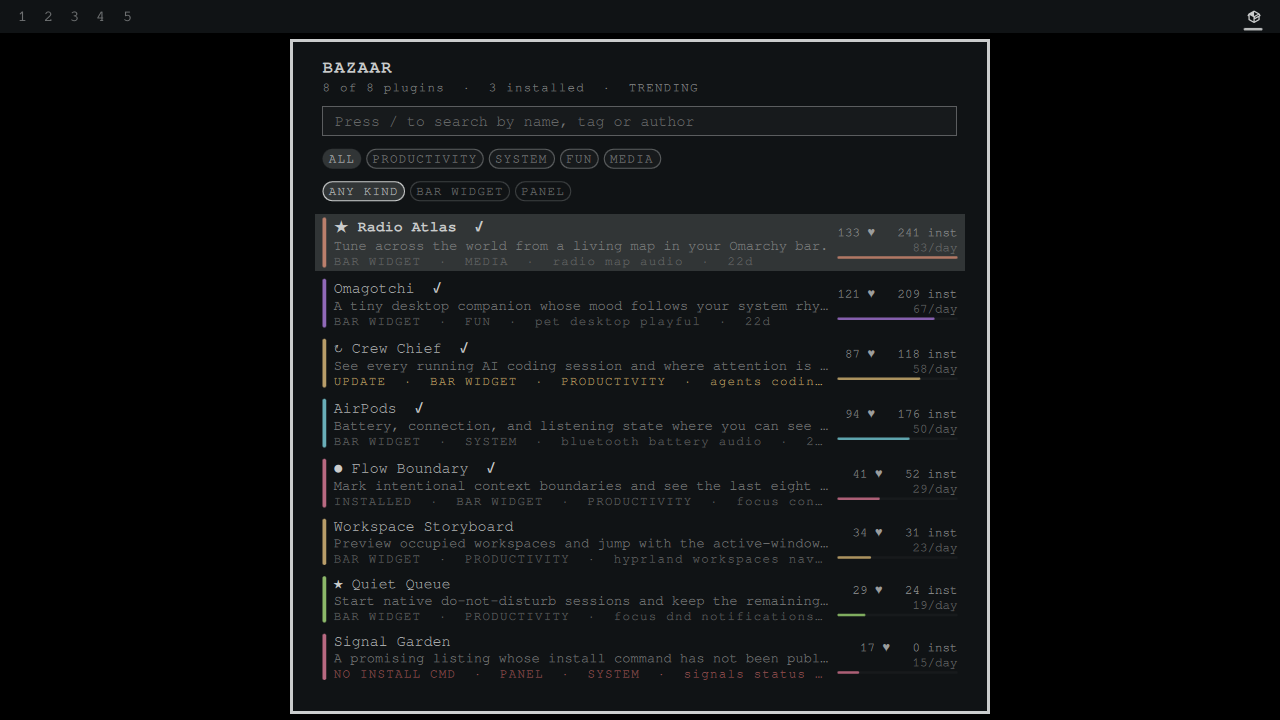
You are in a terminal. You want a clipboard widget, or a VPN indicator, or something you cannot name yet. The marketplace is a website, so finding out means leaving what you were doing, loading a page, scrolling, and coming back.
Bazaar puts the whole catalog behind one key. Type a few letters, get the matches ranked, press enter, and the install command is on your clipboard. The pill counts what has been listed since you last looked and shows nothing when you are caught up.

Trending means views per day, not a running total
Hearts, installs and views are cumulative counters. Ranking on them returns whatever has been listed longest and calls it popular, which is why the same handful of plugins sit at the top of every "most hearted" list forever.
The catalog records when each plugin was listed, so Bazaar divides: views per day since listing. That is the only figure here that distinguishes what is hot right now from what has been around longest, and it costs one division.
Sort by trending, hearts, installs, views, GitHub stars, newest, or name. Whatever you choose, the bar under each row shows relative magnitude, scaled to the 90th percentile rather than the maximum so one runaway listing does not flatten everything else into an invisible sliver.
It tells you when a plugin cannot be installed
The marketplace publishes, for every listing, whether an install command exists. Bazaar reads that flag and marks the ones that have none.
This is not a rare edge case. Some popular listings require manual setup because the marketplace has no install command for them. Bazaar shows you that before you spend time on a listing rather than after.
A shortlist the website cannot give you
Marketplace hearts are anonymous aggregates by design: the engagement service stores no accounts, no cookies and no browser identifiers. That is a good privacy decision, and it means there is no "plugins I hearted" to fetch back.
Bazaar keeps a saved list locally instead. Press s to save, a to show only
saved. It lives in your own state directory, it is yours, and it is the one
feature here that a website structurally cannot offer.
Keys
| Key | Action |
|---|---|
/ |
search by name, description, tag or author |
j k or arrows |
move |
enter |
copy the install command |
o |
open the repository |
s |
save or unsave |
a |
show only saved |
t |
cycle sort |
c |
clear search and filters |
r |
refresh now |
esc |
close |
Category filters are pills you can click. Left-click a row copies its install command; right-click opens its repository.
Install
Copy the plugin into your Omarchy plugins directory and enable it in the bar:
git clone https://github.com/jeremylongshore/omarchy-bazaar-entry.git \
  ~/.config/omarchy/plugins/bazaar
Then add io.github.jeremylongshore.bazaar to your bar layout in
~/.config/omarchy/shell.json, or enable it from the Omarchy settings UI.
To remove it, delete that directory, drop the entry from your bar layout, and
optionally rm -rf ~/.local/state/omarchy/bazaar to clear the cache and your
saved list.
Settings
| Setting | Default | What it does |
|---|---|---|
| Default sort | Trending | which ranking the panel opens on |
| Count new listings on the pill | On | show how many plugins appeared since you last looked |
| Flag listings nobody can install | On | mark plugins whose install command is missing |
| Desktop notifications | Off | notify when new plugins are listed |
How it works
No node, no python, no external runtime. A stock Omarchy install has no node on
the graphical session PATH, so the whole plugin is Quickshell plus the curl your
box already ships. Parsing lives in a pure Model.js that loads unchanged in
the shell and in node, which is how the offline suite covers it.
Two sources, refreshed on different cadences because they cost different amounts:
| Source | Size | Cadence |
|---|---|---|
plugins.omarchy.org/catalog.json |
about 1.2 MB gzipped (9.1 MB decoded, 2026-09-20), growing | every 6 hours, conditionally |
api.omarchyplugins.com/v1/stats |
15 KB gzipped | every 30 minutes |
The catalog carries an ETag, so an unchanged catalog answers 304 with no
body at all. Both are cached under ~/.local/state/omarchy/bazaar/ through
FileView with atomic writes, so a killed shell never leaves half a file. The
panel refreshes on open when the cache is stale, and is idle otherwise.
Neither request is authenticated and neither carries anything about you. Bazaar only reads.
Safety
Every listing is written by a third party, so all of it is treated as untrusted
input. Names, descriptions, tags and authors render as PlainText, width-bound
and elided, so a long or hostile name cannot push a row or shove the stats off
the panel.
The install command is the one string that reaches your clipboard, and it is
refused outright if it contains a newline, because a newline in a pasted command
runs a second command. It reaches wl-copy on stdin rather than through a
shell, so there is nothing to quote and nothing to escape.
Repository links are opened only when they match https://github.com/....
Tests
npm test
The suite runs against real catalog and stats payloads captured from the live marketplace, never the network.
Maintainers wanted
These plugins are growing, and we are looking for dependable Omarchy users who want to review issues, test releases, and keep a plugin healthy over time. Start with a small pull request or open a maintainer interest issue titled Maintainer interest. Tell us which plugin you use and how you want to help. Consistent contributors can earn maintainer responsibility.
License
MIT. See LICENSE.