
Crew Chief
Every running AI coding agent session in your Omarchy bar, any harness, and a loud pill the moment one is blocked waiting on you.
You're running four agent sessions across four projects. Maybe Claude Code in two,
Codex in one, Goose in another. One of them has been sitting on a permission prompt for
six minutes. Which one? Crew Chief knows. A bar pill counts your running sessions,
4, and the moment a session is blocked waiting on you, the pill goes loud in
your theme's active color: 2 need you. The panel lists the whole fleet,
attention first: project, harness, state, how long it's been waiting, and the
capped attention headline its reporter supplied.
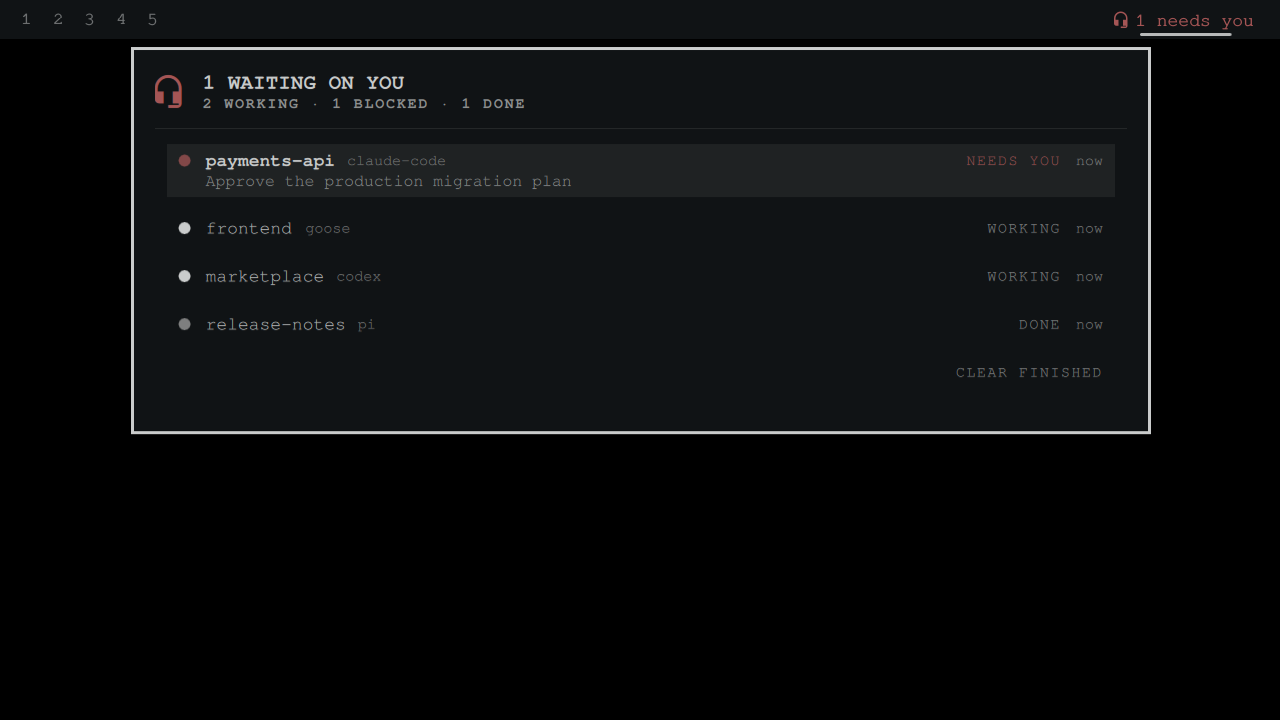
The existing agent widgets tell you about your quota. Crew Chief tells you who needs you right now, fed by each harness's own lifecycle events, not by polling a usage API.

Works with every make and model
Crew Chief is harness-agnostic by design: the widget watches a spool of tiny JSON state files (the protocol), and anything that can run a command can report in. Three integration tiers:
| Harness | Integration | States you get |
|---|---|---|
| Anything running under Herdr, whose detection roster covers Claude Code, Codex, Amp, Cline, Copilot, and more | zero config: when herdr is installed, the widget consumes one bounded herdr status --json snapshot per poll (herdrSync setting, default On, harmless no-op without it) |
working / needs you (blocked) / done, with the pane title as context |
| Claude Code (standalone) | first-class hook adapter, one-command install (below) | working / needs you / done, with a bounded attention headline |
| OpenAI Codex (standalone) | adapters/codex-notify wired into notify in ~/.codex/config.toml |
done (turn complete) |
| Goose, Kilo, pi, Hermes, aider, opencode, anything | call bin/crew-chief-report from whatever event surface your tool has: hooks, notify programs, wrappers, extensions |
whatever you report |
Remote fleets work too: sessions you drive from your phone (Moshi/mosh, SSH) report in wherever the harness actually runs. To see another machine's fleet on this bar, sync its spool directory over (Syncthing, rsync) or have its reporter write via SSH. Rows are plain files and stale ones age out automatically.
The generic reporter is one command with sane defaults (session id defaults to the
harness PID, directory to $PWD):
crew-chief-report working   --agent goose
crew-chief-report needs_you --agent kilo --message "waiting on approval"
crew-chief-report done      --agent codex
crew-chief-report end
If your favorite harness has a native event surface you'd like a first-class adapter for, open an issue. Adapters are ~40 lines of bash.
Install
omarchy plugin add https://github.com/jeremylongshore/omarchy-crew-chief-entry --enable
Add Crew Chief to your bar layout (Omarchy menu → Bar), then wire your harnesses. For Claude Code (one command, idempotent, backs up your settings first):
~/.config/omarchy/plugins/omarchy-crew-chief-entry/hooks/install-claude-hooks
Restart any running Claude Code sessions so they pick up the hooks. That's it. New sessions report in automatically. Reporter messages are persisted locally and rendered in the panel, so adapters should send an attention headline, never a secret or transcript excerpt.
For Codex, point notify at the adapter in ~/.codex/config.toml:
notify = ["/home/YOU/.config/omarchy/plugins/omarchy-crew-chief-entry/adapters/codex-notify"]
For everything else, call bin/crew-chief-report from your tool's event hooks. See
docs/PROTOCOL.md.
How it works (Claude Code adapter)
Claude Code fires hook events at lifecycle
moments. The installed hook (hooks/crew-chief-event, ~40 lines of bash + jq) writes one
tiny JSON state file per session under ~/.local/state/omarchy/crew-chief/:
| Claude Code event | Session state |
|---|---|
SessionStart, UserPromptSubmit |
WORKING |
Notification (permission prompt, waiting on input) |
NEEDS YOU |
Stop (finished its run) |
DONE |
SessionEnd |
removed |
Every other harness reaches the same spool through its own adapter or the generic reporter. The widget treats all makes and models identically.
The widget polls that spool (default every 3s) and renders the fleet. No network, account, API key, telemetry, or transcript polling. The spool carries a bounded session id, project directory, harness, state, timestamp, and optional attention headline. The writer retains at most 256 records; each read examines at most 1,024 candidate names, opens only regular same-owner files without following links, reads 4 KiB per file, and returns at most the newest 64 sessions.
Using the panel
- Rows sort attention-first. The session that's waited longest on you is on top, with its reporter-supplied attention headline under the project name.
- Left-click a row: best-effort jump to that project's terminal window
(
hyprctl dispatch focuswindow). - Right-click a row: dismiss it from the list.
- CLEAR FINISHED: sweep away all
DONErows at once. - Stale sessions (no event for 4h, configurable) drop off automatically.
Settings
| Key | Default | What it does |
|---|---|---|
pollSec |
3 |
Spool poll interval (seconds) |
staleMinutes |
240 |
Forget sessions with no events after this long |
showDone |
On |
Keep finished sessions visible until dismissed |
herdrSync |
On |
Snapshot Herdr-detected agent panes into the fleet each poll (no-op without Herdr) |
Remove
omarchy plugin remove io.github.jeremylongshore.crew-chief
To unwire the hook, restore the backup the installer made
(~/.claude/settings.json.crew-chief.bak) or delete the crew-chief-event entries from
~/.claude/settings.json.
Dependencies
jq(ships with Omarchy), used by the hook scripts and reporter.- At least one agent harness to watch: Claude Code (hooks,
any 2025+ release), Codex CLI (
notify), or anything that can invokecrew-chief-report.
Development
The offline lane covers model behavior, hooks, every adapter, descriptor-bound state races, accessibility, exact marketplace copy, coverage, mutation, and presentation contracts:
npm ci
npm test
npm run test:race
npm run test:mutation
npm run audit
npm run test:e2e performs validator, qmllint, and live-shell rendering on
the configured Buzz Omarchy rig.
Maintainers wanted
These plugins are growing, and we are looking for dependable Omarchy users who want to review issues, test releases, and keep a plugin healthy over time. Start with a small pull request or open a maintainer interest issue titled Maintainer interest. Tell us which plugin you use and how you want to help. Consistent contributors can earn maintainer responsibility.
License
MIT. See LICENSE.