
Wait State
CPU usage tells you the machine is busy. Wait State tells you whether your work is stuck.
Wait State is a native Omarchy bar widget for Linux pressure stall information (PSI). It reads the kernel's CPU, memory, and I/O pressure signals, follows the worst current bottleneck in the bar, and keeps six hours of bounded history for the panel.
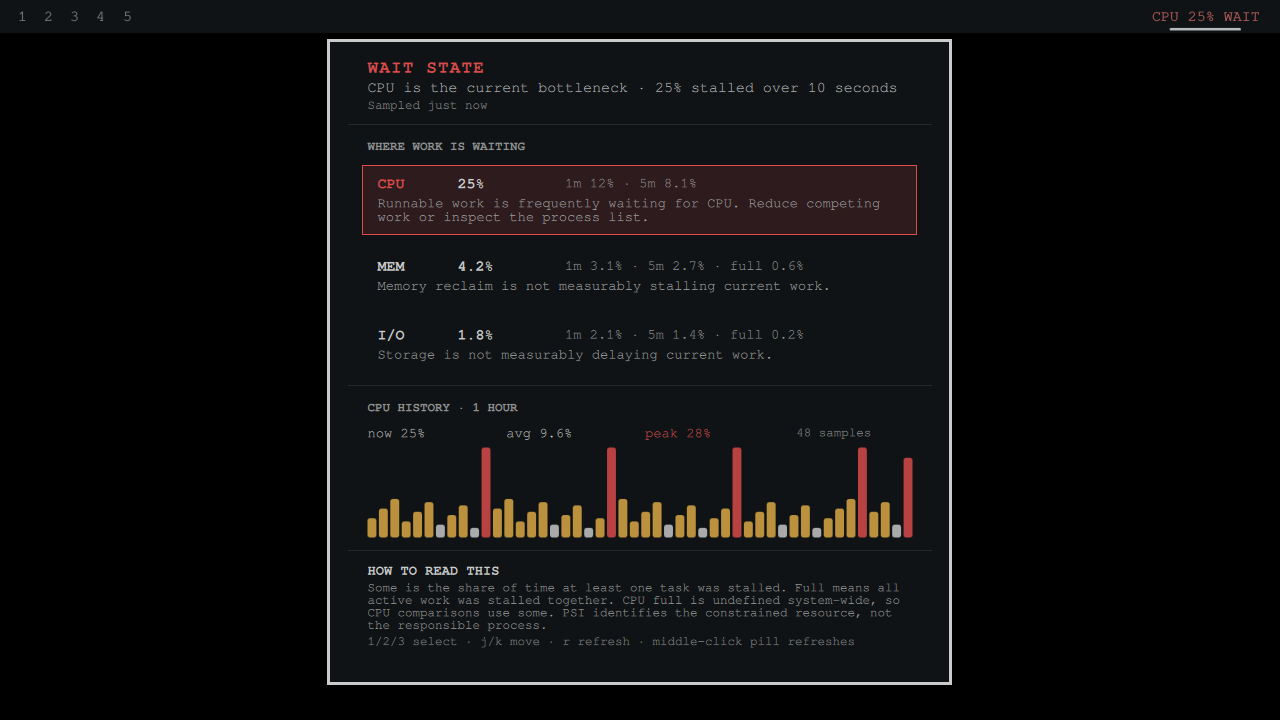
The screenshot above is a direct full-frame capture from a real isolated Omarchy shell on the Buzz production rig. A bounded rig-only PSI fixture drives the unchanged procfs reader and state parser so the same complete product story is reproducible without leaking host pressure or inherited history.

What it answers
Traditional monitors report utilization: how much CPU or memory is in use. A busy machine may still be responsive. PSI reports the share of wall-clock time that work could not proceed because it was waiting for a resource.
The bar reads like this:
CPU 8.1% WAIT
Click it to see:
- live 10-second pressure for CPU, memory, and I/O;
- 1-minute and 5-minute kernel averages;
- partial stalls (
some) and whole-machine stalls (full); - a bounded 15-minute, 1-hour, or 6-hour history;
- current, average, and peak pressure for the selected resource;
- a plain-language interpretation that does not pretend to identify a process.
CPU full is undefined at the system level, so Wait State deliberately uses
some for CPU comparisons. Memory and I/O rows also expose full, where it
means every non-idle task was stalled together.
Install
omarchy plugin add https://github.com/jeremylongshore/omarchy-wait-state-entry.git --enable --yes
Wait State requires an Omarchy kernel with PSI enabled. Current Omarchy systems expose these read-only files:
/proc/pressure/cpu
/proc/pressure/memory
/proc/pressure/io
If a source is missing, the panel says it is unavailable. A partial read never masquerades as a complete measurement.
Controls
| Input | Action |
|---|---|
| Click the pill | Open or close the panel |
| Middle-click the pill | Refresh immediately |
| Click a resource row | Select its history |
j / k |
Move through CPU, memory, and I/O |
1 / 2 / 3 |
Select CPU, memory, or I/O |
r |
Refresh immediately |
Esc |
Close the panel |
Settings
| Setting | Default | Purpose |
|---|---|---|
| Refresh interval | 5 seconds | Live sampling cadence: 2, 5, 10, or 30 seconds |
| Bar resource | Worst | Follow the highest current pressure or pin one resource |
| Default history | 1 hour | Start the panel at 15 minutes, 1 hour, or 6 hours |
| Warning threshold | 5% | Elevated-state display boundary |
| Critical threshold | 20% | Severe-state display boundary |
The thresholds are presentation choices, not universal kernel limits. Workload and latency objectives differ, so the plugin normalizes invalid settings but does not claim that one percentage is harmful on every machine.
Data and resource bounds
Wait State has no network access, credentials, telemetry, or elevated actions. It does not kill processes or change system configuration.
- Exactly three fixed procfs files are read.
- Each file is capped at 512 bytes by the reader.
- The combined parser input is capped again at 4,096 characters.
- History is sampled at most once every 15 seconds.
- Persistence is capped at 1,440 points, which is six hours at that cadence.
- The state parser refuses files above 1,000,000 characters.
- State lives at
$XDG_STATE_HOME/omarchy/wait-state/state.json, falling back to~/.local/state/omarchy/wait-state/state.json.
The runtime is QML plus Bash and coreutils. Node is used only by the offline test suite and is never invoked by the graphical session.
What PSI can and cannot prove
PSI can identify whether CPU, memory, or I/O is constraining forward progress. It cannot name the process responsible. The panel suggests the next class of investigation, but it never turns a resource-level signal into a process-level accusation.
Kernel documentation: Pressure Stall Information.
Development and verification
npm test
npm run test:race
npm run test:mutation
npm run audit
bash scripts/run-plugin-gates.sh .
bash scripts/rig-verify.sh .
bash e2e/buzz.sh
bash scripts/approve-preview.sh
Static validation and qmllint do not prove the plugin loads. The E2E step
starts an isolated real Omarchy shell, exercises the production reader and
state parser, opens the panel, captures a direct 16:9 frame, and treats every
plugin-sourced QML warning as a finding. Visual approval is recorded only for
the exact preview hash that was inspected.
Remove
omarchy plugin remove io.github.jeremylongshore.wait-state --yes
rm -rf -- "${XDG_STATE_HOME:-$HOME/.local/state}/omarchy/wait-state"
The second command is optional and deletes only Wait State's disposable local history.
Maintainers wanted
These plugins are growing, and we are looking for dependable Omarchy users who want to review issues, test releases, and keep a plugin healthy over time. Start with a small pull request or open a maintainer interest issue titled Maintainer interest. Tell us which plugin you use and how you want to help. Consistent contributors can earn maintainer responsibility.
License
MIT.