
Bing Wallpaper for Omarchy
Sets your background to Bing's image of the day, keeps the last days in a browsable library, and puts the image back after a theme switch.
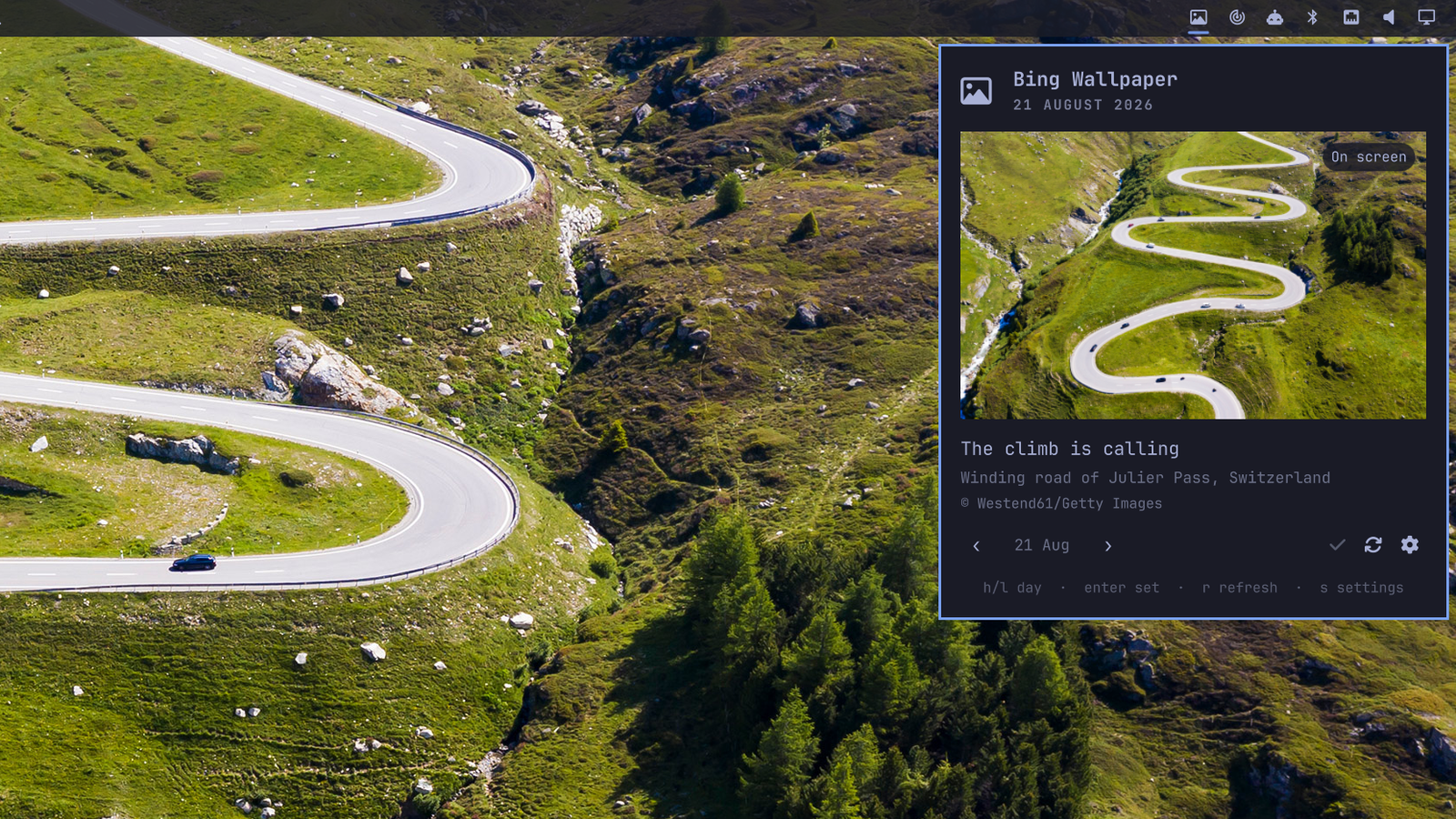
The bar button opens a panel with today's image, its title and the photo
credit. ‹ steps back through the library and › forward again, and any day
can be made the background with one click.
Requirements
Omarchy with the shell plugin system, plus curl and jq — both ship with
Omarchy, and bing-wallpaper-sync refuses to run without them. Backgrounds are
applied through Omarchy's own omarchy-theme-bg-set. Nothing else is pulled in,
and the plugin talks to no service other than Bing's public image-of-the-day
endpoint.
That is enforced, not just intended. Requests are pinned to
https://www.bing.com: the feed supplies a path, never a host, and a value
that could point the request anywhere else is dropped before it is fetched.
Redirects are not followed blindly. curl is asked not to follow them at all,
and each hop is checked here instead, so a redirect leaving www.bing.com
ends the transfer rather than being fetched from wherever it points. The feed
also names the file, and only an eight-digit date is accepted there, so a
download can land in the image directory and nowhere else. A download is kept
only if the bytes really are a JPEG, so a 200 that turns out to be an error
page or a transfer cut short is discarded and counted as a failed fetch rather
than becoming your background.
Feed text is treated as text. Titles and copyright lines are rendered with
Text.PlainText and stripped of the characters that would let QML's automatic
rich-text detection turn a title into a document that loads remote images.
Install
omarchy plugin add https://github.com/jestemkarol/bing-wallpaper-omarchy.git --enable
That clones it into ~/.config/omarchy/plugins/, validates the manifest, and
puts the widget in your bar. Within a few seconds it fetches Bing's whole
archive — fifteen days — and applies today's image.
To run it without a bar button, skip --enable and add the id to plugins[]
in ~/.config/omarchy/shell.json instead — the service does the fetching and
applying either way.
Settings
Open the panel and press s, or edit the plugin's entry in shell.json.
| Setting | Default | |
|---|---|---|
| Region | auto |
Bing publishes a different image per market. auto follows your system locale. |
| Resolution | UHD |
Roughly 4 MB an image. The smaller sizes are a few hundred kilobytes. |
| Apply new images automatically | on | Off downloads in the background and leaves picking to you. |
| Keep it after a theme switch | on | See below. |
| Shuffle the library | off | Applies a random downloaded image on each check instead of today's. |
| Keep images for | 30 days | How deep the library gets. See below. |
| Notify when the background changes | off |
How many images you get
Bing's archive holds fifteen days. It serves eight per request and pages
with idx; idx=7 returns days 7–14 and anything past that clamps to the same
window, so two requests reach all of it. That is what you have a minute after
installing.
From there the library grows by one image a day and is bounded by Keep images for, which defaults to 30 days and goes to 365. So a month in you have a month; a year in, a year — but only from the day you installed it. There is no way to reach further back through Bing, and this plugin does not fetch from third-party mirrors of the archive.
The daily check is a single request. Only the fifteen-day sweep pages twice.
Theme switches
omarchy theme set replaces your background with one of the new theme's own
images. With Keep it after a theme switch on, the Bing image goes back up
once the theme transition has settled.
It only does that when the Bing image was actually your background beforehand. Pick a wallpaper by hand and the plugin stays out of your way. It notices that choice within a minute, so the one case it gets wrong is changing your wallpaper by hand and switching themes in the same minute — the Bing image comes back once, and the next hand-pick sticks.
A note on the bar
A transparent bar (bar.transparent in shell.json) chooses its text color by
sampling the wallpaper underneath it. Omarchy re-samples that on a theme change
but not when only the background changes, so this plugin asks for a re-sample
after every image it applies — without it, a day's images would take turns
being unreadable.
Photographs are busier than the backgrounds themes ship, and a fully
transparent bar over one can be a lot. bar.transparent is all-or-nothing, but
a tinted bar is a separate setting — put this in ~/.config/omarchy/shell.toml,
which layers over whatever theme is active and survives theme switches:
[bar]
background-alpha = 0.85
and turn the flag off, since it means fully transparent:
omarchy bar transparent false
That gives a bar in your theme's color at 85% opacity — legible over any image, still showing what is behind it.
Commands
omarchy-shell bing-wallpaper status      # what is downloaded, what is up, when the next check is
omarchy-shell bing-wallpaper list        # every image in the library
omarchy-shell bing-wallpaper refresh     # ask Bing now
omarchy-shell bing-wallpaper today       # apply today's image
omarchy-shell bing-wallpaper next        # the next day, a newer image
omarchy-shell bing-wallpaper previous    # the previous day, an older image
omarchy-shell bing-wallpaper random      # anything from the library
omarchy-shell bing-wallpaper apply 20260818
In the panel: h goes back a day and l forward, enter sets the
background, r refreshes, s opens settings, esc closes. On the bar
button, middle click refreshes and right click steps back a day.
Where things live
~/.local/share/omarchy-bing-wallpaper/
├── images/20260818-geometry-of-a-star-city.jpg
└── state.json
Filenames carry the image title because Omarchy shows a background's basename
as its display name — omarchy theme bg current reads "Geometry Of A Star
City" rather than a row of numbers.
The background itself is set through omarchy-theme-bg-set, the same command
the built-in background switcher uses, so the transition and the live update
are Omarchy's own.
Remove
omarchy plugin remove io.github.jestemkarol.bing-wallpaper
That disables the widget and deletes the folder outright — no backup is kept, because the checkout's history is upstream in git.
The image library is left behind on purpose, so removing and reinstalling does not re-download it:
rm -rf ~/.local/share/omarchy-bing-wallpaper
Do that after choosing another background — omarchy theme bg next will do —
because the background symlink still points into the library, and deleting the
images out from under it leaves it dangling.
Checking Bing yourself
bing-wallpaper-sync is a plain script and runs on its own:
./bing-wallpaper-sync --market ja-JP --resolution 1920x1080 --dir /tmp/bing --dry-run
Development
./test/run.sh                                    # no running shell, one bing.com request
omarchy plugin validate .
qmllint -I "$OMARCHY_PATH/shell" Service.qml Panel.qml
omarchy restart shell                            # a rescan will not reload a service
Model.js holds the scheduling and formatting rules with no QML dependency,
which is what lets test/model.js run them under node.
License
MIT