
Omahub
← All plugins
J

Open With

by Jhair Lescano

When you open a link, a small native menu asks which browser and profile it opens in — or copy it. Only the browsers you have installed show up. No config, nothing to learn.

Security review

Potentially dangerous behavior detected · 4 findings

Deterministic scan — not a security guarantee

High
Risk level
High
Analyzed commit
da15cba
Scanned
1 month ago
  • Registers scheduled or boot-time system tasks.

    systemd-run >/dev/null 2>&1; then
  • Registers scheduled or boot-time system tasks.

    systemd-run --user --quiet --collect \
  • medium eval tests/test.sh:29

    Shell sources dynamically generated content.

    source <(sed -n "46,112p" bin/omarchy-open-with)
  • Docs persistence README.md:79

    Registers scheduled or boot-time system tasks.

    systemd-run --user` — passing the browser and

Automated analysis only — not a security guarantee.

AI advisory review

No obvious issues detected

Language-model assessment · ~deepseek/deepseek-v4-flash-latest — advisory only

Low
AI risk level
Low
Recommendation
install
Model
~deepseek/deepseek-v4-flash-latest
Analyzed commit
da15cba
Reviewed
1 month ago

The plugin is a URL handler that lets users choose which browser/profile to open links with. It registers itself as the default handler via xdg-mime, which is reversible and user-initiated. The code is well-structured, uses safe argument passing, and contains no malicious or obfuscated behavior. The flagged systemd-run usage is for launching browsers detached, not for persistence, and the eval in tests is only in test code, not in the runtime plugin.

  • Modifies system default browser handler (xdg-mime), but this is the plugin's intended purpose and is reversible via uninstall.
  • Uses systemd-run to launch processes, but only to detach browser launches; no persistence or unauthorized execution.
  • Test script uses `source <(sed ...)` to extract code for testing, but this is not part of the runtime plugin.
How this check works

This review combines the deterministic scan (the rule-based results above) with an independent look at the plugin's code by a language model. The model reads a trimmed sample of the repository's files, the manifest, and the README, then gives a plain-language risk level and a recommendation: install (no notable danger), review (look closer first), or avoid (clearly dangerous).

It runs on the same analyzed commit as the deterministic scan and is strictly advisory — it is not a security guarantee and never blocks a plugin by itself. A human moderator still reviews plugins before they are listed.

AI advisory only — automated analysis, not a security guarantee.

Install
$ omarchy plugin add https://github.com/jlescanog/omarchy-open-with --enable
Productivity #quickshell #launcher #system

Open With — Omarchy plugin
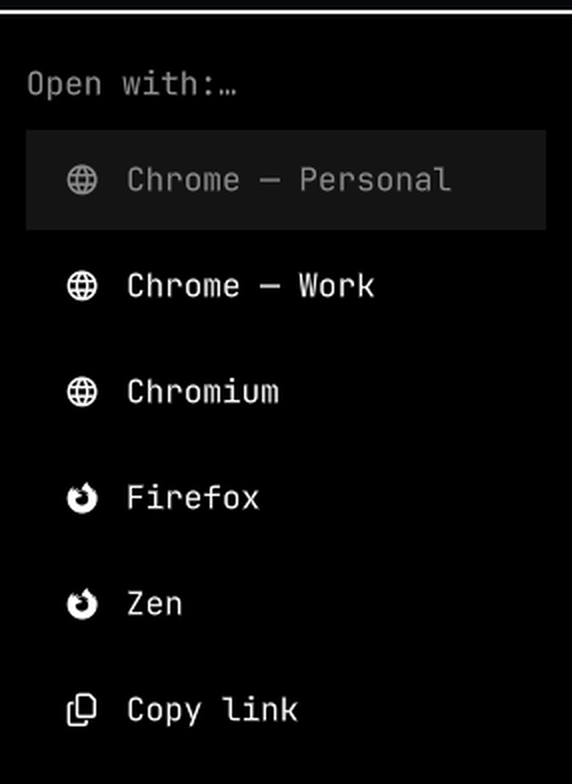
The menu, opened on a link

Click a link anywhere — a chat app, the terminal, a PDF, a notification — and a small native menu asks which browser and which profile it opens in. Or copy it.

That's the whole plugin. No per-site learning, no bar widget, no config file. Only the browsers and profiles you actually have installed show up in the list.

Why

If you run more than one browser profile — one per client, per project, per identity — nothing outside the browser knows they exist. Every app that opens a link just asks the system for "a browser" and the URL lands wherever. Open With puts the choice in front of you at the moment the link opens, and adds a Copy link row for when you didn't want to open it at all.

If you want links to route themselves by domain, or a remembered default, use Browser Picker instead — this one is deliberately the minimal version.

Requirements

  • Omarchy 4 (omarchy-shell)
  • wl-clipboard — for the Copy link row
  • jq — to list profiles (without it you still get one row per browser)
  • a menu program: the native Omarchy menu, or fuzzel / wofi / rofi

Install

omarchy plugin add https://github.com/jlescanog/omarchy-open-with.git --enable --yes

Then make it your default link handler (reversible — it saves the current one):

~/.config/omarchy/plugins/io.github.jlescanog.open-with/bin/open-with-ctl install

or from the shell IPC:

omarchy-shell io.github.jlescanog.open-with install

Uninstall

~/.config/omarchy/plugins/io.github.jlescanog.open-with/bin/open-with-ctl uninstall
omarchy plugin remove io.github.jlescanog.open-with

uninstall restores whatever browser was the default before.

Keybinding (optional)

Bind the menu to a key for the current clipboard URL, e.g. in ~/.config/hypr/bindings.conf:

bindd = SUPER, B, Open link with…, exec, omarchy-shell io.github.jlescanog.open-with clipboard

Supported browsers

Chrome, Chromium, Brave, Edge, Vivaldi, Opera, Thorium (with per-profile rows), and Firefox, LibreWolf, Floorp, Waterfox, Zen. Anything not installed is simply absent from the menu.

How it works

open-with-ctl install writes ~/.local/share/applications/io.github.jlescanog.open-with.desktop pointing at bin/omarchy-open-with %u and sets it as the xdg-mime default. When a link is opened, that script lists the installed browsers/profiles, shows the menu, and launches the choice detached via systemd-run --user — passing the browser and profile as a real argument vector, never as a shell string.

Service.qml is a thin singleton: it never intercepts links itself, runs no long-lived process, and only exposes open / clipboard / install / uninstall / status over IPC.

License

MIT — see LICENSE.