
Sportray
Live sports scores in your Omarchy bar.
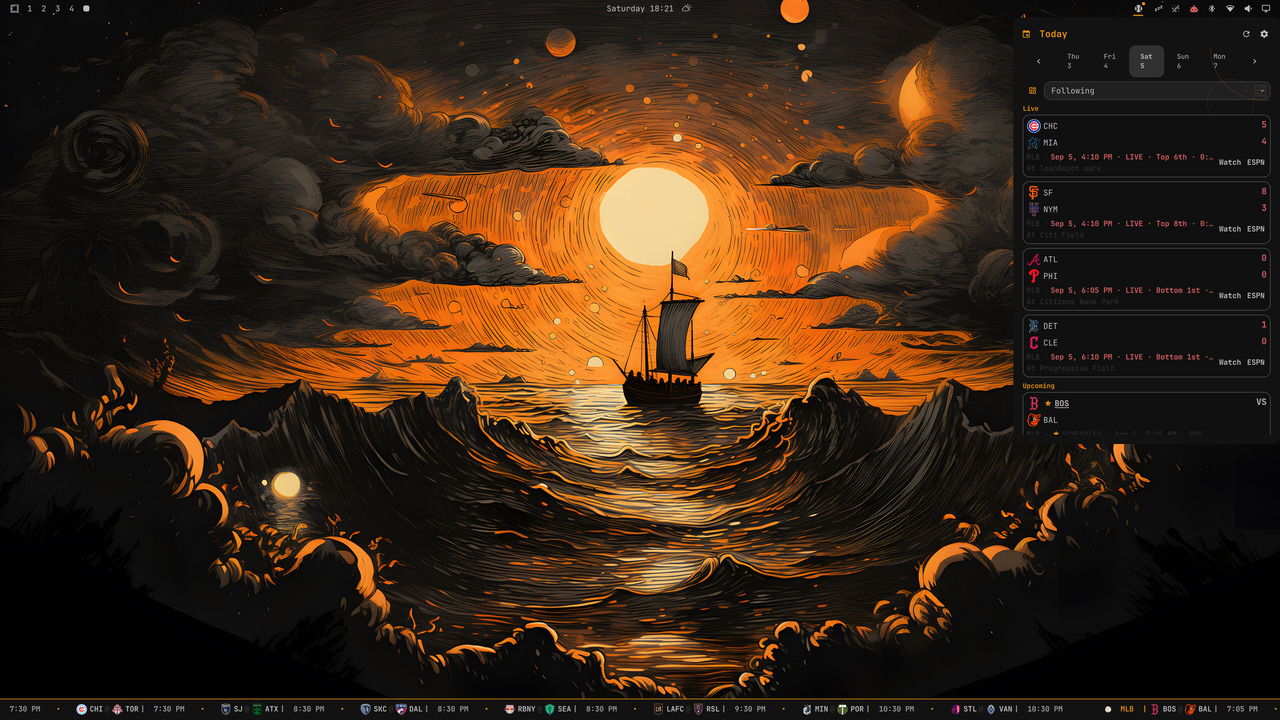
Sportray is a native Omarchy Quattro bar-widget for checking a selected day's
games without opening a separate application. Click the compact bar widget to
open a favorites-first, keyboard-friendly scores panel with a sport chooser,
date carousel, grouped score slate, and one settings hub.
At a glance:
- Favorite-first — Following puts your teams and their live games first.
- Eight leagues — NHL, NFL, MLB, NBA, NCAA Football, NCAA Men's Basketball, Premier League, and MLS are available from one chooser.
- No account or API key — Scores, preferences, and alerts stay on your machine; Sportray has no backend or telemetry.
Features
- Scoreboards for NHL, NFL, MLB, NBA, NCAA Football, NCAA Men's Basketball, Premier League, and MLS
- Clear states for scheduled, live, and final games
- Favorite-team selection with a Following home for favorite-team games
- Stable per-league views with grouped standings on supported leagues
- Five-day date carousel with previous/next-day navigation and a Today reset
- Empty league days offer the next scheduled game as a one-click jump
- Game rows open a local game-details view; the source action opens the provider game page (ESPN gamecast, MLB.com gameday, or NHL.com gamecenter)
- Upcoming games show the bookmaker line (spread and over/under) where the provider supplies it
- Favorite-aware bar indicator plus a persistent bottom ticker that scrolls live scores, upcoming games, and recent finals
- Automatic updates that stay quiet when nothing is live
- Desktop notifications for favorite game starts, score changes, finals, plus optional pregame reminders and close-game alerts
- Temporary one-game watches for games without favoriting a team
- Persistent league, favorite, and notification preferences
- Configurable ticker visibility, top/bottom placement, and scroll speed
- Ticker controls for previous-day review, pause/resume, and next-day preview
- Theme-aware layout for top, bottom, left, and right bars
- Keyboard navigation with visible focus and Escape-to-close
Install
On Omarchy 4, install and enable with:
omarchy plugin add https://github.com/joega/sportray.git --enable
The plugin ID is io.github.joega.sportray. To manage it after installation:
omarchy plugin enable io.github.joega.sportray
omarchy plugin disable io.github.joega.sportray
omarchy plugin remove io.github.joega.sportray
Sportray needs Omarchy 4 with the Quattro shell and the curl command
included by Omarchy. It fetches scores directly from ESPN, MLB StatsAPI, and
NHL data endpoints, and uses Omarchy's notification helper when alerts are
enabled. It does not install packages, request privileged access, create a
service, or overwrite user configuration.
Removing the plugin unloads Sportray but leaves your preferences in place so a reinstall keeps your settings:
~/.local/state/omarchy/settings/sportray.json
Remove that file separately if you want a complete preference reset.
Using Sportray
The panel opens on today's games. Use the date carousel to look back at completed slates or forward to upcoming games.
[and]move one day;Treturns to today.- On a supported league view,
Stoggles standings. - When a league has no games on the selected day, select View day to jump to its next scheduled game day.
- Select any loaded game row to see details such as status, venue, scoring lines, and team stats where available.
The bar widget shows a compact favorite-aware indicator with score details on hover. The thin ticker across the bottom of the screen scrolls current live scores, upcoming games, and recent finals; selecting a game opens its provider game page (ESPN gamecast, MLB.com gameday, or NHL.com gamecenter), while selecting elsewhere on the strip opens the normal scores panel. Games without a provider link stay neutral and keep the panel-open action.
Settings
Open the panel's Settings action to choose Sports & leagues, Favorite teams, or Notifications.
- Sports & leagues — Enable a league to fetch its scores; Follow it to promote it on Following and in navigation. Followed leagues can be reordered; disabling a league removes it from the followed set.
- Favorite teams — Search, filter by league, and follow teams. Favorites sort first and pin their games to the top of league views.
- Notifications — Independently control game starts, score changes, game finals, optional pregame reminders, and optional close-game alerts. Use Send test notification to preview the Omarchy notification channel.
- Watch — Follow a single game temporarily from a score row or its details view, without favoriting either team.
Press Escape to step back from settings to the prior score view.
Data sources and privacy
- NHL scores come from the NHL public scoreboard API.
- NFL, NBA, NCAA Football, NCAA Men's Basketball, Premier League, and MLS scores and team lists come from ESPN's site JSON endpoints.
- MLB uses ESPN first with an MLB StatsAPI fallback, and league views use ESPN or NHL standings where available.
Requests go directly from your computer to the sports data providers. Sportray has no backend, account, analytics service, or telemetry. It does not ask for API keys, upload preferences, or execute downloaded code.
Sportray is currently tested only in the United States; provider availability may vary by region. Contributions for additional data adapters, providers, sports, and leagues are welcome.
Troubleshooting
- If a league shows no games, check that it is enabled in Settings, try another date in the carousel, or use the Refresh action.
- If a provider is temporarily unavailable, that league shows an unavailable state while healthy leagues keep working.
- If the widget is not visible, re-enable the plugin and restart the shell.
- Do not delete the state file unless you intentionally want to reset leagues, favorites, and notification preferences.
License
Sportray is released under the MIT License. See CHANGELOG.md for release notes.