
Blink Cameras for Omarchy
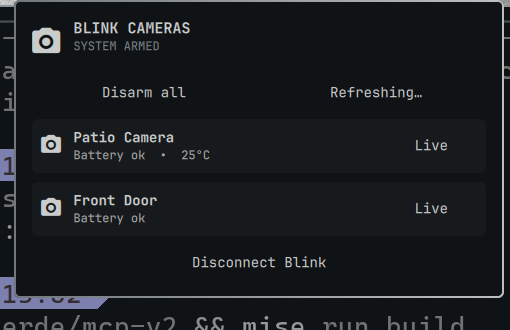
A native Omarchy Quattro bar widget for Amazon Blink cameras. Check your system at a glance, arm or disarm it, and open an on-demand live view without reaching for your phone.
[!IMPORTANT] This community project is not affiliated with Amazon, Blink, or Immedia. It uses Blink's private cloud API through BlinkPy, so upstream changes can occasionally require a plugin update.
Features
- Armed/disarmed status in the Omarchy bar
- One-click arm or disarm for all Blink systems
- Camera battery, temperature, and motion status
- Embedded, on-demand live video for each supported camera
- Guided email/password and 2FA connection flow inside the panel
- Automatic, hash-locked dependency setup and caching through
uv - Configurable refresh interval, limited to a Blink-friendly minimum of 60 seconds
- No saved password and no secrets inside the plugin directory
Install
Install from the Omarchy Plugins marketplace when the listing is available, or install directly from GitHub:
omarchy plugin add https://github.com/JonathanRiche/omarchy-blink.git --enable
The widget is placed in the right section of the bar by default. No Python,
pip, or virtual-environment setup is required.
Connect Blink
- Click the video-camera icon in the Omarchy bar.
- Enter the email address and password used by the Blink app. This may be different from a linked Amazon account.
- Enter the verification code Blink sends by SMS, WhatsApp, or email.
- Wait for the camera list to appear.
The first connection can take a little longer while uv downloads the pinned,
hash-locked BlinkPy runtime. Later launches reuse its cache.
Use
- Select Arm all or Disarm all to update every Blink system.
- Select Refresh to retrieve current device information.
- Select Live beside a camera to begin streaming in the panel.
- Click the video or close the panel to stop a live session.
- Select Disconnect Blink to remove the locally saved session.
Live sessions stop when the panel closes and are capped at five minutes so a camera cannot remain streaming unnoticed.
Configure
The default refresh interval is 60 seconds. Change it through Omarchy's bar configuration or from the command line:
omarchy bar set io.github.jonathanriche.omarchy-blink refreshIntervalSec 120
Move the widget with the normal Omarchy bar command:
omarchy bar move io.github.jonathanriche.omarchy-blink --section right
Privacy and security
- Your password is sent to the local helper over stdin, never in process arguments.
- Your password is discarded after the initial Blink authentication succeeds.
- Refresh-token data is stored at
~/.local/state/omarchy-blink/credentials.jsonwith user-only permissions. - Credentials and camera data are never stored in this Git repository.
- Live video is proxied only over a loopback socket on your machine.
- Saved state is read without following symlinks and with strict size/type limits.
- Camera counts, field lengths, errors, and helper output are bounded before QML receives them.
- Disconnecting removes the saved authentication and status cache.
[!WARNING] BlinkPy's current live-view transport uses an unauthenticated ephemeral TCP listener on
127.0.0.1and does not verify the upstream IMMIS TLS certificate. Another local OS user may be able to connect to an active feed, and a hostile network may be able to intercept it. Use Live View only on a trusted, single-user machine and trusted network. These are upstream BlinkPy transport limitations; closing the panel terminates the listener immediately.
See SECURITY.md for reporting security issues.
Requirements
- Omarchy 4 with the Quattro shell
uv(included with current Omarchy installations)- Qt Multimedia support (included with Omarchy)
- Internet access to Blink and, on first use, the Python package index
Troubleshooting
The login is rejected
Use the credentials from the Blink mobile app, not automatically your Amazon credentials. Test them in the Blink app or reset the Blink password if needed.
A verification code does not arrive
Check the email address or phone configured in Blink. Blink may impose a short wait before another code can be requested.
Live view fails
Confirm the camera is online and not already busy recording or streaming. Battery cameras may take several seconds to wake. Close the panel, reopen it, and try once more.
Inspect plugin logs
qs log -p /usr/share/omarchy/shell --tail 100 | grep -i blink
Update or remove
omarchy plugin update io.github.jonathanriche.omarchy-blink
omarchy plugin remove io.github.jonathanriche.omarchy-blink
Removing the plugin does not silently delete your Blink session file. Use Disconnect Blink first if you also want to remove local authentication.
Development
omarchy plugin validate .
qmllint -I /usr/share/omarchy/shell BarWidget.qml Panel.qml
uvx ruff check blink_helper.py
uv run --with blinkpy==0.25.9 python -m unittest discover -s tests -v
./run_helper.sh status
Contributions are welcome. See CONTRIBUTING.md.