
Verde for Omarchy
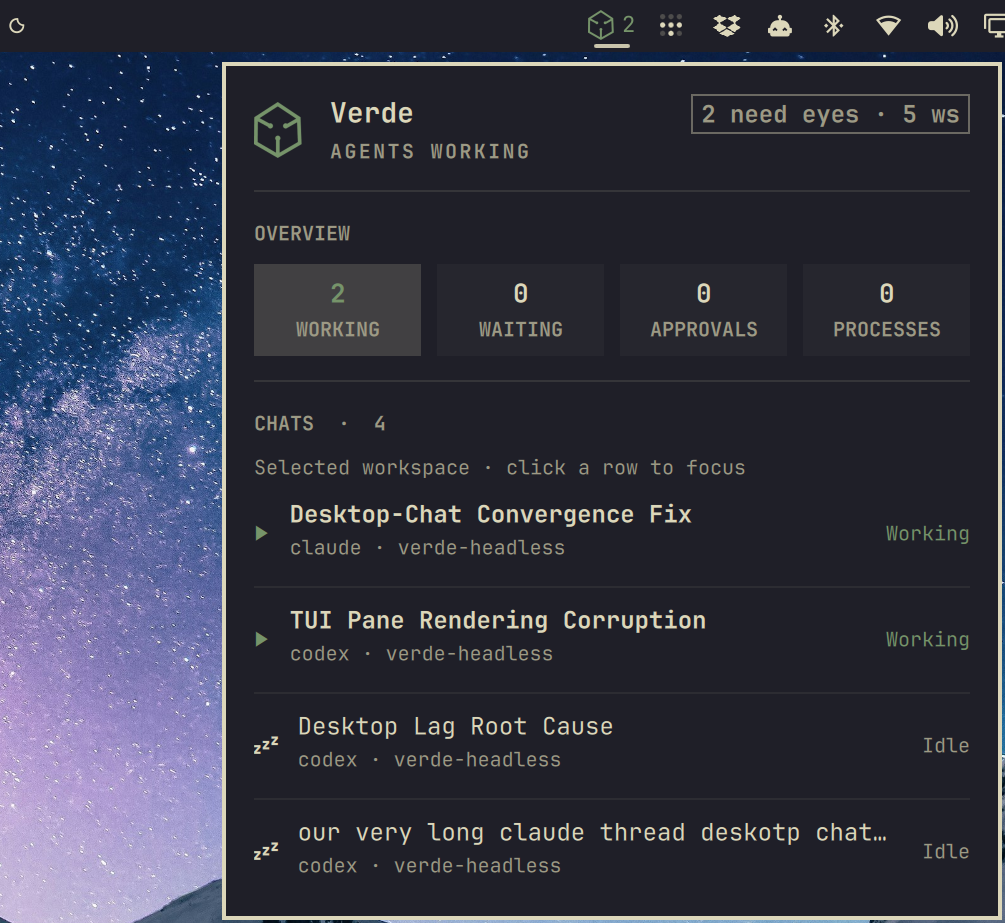
An Omarchy bar widget for monitoring Verde agent activity. It shows working chats, approvals, and attention counts in the bar, and opens a keyboard-accessible panel with chats in the selected workspace.
Requirements
- Omarchy with the Quattro shell plugin system
- Verde available on
PATH(desktop app optional but required for live status) jq- GNU coreutils (
timeout) - An Omarchy-compatible Nerd Font for the status icons
This plugin does not install Verde. Install Verde separately, then add the widget.
The widget polls Verde locally via state.sh (about every eight seconds; a bit faster while the panel is open). Overlapping polls reuse a cached envelope. It makes no network requests and does not modify Verde or Omarchy configuration directly.
Install
Review the source before installing. Omarchy plugins run as unsandboxed code inside the long-running shell process.
omarchy plugin add https://github.com/JonathanRiche/omarchy-verde.git --enable
The widget is placed in the right bar section by default. If it was installed without --enable, enable it later:
omarchy plugin enable io.github.jonathanriche.verde --section right
Use
- Left-click the widget to open or close the panel.
- Right-click the widget to refresh immediately.
- In the panel, press
RorEnterto refresh andEscapeto close. - When Verde is installed but offline, press
Oor click Open Verde to launch the app. - When online, click an agent row to jump to that thread/pane in Verde (
workspace select+pane focus, which also selects the chat thread bound to the pane).
Bar text
The bar uses the official Verde logo as a white mask (assets/verde_logo_mask.png), tinted to the status color (theme green when working, urgent when approvals/attention need eyes, foreground when idle).
| State | Example |
|---|---|
Verde missing from PATH |
logo + × |
| CLI present, live IPC down | logo + · |
| Online, idle | logo + workspace count |
| Working turns | logo + working count |
| Approvals / attention | logo + count (urgent color) |
Panel sections
- Hero — online/offline summary and short status line
- Overview — Working · Waiting · Approvals · Processes
- Agents — ACTIVE panes from every workspace (working / waiting / done until you focus them), plus idle panes in the current workspace
- Actions — Open Verde when offline; focus pane when online
v1 stays read-only aside from Open / Focus. Approve and stop stay in the Verde app.
Update
omarchy plugin update io.github.jonathanriche.verde
Remove
omarchy plugin remove io.github.jonathanriche.verde
Removal deletes only the plugin checkout and removes the widget from the Omarchy bar configuration. It does not uninstall Verde or its data.
Develop
Validate the plugin against the installed Omarchy manifest schema:
omarchy plugin validate .
Exercise the data plane without the shell:
./state.sh | jq .
# Offline path (CLI present, live IPC unreachable) — still one JSON object:
# stop Verde or break the live socket, then re-run ./state.sh | jq .
For local testing, install from a local Git remote or copy the repository into ~/.config/omarchy/plugins/io.github.jonathanriche.verde and rescan plugins.
Regenerating preview.png
With the widget enabled on Quattro, open the panel and capture the bar + panel:
# example with grim on Hyprland
grim -g "$(slurp)" preview.png
If you cannot capture a live screenshot, keep a mockup in preview.png and replace it before marketplace submission.