
Live Captions for Omarchy
If your computer can hear it, you should be able to read it.
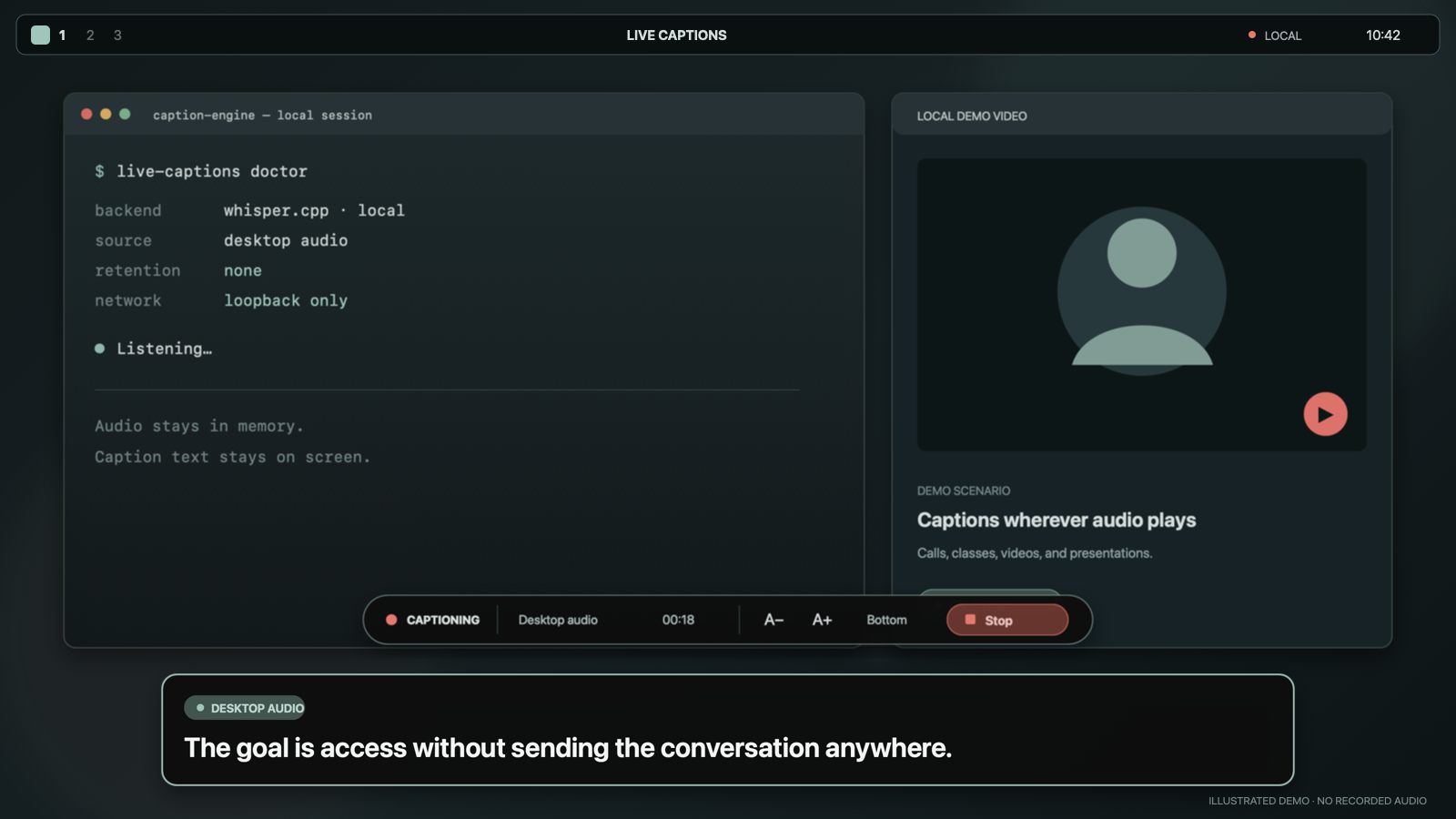
Live Captions turns microphone or desktop audio into readable text across every Omarchy display. It is local, click-through, and never saved. Whisper runs on your machine; the plugin writes neither audio nor a transcript.
Choose one source. Press Start. Keep working.
Try it
Omarchy plugins run inside the long-lived shell without a sandbox, so review this repository before installing it.
omarchy plugin add https://github.com/josephbriones/omarchy-live-captions.git --enable
omarchy-shell shell summon io.github.josephbriones.live-captions '{"demo":true}'
The second command is a deterministic demo. It uses fixed sample captions and never starts pw-record, whisper-server, or an audio device.
Deliberately small
- One source per session: microphone or desktop audio, never a hidden mix.
- One local model, kept warm while captions are running.
- No cloud API, account, analytics, saved recording, or transcript archive.
- No automatic package install, model download, or rewrite of Omarchy, Hyprland, or PipeWire configuration.
- No always-on capture. Opening the overlay checks setup; only an explicit Start action opens audio.
- No silent lag. If the selected model falls behind live audio, the session stops with an actionable error instead of displaying stale captions.
The manifest's keepLoaded setting keeps the lightweight QML owner resident so it can finish bounded child-process cleanup. It does not keep a recorder, model server, or audio stream running: capture still requires Start, and Stop or Close ends it.
Captions arrive after a four-second audio window plus local inference. Adjacent windows overlap by one second so boundary words are less likely to disappear. The displayed latency value is a window-plus-inference estimate, not an observed end-to-caption measurement. This is rolling local captioning, not sub-second broadcast transcription.
Set up real captions
You need:
- a current Omarchy release with Quattro plugins;
pw-record, already supplied by Omarchy's PipeWire stack;whisper-serverfrom the current Archwhisper-cppbaseline (1.9.1 for this v0.2 release);setpriv, supplied by Omarchy's baseutil-linuxinstallation;- a local
whisper.cppGGML model.
Both setpriv and the supported whisper-server interface are mandatory. doctor capability-probes the exact server flags and is authoritative; 1.9.1 is a tested package baseline, not a semantic version floor, so older or newer builds may work when they expose those flags. Live Captions can discover several common local model caches, including compatible models already downloaded for VoxType. Discovery is language-aware: an English-only .en.bin model works only with English, while auto or another language requires a multilingual model. The setup guide has the Omarchy package commands, a pinned English-model option, and verification steps.
Check readiness without opening an audio device:
~/.config/omarchy/plugins/io.github.josephbriones.live-captions/bin/live-captions doctor
If no model is found, preview the plugin-only preference change:
~/.config/omarchy/plugins/io.github.josephbriones.live-captions/bin/live-captions configure \
  --model /absolute/path/to/ggml-model.bin \
  --source microphone
Apply it only after reviewing the preview:
~/.config/omarchy/plugins/io.github.josephbriones.live-captions/bin/live-captions configure \
  --model /absolute/path/to/ggml-model.bin \
  --source microphone \
  --apply
That writes only $XDG_CONFIG_HOME/omarchy/live-captions/config.json. To override it for every caption run in the current shell process, set LIVE_CAPTIONS_MODEL or LIVE_CAPTIONS_LANGUAGE in the environment that launches omarchy-shell. The override lasts until that shell is restarted.
Use it
Open or close the overlay:
omarchy-shell shell toggle io.github.josephbriones.live-captions
Select Microphone to caption the default PipeWire input, or Desktop audio to caption the default output's monitor stream. Then press Start captions. A visible indicator remains on screen for the entire capture.
Startup reports Listening only after pw-record supplies the first PCM bytes. If the selected route supplies no audio within five seconds, startup fails and both owned children are cleaned up.
The overlay puts click-through caption cards on every display and keeps its controls on the focused display. You can pause captions, stop, move captions to the top or bottom, change text size, and choose how many lines remain visible. Tab and Shift+Tab move through every control, Enter or Space activates it, and Escape closes the overlay and stops capture.
Pause keeps pw-record running and the PipeWire stream linked, but drains and discards new PCM without showing new captions. The one window already being prepared or requested may finish locally after Pause; its result is suppressed, and no later window starts until Resume. Resume starts with fresh audio. Use Stop or Close when capture should end completely.
Direct IPC uses the same controls as the UI:
omarchy-shell io.github.josephbriones.live-captions start
omarchy-shell io.github.josephbriones.live-captions pause
omarchy-shell io.github.josephbriones.live-captions resume
omarchy-shell io.github.josephbriones.live-captions stop
omarchy-shell io.github.josephbriones.live-captions state
start returns not-ready until the overlay's local check passes. These methods act on an already-open plugin; summon it first.
To add a shortcut, put a binding in your own Hyprland bindings file:
o.bind("SUPER + ALT + C", "Live captions", "omarchy-shell shell toggle io.github.josephbriones.live-captions")
The plugin does not edit your bindings.
Remove it
Stop captions, then use Omarchy's normal removal path:
omarchy plugin remove io.github.josephbriones.live-captions
Removal leaves whisper.cpp, your model, and the small preferences file at ~/.config/omarchy/live-captions/config.json alone.
Development
Run portable validation:
bash scripts/validate.sh
The automated suite includes a deterministic real-subprocess pipeline built from fake setpriv, pw-record, and whisper-server executables. It exercises lifecycle and cleanup without a microphone, PipeWire route, Whisper model, or Omarchy hardware. Real microphone, desktop-monitor, multi-display, and end-to-caption checks remain manual release gates.
On Omarchy, run the no-audio desktop acceptance path:
bash scripts/acceptance-test.sh
Real capture always needs an explicit flag and a human Start action:
bash scripts/acceptance-test.sh --real --source microphone
Testing covers the acceptance matrix. Architecture explains the process and privacy boundaries.
Limits in 0.2
- Captions arrive as stable rolling-window results, not partial words.
- Microphone and desktop audio cannot run simultaneously.
- Source labels describe the selected device; they do not identify speakers.
- Accuracy and latency depend on the model, language, hardware, and audio quality.
- English-only
.en.binmodels require English. Other languages andautorequire a multilingual model. - Language tags such as
pt-BRare reduced to Whisper's primary code (pt).
License
MIT © 2026 Joseph Briones.