
Quick Emoji
Slack-style emoji completion in every app, built for Omarchy Quattro.

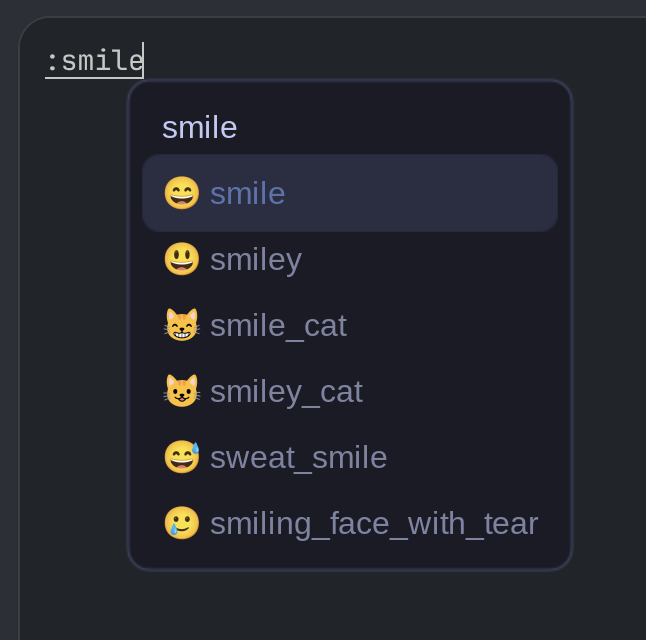
Type :w and a small, theme-aware picker appears at the caret. Keep typing to
fuzzy-search, use the arrow keys to move, and press Enter, Tab, or Space
to insert the highlighted emoji. A complete shortcut such as :wave: expands
immediately to 👋. Escape closes the picker and leaves the literal text in
place. The compact six-row picker scrolls through every ranked match one result
at a time.
Install
omarchy plugin add https://github.com/joshferrara/quick-emoji.git --enable
Quick Emoji uses the Fcitx5 input-method service that Omarchy already runs. On
first enable it compiles a small user-local Fcitx5 addon, installs it under
~/.local, adds a plugin-scoped environment drop-in to Omarchy's Fcitx5 user
service, and restarts that service. No sudo, additional package, keylogger,
accessibility permission, or second Quickshell process is used.
Quick Emoji checks its prerequisites before changing any files. A full Omarchy installation includes them. Reduced environments such as Try Omarchy may omit some packages; if so, setup reports one command containing everything missing:
omarchy pkg add fcitx5 pkgconf base-devel
Use
| Key | Action |
|---|---|
:name: |
Expand an exact GitHub/Slack-style alias |
:query |
Open and filter the picker |
↑ / ↓ |
Move through all results one at a time |
Page Up / Page Down |
Jump six results |
Enter, Tab, or Space |
Insert the highlighted emoji |
Escape |
Close and keep the literal :query text |
Backspace |
Edit the query; at an empty query it cancels |
The picker is intentionally disabled in password fields. Mouse selection also works, but the complete flow is keyboard navigable.
Terminal emulators
The picker is typically unwanted in terminal emulators, where :w, :q, and
similar strings are shell commands or editor actions. By default Quick Emoji
is disabled in these terminals (Alacritty, kitty, foot, Ghostty, WezTerm,
GNOME Terminal, Konsole, xterm) — this also covers anything running inside
them, such as zsh, tmux, helix, or vim.
To temporarily allow emoji completion in terminals, toggle it on:
bash ~/.config/omarchy/plugins/io.github.joshferrara.quick-emoji/scripts/manage.sh toggle-terminals
Running the same command again turns it back off. The toggle is instant (the addon checks a flag file on every keystroke) and persists across Fcitx5 restarts. When enabled, terminal emulators behave like any other app; password fields remain blocked regardless.
Search covers 1,870 Unicode emoji and 1,913 aliases from GitHub's gemoji, plus descriptions and keyword tags. Ranking favors exact aliases, then prefixes, contained terms, subsequences, and small spelling mistakes.
Omarchy integration
The popup uses Fcitx5's caret-aware candidate surface, configured as a compact vertical list. Its background, border, selection, text, and font are kept in sync with Quattro's live menu tokens. Corner radius, border color and width, spacing scale, and typography also follow the active theme, including changes while the session is running. Theme changes restart Omarchy's supervised Fcitx5 service once so its Classic UI reloads the generated SVG assets.
While enabled, Quick Emoji temporarily owns Fcitx5's classicui.conf so it can
provide the vertical Omarchy-styled surface. It backs up the prior file and
restores it when the plugin is disabled or removed. A lightweight systemd path
unit handles cleanup if the repository folder is deleted outside Omarchy's
normal removal flow. Enabling the plugin is explicit consent for this temporary
configuration change; no existing configuration is discarded.
Remove
omarchy plugin remove io.github.joshferrara.quick-emoji
Removal restores the previous Fcitx5 UI configuration and deletes the compiled addon, service drop-in, generated theme, emoji data, cache, and cleanup unit. To perform that cleanup manually before removing the repository, run:
bash ~/.config/omarchy/plugins/io.github.joshferrara.quick-emoji/scripts/manage.sh deactivate
Requirements and security boundary
- Omarchy Quattro
- Fcitx5 and its development files,
pkg-config, a C++ compiler,flock, and systemd user services (all present in a standard Omarchy installation) - Applications must expose a normal Fcitx/Wayland, GTK, Qt, or XIM text input context. Apps that deliberately bypass the system input method cannot be completed.
Like every Quattro plugin, this code runs unsandboxed with your user
permissions. Quick Emoji sees keystrokes only after a text field has handed
them to Fcitx5; it does not read /dev/input, store typed queries, use the
network, or run as root.
Troubleshooting
If the picker does not appear, restart the shell and inspect its log:
omarchy-shell shell rescanPlugins
qs log -p "$OMARCHY_PATH/shell" --tail 100
Confirm Fcitx5 and the addon are running:
systemctl --user status omarchy-fcitx5.service
fcitx5-diagnose | rg -i 'quick emoji|quickemoji'
Successful setup also verifies that quickemoji.so is loaded by the supervised
Fcitx5 process. If that check fails, inspect its service log:
journalctl --user -u omarchy-fcitx5.service -n 100
Some Electron applications need to be restarted after an input-method service restart. On older Chromium configurations, native Wayland text-input support may also need to be enabled.
Development
Validate the repository with Quattro's own validator:
omarchy plugin validate .
The native addon is compiled on the target system against its installed Fcitx5 ABI. To build it directly on Omarchy:
read -r -a cflags <<<"$(pkg-config --cflags Fcitx5Core)"
read -r -a libs <<<"$(pkg-config --libs Fcitx5Core)"
c++ -std=c++20 -O2 -fPIC -shared "${cflags[@]}" src/quickemoji.cpp \
  -o /tmp/quickemoji.so "${libs[@]}"
Credits
- Interaction model inspired by Rocket by Matthew Palmer.
- Emoji aliases and metadata are from GitHub gemoji
under its MIT license; see
data/GEMOJI-LICENSE. - Input and popup plumbing uses Fcitx5.
Quick Emoji is an independent project and is not affiliated with Rocket, GitHub, Fcitx, or Omarchy.