
SysProcess Manager
Omarchy Quattro bar widget for live CPU, RAM, swap, processes, systemd services, and installed packages.
Click the chip on the bar to open a dashboard with telemetry cards, tabs, search, filters, process end, service start/stop/restart, and journal logs.
Preview
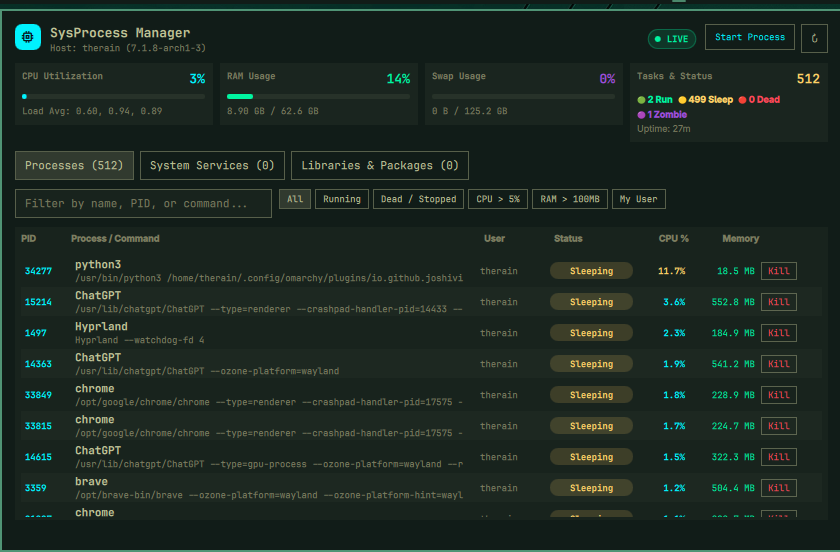
This plugin runs inside omarchy-shell (unsandboxed, with your user permissions). Review the code before you enable it.
Install
omarchy plugin add https://github.com/joshivivek67/omarchy-sys-process-manager.git --enable
Omarchy clones the repository, validates manifest.json, and asks before enabling it. No sudo or pkexec is required.
Place or move the widget if it is not already on the bar:
omarchy bar put io.github.joshivivek67.sys-process-manager --section right
Usage
- Left-click the bar chip to toggle the panel.
- Processes — search, filter (running / dead / CPU / RAM / your user), end a process with confirmation (SIGTERM).
- System Services — start, stop, restart, and view
journalctllogs as the logged-in user. - Libraries & Packages — browse installed packages (
pacman -Qordpkg-query). Read-only; this plugin does not install or remove packages. - Start Process — run a command in the background as your user.
Keyboard while the panel is open:
| Key | Action |
|---|---|
1 / 2 / 3 |
Processes / Services / Packages |
/ |
Focus search |
n |
Start process |
r |
Refresh |
| Escape | Close |
Remove
omarchy plugin remove io.github.joshivivek67.sys-process-manager
That disables the plugin, then deletes the git checkout. Your other Omarchy config is left alone.
Dependencies
Required:
- Omarchy Quattro (
omarchy-shell/ Quickshell) python3bashps
Optional, used only if present:
systemctl— list units and start/stop/restart as the current userjournalctl— service logspacmanordpkg-query— list installed packages (query only)
No network calls. No sudo or pkexec is required. Process signals and systemctl actions run as the logged-in user and cannot escalate privileges.
License
MIT. See LICENSE.