
Remnic Recall
Your AI agents' memory, in the Omarchy bar.
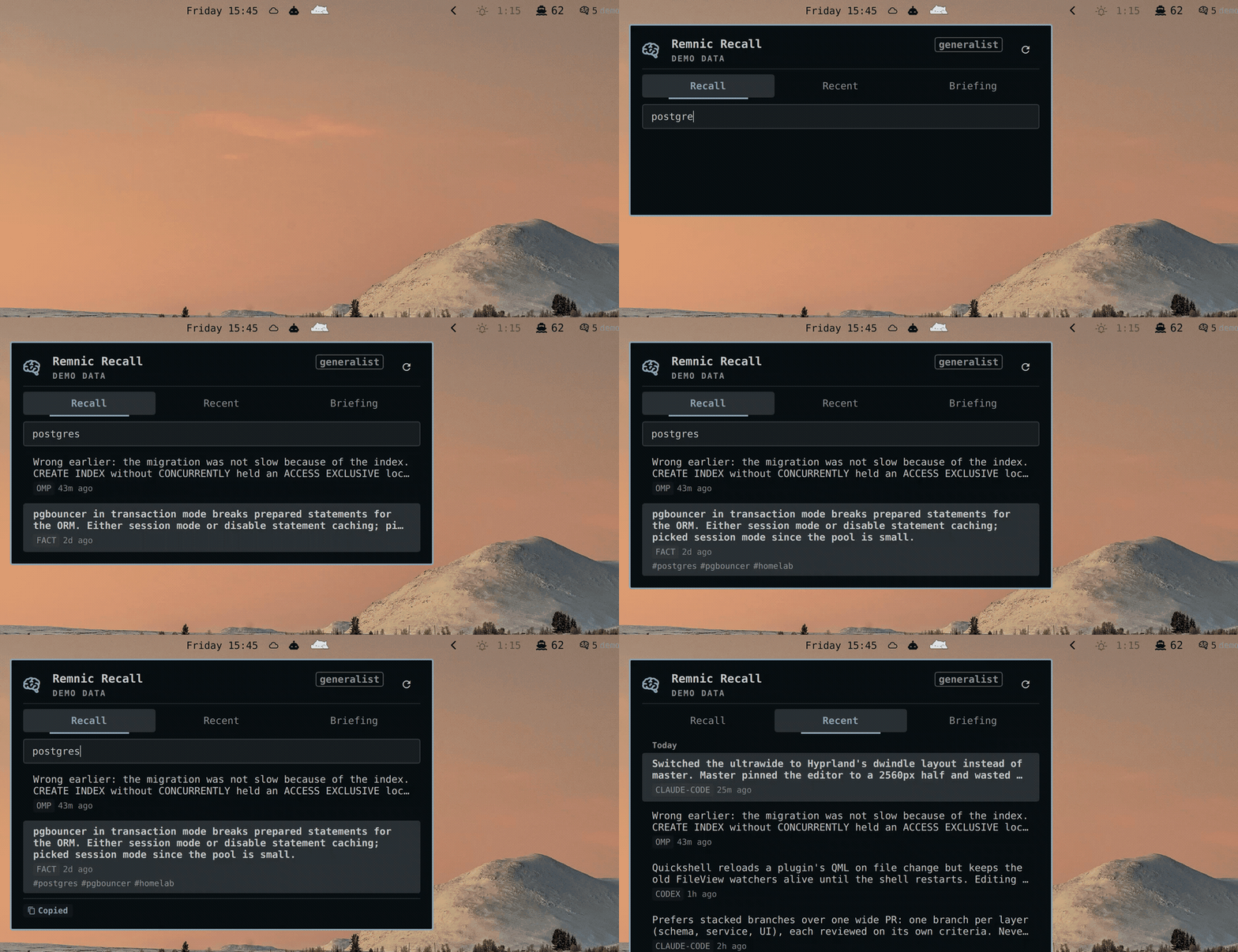
Omarchy's marketplace tracks what your agents cost. Nothing tracks what they remember. Remnic Recall puts the Remnic memory engine on the desktop: capture activity in the bar, recall search, recent memories, and your morning briefing in a panel you open with one keystroke. Built by Remnic's author.
Full-resolution recording: docs/screenshots/demo.mp4.
What it does
- Bar chip. Memories captured today, a single accent pulse when a new one
lands, a warning dot when the engine stops answering, and a
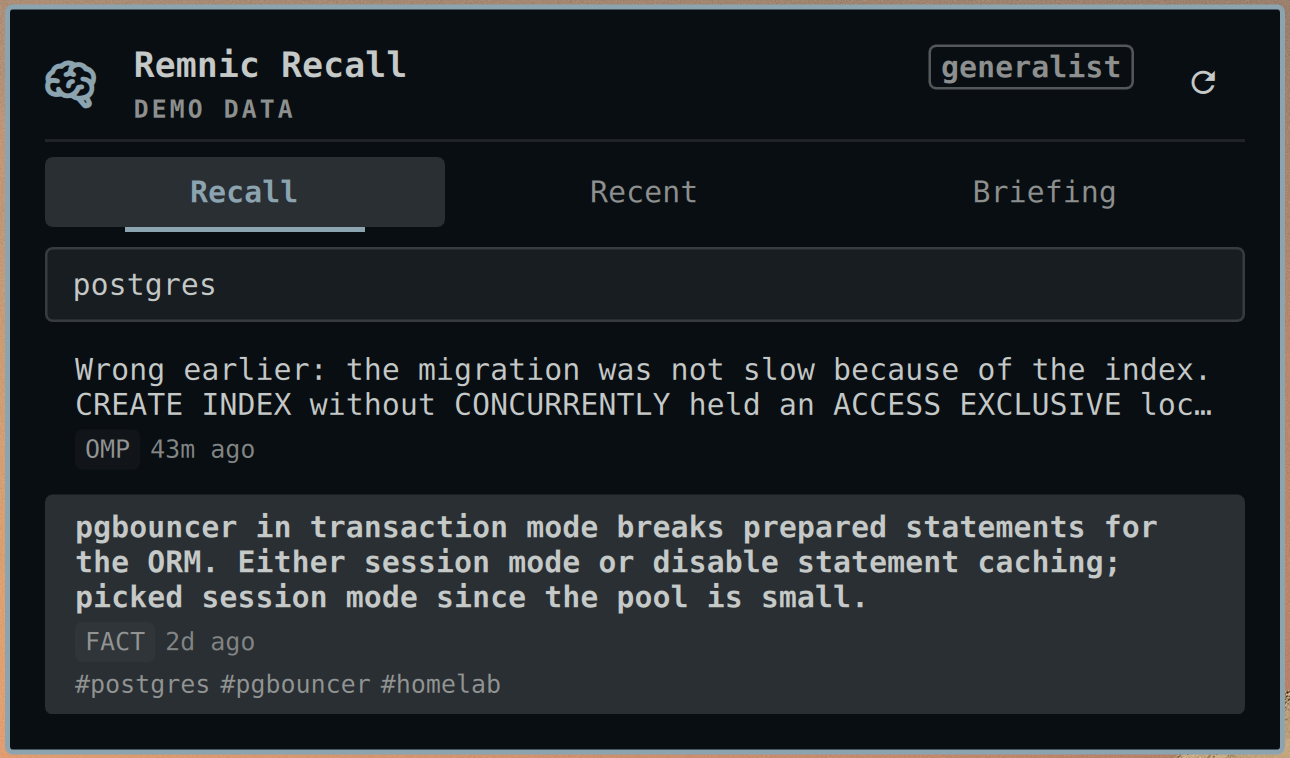
demobadge on sample data. Horizontal and vertical bars both render. - Recall. Search-as-you-type over the memory store, 300 ms debounce, three
characters minimum, twenty results. A row expands to the full memory text with
its tags.
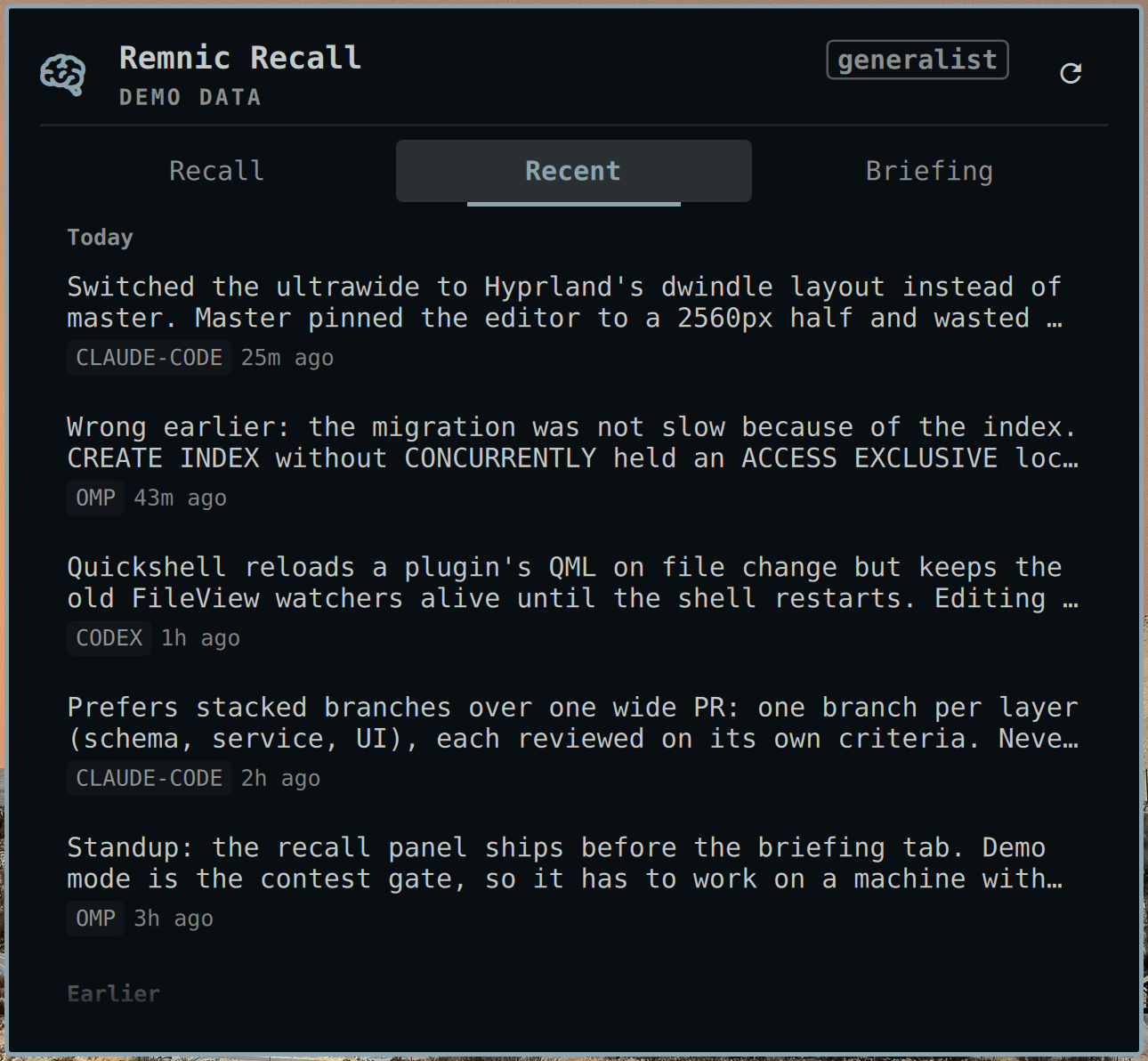
Entercopies that text to the clipboard. - Recent. Today's captures newest first, split into Today and Earlier, each row carrying the agent that captured it and a relative timestamp.
- Briefing. The engine's daily briefing, rendered with its headings, lists, and emphasis intact, plus its generation time and a refresh action.
- Send to an agent.
Ctrl+Enterseeds your default coding agent with the selected memory as its prompt. Opt-in; see Sending a memory to an agent. - Health at a glance. The header states whether the engine answers, how
fresh its index is, and when the data on screen last arrived:
engine ok · qmd active · synced 15:26. - Demo mode. No Remnic installed? The whole UI runs on a bundled 25-memory
sample dataset, marked
DEMO DATAwherever fabricated rows can appear. - Deep links. Open the panel pre-searched from a script or a Hyprland keybind.
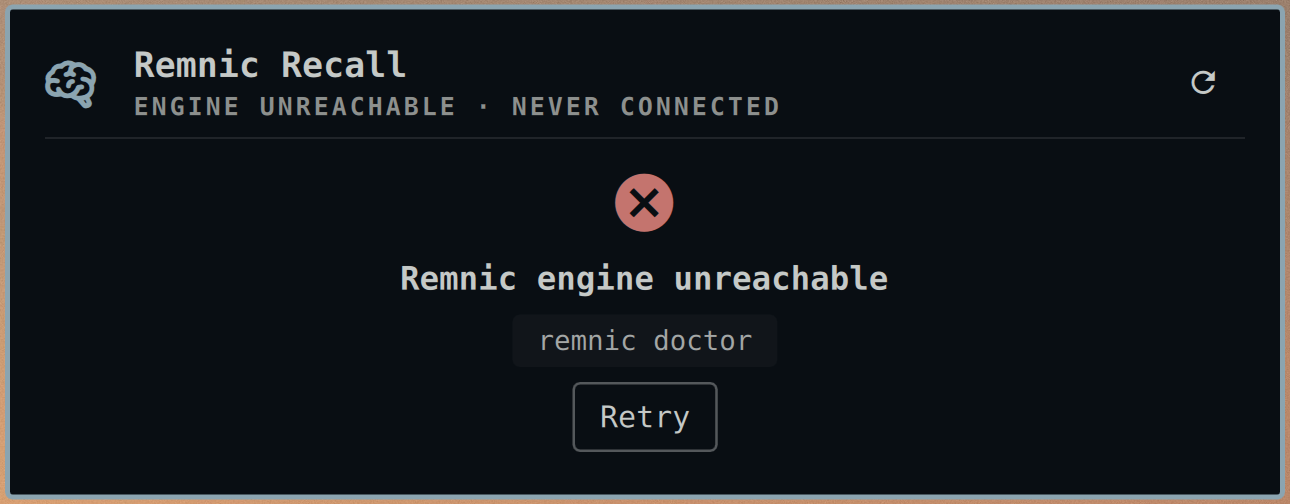
- Honest states. A connecting card while the first probe is in flight, an offline card with a retry, and a search failure that says the engine did not answer rather than pretending there were no matches.
- Theme-aware. Every color, font, and gap comes from Omarchy's semantic tokens, so the chip and panel recolor the moment you switch themes.
- Keyboard-first. The panel takes focus on open and never needs the mouse.
| Recall | Recent | Briefing |
|---|---|---|
 |
 |
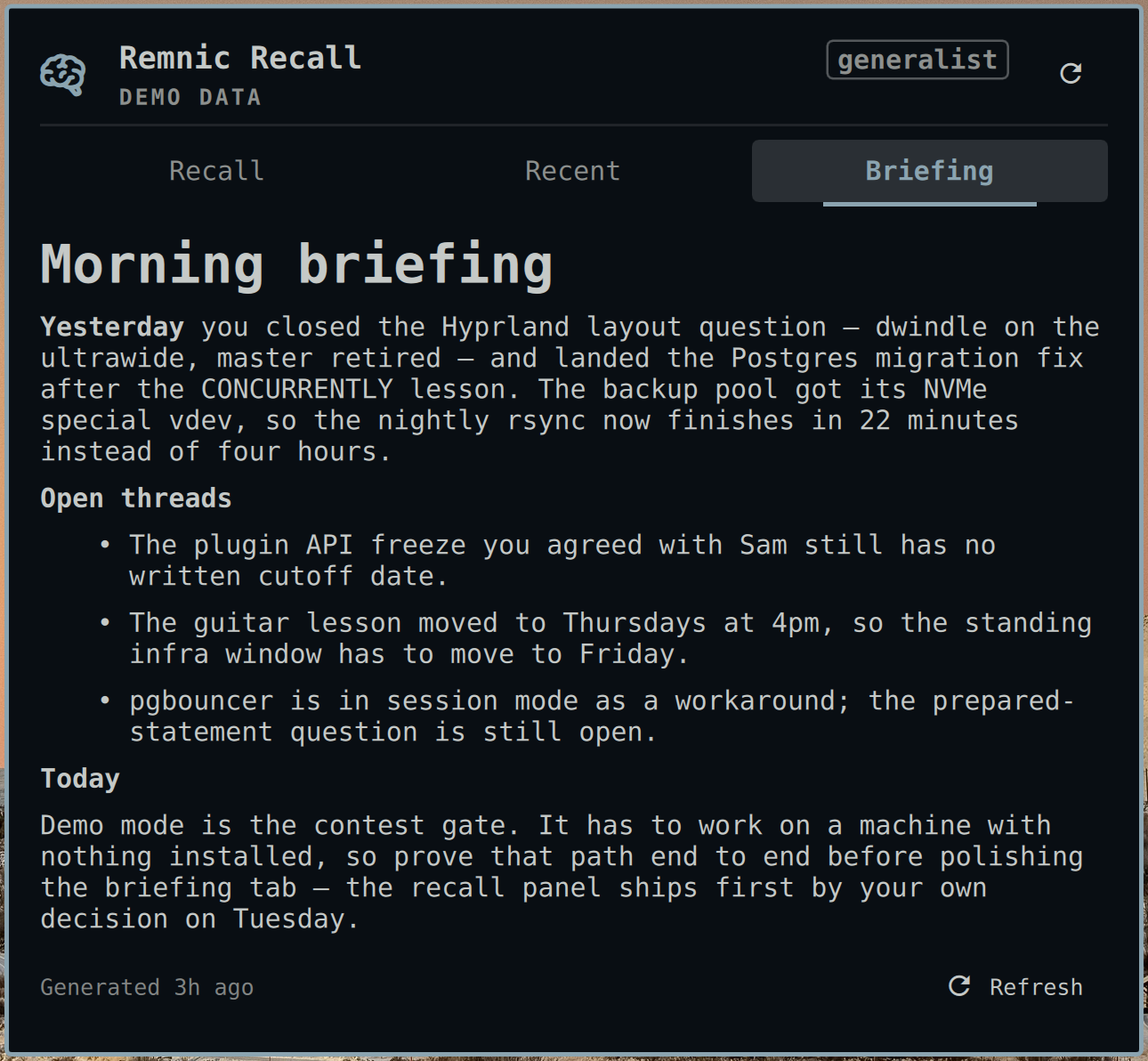 |
The panel sizes itself to its content, so a two-result search is a small card rather than a tall box with a void under it. Results stagger in as they arrive, tabs crossfade, a fade at the bottom edge marks a list that scrolls, and the chip pulses once per new memory.
Installation
omarchy plugin add https://github.com/joshuaswarren/omarchy-remnic
omarchy plugin enable io.github.joshuaswarren.remnic right
That is the whole install. With no engine present you get demo mode immediately.
Removal is the mirror image: omarchy plugin disable io.github.joshuaswarren.remnic, then omarchy plugin remove io.github.joshuaswarren.remnic. The plugin writes nothing outside Omarchy's own
config, so nothing else is left behind. Your memory store belongs to Remnic and
is never touched, on removal or at any other time.
Requirements
- Omarchy 4 (Quattro shell). Developed and verified on
4.0.0.r1758. wl-clipboard, for the copy action. Omarchy ships it.- Optional, for live data: a Remnic engine. Installation
and setup are documented at remnic.ai and in the
joshuaswarren/remnic repository.
Any daemon serving the
/engram/v1read API works.
A standard local Remnic install needs no configuration here: the plugin looks
for the daemon at http://127.0.0.1:4318 and a token in
~/.remnic/tokens.json, which is where Remnic puts them.
Settings
Settings live inline on the plugin entry in ~/.config/omarchy/shell.json,
under the bar.layout section. They hot-apply; no shell restart.
{
  "id": "io.github.joshuaswarren.remnic",
  "daemonUrl": "http://127.0.0.1:4318",
  "token": "",
  "tokenPath": "~/.remnic/tokens.json",
  "remnicCommand": "remnic",
  "namespace": "",
  "pollSeconds": 60,
  "recentLimit": 30,
  "demoMode": "auto",
  "allowInsecureToken": false,
  "sendToAgent": false
}
| Setting | Meaning |
|---|---|
daemonUrl |
The Remnic access daemon. A remote daemon works; use a token that daemon issued. |
token / tokenPath |
An inline token wins; otherwise the first entry of the token store is used. |
allowInsecureToken |
The token is sent only to https:// or a loopback address. Set true to also send it over plaintext HTTP to a remote daemon. Without it the plugin still runs, unauthenticated. |
namespace |
Empty uses the daemon's default namespace. |
remnicCommand |
The briefing binary. A bare name resolves on PATH; an absolute path is taken as-is. |
pollSeconds |
Capture-count poll interval. Floored so a hand edit cannot spin. |
recentLimit |
How many memories the Recent tab holds. |
demoMode |
auto (demo only when no engine answers), on, off. |
sendToAgent |
Enables Ctrl+Enter. Off by default. |
Usage
Left-click the chip to toggle the panel on Recall. Right-click opens Recent.
| Key | Action |
|---|---|
Tab / Shift+Tab |
cycle tabs |
↑ ↓ |
move the selection |
→ ← |
expand and collapse a row |
Enter |
copy the memory text |
Ctrl+Enter |
send the memory to your default agent (when enabled) |
Esc |
close the panel |
Deep-link from a script or a Hyprland keybind:
omarchy-shell shell toggle io.github.joshuaswarren.remnic '{"tab":"recall","query":"postgres"}'
omarchy-shell shell summon io.github.joshuaswarren.remnic '{"tab":"briefing"}'
The payload takes tab (recall | recent | briefing) and an optional
query.
States
| State | Chip | Panel |
|---|---|---|
| Live | glyph + today's count | tabs with live data; header reads engine ok · qmd <state> · synced <time> |
| Connecting | glyph only | a connecting card while the first probe runs |
| Offline | warning dot, tooltip shows last-seen | offline card with a remnic doctor hint and Retry |
| Demo | demo badge |
DEMO DATA mark, bundled sample dataset |
Sending a memory to an agent
Ctrl+Enter hands the selected memory's text to omarchy-agent-prompt, which
opens your configured default agent with that text as its prompt. It is off
until you set sendToAgent: true, for one specific reason:
omarchy-agent-prompt takes the prompt as a command-line argument, so while the
agent runs, the memory text is visible in the process list to any other process
running as you. Nothing leaves the machine, but the text does leave the panel.
That is a fair trade for some people and not for others, so it is your call to
make rather than a default. The seed is length-clamped, and nothing is sent
without that explicit keystroke.
Security and privacy
Memory content is sensitive, so the plugin is read-only by contract and states exactly what it does.
- Network. Live reads go to the Remnic daemon's existing HTTP API,
GET /engram/v1/healthandGET /engram/v1/memories. No mutating endpoint is ever called.daemonUrlis the only host contacted. No telemetry. - Credentials. The bearer token is read from disk, sent only as an
Authorizationheader, and never logged, rendered, or placed in a URL, an argument vector, or the clipboard. It is withheld unless the destination is loopback or HTTPS, whichallowInsecureTokenexists to override on purpose. - Processes. Exactly three, each a fixed argument array with no shell:
remnic briefing --format json;wl-copy, with the memory text on stdin and only on an explicitEnter; andomarchy-agent-prompt, only onCtrl+Enterand only when you have enabled it. Audit them withgrep -n "Process {" -r .. None of the three can create, forget, or migrate a memory. Clicking the chip also asks the host to runomarchy-shell shell toggle …through Omarchy's ownbar.run, which is how every third-party widget opens its panel. - Rendering. Memory text renders as plain text. The briefing is the one markdown surface and is treated as untrusted, because the engine assembles it out of memory content: inline HTML, images, link syntax, and tables are all neutralized, so no memory can embed markup or trigger a remote fetch. A bare URL may still render as an inert link; the plugin installs no link handler, so it cannot be opened. Headings, emphasis, and lists survive.
- Disk. Nothing is written, anywhere.
- Bounds. Responses are size-capped before parsing, the memory array is length-capped, and every daemon-supplied string is length-clamped before it reaches text layout, so a slow or hostile daemon cannot stall or exhaust the shell process.
One caveat applies to every Omarchy shell plugin, not only this one: plugins run
unsandboxed in a single process, so any installed plugin can rewrite
shell.json, including this plugin's settings. Remnic Recall grants a neighbor
nothing it could not already do directly.
Troubleshooting
- The panel says offline but the daemon is running. Check
daemonUrl, and that the token was issued by that daemon:curl -H "Authorization: Bearer <token>" <daemonUrl>/engram/v1/health. - The briefing tab is missing in live mode. The daemon's briefing route
answered with nothing renderable and the CLI fallback failed — the
remnicbinary is not on the shell'sPATH, or the briefing command failed. Runremnic briefing --format jsonin a terminal to see the error. - Everything shows demo data. The plugin found no daemon response and no
token. Set
demoModetooffto see the offline card instead, or configuredaemonUrland the token. Ctrl+Enterdoes nothing.sendToAgentisfalse, which is the default.
Development
Setup, the hot-reload loop, and the log commands are in docs/DEVELOPMENT.md. The frozen design contract is in docs/DESIGN.md; the spec and acceptance criteria are in docs/REQUIREMENTS.md.