
Plugin Manager
An Omarchy bar widget that manages your plugins from the bar: browse the marketplace, install from it — choosing where in the bar each widget goes — and enable, disable, update, or remove what you already have. It opens as a popup under the bar and expands, on request, into a full-size panel with a details pane.

What it does
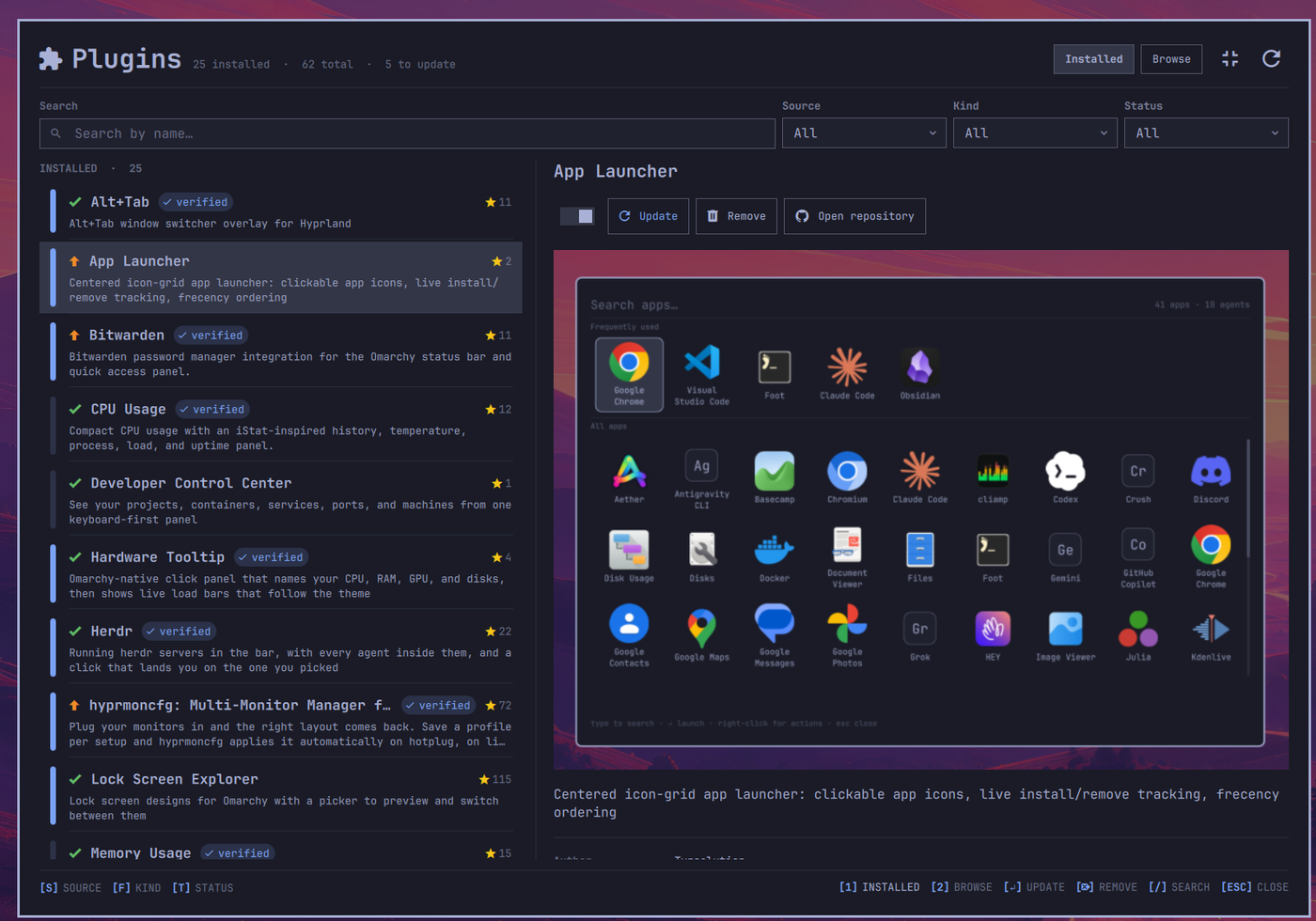
Click the puzzle icon and you get two tabs in a popup: Installed, which is what the shell actually found on disk, and Browse, which is the marketplace. Both are described below. When the popup is too small for the job, the same two tabs open in a full-size panel.
The expanded panel
The popup is built for a glance. When you want room, the icon left of the
refresh button () hands the same manager to a full-size panel, and the
icon in the same corner brings the popup back. The header, the tabs, the
summary counts, the opening animation and the card flip between tabs are the
ones the popup has; what changes is how much each tab can show. It opens as an
overlay above everything; Open expanded panel as a tiled window, in the
settings pane, makes it open as a window Hyprland tiles instead.
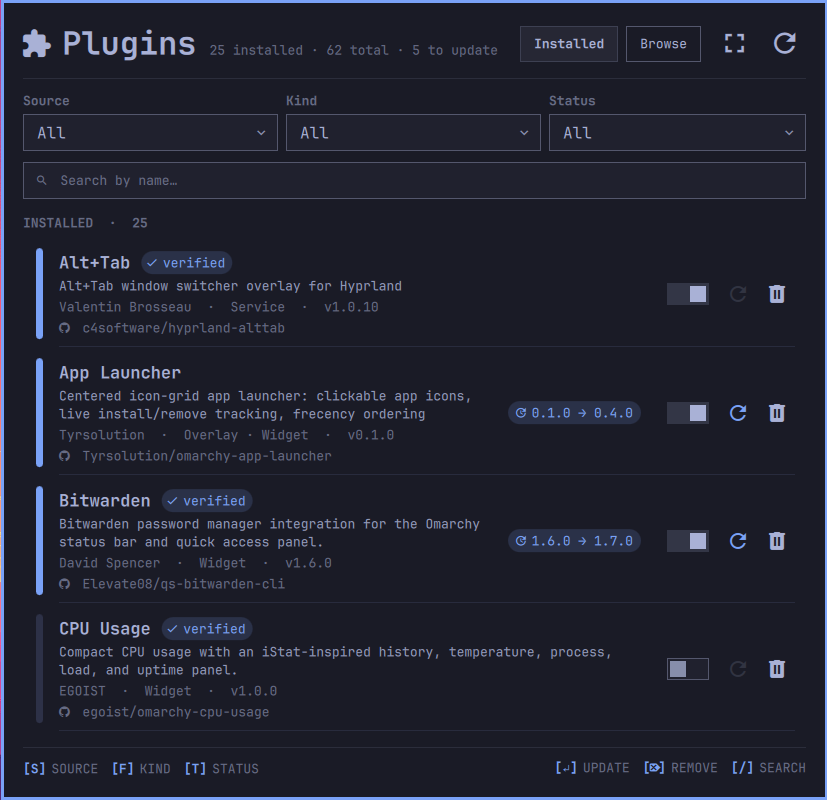
Installed becomes a list beside a details pane. The rows are summaries:
a mark leads the name — a green check when the checkout is up to date, a
green arrow when a verified update is installable — followed by the verified pill
and, on the right, the repository's GitHub star count, with one line of
description underneath. Everything else moves to the pane on the right, which
shows the selected plugin in full: its name, the on/off switch and the Update,
Remove, and Open repository buttons laid out under it, the plugin's own
screenshot, the whole description, and its facts. The screenshot is the
checkout's preview.png when it ships one, otherwise the catalog preview for
the same id. The Version fact is a link that resolves to the matching GitHub
Release at click time, exactly as the popup's row does. Your place in the list
survives a trip to Browse and back, and the pane refreshes on its own once the
shell has finished an enable or disable.
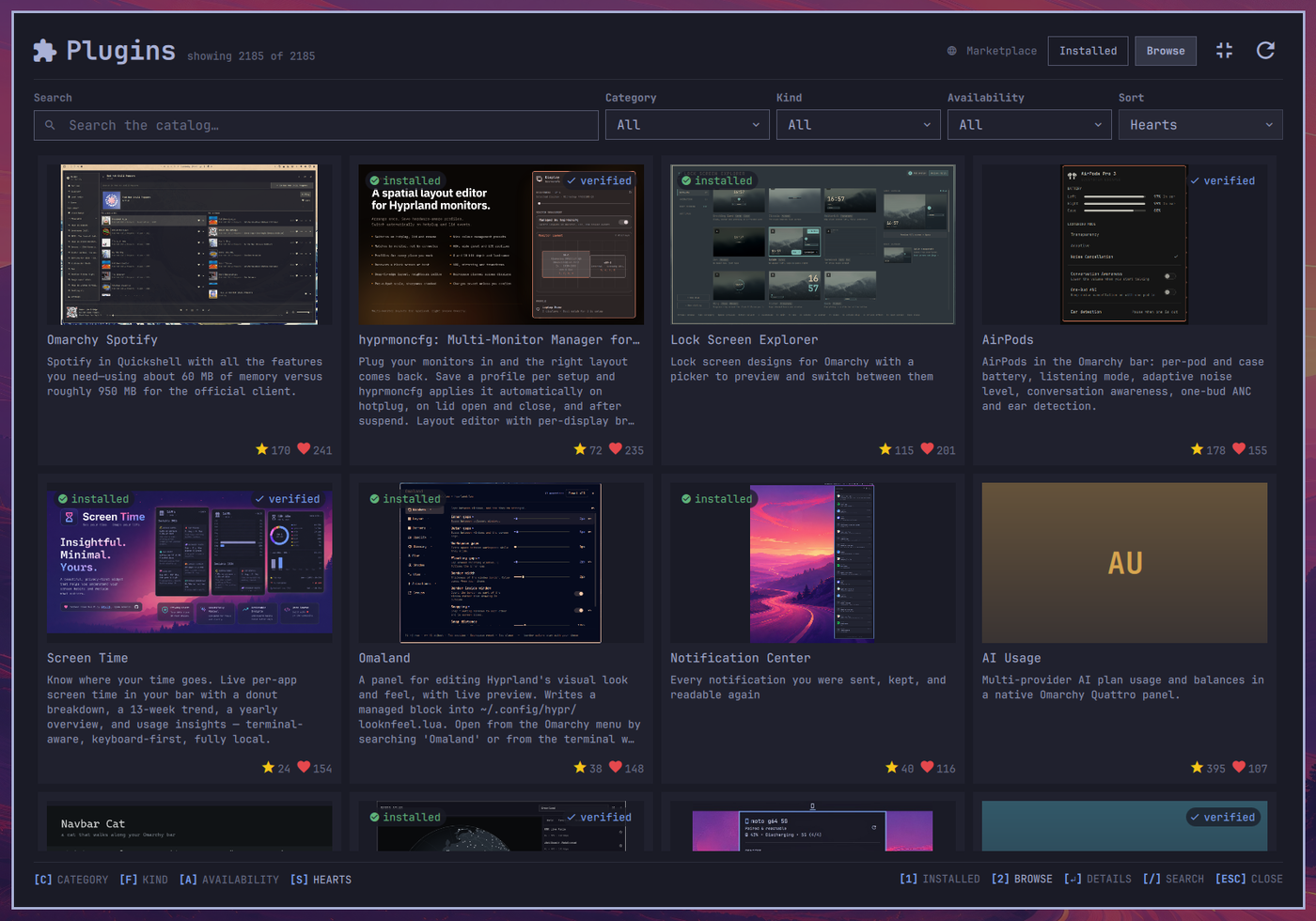
Browse becomes a wider grid of the same cards, with the card pictures shown
whole rather than cropped to the frame, so a tall or wide screenshot is still
the screenshot. The cards drop their info and install buttons because a card
opens a full page instead: click it, or select it and press Enter.
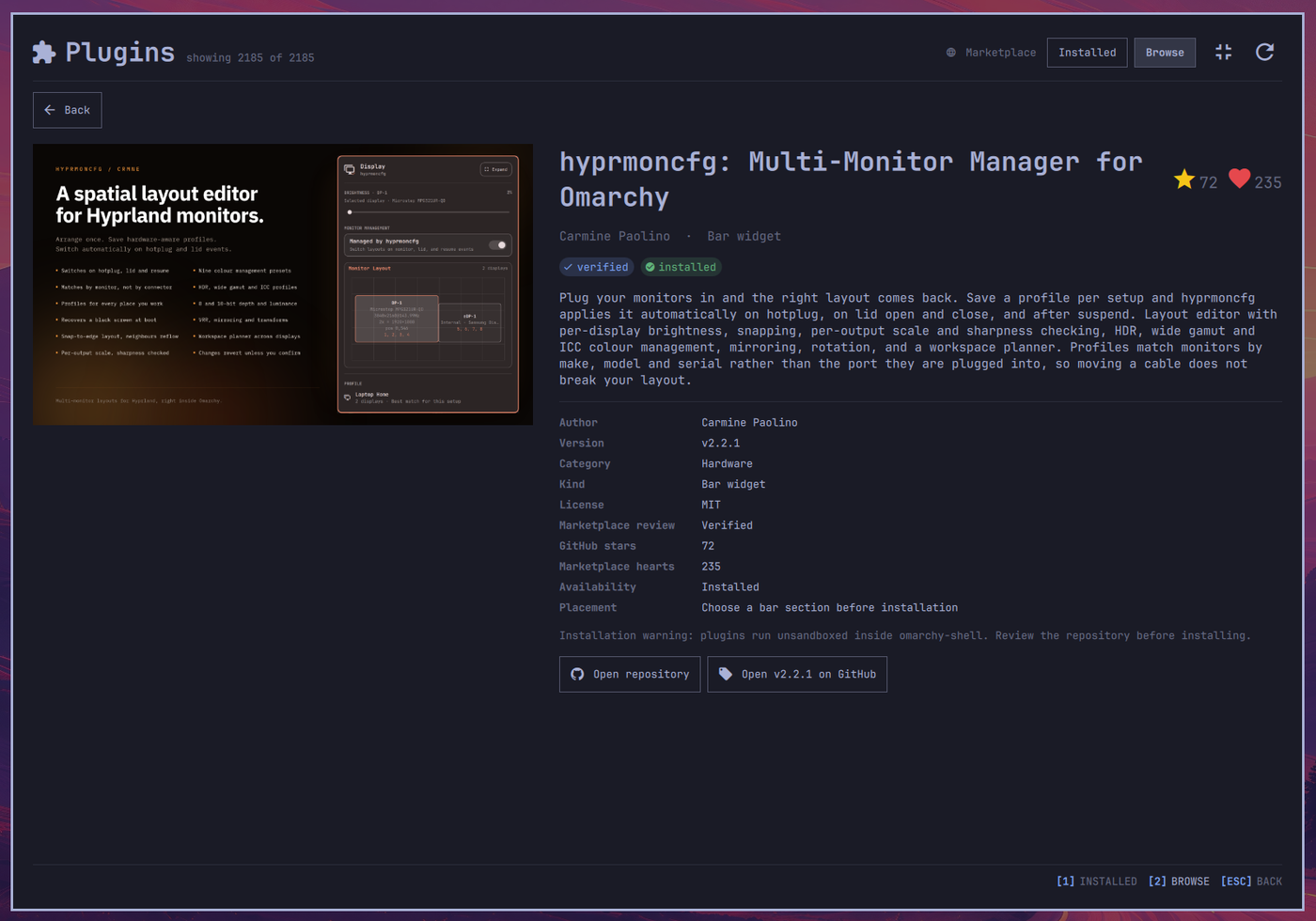
The details page takes the whole panel. It leads with the preview and the
name, then the author and kind, the verified and installed pills, the full
description, and every catalog fact the manager has — author, version,
category, kind, license, review status, stars, hearts, availability, and
whether installation will ask for a bar section — followed by the installation
warning and the repository and Release buttons. A plugin you do not have yet
gets an Install button here; the confirmation overlays the page, and the
page stays open once the install lands so you can see the installed pill
arrive. The filter row hides while the page is up. Backspace or Back
returns you to the grid; Esc closes the expanded panel.
Both tabs share one search box and, on this surface, it wears a caption like
the dropdowns beside it and grows an x the moment there is something to
clear. The hint bar names the tab keys as well as the actions — [1] INSTALLED [2] BROWSE on the right, before [ESC] CLOSE — so every way in and out is
written down.
Settings, opened from the gear in either header, groups its switches and Restart Shell action into rounded cards. Search and filters stay hidden while Settings is open, and the cards scroll when the available height is small.
The Info card shows the plugin, active update-data, and update-data archive
paths, abbreviating the account's passwd home as ~ for display only. Loading
or unavailable paths are labeled accordingly, never replaced with an
environment-derived path.
Delete update data asks before permanently deleting completed journals and rollback backups from both active and archive roots. Deletion is irreversible; it does not uninstall plugins or undo updates. Failed, unresolved, interrupted and unsafe histories are preserved. Cancel sends no deletion request. A zero active count does not disable the button: the archive may still contain completed data. The button waits for an available status and for local actions to settle.
Opening Settings only reads status; it never starts cleanup automatically. After each cleanup attempt, Settings keeps a bounded outcome message with this pass's removed/preserved sample counts and separately refreshes the active count. These counts are not the total retained history and do not claim both roots are empty. Unknown or partial outcomes require inspection, not an automatic retry. Closing the popup can lose the outcome; reopen Settings for a new observation.
Under the hood the plugin registers a second kind, panel, whose entry point
is Expanded.qml. Both surfaces share one data layer, PluginStore.qml, so
an install, update, enable, disable or remove is the same code whichever
window you started it from. Catalog parsing, enrichment and initial sorting run
in an isolated offscreen Quickshell process; the desktop receives bounded result
frames instead of hosting a WorkerScript.
One consequence of the extra kind: the shell now routes
omarchy-shell shell toggle io.github.juancasanueva.plugin-manager to the
expanded panel, which makes it the thing to bind a hotkey to, while the bar
button still opens the popup.
Arrange the bar
Choose Arrange () in either header. The popup opens its own overlay, like
Settings; it never opens Expanded. After a save rebuilds the bar, Arrange returns
to the popup on the same screen. Drag entries within or between Left, Center, and Right.
Dropping saves immediately through omarchy-bar move; there is no Apply
step. Press Esc during a drag or release outside the board to cancel it.
The board shows configured order, not a pixel-perfect bar preview. Each duplicate keeps its own raw position and settings: moving one instance does not move every entry with the same ID. The host may pin the tray visually, so tray placement on screen can differ from configured order. An ID that cannot pass losslessly through the CLI stays visible, with a move-refusal message rather than a silently altered ID.
Layout messages stay with Arrange and popup placement, not Settings or the expanded plugin lists. In the expanded Settings and Arrange views, relevant status messages appear below Back, above the controls they describe.
A host layout change cancels any stale drag. A client exit alone does not prove
that the move saved: the manager waits for the expected host layout. After an
uncertain or mismatched result, inspect the current board and click Use current
layout to accept it after the client exits; the manager never retries a move
automatically. In the popup, Back, Esc/Backspace outside a drag, Hide popup,
or choosing another page cancels automatic return, not the pending move lock.
Automatic popup destruction does not cancel return. In Expanded, navigation,
collapse and restart stay locked; Hide window remains safe and reopening
returns to the pending board. Both boards share the retained owner's move lock.
The panel is retained with keepLoaded, but starts hidden without config reads
or inventory work. Hiding retains pending reconciliation; explicit plugin
reload, disable/removal, or shell shutdown does not. This is not a global lock
against other tools or popup instances, nor an atomic compare-and-swap with the
host: avoid concurrent bar edits while a move is pending.
The Installed tab
What the shell actually found, in two sections:
- Installed — everything under
~/.config/omarchy/plugins, with update and remove buttons alongside the on/off switch. - Built-in — everything shipped under
/usr/share/omarchy. These can be switched on and off like any other plugin, but not pulled or deleted: they are not ours to change.
The split is not cosmetic. In one mixed list, most rows carry controls that do nothing, and you have to work out which from a badge. Two sections make the available actions constant within each one.
A bar down the left of each row says whether the plugin is on. For a bar widget "on" means exactly one thing — it has a place in the bar — because that is what the shell itself reports.
Under the name, every row states what the plugin actually does — the
description from its manifest, wrapped across as many lines as it takes. It
used to be pinned at two, which was wrong in both directions: a
one-line blurb paid for a blank line it never used, and anything longer was
cut off mid-sentence with no way to read the rest. Rows therefore differ in
height, and that is the better trade — an uneven list is something you can
see past, a truncated sentence is not. A plugin whose author left the
description out says so, which is how you tell an empty manifest field
from a failed read. After the description comes who wrote it, what it plugs
into, and which version is on disk — read from each plugin's own
manifest.json at load time, so it is there for every plugin rather than only
the git checkouts an update check happens to reach. For a user Git checkout with
a current GitHub origin, that version is also the Release name to look up.
Clicking it checks v<version> first, then <version>. The first published
GitHub Release opens. If neither exists, navigation falls back in exactness
order: a matching local version tag at HEAD, the loaded HEAD commit, then
the validated repository root. The checkout does not need a local tag to make
the version interactive; the tag is provenance for the best fallback, not
proof that GitHub published a Release. Built-ins and rows without this current
Git checkout contract remain plain. The bounded GitHub API checks happen only
after the click — opening the panel makes no Release API request. Last comes a
link to the plugin's own repository:
reading what you are running is the whole defence here, and it should not get
harder once a plugin is installed. Git remotes are converted to something a
browser can open, so ssh and git@host:path checkouts link too.
A row that shows that link needs no badge saying it came from git — the link
already said so. So the git / local badge appears only on rows that have
no link, where it is the one thing separating a checkout whose origin has
gone missing from a folder somebody dropped in by hand. Both lose the link
and the update button; without the badge they would look identical.
A labelled filter row sits above Search, in the same shape the Browse tab uses, and every control narrows both lists at once:
- Source filter (
s) — All, Installed, or Built-in. Picking one section hides the other, which is also the quickest way to see that a section is empty. - Kind filter (
f) — bar-widget, panel, overlay, menu, service. The dropdown is built from the kinds actually installed, so the row never offers a filter that would match nothing. A plugin that replaces the whole bar and one that mounts inside it share the Bar-widget option, because both answer the same question; each row still names its own kind. - Status filter (
t) — All, Enabled, Disabled, or Update. Enabled/Disabled read the same on/off state shown by each row's switch; Update shows checkouts with a newer marketplace-verified snapshot for their GitHub origin, and, only with Allow updating unverified plugins switched on, checkouts with detected upstream changes as well. - Search by name (
/) — matches the name and the id, so typinghyprmoncfgfindscrmne.hyprmoncfg. It deliberately does not search descriptions: a search that matched prose would surface plugins whose names look nothing like what you typed. Anxappears at the end of the box while there is a term to clear, and switching tabs clears it too: the two tabs search different things, so a term carried across would be a different query silently shrinking the other list.
The hint bar under the list shows the filters on the left — [S] SOURCE [F] KIND [T] STATUS, each naming its dropdown while neutral and its value,
brighter, once it narrows — and the row actions on the right.
When nothing matches, the message names whichever controls excluded everything
— including source and status when they are hiding otherwise matching plugins.
Knowing what needs updating
Only what can be installed counts as an update. By default, update badges, the header count, the Update filter, and the bar's blue dot include a checkout only when the marketplace has verified a newer snapshot of it. A repository whose author has pushed past the verified commit, or that the marketplace does not list at all, is not an update: the panel says No verified update available and offers nothing, because nothing reviewed is there to offer. The background check still records what it observed.
Allow updating unverified plugins, in the settings pane (the gear in the header of both the popup and the expanded panel; the settings are shared), changes that. It is off by default. Switched on, every checkout with observed upstream changes shows again, with an orange arrow rather than the green one, and is counted. Update works for GitHub origins: the button installs the exact upstream commit the check observed after a confirmation that names that commit and links its diff. A checkout hosted elsewhere shows its arrow and update needs a GitHub origin, with the button disabled, because the helper binds only canonical GitHub repositories. Nothing is fetched from a moving branch: the commit the row shows is the commit the helper is asked for, and if the tip moved while the question was on screen the answer installs nothing. A verified snapshot always wins: when one is installable it is what Update installs, unreviewed tips are offered only when there is no verified snapshot ahead of the checkout, and a checkout meeting both conditions is counted once. With the setting on you are choosing to run code the marketplace has not reviewed.
Allow installing unverified plugins, the second switch in the same pane,
is the matching opt-in for Browse, and also off by default. Installing
unreviewed code is a separate decision from updating to it, so it is a
separate switch under a separate key; neither reads the other's value.
Switched on, a listing the marketplace never verified a snapshot of becomes
installable from the tip of the branch its listing names, after a
confirmation that names the repository and the branch. The helper resolves
that branch to one commit before it fetches anything and installs exactly
that commit, so the install is pinned even though the offer was not. The
listing's own url and the repository behind it must still agree, exactly as
for a verified listing, and a listing that names no branch stays uninstallable
rather than having main guessed for it. Flipping the switch re-labels the
cards already on screen; nothing is refetched.
Both settings are stored in this plugin's own entry in
~/.config/omarchy/shell.json, as allowUnverifiedUpdates: true and
allowUnverifiedInstalls: true, written
through the host and merged over whatever else that entry holds. A switch
refuses to write until the plugin list has loaded and that entry was read
whole, so a failed read can never rewrite the entry from an empty copy. With
the setting off, a checkout whose only difference is an unreviewed upstream
commit carries neither the arrow nor the green check: the panel does not claim
it is current, it says No verified update available.
Open expanded panel as a tiled window, the third switch in the same pane,
is also off by default. Off, the expanded panel is an overlay: it floats
above everything, takes the keyboard while it is up, and closes on Esc or a
click outside. On, it opens as an ordinary window, which Hyprland tiles into
the current workspace like any app, so the manager can sit beside the terminal
you are editing a plugin in. There is no scrim and no outside to click; Esc
still closes it, and so does the compositor's own close. The window type is
decided when the panel opens, from this plugin's entry read straight out of
shell.json ahead of everything else it loads, so the switch applies the next
time you open the panel rather than to the window you flipped it in. It is
stored as tiledExpandedPanel: true in the same entry, written the same way.
One Hyprland note: the window carries the shell's own app id rather than one of
its own, so a per-window rule has to match its title:
windowrule = float, title:^(Plugin Manager)$ is what would undo the tiling
for it.
Restart Shell, the button under the three switches, clears Quickshell's
compiled-QML cache and runs omarchy restart shell, so every plugin, this one
included, is loaded again from what is on disk. Reach for it when a plugin
edited in place keeps showing its old self after a rescan. What is removed is
exactly quickshell/qmlcache under $XDG_CACHE_HOME (~/.cache when unset),
a cache Quickshell rebuilds on its next start; nothing else is touched, a
symlink planted on that name is left alone rather than followed, and a cache
that does not exist yet is simply not there to remove. The host refuses the
restart while the session is locked. The result arrives as a notification,
because the panel does not survive its own restart.
- Upstream changes — not verified (setting on) means the observed branch tip does not match an authorized verification snapshot. Being at an older verified SHA does not make the checkout current. Unreviewed commit … installable follows it when the tip can be installed under the setting.
- Verified snapshot … available names the only installable candidate. If upstream is newer and unreviewed, Update still requests only this verified SHA. A differing SHA is not proof of ancestry: the helper must prove fast-forward eligibility.
- Installed is ahead of verified snapshot … means the installed commit already contains the verified one, for example after updating through the host command or another tool. Update is disabled because the helper would refuse that downgrade. Ancestry comes from the checkout's most recent 128 commits, so an older verified commit beyond that window is still offered and refused with a reason.
- No upstream changes (setting on) requires a matching checkout-bound branch report. Upstream check unavailable and, with the setting off, Update check unavailable mean missing, failed, or stale evidence, not current.
The badge and details' Changes link compare the exact upstream commits when upstream changes are detected; otherwise they compare the verified-only candidate. Their labels identify which comparison opens. Report versions describe upstream, never the separately named verified target. Cached catalog metadata may display a candidate; executing a verified snapshot always requires fresh exact repository/SHA authorization. There is no fallback from a verified snapshot to an upstream SHA and no confirmation that overrides a refusal.
The actions
-
Add — from the Browse tab only; there is no url field. Installing a card invokes the same bundled Python helper an update does, with the repository, the full marketplace-verified commit, the id, and the bar section you chose. It installs only that commit, never
origin HEADor a branch tip, and the hostomarchy plugin addcommand is deliberately not used. A listing the marketplace has not verified a snapshot of cannot be installed from the panel at all — unless Allow installing unverified plugins is switched on, in which case it is offered from the tip of its validated branch, marked Installable (unreviewed) in details, and installed as the one commit the helper resolves that branch to. A listing whose install command names a repository its own listing does not is refused under either setting: the card states the reason instead of offering a button. The confirmation names the short verified commit, or the branch when there is none, and the repository the request will actually fetch — the same one the helper reauthorizes — rather than the registry's free-text install command. -
Enable / disable — one switch per row, not a pair of icons that trade places. An icon that changes with the state makes you read the glyph to learn where the plugin stands and read it again to work out what clicking will do; a switch is already showing you both. Switching one on asks a bar widget where it goes first and lands it in the section you picked; anything else simply goes on. Switching one off takes a widget out of the bar and leaves the plugin on disk. The knob only moves once the shell has actually done it, so cancelling the placement question leaves the switch where it was rather than lying about a plugin that never went on.
Whether a plugin can be switched off is the shell's call, not this panel's: a whole bar has no off, only a successor. Those rows still draw the switch, dimmed and fixed on — a row with no control at all reads as something that failed to render. Disabling this panel closes the window you are clicking in, so that one confirms and hands you the command to undo it.
-
Move — for a bar widget that is on the bar, changes which section it sits in. The expanded panel's details pane shows the three sections as one segmented control, Left | Center | Right, with the current one lit; clicking another moves the widget there. Expanded still uses
omarchy plugin enable <id> <section>. In the popup, choose Arrange in the header to reposition widgets; Installed rows have no move button. Enabling a widget still asks which section to use. Nothing editsshell.jsondirectly. The current section is read fromshell.jsonat load time, so the control only changes once the shell has actually moved the widget, and a widget whose section could not be read gets no control rather than a guess. -
Update — invokes the bundled Python helper with the displayed repository, full target SHA, id, and expected installed HEAD. It installs only that commit, never
origin HEAD, another branch, or a fallback commit. The hostomarchy plugin updatecommand is deliberately not used. The target is the marketplace-verified snapshot, installed on the click; or, only with Allow updating unverified plugins switched on and no verified snapshot ahead, the exact upstream commit the background check observed, installed after a confirmation that names it. Such an install is recorded as unverified in the transaction'srequest.json(unverifiedCommitinstead ofverifiedCommit) and in the desktop notification ("Pinned plugin update (unverified)"). -
Remove — for anything under
~/.config/omarchy/plugins, runsomarchy plugin remove <id> --yesbehind a confirmation.
Pinned install and update transaction, and recovery
Installs and updates are the same transaction with a different publication
step, and everything below applies to both. An install request carries the
repository, the id, and the bar section instead of an expected installed HEAD,
plus either the verified commit or — under Allow installing unverified
plugins — the validated branch to resolve. Either shape refuses outright
when ~/.config/omarchy/plugins already holds that name (directory, file or
symlink) or when the host already knows that plugin id.
The helper reads https://plugins.omarchy.org/catalog.json directly over HTTPS,
without redirects or cached fallback, before fetching and again before
publication. Browse reads the same canonical URL, but through its own cache;
execution never consults that cache and rejects every redirect response.
A unique community listing must still be verified at exactly the
requested repository and full SHA. For an unverified request, made only under
Allow updating unverified plugins or Allow installing unverified
plugins, the catalog is not consulted at all: the target is the exact
upstream commit the panel observed, or — for an unverified install — the
commit a single ls-remote resolves the requested branch to, before anything
is fetched. No fetch and no checkout ever names a branch, and an ambiguous or
unreadable answer refuses instead of picking among candidates. Every other
check below applies unchanged. HTTPS and git@github.com: / ssh://git@github.com/
origins compare canonically; network Git always uses canonical HTTPS. Repository
moves, revoked verification, malformed metadata, or unavailable objects refuse
rather than silently choosing another target.
Staging lives in a private 0700 transaction under
~/.config/omarchy/plugin-manager-updates/txn-<random>/, outside plugin discovery
and on the same filesystem. The helper uses isolated, hook-free Git, checks the
snapshot tree and manifest id, and runs the host validator before publishing.
An update exchanges the installed directory with the staged checkout using Linux
RENAME_EXCHANGE; an install moves the staged checkout into the new name using
RENAME_NOREPLACE, so a name that appeared while the transaction was staging
wins the race untouched and the checkout stays in the unpublished transaction.
There is no missing-directory gap and nothing the helper did not create is ever
removed. Files and directory entries are fsynced; only successful publication
triggers the host rescanPlugins IPC operation. Only a successful rescan is
followed by omarchy-plugin-enable, after the same bounded wait for shell
discovery the host add performs: <id> --section <section> for a bar widget
you placed, a bare <id> for everything else, which the host switches on
without a placement. Every install is enabled; a plugin left on disk and never
switched on reads as one that did not install.
| Prerequisite | Refusal behavior |
|---|---|
| Actual account home, owned non-symlink directories, no group/other write access | No alternate HOME, worktree, or path fallback |
| Ordinary SHA-1 checkout with one origin and standard core/branch configuration | Includes, other config sections, external object stores/worktrees, symlinks and hardlinks are refused; local Git config is never executed |
| Clean tracked files and index | Dirty, staged, untracked, ignored files and special index flags are refused; never stash, reset or delete user changes |
| Fast-forward proven within 256 fetched history levels | Divergence, downgrade, missing ancestry, or unavailable target refuses |
| Bounded work | 120-second transaction; 16 MiB raw/5,000-entry authorization catalog; 8 MiB projected catalog/cache; 1,000 source files, depth 20, 16 MiB source tree; 32 MiB Git file limit and 128 MiB inspected checkout limit |
| Same filesystem with atomic exchange support | Refuse rather than use two renames |
| Install target name unused, and its id unknown to the host catalog | Refuse rather than overwrite, merge into, or shadow an existing plugin |
Whatever the helper publishes — an installed plugin or a replacement — retains
a fresh .git, canonical origin and detached HEAD. It is a shallow clone
(depth 256) with no tracking branch, so the host's own omarchy plugin update <id> does not work for that checkout: later updates for it go through this
panel's pinned update only. To return to the host flow, remove the plugin and
add it with the host command.
Local branches, tags, reflogs, hooks and configuration are not migrated;
for an update they remain in the original checkout at the transaction's
checkout/ backup. An install replaces nothing, so it has no backup and reports
none: its transaction directory keeps the journal alone once the checkout has
been published out of it.
Read-only update-data status
From the plugin checkout, run
/usr/bin/python3 -I -S helpers/pinned_update.py --update-data-status.
This fixed endpoint accepts no path arguments and returns one JSON object (at
most 8 KiB), with schemaVersion: 1, canonical paths.plugins, paths.active
and paths.archive derived from the account's passwd home, not HOME or XDG
variables. Unsafe or oversized home metadata is refused, with paths: null.
available: true includes activeCount, limit: 32, and lowerBound: false
for counts 0–32, true for 33 (meaning at least 33). Every direct active entry
counts, including unknown files and symlinks; contents and archives are never
inspected. Missing active data or its configuration parents means zero; an
unsafe/unreadable root means available: false, activeCount: null, a bounded
error, and exit code 1 instead of success (0). A missing home is unavailable.
The endpoint creates, archives and deletes nothing, does not open the plugins
or archive directories, and does not acquire or replace the update lock.
It is a bounded observation with cancellation/deadline checks, not a locked
snapshot or permission to mutate data. Both Settings surfaces request it on
opening and after local cleanup, update and install completions, including
failures. There is no polling loop. An invalidated response cannot restore a
pre-mutation count.
Delete completed update data
This permanently removes rollback backups. To explicitly delete only confirmed-success transactions in both active and archived data, run from the plugin checkout:
/usr/bin/python3 -I -S helpers/pinned_update.py --cleanup-completed
The command is the authorization: it has no interactive prompt and accepts no paths, extra options or environment overrides. In Settings, the shared confirmation dialog explicitly names both roots, completed journals, rollback backups and irreversible deletion; its destructive Delete action sends one request. It rechecks busy/action/status state when answered. Failed, unresolved, malformed, unsafe and interrupted histories are preserved. Installed plugins are never opened, and journal backup strings are never used as deletion paths.
The command holds the updater's active-directory inode lock throughout discovery and removal. If only safe archive storage exists, it creates just the missing active lock directory (0700) under the validated existing Omarchy parent. Missing storage is a no-op; it never creates configuration parents, a lockfile, or an archive directory, and never replaces an existing active root. Unsafe roots and lock contention fail closed. The read-only status endpoint still creates nothing.
Result and process contract
Stdout is one JSON object plus newline, at most 4 KiB. Exit 0 means complete;
all other outcomes exit 1. Version 1 has exactly these fields:
| Field | Meaning |
|---|---|
schemaVersion |
Integer 1. |
status |
complete, limited, cancelled, partial, failed, or unknown (see below). |
discovered, visited |
Nonnegative integers: names collected and names processed, respectively; visited <= discovered <= 512. |
removed |
Confirmed, synced transaction removals. |
preserved |
Visited names left untouched: non-transaction names or refused candidates. Not a total retained count. |
partial |
Candidates where mutation began but completion/durability failed (at most one). |
removedUnsynced |
Subset of partial: directory removed but final parent sync failed. Never included in removed. |
unknown |
Attempted candidate whose outcome could not be observed (at most one). |
discoveryComplete |
Boolean: both present roots were fully enumerated. Does not imply every discovered candidate was processed. |
refreshRequired |
Always true: separately call --update-data-status after completion; there is no embedded recount or locked final count. |
error |
Empty for complete; otherwise sanitized diagnostic, at most 200 characters. No per-path results. |
visited = removed + preserved + partial + unknown. Unvisited discovered names
are discovered - visited; incomplete discovery leaves the remaining total
unknown. Earlier counts survive later errors. complete means the bounded
inventory was processed, not that all history was eligible or that storage is
empty. limited means discovery/candidate/budget/deadline exhaustion; cancelled
means cancellation before a reported partial mutation; partial stops after the
first partial candidate; failed covers storage/lock/I/O failure; unknown
means an attempted removal lost its outcome. Never treat partial/unknown as
success or automatically retry them.
Discovery stores at most 256 names per root, 512 total, without sorting, charging one extra lookahead name to detect overflow. At most 128 transaction candidates across both roots are attempted, including refusals. A single shared budget (below) covers discovery and every candidate; exhausted budgets stop work, not just one candidate. Names are collected from fresh held-descriptor views.
Cleanup stays foreground, creates no subprocesses, and handles TERM/INT/HUP by cooperative cancellation. It is not the updater's detached launch path. A CLI caller must supply its own process-group timeout/hard-stop for blocked I/O. Missing/truncated JSON, output failure or owner destruction means outcome unknown, even if files were removed. Do not retry automatically; refresh status and inspect retained history.
Settings uses dedicated raw SplitParser processes, not the generic action
collector. Both stdout and stderr have conservative UTF-8 budgets: 8 KiB each
for status, 4 KiB each for cleanup, in addition to the helper's producer limits.
Schema, exit code and counter relationships must agree before reporting an
outcome. Labels contain static prose and validated numbers, never helper error
markup. A fresh status process is created only after the previous one's deferred
exit callbacks settle; requests coalesce without retrying cleanup.
Fixed argv invokes the bundled helper through /usr/bin/python3 -I -S with
--update-data-status or --cleanup-completed, never a shell or a displayed
path. Each runs under an inner /usr/bin/timeout -k 1 (6 seconds for status,
20 for cleanup) and an outer /usr/bin/timeout (8 or 22 seconds). The outer
observer forwards TERM on overflow/destruction; it has no competing KILL timer.
The independent inner supervisor retains its group and one-second hard-stop if
QML destroys the direct child. The existing detached updater is unchanged.
Cleanup joins the store's busy state, while the helper's inode lock remains the
authority across surfaces/processes; UI guards are not a global filesystem lock.
Removal safety
The command uses remove_completed(lock, parent, name, budget) for each original
txn-<24 lowercase hex digits> name. CleanupLock(Updater()) itself remains
existing-only; only the command opts into missing-active-root creation.
| Boundary | Internal contract |
|---|---|
| Eligibility | Rechecked request, prepared, published and result journals must prove exact success. Only those four journal files, optional index-before / index-final files and an update's checkout directory are accepted at the top level. |
| Preflight | Two bounded full-tree passes before mutation. Owned, safe-mode real directories and singly linked regular files only; no symlinks, specials or mount crossings. Linux's bounded /proc/self/fdinfo mount IDs also reject same-device bind mounts; unavailable checks fail closed. |
| Tree ceilings | 32 MiB per file, 128 MiB total, 4,096 entries and directory depth 20 relative to the transaction. Descriptor use is depth-bounded, not entry-count-bounded; account paths over 32 components are refused. |
| Shared budget | By default: 200,000 work units, 32,768 visited entries, 4 MiB charged name/record metadata and 512 MiB inspected file sizes across all passes/candidates. A 15-second cooperative deadline and worker cancellation checks apply; these cannot interrupt a blocked kernel I/O call. |
| Mutation | Descriptor-relative identity rechecks; backup contents first, checkout root and journals later, interruption marker and transaction last. Changes are fsynced; active/archive roots are never removed or replaced. |
The result has status, transactionRemoved and a bounded error:
refused means this call changed nothing; removed means removal and parent
sync succeeded; partial means mutation began but completion or durability is
uncertain. transactionRemoved: true with partial specifically reports a
removed directory whose final parent sync failed. The CLI counts that outcome
in partial and removedUnsynced, never in removed.
Recursive deletion is not atomic and has no rollback. Before the first
unlink, an exclusive .cleanup-started marker is synced in the transaction.
Even a marker-only failure is partial. Eligibility rejects that marker,
including during updater archival; it remains through backup/journal removal.
If the marker has already gone, the success journals have too, so remaining
malformed data cannot silently qualify again. Interrupted remnants require
manual inspection, not automatic recovery. Removing a backup forfeits its
rollback data; this primitive does not undo any installed update.
The advisory lock excludes cooperating update/cleanup workers, not arbitrary same-user writers. Rechecks detect observed changes but cannot make a recursive snapshot or eliminate the final check-to-unlink race. Tests use disposable data and simulated mount identities, never host mounts or live update roots.
Recovery and retained transactions
At exactly 32 active entries, the next install or update first archives
provably completed transactions into
~/.config/omarchy/plugin-manager-updates-archive/txn-<same-id>/. Below that
threshold, nothing is archived. Only exact installed or updated results
qualify: the published result, original request, prepared identities and
backup layout must agree, with no refused.json marker. Reload, enable or
finalization failures, partial records, unknown schemas and unsafe entries
stay active. Historical eligibility does not depend on the plugin's current HEAD.
Archival moves each whole transaction, including its original checkout, without copying or deleting files, traversing backup contents, rewriting journals or leaving aliases in the active directory. The private 0700 archive is on the same filesystem; no-replace renames never overwrite an existing archive entry. Both directories are fsynced. The archive grows cumulatively and is never automatically pruned or enumerated by the helper.
Archived journals keep their historical absolute backup paths. If the
recorded active path no longer exists, look under
~/.config/omarchy/plugin-manager-updates-archive/<same txn>/checkout and inspect
the journals beside it. Do not blindly reuse a stale backup string.
Inspect request.json, prepared.json (directory device/inode identities),
published.json and result.json to distinguish staging from publication.
A crash between publication and journaling requires checking those identities
and both HEADs; do not assume the backup name alone proves which tree it
contains. An unpublished install leaves its staged checkout/ in the
transaction beside refused.json; nothing outside that directory changed.
There is no automatic recovery or rollback that could overwrite later edits.
The advisory lock serializes helper requests, not arbitrary same-user writers;
final rechecks do not make concurrent external edits race-free.
Keep backups until reviewed, and recover manually only after preserving the
current checkout. If 32 entries remain unresolved, or discovery encounters a
33rd entry, further installs/updates refuse with a README recovery hint. Review
~/.config/omarchy/plugin-manager-updates/ and manually move only transactions
you have understood and preserved; the helper never guesses about incomplete
history. Discovery inspects at most 32 direct entries under the existing helper
lock, and successful archival requires a fresh capacity count before proceeding.
An archive error also refuses the new transaction: inspect both active and
archive locations before retrying, since an earlier move may have completed.
Never resolve a collision by overwriting an archived transaction.
Once clicked, the finite worker runs independently of the QML observer. Closing
the window is not cancellation, including during a manager self-update.
The already-loaded Python worker retains no dependency on reopening its helper
source after publication. Its bounded notification and transaction records
outlive the window. A rescan failure reports updated; reload failed or
installed; reload failed, not unchanged, and an install that published but
could not be placed reports installed; enable failed. A refusal reports
unchanged; update refused or unchanged; install refused followed by the
helper's reason (for example a dirty checkout, a name already taken, or a
revoked verification), and the same reason is written to refused.json in the
transaction directory when one was opened.
If the observer loses the result, inspect the retained transaction; do not retry
blindly. Live Quickshell hot-reload/self-update behavior still needs runtime
validation; disposable transaction tests do not prove desktop integration.
The Browse tab
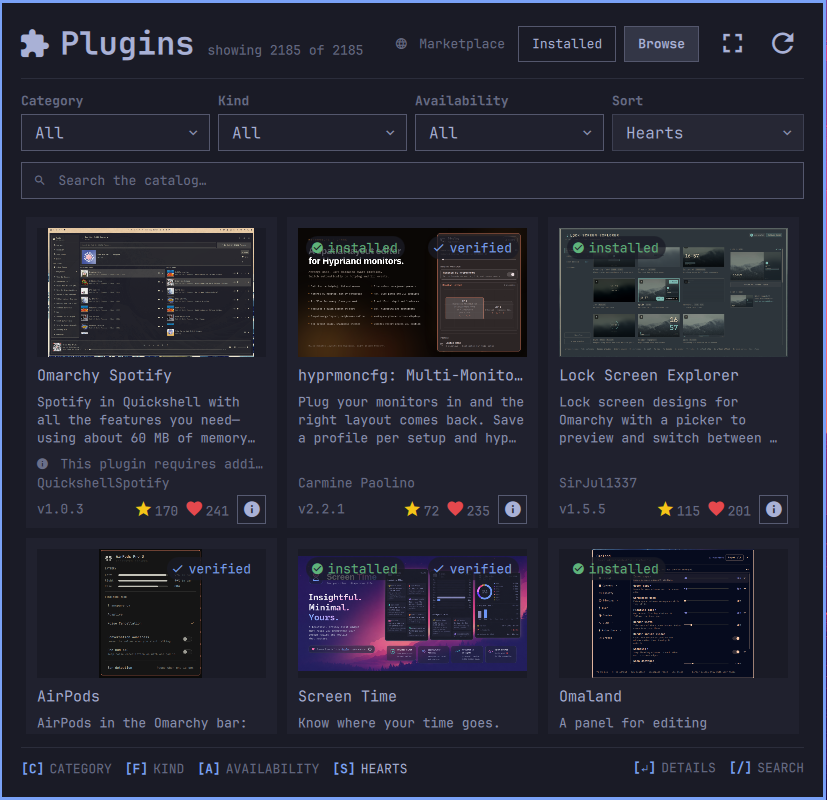
<sub>Shown with qt6-imageformats installed, so the registry thumbnails
decode too. Without it the second source is skipped and more cards fall back
to accent tiles — see below.</sub>
The second tab is the omarchyplugins.com
marketplace. Search matches name, id, author, and description. Category and
kind options come from the current catalog, while Availability narrows to
plugins that can be installed here or plugins already installed. All four
filters compose, and an empty result offers Clear filters rather than
leaving you at a dead end. The hint bar under the grid shows the filters on
the left — [C] CATEGORY [F] KIND [A] AVAILABILITY [S] RECENTLY ADDED,
each naming its dropdown while neutral and its value, brighter, once it
narrows — and [↵] DETAILS [/] SEARCH on the right.
Sort explicitly by GitHub stars, Marketplace hearts, Recently added (newest first), or Name. Unknown counts stay unknown and sort after real counts; stars and hearts are never combined. Names and ids provide deterministic tie-breakers.
Cards are summaries: preview, three description lines, creator, version,
separate popularity counts, installed state, and an install or details action.
Open details by clicking a card or selecting it and pressing Enter. In the
popup the details open over the grid; in the expanded panel they take the
whole window. Either way the details surface leads with the same preview the
card showed, then shows every available catalog fact used by the manager,
including the full description, author, version, category, kind, license,
repository and Release actions, both popularity counts, install state,
placement requirement, and installation limitations. Missing fields are
omitted rather than replaced with claims the catalog did not make.
Repository and Release actions open through omarchy-launch-browser, so they
land in whichever browser omarchy default browser selected, and only trusted
https:// URLs are passed to it. Use Tab, arrow keys, or Shift+Tab to move
between details actions, Enter to activate one, and Esc to close.
The creator gets one line and the catalog version shares the next with a
yellow star for GitHub stars and a red heart for anonymous Marketplace hearts,
each count sitting on its icon's baseline beside the details and install
buttons. The metrics stay separate: stars come from each catalog.json
listing, while hearts
come from https://api.omarchyplugins.com/v1/stats at
plugins[pluginId].hearts. Missing or malformed counts are omitted rather than
shown as zero.
For an exact GitHub repository, opening the Release action checks names
v<version> and then <version> through the same bounded, click-time probe used
by Installed rows. A match opens the published Release; absence or failure falls
back to the validated repository root. Non-GitHub and missing versions remain
plain or absent, and opening Browse never performs a Release API request.
Not everything the registry lists is installable from here — suites ship their
own installers, some repos are not plugin-shaped, some listings have no
marketplace-verified snapshot for the panel to install exactly, and some name
one repository in their install command and another in the snapshot that was
reviewed. Those cards show
a visible blocked reason, with the full explanation in details, instead of a
button that could only fail. A listing blocked only for want of a verified
snapshot, and carrying a branch the marketplace validated, says so: its reason
adds that Allow installing unverified plugins would offer it.
Plugins you already have carry an installed badge on the preview, beside the
verified one, rather than offering themselves again.
Installing asks where it goes
Installing a plugin makes the shell tear every plugin widget down and rebuild it — this panel among them. There is no "after the install" in which a plugin's own window can ask you anything, so the section question comes before anything is staged, off the kind the registry publishes. Both answers in hand, the helper forks an independent worker before it touches the plugin root, so publication and placement finish whatever happens to the window that started them; a process owned by a destroyed panel cannot be relied on to finish, and the placement is the half that would be dropped. Only the result can be lost, and the helper reports through a desktop notification that outlives all of this. The enable runs after publication and a successful rescan, so an install that could not be switched on still says installed; enable failed rather than being rolled back.
Where the catalog comes from
https://plugins.omarchy.org/catalog.json, the same file the website renders
from, generated by
HANCORE-linux/omarchy-plugin-marketplace
(MIT). It is read from the cache when the panel opens and fetched when that
cache is missing or stale, projected down to the fields this panel uses, and
cached for six hours in ~/.cache/omarchy-plugin-manager/. A failed automatic
fetch falls back to the cached copy — a stale storefront beats an apparently
empty one. The refresh button forces a re-fetch; if it fails, Browse shows a
refresh error and keeps the catalog already on screen. Retry Refresh to check
for new listings.
Raw marketplace downloads are capped at 16 MiB by both curl and the helper's stream reader. The projected catalog sent to Browse and stored in the cache is still capped at 8 MiB; unused upstream fields do not consume that budget. Consumer entry-count, nesting-depth, string-length and time limits are unchanged.
The cache is read and written only by helpers/pinned_update.py, the same
helper that installs and updates. It reaches the cache directory component by
component through owner-checked no-follow directory descriptors, creating a
missing one private (0700) relative to its parent's descriptor, and refuses a
symlink, another owner, or group/world write anywhere on that path. The cached
file is opened no-follow through that descriptor and must be a regular file
the account owns; a fresh projection is written to an exclusive temporary file
beside it and renamed into place relative to the same descriptor, so readers
see the old bytes or the new ones and nothing outside that directory is ever
created or replaced.
The work per keystroke is kept small on purpose. Each entry's lowercased
search text and its listing timestamp are derived once, in the isolated builder,
so the main thread does one substring test per entry rather than lowercasing
four fields and parsing a date. The catalog is sorted once per sort mode and
then filtered in that order, since filtering keeps the order it is given, so
typing never re-sorts two thousand entries. The search box itself is
debounced: the lists follow it after a short pause rather than rebuilding
every visible row or card once per letter, and clearing applies at once. And
the Browse grid has no model until the tab has been shown, because a hidden
GridView still builds the cards in its viewport — and fetches their
previews — the moment the catalog lands.
The catalog's installCommand is read, never executed: the url is parsed
out of it, validated, and passed to the same argv array everything else uses.
Where the card previews come from
Each card tries three sources in order and stops at the first that decodes:
- The repository's own
preview.png, read straight fromraw.githubusercontent.comat the branch the registry validated. Most plugins ship one — 31 of a 40-repo sample — and PNG is a format Qt always reads. - The registry's curated thumbnail. These are WebP, which Qt decodes only
when
qt6-imageformatsis installed. It is not a dependency of Omarchy or Quickshell, so on a stock system this step is skipped after the first failure tells the panel so. - The accent-and-initials tile the registry ships for listings with no screenshot at all.
Installing qt6-imageformats adds the second source, which fills in most of
what the first one misses:
sudo pacman -S qt6-imageformats
Verified is a signal, not a promise
The registry runs a security baseline over listings and marks some verified. The badge is shown on Browse cards and, joined by id to the same catalog, as a pill beside the name of Installed rows — so what you already run says whether the registry reviewed it. The install dialog says in words that a review is not a guarantee. Plugin code runs unsandboxed with your user's privileges whether or not it carries a badge.
Why it confirms
Adding a plugin fetches a repository and loads its QML into the long-running
omarchy-shell process. Plugin code is unsandboxed: it runs with your
user's full privileges. Removing deletes a directory. Both actions confirm
first, and the install dialog shows the short verified commit and the full
repository url the fetch will use, so you can read both before anything runs.
There is no free-text url entry, and the url shown is the one bound to the
reviewed snapshot rather than anything the listing's install command claims:
a listing whose two disagree cannot be installed here at all.
Commands are executed as argv arrays, never through a shell, so a repository
url cannot become a command. Urls are also validated against https://,
ssh://, and git@host:path before they are passed on.
Keyboard
| Key | Action |
|---|---|
↑ ↓ / k j |
Move the selection; Browse also supports ← → and h l |
Enter |
Update the selected Installed plugin; open the selected Browse card's details |
Delete |
Remove the selected plugin |
/ |
Focus the search box |
f |
Cycle the Kind dropdown on either tab |
s |
Cycle Source (Installed) or Sort (Browse) |
t |
Installed: cycle the Status dropdown |
c a |
Browse: cycle the Category and Availability dropdowns |
1 2 |
Switch to the Installed / Browse tab |
r |
Re-read the plugin list or re-fetch the active Browse catalog |
Esc |
Clear the search, then leave the field, then close the panel |
In the popup's Browse details, Tab, Shift+Tab, and the arrow keys move
between actions; Enter activates the selected action and Esc returns to
the card grid. In the expanded panel's Browse details, Backspace or Back
returns to the grid, while Esc closes the panel. Backspace still edits text
when search has focus, and open dialogs retain their keys. The expanded hint
bar shows [BACKSPACE] BACK alongside the 1 and 2 tab shortcuts.
Install
omarchy plugin add https://github.com/juancasanueva/omarchy-plugin-manager.git --enable
Then move it if it did not land where you want it:
omarchy bar move io.github.juancasanueva.plugin-manager --section right
Remove
omarchy plugin remove io.github.juancasanueva.plugin-manager --yes
That deletes ~/.config/omarchy/plugins/io.github.juancasanueva.plugin-manager
and takes the widget out of your bar. The catalog cache at
~/.cache/omarchy-plugin-manager/ and transactions/backups under
~/.config/omarchy/plugin-manager-updates/ and
~/.config/omarchy/plugin-manager-updates-archive/ survive removal. An already accepted
finite update also continues through finalization. Review retained transactions
before removing or moving them; the manager never automatically deletes backups.
To take it off the bar without uninstalling it, use the panel's own disable button, or:
omarchy plugin disable io.github.juancasanueva.plugin-manager
Requirements
No dependencies are installed automatically. Enable/disable/install/remove use
the host commands; pinned updates additionally require system Python 3 (stdlib
only), Linux /proc, flock, and libc/filesystem renameat2 exchange support.
A fixed /usr/bin/env -i argv supplies only PATH and WAYLAND_DISPLAY, then
executes /usr/bin/python3 -I -S; helper subprocesses use their own clean environment.
This uses Quickshell's supported command list instead of a map-to-hash environment binding.
| Command | Used for |
|---|---|
git |
discovery and isolated exact-SHA fetch/ancestry/checkout |
jq |
parsing plugin manifests and the shell configuration |
curl |
fetching the catalog and remote manifests |
notify-send |
reporting install and pinned-update outcomes outside the panel |
python3, omarchy-plugin-validate, qs |
bounded update transaction, staged validation, and post-publication rescan |
/usr/bin/quickshell |
isolated offscreen catalog building with the existing Model.js |
bash, coreutils |
the loading and install scripts |
omarchy-launch-browser |
opening repository links in your chosen browser |
Optional: qt6-imageformats turns on the registry's WebP card thumbnails
(see above). Without it the panel falls
back to repository preview.png files and accent tiles.
What it writes
Only on an explicit action: enabling/disabling edits shell configuration via
host commands, and installation/removal uses host commands. Pinned updates
write private staging, transaction records and retained original checkouts,
and atomically exchange one plugin directory. At the active transaction limit,
pinned installs/updates can create ~/.config/omarchy/plugin-manager-updates-archive/
and move completed transaction directories there, preserving all recovery data.
Archival does not edit shell.json or change installed plugins.
The Browse cache at ~/.cache/omarchy-plugin-manager/ is written automatically
when the catalog is missing or stale, through owner-checked no-follow
directory descriptors with a descriptor-relative atomic rename, never through
a path a symlink could redirect.
Each catalog build also uses a private /tmp/omarchy-catalog-* directory for its
request descriptor and isolated XDG config/cache/runtime/logs. Its guardian removes
that directory on completion, failure, cancellation, or owner exit. Force-killing
the guardian itself can leave this temporary state behind.
Develop
The plugin directory must live at
~/.config/omarchy/plugins/io.github.juancasanueva.plugin-manager. Saving any
file under ~/.config/omarchy/plugins/ hot-reloads the plugin code.
omarchy plugin validate ~/.config/omarchy/plugins/io.github.juancasanueva.plugin-manager
qmllint -I /usr/share/omarchy/shell BarWidget.qml Panel.qml Expanded.qml

omarchy-shell shell rescanPlugins
omarchy-shell shell toggle io.github.juancasanueva.plugin-manager '{}'
Catalog shutdown workaround
Issue #3 reports a Qt 6.11.2 / Quickshell 0.3.1 shutdown crash in WorkerScript
destruction. The plugin no longer instantiates WorkerScript, even when Browse
has never opened. CatalogBuilder.qml imports the unchanged Model.js in a
separate process; helpers/catalog_build.py supervises it without network access
or a new runtime dependency. This avoids the implicated lifetime boundary; the
original full-shell crash has not been reproduced locally.
The helper rejects, rather than truncates, requests above 8 MiB of catalog text, 1 MiB of encoded installed IDs, or 49 MiB of transport JSON. Enriched publication has a separate 16 MiB budget and 64 KiB frames (each entry must fit one frame). There is no 5,000-entry browsing cap. Child stdout and stderr are bounded, and the offscreen engine has a 2 GiB address-space limit. The helper checks a cooperative 20-second budget at I/O boundaries, not an independent wall-clock watchdog: JSON processing, framing, process launch/wait and filesystem cleanup can extend elapsed time beyond that budget. An observer/guardian pair handles early owner destruction, when Quickshell kills its direct child before that child can clean up; it terminates the owned engine group and reaps its direct engine child. Teardown tests check for non-running descendants, not the absence of zombies. Failed launches retain the catalog and permit retry. Cancellation waits for an owned positive PID, and stale generations never replace the displayed catalog.
The desktop parses one result frame per event-loop turn. Final assignment, installed/opt-in re-stamping and view bindings still cost synchronous time; this is not a claim of zero-cost publication. Run the isolated regression/timing suite without installing the plugin or restarting the desktop:
node --test test/catalog-builder.test.mjs
It tests Model parity, errors/retry, stale results, budgets, owner/parent teardown and complete 6,000-entry publication. Its timing smoke test covers the store, not rendering a full panel or the reporter's exact IPC shutdown sequence.
Layout
| File | Role |
|---|---|
manifest.json |
Plugin contract — id, kinds, entry points |
BarWidget.qml |
The bar slot and the open/close contract the bar routes through |
Panel.qml |
The popup: both tabs, search, filters, and the dialogs |
Expanded.qml |
The full-size panel: one card hosted by either the overlay or a tiled window, Installed as list plus details, Browse as a wider card grid with a full-page details face |
InstalledListRow.qml |
One summary row in the expanded list: state mark, name, verified pill, star count, one line of description |
InstalledDetails.qml |
One installed plugin in full: switch and action buttons, screenshot, description, facts, and links |
CatalogDetailsPane.qml |
The expanded panel's Browse details page: preview, facts, warning, repository, Release, and Install |
PluginStore.qml |
The shared data layer: plugin list, update check, catalog fetch, actions, and what is pending confirmation |
CatalogBuilder.qml, helpers/catalog_build.py |
Isolated catalog model builder and bounded process supervisor |
ReleaseNavigator.qml |
The click-time Release probe and the one place a browser is launched from, shared by both surfaces |
PluginRow.qml |
One popup row: name, author/kind/version, description, repository link, on/off switch, and its buttons |
CatalogCard.qml |
One compact marketplace card: preview, summary, state, metrics, details, and install |
PluginDetails.qml |
The popup's Browse details: full Marketplace metadata, trusted links, limitations, and keyboard actions |
ChoiceDialog.qml |
The modal that asks which one, where ConfirmDialog asks whether |
Model.js |
Pure parsing, merging, grouping, searching, and filtering |
License
MIT — see LICENSE.