
Scrolling Position
A bar widget for Omarchy that shows where you are on the
tape when a workspace uses Hyprland's scrolling layout.
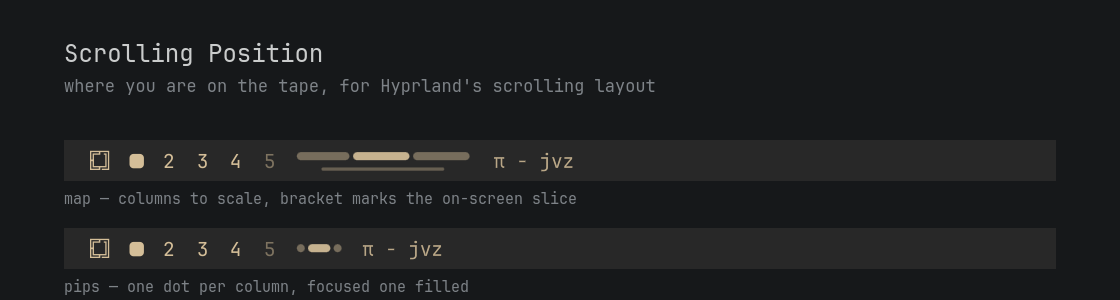
The scrolling layout is a one-dimensional strip of columns, usually wider than the screen. The screen itself can only ever show you the part you are looking at. This widget shows the part you are not: how many columns exist, which one has focus, and how much tape is parked off each edge.
It hides itself completely on workspaces that use any other layout.
Two modes
Click the widget to switch; the choice is written back to your shell.json, so
it survives a restart.
- map — columns drawn to scale, with a bracket underneath marking the slice currently on screen. Reads like a scrollbar: a wide segment is a wide column, and a bracket that runs off the end means empty space beyond the last column.
- pips — one dot per column, the focused one drawn as a filled pill. Position and count only, in a fraction of the width.
In both modes, opacity encodes visibility: focused, fully on screen, peeking in at an edge, or entirely off screen.
Requirements
- Omarchy 4 (the Quattro Quickshell shell,
omarchy-shell) - Hyprland with the native
scrollinglayout — developed and tested on 0.56.2 - No external dependencies: no extra packages, no helper binaries, no network access. The widget reads Hyprland's own IPC through Quickshell and nothing else.
Install
omarchy plugin add https://github.com/Jvaxx/omarchy-scrolling-position.git --enable
--enable asks which bar section to place it in. The natural spot is left,
directly after omarchy.workspaces, so workspace number and column position sit
together:
"left": [
  { "id": "omarchy.workspaces" },
  { "id": "io.github.jvaxx.scrolling-position" },
  { "id": "omarchy.active-window" }
]
Or place it later with:
omarchy bar move io.github.jvaxx.scrolling-position --section left
Remove
omarchy plugin remove io.github.jvaxx.scrolling-position
That deletes ~/.config/omarchy/plugins/io.github.jvaxx.scrolling-position/ and
drops the widget from the bar. The plugin writes nothing outside its own entry
in ~/.config/omarchy/shell.json, creates no state files, and leaves no
background process behind, so nothing else needs cleaning up.
To keep the plugin installed but take it off the bar, delete its entry from the
bar.layout section of shell.json.
Settings
Set these inline on the widget's entry in ~/.config/omarchy/shell.json; they
hot-reload on save.
| Key | Default | What it does |
|---|---|---|
mode |
"map" |
"map" or "pips". Clicking the widget rewrites this. |
mapLength |
110 |
Length of the minimap along the bar, in pixels, before text scaling. Ignored in pips mode. |
pollInterval |
600 |
Fallback refresh in milliseconds. 0 makes the widget purely event-driven — see below. |
hideWhenSingleColumn |
false |
Hide the widget when the workspace has only one column, since there is nowhere to scroll. |
{ "id": "io.github.jvaxx.scrolling-position", "mode": "pips", "hideWhenSingleColumn": true }
How it stays in sync
Hyprland keeps off-screen columns in hyprctl clients with their real
coordinates — a column parked left of the viewport reports a negative x — so
the whole tape can be reconstructed from geometry alone. Windows stacked in one
column share an x/width pair and collapse into a single segment.
Refreshing is the interesting part, because Hyprland has no event for a layout
geometry change. Verified on .socket2: moving focus emits activewindowv2,
while layoutmsg colresize moves every column on the tape and emits nothing at
all. So the widget uses three paths:
-
Events. Any Hyprland IPC event fires a three-shot refresh at 0/120/380 ms — one read for the dispatch, the rest for the animation settling. This covers all ordinary scrolling, which is focus movement, instantly.
-
A heartbeat,
pollInterval(600 ms default). This is what catches the eventless changes: column resizes and mouse-drag resizes. An unchanged tape is compared by signature and dropped without repainting, so a static strip costs a socket read and a string compare. -
An IPC hook, for anyone who would rather not poll:
omarchy-shell -q io.github.jvaxx.scrolling-position refreshAdd that line to a script that reshapes columns (a
colresizebind, for instance) and the widget updates on the dispatch. With every such bind wired up you can setpollInterval: 0and run fully event-driven — at the cost of mouse-drag resizes, which no script can intercept, going stale until the next focus change.
Registering a new IPC target requires a full omarchy restart shell; plugin
hot-reload alone does not pick it up.
Notes
- Multi-monitor: each bar reads its own screen's active workspace, not the focused one, so the widget on your second monitor describes that monitor's tape.
- Fullscreen needs no special handling: Hyprland gives the fullscreen window exactly the viewport and pushes its neighbours off both edges, which the map renders correctly as one column filling the screen.
- Cold start: Quickshell only learns the active window from an
activewindowv2event and never seeds it, so the focused column falls back tofocusHistoryIDfrom the same snapshot as the geometry. The right column is lit on a freshly started bar, before you have touched anything. - Floating windows and the scratchpad are excluded from the tape.
- Colors come from the active Omarchy theme (
bar.text); there is nothing to configure and nothing to restyle when you switch themes.
License
MIT — see LICENSE.