
Nook
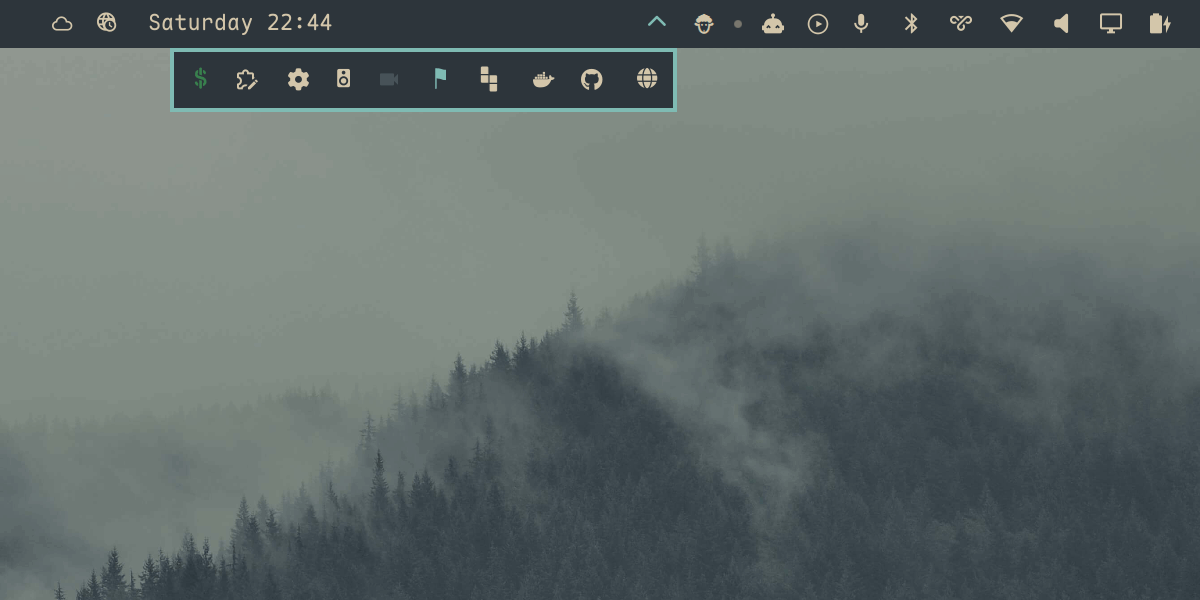
A bar drawer for Omarchy, for when too many plugins have cluttered your bar. Collapse the ones you rarely touch into a tray that opens below the bar rather than along it, so nothing on the bar gets covered or moved. Drag widgets in and out.
Install
omarchy plugin add https://github.com/Katsari/nook.git --enable
Update
omarchy plugin update io.github.katsari.nook
omarchy restart shell
The restart is needed because a rescan does not replace a plugin's already-compiled code. The same applies after editing Nook's code by hand.
Usage
Hover the chevron to open the tray. Click it to pin the tray open, and click again to put it away. Click a widget inside to use it as you would on the bar.
Drag a widget off the bar onto the chevron to file it away, drag one inside the tray to reorder it, and drag one out to put it back on the bar. A caret marks where it will land. A press too short to become a drag stays a click.
Every move rewrites ~/.config/omarchy/shell.json.
Settings
Settings live on Nook's bar.layout entry in ~/.config/omarchy/shell.json.
| Key | Default | Meaning |
|---|---|---|
items |
[] |
The widgets inside, as layout entries |
trigger |
"hover" |
"hover" opens on pointer-over; anything else means click-only |
duration |
180 |
Reveal animation, in milliseconds |
The tray's layer surface is named nook, for Hyprland layer rules.
Custom modules work too. An entry with exec runs its command on an interval
and shows the output, the same as on the bar; one with source loads that QML
file. Neither is a plugin, so neither needs a plugins[] entry.
Each item takes the same shape as a bar layout entry, so per-widget settings go on the item:
{
  "id": "io.github.katsari.nook",
  "trigger": "hover",
  "items": [
    { "id": "some.widget" },
    { "id": "another.widget", "format": "short" }
  ]
}
Editing items by hand needs a second step: add each widget to the top-level
plugins[] array as well, or it stays disabled and never renders. Dragging
does both for you.
Commands
omarchy-shell io.github.katsari.nook toggle            # also: open, close
omarchy-shell io.github.katsari.nook absorb <id>       # move a widget in
omarchy-shell io.github.katsari.nook eject <id>        # put one back on the bar
omarchy-shell io.github.katsari.nook reorder <from> <to>
omarchy-shell io.github.katsari.nook status            # what it thinks it is doing
reorder takes positions among the widgets the tray draws, counting from
zero. to is an insertion index measured before the move, so reorder 0 3
puts the first widget third.
Read status when a gesture misbehaves: it separates a wrong state from a
pointer that never arrived.
Tests
tests/all.sh
GitHub Actions runs the node tests and the source checks on every push. The lint and harness legs need the omarchy shell source and a Wayland session, so they skip themselves there and only run locally.
tests/layoutmodel.test.js runs every shell.json edit in LayoutModel.js
under node. tests/qml.test.sh lints BarWidget.qml, checks that the QML and
the library agree, and loads the real widget in a throwaway quickshell
instance against a mock bar to drive absorb, reorder, eject, and both
reconcile paths end to end.
tests/drag.test.py drives the real pointer, so it is opt-in:
tests/all.sh --drag
It drags a widget off the bar into the drawer, hovers the chevron and checks
the widget is actually drawn below the bar, then drags it back out. It takes
over the mouse for about twenty seconds. Build the pointer once with
tests/tools/vptr/build.sh. shell.json is snapshotted first and restored at
the end, pass or fail.
Remove
omarchy plugin remove io.github.katsari.nook
Whatever the tray held stays in items on that entry, so removing Nook while
it is full leaves those widgets off your bar. Drag them out first, or eject
each one.
Known limits
Built for Omarchy 4.0.3. Beyond the widget contract every plugin uses, Nook reaches into the bar's widget registry, its slot and click-target bookkeeping, and its drag state. No plugin API covers those. 4.0.3 stopped handing third-party widgets the real bar, so Nook now adopts it from a first-party widget on the same bar; on a bar without any first-party widget it sits inert. A future update can break it again.
- One Nook per bar. The manifest sets
allowMultiplefalse, so the bar will not add a second. A hand-written one would still load, and both would write to the first entry they find. - Bottom and right bars can misroute a bar click.
Bar.moduleClickTargetAtmaps a click into every registered target's geometry without checking which window the target is in, and on those two edges the tray overlaps the bar's coordinate range. The chevron is covered; other bar widgets are not. - The bar's own tooling does not see inside the tray.
omarchy bar set,omarchy bar moveandomarchy-shell shell listPluginsall readbar.layout, so a hosted widget reads as absent, andlistPluginsreports it disabled. Eject it to configure it from the command line. - Panel numbers skip hosted widgets.
omarchy-shell shell togglePanelAtcounts the panels visible in a bar section, so the tray's contents are not in the count. Toggling a panel by id works:omarchy-shell shell summon <id>opens the tray and its panel with it.